Free Grok Bot Forever? OpenMausBot + Local Qwen (No API Bills)
We tested four OpenMausBot jobs using local Qwen3.8-Flash-Next through Strata. A price-drop alert fired and the final Snake file passed our test, but none of six shell-based scheduled runs delivered a proper brief to chat. Setup, prompts and failures are included.
Free Grok Bot Forever? OpenMausBot + Local Qwen (No API Bills)
Grok Bot is xAI's service for keeping AI teammates: bots with names, jobs and context that builds up over time. You message a bot, and it works across apps and websites using the browser, files and terminal on a persistent cloud computer. It can repeat a job on a schedule, hand work to other bots in a group chat, and keep going after you close your laptop.
On xAI's pricing page, as of November 3, 2026, the cheapest new-customer plan on The X Subscription that includes Grok Bot is Premium at $30 a month. Super is $100 and Ultra is $200. Plus at $8 and the free plan do not include it. Usage comes out of a weekly pool shared with the Grok apps and Cursor. There is no model picker, and the computers the bots work on run in Cursor's cloud. These are new-plan prices; the FAQ separately describes access through existing paid Cursor and other accounts.
What OpenMausBot is
OpenMausBot describes itself as an open-source Grok Bot alternative and an independent project inspired by Grok Bot, not affiliated with xAI. The code is Apache-2.0, apart from one enterprise/ folder under its own license. It looks like a messaging app where every contact is an agent. You can choose a model per bot and assign a computer; our bots shared one Local VM. Bots can run on a schedule and share a group chat. There is also a default bot called MausBot, the "Chief of Staff", which reads failed runs and steps in.
The model choice lets us avoid paid model API calls. The built-in chat engine accepts an OpenAI-compatible endpoint, and we connected Strata to it to see whether OpenMausBot can stand in for Grok Bot. We did not change any Claude Code or Codex setting. This route uses OpenMausBot's own engine only.
What worked without an API bill?
The install behind these results has nine bots: the eight in this post and one we do not cover. All were configured to use our local model, and all 88 session starts in its event logs name that model. Our earlier container install, used for the run without a computer, is not in this count. Hardware and electricity still cost money, and some jobs took tens of minutes. We did not benchmark against a hosted model.
So how far does a local model get? We gave Qwen3.8-Flash-Next four jobs on an A100 with a GPU memory budget of about 12 GiB.
The first was a scheduled tech brief: read Hacker News, GitHub Trending and arXiv, pick five items and summarize them. Five of six shell-based scheduled runs wrote a brief, two only after MausBot retries. But zero delivered a proper scheduled brief to the chat. Writing the output and delivering it were separate outcomes.
The second was a price watch on a small shop page we built. Checking every 10 minutes, the bot caught a keyboard's drop from $129 to $99 and told us in chat, though it also missed a check. The third was a research team: two bots looked up the context-size fields of three servers, and the citations we checked matched their sources. The fourth was coding. A Snake game built the evening before the brief runs passed our browser test in its final version.
Here are the results. We explain the problems in the right column as we go.
| Job | Result | The catch |
|---|---|---|
| Tech brief, shell recipe | 0 proper briefs delivered in 6 scheduled runs; 5 wrote one internally, two after MausBot retries | Written briefs stayed in runs marked failed. The only completed run posted text with a tool call without fetching a page. We found one misattributed number in the facts checked |
| Tech brief, browser | 1 of 3 runs produced a brief | That one took about 47 minutes and help from MausBot, and the other two were not clean repeats |
| Price watch, our test page | Caught the one drop, no false alerts in 6 runs | One run never read the page |
| Research team, two bots | 53 tool calls, none failed, all citations matched | There were no wrong claims for the checker to catch |
| Snake game | Passed our test after 22 minutes | MausBot sent the bot back twice |
Below are the setup steps, the prompts we used, and what broke along the way.
Our setup
We ran this on an A100 80GB with Strata held to about 12 GiB, and on a 12 GiB graphics card, memory at least will not be what makes the run fail.
The setup also used substantial system RAM. The container peaked at 51.26 GiB in docker stats during the jobs below, and an earlier 64K run without a computer reached 60.22 GiB in the same reading. We did not try with less RAM. Our server has two A100s, and we pinned Strata to one of them with --gpus device=1.
Step 1: Start Strata with a big enough context
If you do not have the model yet, our Strata post links the release. Model files take 64 GB on disk plus 8.8 GB of Strata data. Our data folder was already filled, and we did not test an empty one, where Strata may download the model again. The command below uses GPU 0 only. Our runs used GPU 1 (--gpus device=1), and on GPU 0 we only confirmed that this flag exposes a single card. Choose the device index for your machine:
openssl rand -hex 24 > strata.key
docker run -d --name omb-strata --gpus device=0 \
  -p 127.0.0.1:18090:8080 \
  -v /path/to/strata-data:/data \
  -v /path/to/IQ2_XS:/models:ro \
  -v "$PWD/strata.key":/run/k:ro \
  -e FAMILY=qwen -e MODEL=IQ2_XS -e MODEL_PATH=/models \
  -e CONTEXT=128k -e PARALLEL=2 -e API_KEY_FILE=/run/k \
  ghcr.io/niko1221/strata:latest-cuda12
The latest-cuda12 tag can move. The digest of the image we used is sha256:b72474a0165bc8f3a993b4dfe595cb2a63f8ec2abe008650450cf0e08e2f0590.
On our A100 we also passed -e STRATA_SET="vram-reserve-mib=71300" to hold it near 12 GiB. The value 71300 is specific to our A100 and should not be copied to a different card. The command above omits this extra setting. With that setting, the two Strata processes held at 8,524 and 1,524 MiB through about an hour and 45 minutes of logging at 2-second intervals, including the shell jobs and one check where the bot read a screenshot. We did not log per process before that, during the browser, price and research jobs.
In those hours the whole device briefly read between about 15 and 48 GiB before dropping back to about 10 GiB, and we could not tell whether that was Strata or another job on the same GPU.
Keep 127.0.0.1 in the port flag. OpenMausBot refuses tools over plain HTTP unless the address is loopback. If you point it at another container by name, you get Images and computer tools require HTTPS for remote API endpoints.
The key entered in the model-provider form must match the contents of strata.key. The command above configures Strata authentication with API_KEY_FILE=/run/k. You do not need a paid provider’s API key, but an arbitrary different string will not match this server’s key.
Step 2: Install OpenMausBot and add the model
We used Node 24 on the host and installed version 0.1.138:
npm install -g openmausbot@0.1.138
openmausbot serve --port 8799
The command pins the version we tested. Installation took 8 seconds on our machine. We kept ours apart from the rest of the server with --prefix and --data-dir, so we did not run the -g form exactly as written. serve stays in the foreground, so run later commands in another terminal. serve prints a single-use pairing link, http://127.0.0.1:8799/pair#code=.... Open it to let your browser in, and run openmausbot pair when you need a new one. curl from the same machine worked without pairing.
Add the endpoint under Settings, Connections, Model providers, in the form for other OpenAI-compatible servers. It asks for a name, the URL http://127.0.0.1:18090/v1, the contents of strata.key, and the model name qwen3.8-flash-next-iq2_xs. We sent the same fields to the API that form calls, POST /api/instances/openai-compat, rather than typing them in, so we have read that form in the source but not clicked through it. Then make a bot. <instance id> is the value starting with openai-compat- in the output of openmausbot models:
openmausbot new-bot Flash --model "<instance id>/qwen3.8-flash-next-iq2_xs"Step 3: Give the bot a computer
Without one, our bot did not finish a simple file task. It tried to run Python in a browser tab, kept failing, and we stopped it after about 11 minutes. We ran that test on a container install that has a browser engine. The npm install above does not have one. For the remaining tests we connected a Local VM for file and browser work.
The Local VM is a Linux desktop in a container, and it needs Docker or Podman. We used the API behind the app's settings:
curl -X POST http://127.0.0.1:8799/api/local-computer/pull \
  -H 'content-type: application/json' -d '{}'   # 1.51 GB, 89 seconds
curl -X POST http://127.0.0.1:8799/api/local-computer/start \
  -H 'content-type: application/json' -d '{}'   # returns in 3 seconds, not ready yet
curl http://127.0.0.1:8799/api/local-computer   # wait for "ready": true
curl -X PATCH http://127.0.0.1:8799/api/bots/<bot id> \
  -H 'content-type: application/json' -d '{"computer":"vm"}'
The start call returns before the desktop is up, and an early status can even say the desktop failed to start. When we restarted the same VM later, that message cleared and it reported ready at 6.8 seconds.
Why we used a 128K context for this setup
We started at a 64K context. Without a computer the bot's first prompt was about 23,700 tokens. Giving it a computer more than doubled that, to about 50,000 tokens, before the work even began. A Snake job at 64K ran for about 5 minutes and then got this:
upstream HTTP 400: request exceeds the context window:
prompt (65658 tokens) leaves no room to answer in the context (65536)
The source revealed a mismatch: OpenMausBot was not reading Strata’s actual context limit, the number of tokens the model can process in one request. In the version we used, it asks llama.cpp's /props for the size only when a server's model entry says owned_by: llamacpp. Strata answers /props and reports n_ctx there, but its model entry has no owned_by, and OpenMausBot does not read the meta.n_ctx it does send. OpenMausBot assumes 128K and plans to compact the conversation at 80% of that. With an actual 64K server limit, the request can overflow before that compaction point. Strata does not truncate requests, so the bot kept sending until the server refused.
Our workaround was to make the server match that assumption rather than change the app’s code. 128K with Strata's default four slots would not start under our limit, about 1 GiB short. With PARALLEL=2 it started, and it used less VRAM than the 64K setup with four slots did.
| 64K, 4 slots, no computer | 64K, 4 slots, Local VM | 128K, 2 slots, Local VM | |
|---|---|---|---|
| First prompt | about 23,700 tokens | 49,838 tokens | about 50,400 tokens |
| First reply after a restart | 42.6, 42.3 s | 88.7 s | 94.7, 98.1, 98.7 s |
| Next new conversation | 6.8, 7.2 s | - | 8.2, 8.2, 8.0 s |
| Peak VRAM | 11,631 MiB | 11,593 MiB | 10,158 MiB |
For the first reply after a restart, the engine read the whole prompt at about 550 tokens per second. After that, the fixed part is reused. The repeats are few (one to three per column). The first column comes from our earlier container install, so its numbers are not strictly comparable with the other two. The 10,158 MiB peak is a single 2-second sample; the readings on either side of it were 10,065 MiB.
Even 128K did not keep every run within the limit. The prompt reached 101,112 tokens during the Snake job, and one browser run below overflowed the limit at 135,198 tokens.
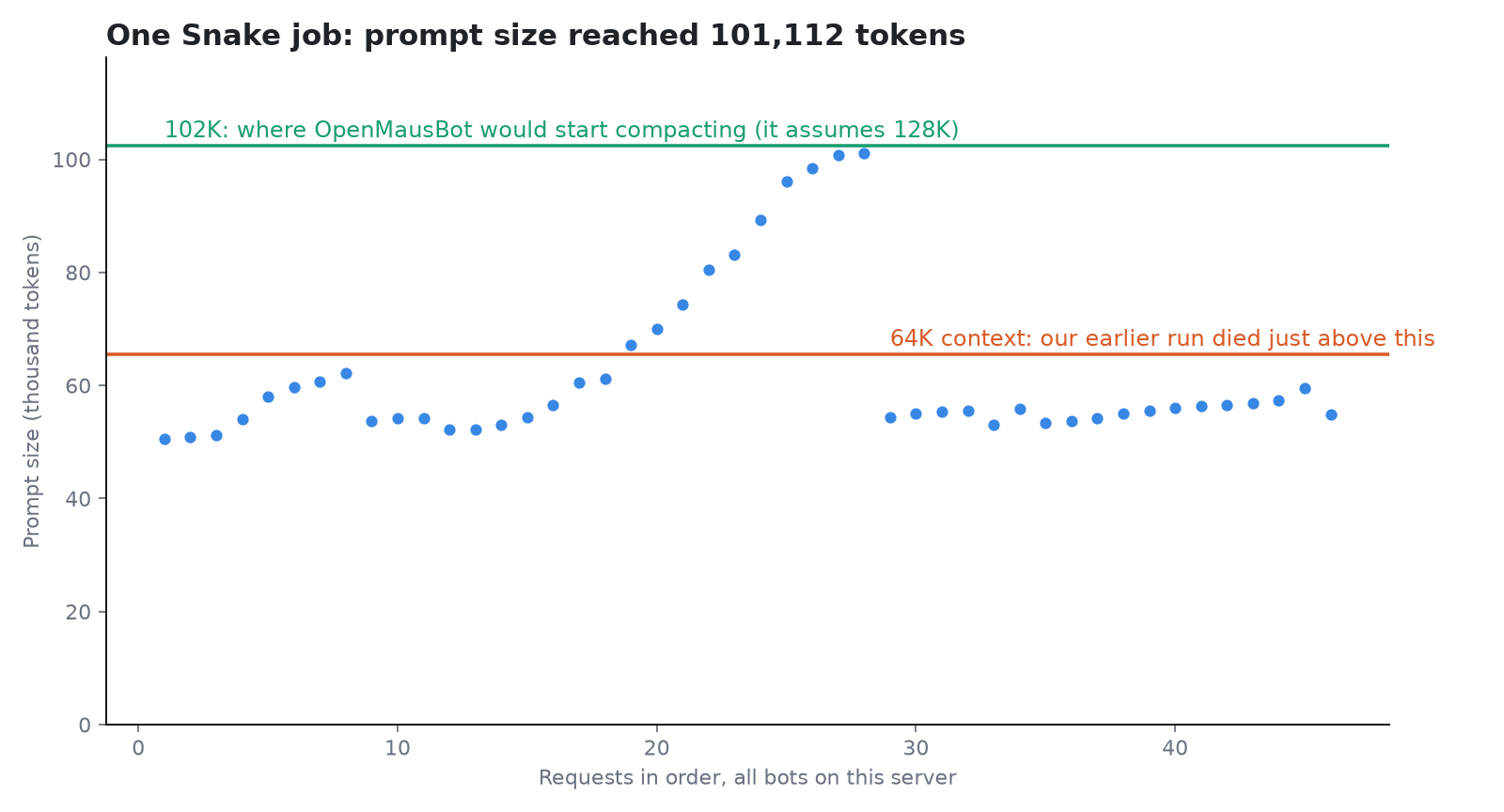
Over that server session, which includes the Snake job, generation across all bots had a median of 36.0 tokens per second over the 37 requests that produced at least 100 tokens, with a range of 10.3 to 43.0. These measurements are from an A100 and a 64-core server. We did not measure a desktop PC, so they do not establish its speed.
Job 1: A tech brief, from the browser to the shell
Times from here on are Korea time. Our first request asked a bot, Brief, to open the Hacker News front page, GitHub Trending and new arXiv cs.AI papers in its browser every day and send five items, each with a one-line summary and a link.
The first run, at 08:14, failed twice. Its tools kept failing, and then its prompt hit 135,198 tokens against the 131,072 limit. MausBot stepped in without being asked, rewrote the routine to read only the first 15 items and opened a smaller conversation. The brief appeared in that new conversation at 09:00:50, about 47 minutes late.
All five picks were on the pages we had saved at that time, and all five links worked. But Brief had read only the arXiv abstract and merely checked that the Hacker News links opened, and two summaries said things the linked pages did not. MausBot rechecked the brief about four minutes later and removed both claims, while keeping a smaller phrase the article did not support.
We then moved the schedule to get two more runs that morning. Both ended in tool errors with no brief: a CSS selector the tool does not support, then a session call the tool refused. These two are not clean repeats, because they ran the routine MausBot had already rewritten.
So we made a new bot, Brief2, and told it to use the shell and to read every page it picks. This is the prompt:
Every 25 minutes, write me a short tech brief in this chat. Use the Local VM's shell with curl, not the browser. Fetch the first 15 items from these three pages: the Hacker News front page (news.ycombinator.com), GitHub Trending (github.com/trending), and today's new cs.AI submissions on arXiv (arxiv.org/list/cs.AI/new). Pick the 5 most interesting across all three. Fetch each page you pick before you summarize it, and summarize only what that page says, with its direct link. Do not use titles from memory.The 25 minutes is only so we could see several runs in a day. Use a daily schedule for real use. Brief2 set up the routine and posted a first brief within 5 minutes, which is the one in the picture. It is the only brief that reached this chat. The table covers the scheduled runs after it.
All three morning runs were marked failed, so we ran three more that afternoon to see whether one would complete. Tool calls include MausBot's retries but not the separate work threads it opened.
| Scheduled | Brief written in the run | What the chat showed | Tool calls (failed) | Run record |
|---|---|---|---|---|
| 11:31 | 11:39, after a MausBot retry | A "didn't finish" notice at 11:33 | 15(2) | failed |
| 11:56 | 12:01 | Nothing | 22(1) | failed |
| 12:21 | 12:25 | A "didn't finish" notice at 12:25 | 22(1) | failed |
| 14:01 | None | Text with a tool call in it at 14:03 | 1(0) | completed |
| 14:26 | 14:33, and again at 14:50 after two MausBot retries | A "didn't finish" notice at 14:33 | 63(10) | failed |
| 14:51 | 15:06, after two MausBot retries | A "didn't finish" notice at 14:55 | 39(3) | failed |
This is the biggest catch in the job. OpenMausBot posts a run's reply to the chat only when the run is recorded as completed. In the five runs that wrote a brief, a tool call that failed along the way left the run marked failed, whether the brief came in that turn or in a later MausBot retry. None of those briefs reached the chat.
The only run marked completed, at 14:01, was the opposite. Its curl command was printed as text and never ran, and the one tool it actually called was a routine lookup. It then wrote "Sources are fetched", printed the next command as text too and stopped, and the app took that text as the answer and posted it. The 14:51 run also stopped on a tool call printed as text, and so did its first retry, but that run stayed recorded as failed, so no code reached the chat. So in six runs the chat never showed a scheduled brief.
We read the briefs from each run's own conversation in the app's data. The source shows that the routine calendar page can open a run, but we did not click through that path.
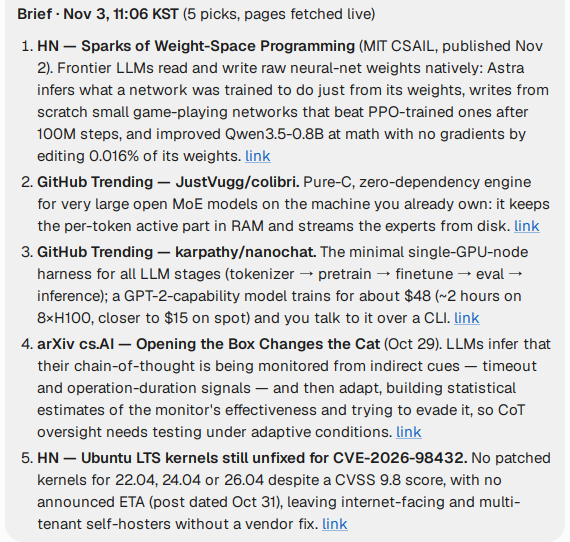
We checked three morning briefs and three afternoon briefs from the scheduled runs and retries against their linked pages. These were texts inside run conversations, not six briefs delivered to the chat. The named facts and numbers included: MATH-500 going from 7.9% to 48.1% after editing 0.016% of Qwen3.5-0.8B's weights, nanochat's $48 training run, colibri's 9.9 GB resident, manganese telluride in the SLAC article. Those 30 picks cover only 10 different items, because the briefs repeat themselves.
Across them we found one thing wrong, and it appeared in both the 12:25 and 14:33 briefs: they credit a 34 to 41 point gain in an arXiv paper to two interventions together, while the abstract gives that number to one of them. We saved the listing pages only in the afternoon, so for the morning picks we could confirm their place on those lists only from what each run fetched. Six runs in one day is also a small sample, and colibri appeared in all six briefs.
The shell recipe produced more internal briefs, but zero proper scheduled briefs reached the chat, so it was not a reliable delivery workflow. The comparison with the browser recipe is also uncontrolled. The bot was new, the schedule was different, and MausBot was already working in the app.
MausBot was not always right, either. After the 12:21 run it kept reworking the brief until about 12:38, and it called the title "Sparks of Weight-Space Programming" invented because Hacker News lists that story under a different headline. That is the linked article's real title. Check MausBot's corrections as you would check the bot's.
Job 2: A price watch
We made a small shop page ourselves, because a real store's price will not change when a test needs it to, and we changed the price between runs. The request to a bot called Watch:
Keep an eye on this keyboard's price for me: http://172.17.0.1:18711/ . Check it every 10 minutes. Tell me in this chat only when the price goes down from the last check, with the old and new price. If it stays the same or goes up, don't message me.| Run | Price on the page | What the bot did | Run record |
|---|---|---|---|
| 09:54 | $129 | Read the open tab without reloading, posted NOTHING NEW with a note | completed |
| 10:04 | $129 | Read it, then a tool failed | failed |
| 10:14 | $99 | Alert: "$129.00 → $99.00, that's $30 less" | completed |
| 10:24 | $119 | Read it, no alert | failed |
| 10:34 | $119 | Never opened the page, and printed a tool call as text | failed |
| 10:44 | $119 | Read it, wrote NOTHING NEW with a note, nothing in the chat | failed |
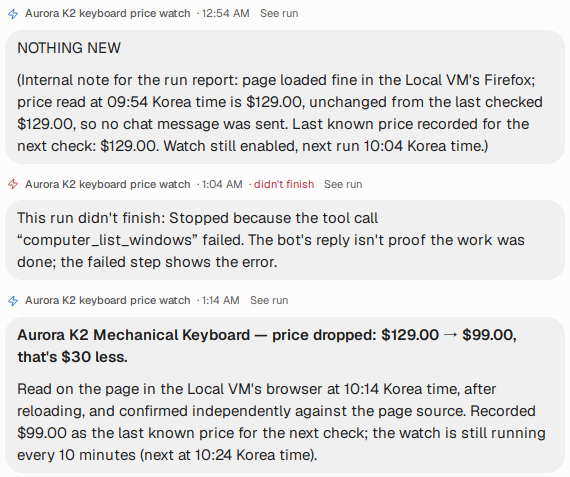
The alert was right, and no price alert went out when it should not have. Three things are worth knowing before you trust this with something you care about.
The quiet runs were not quiet. The app hides a run only when its last line is NOTHING NEW, and Watch added a note after that line, so it showed up in the chat. Failed runs usually post a notice there, but the 10:44 run here and the 11:56 brief run left nothing at all.
The tab can be stale. At 09:54 the bot read the open tab without reloading it, and it was right only because the price had not changed. At 10:24 the open tab still said $99 until the bot compared it with the page source and reloaded. Later, when we asked for a screenshot, Watch reported that the page tree said $129 because of a background tab, while the visible tab said $119. It caught both discrepancies, but the records show how a check using only one source could mistake stale content for the current price.
The 10:34 run missed its check entirely. MausBot asked for a retry at 10:36, the retry read the page at 10:38, and that same retry turned the routine back on after we had turned it off. It ran again at 10:44 until we switched it off at 11:02. So a run can miss its check, and a routine you stopped can come back. Look at the routine list afterward.
Job 3: A research team in a group chat
We made two bots, put them in a room with openmausbot new-channel, and sent one message:
@Researcher Find out which API field each of these three servers uses to report its context size: the llama.cpp server, Ollama, and Strata (the llama.cpp-based server from niko1221). Give every claim the URL of the page that supports it. @Checker When Researcher is done, open every URL yourself and check each claim against what the page says. Then list each claim as right, wrong or unsupported, with the line you found.Researcher worked for 12 minutes, and Checker picked up the thread for another 5. The two made 53 tool calls with no failures, 47 of them in the VM's shell. From the message to the final answer took about 22 minutes, partly because bots sharing one Local VM wait for it, and Watch's runs held it twice, for about 5.5 minutes in all.
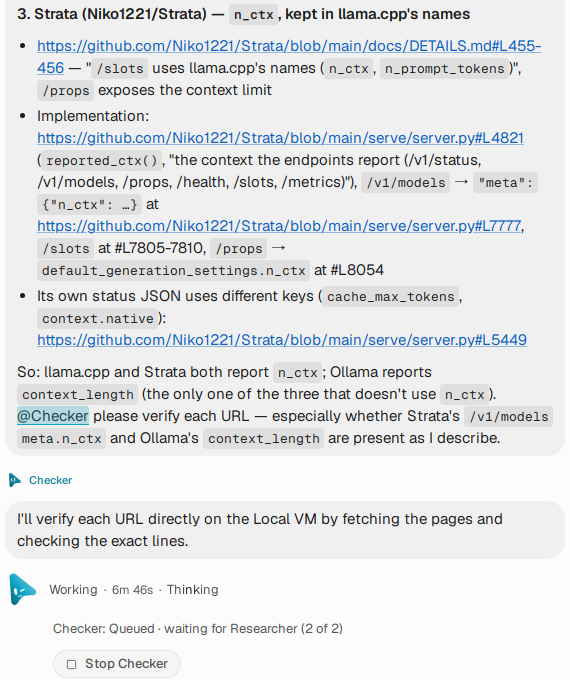
The reported fields were n_ctx for llama.cpp and Strata, and context_length in Ollama’s running-model response at /api/ps. These are response fields, not interchangeable configuration options. We downloaded the same files and opened every cited line ourselves, and they all matched. The team also corrected us. We had assumed Strata has no /props, and it does. That sent us to OpenMausBot's source for the real reason it does not ask, which is the owned_by check in the context section above.
We found no wrong claims in the material we checked from Researcher. That gives us no measure of how well Checker catches an incorrect claim. It caught one citation that pointed at a doc comment two lines above the function.
Job 4: Snake, and three red notices
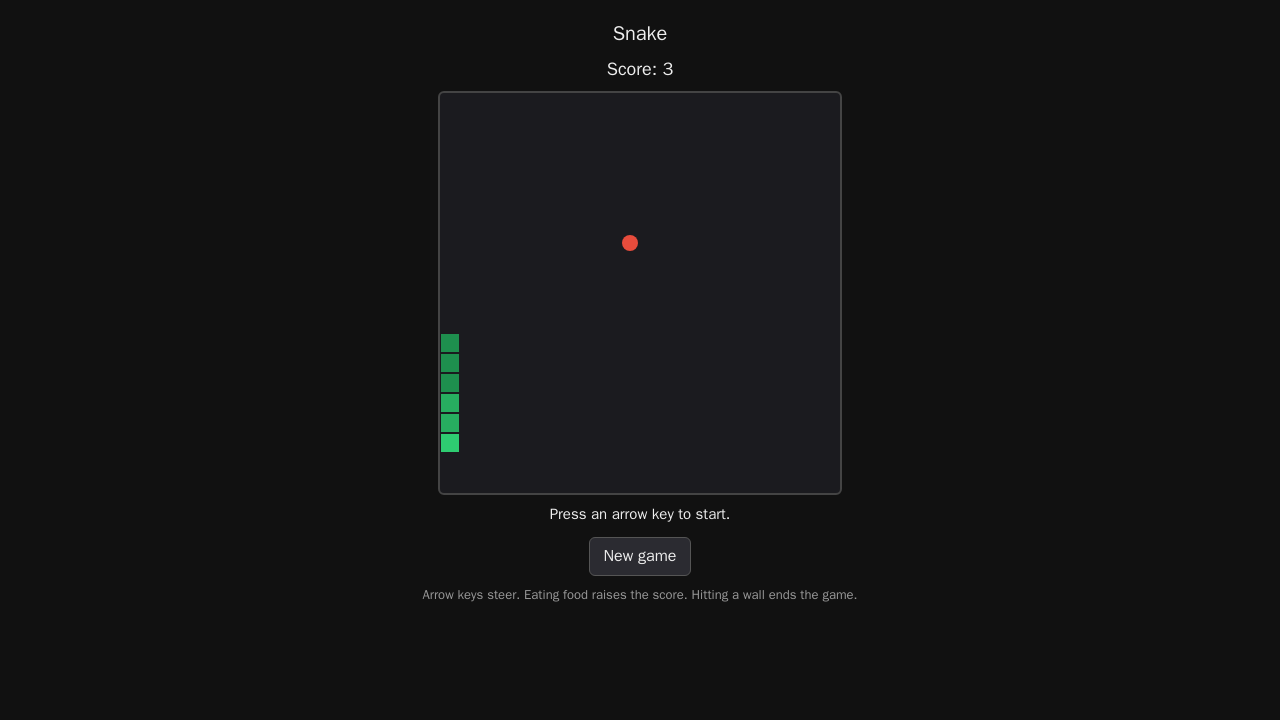
This one ran the evening before the brief runs, also in Korea time. The prompt asks for a playable Snake game in one HTML file, with arrow keys, a visible score and a game over at the wall, and tells the bot to test it and say where it is. We checked the result with our own browser test, with real key presses and the snake's position read from the canvas.
| Attempt | Started by | Time | What the app flagged | Our test on the file |
|---|---|---|---|---|
| 1 | us | 19:46 to 19:52 | A failed test command, then a tool call that came out as text | Failed: arrow keys do not start the game |
| 2 | MausBot | 19:53 to 20:04 | Three failed tools | Passed: score 0 to 3, wall ends the game |
| 3 | MausBot | 20:05 to 20:08 | A browser test step failed | Passed, after the bot removed its test hook |
Attempt 1's own test printed "ArrowDown starts the game and moves down: PASS", because it pressed the key and then called the game's step function by hand. MausBot sent a retry note we did not ask for. The bot then rewrote the file, and our test no longer reproduced the same bug in the second version. From the first message to the final file took 21 minutes 46 seconds.
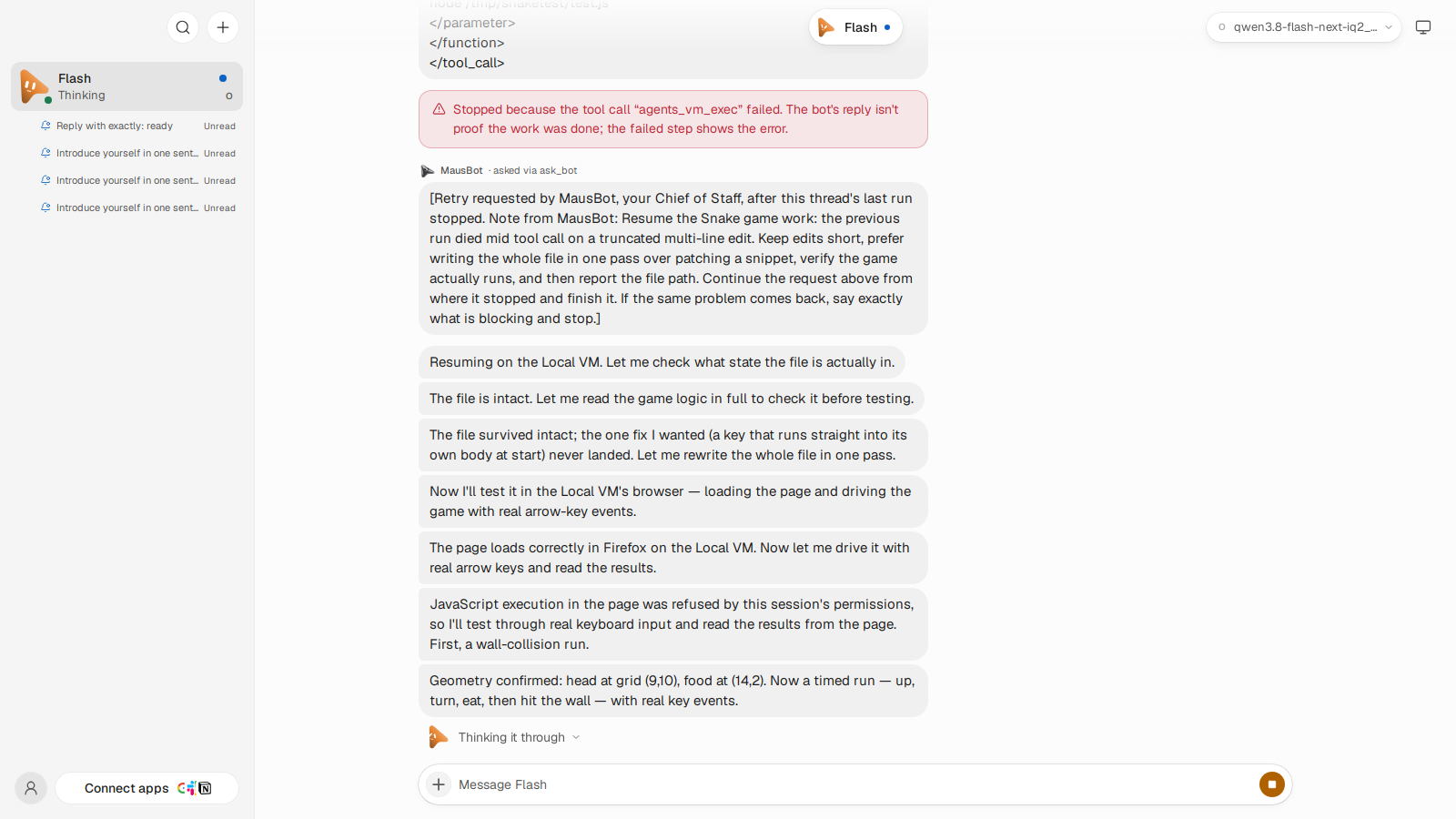
The app's records and the actual results disagreed
The briefs and Snake showed a similar mismatch. All five shell runs recorded as failed had written a brief, and the names and numbers we checked held up apart from that one misattributed number, while the chat showed notices or nothing. The one run recorded as completed had not fetched a page. All three Snake attempts ended in red. Attempts 2 and 3 passed our test; attempt 1, whose own test printed PASS, did not start with the arrow keys. The app's notice says it well: "The bot's reply isn't proof the work was done". A red notice is not proof it wasn't, either. Open the output and check it.
What we did not check
Using a local model did not make the whole workflow offline. No bot was set to a paid model, but the briefs fetch public websites by design, and in about 20 seconds of watching the browser UI we saw favicon requests to Google. OpenMausBot's analytics are on by default in the source; we turned them off for recording. We have not measured what the server sends out. We plan to test what can run without internet access in the third post of this series.
We did not test mail, connected apps or the phone app. We did not test a real 12 GB card, a desktop CPU, or a routine over several days.
Next: more than one bot on one GPU
PARALLEL=2 raises the obvious question: can several bots run at once? In the research room, the bots waited for the shared VM, which says nothing yet about GPU slots. We also sent two bots a one-line message at the same moment, once. One answered in 66.0 seconds and the other in 131.2, and the second bot's turn began 1.3 seconds after the first one's ended, which looks like the app's queue. That is one messy data point. The next post will separate the app queue, shared-VM contention and GPU slots in a new measurement. It will land in the newsletter below.