Google Stitch MCP Setup Guide — Claude Code, Cursor, Gemini CLI (2026)
Step-by-step Stitch MCP setup for every AI coding platform. Auto-install, manual config, UI generation examples, and troubleshooting — everything the official docs skip.
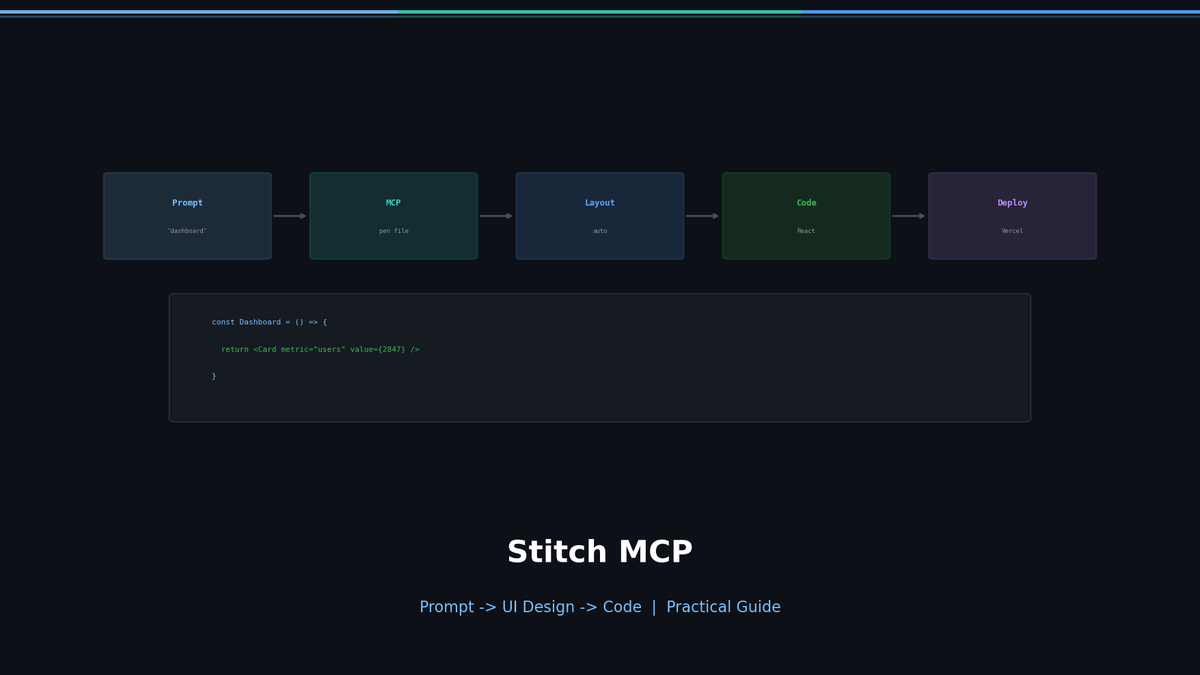
Stitch MCP Practical Guide — From Installation to UI Generation
Google Stitch generates UI designs and frontend code from text prompts. Stitch MCP connects it to AI coding agents (Claude Code, Cursor, Gemini CLI, etc.) as an MCP server.
The official docs list setup steps but skip the practical stuff. This guide covers installation through actual UI generation in one place.
What Stitch MCP Is
Stitch is an experimental tool from Google Labs. As of 2026 it generates with Gemini 3 Flash by default and Gemini 3 Pro in the higher-quality mode, turning a prompt into UI design + HTML/CSS code.
Stitch MCP wraps the Stitch API as an MCP (Model Context Protocol) server, so AI agents can call it as a tool.
In practice: tell your agent "build me a landing page," the agent calls Stitch, and you get design + code back.
Supported Platforms
| Platform | Supported | Config Method |
|---|---|---|
| Claude Code | Yes | claude mcp add |
| Claude Desktop | Yes | claude_desktop_config.json |
| Cursor | Yes | Settings > MCP |
| VS Code (Copilot) | Yes | .vscode/mcp.json |
| Windsurf | Yes | MCP settings JSON |
| Gemini CLI | Yes | gemini mcp add or extension |
| Google Antigravity | Yes | Manual mcp_config.json |
| Codex CLI | Yes | codex mcp add |
The MCP server configuration is nearly identical across platforms.
Installation
Prerequisites
- Node.js 18+
- Google Cloud project (billing enabled)
- At least one project on stitch.withgoogle.com
Automatic Setup (Recommended)
npx @_davideast/stitch-mcp initAn interactive wizard handles gcloud CLI check/install, Google login, project setup, Stitch API activation, and MCP client configuration.
Manual Setup (gcloud)
If you already have gcloud installed:
gcloud auth login
gcloud config set project YOUR_PROJECT_ID
gcloud auth application-default login
gcloud auth application-default set-quota-project YOUR_PROJECT_ID
gcloud beta services mcp enable stitch.googleapis.com --project=YOUR_PROJECT_ID
Health Check
npx @_davideast/stitch-mcp doctor --verboseMCP Registration by Platform
Claude Code
claude mcp add -e GOOGLE_CLOUD_PROJECT=YOUR_PROJECT_ID -s user stitch -- npx -y @_davideast/stitch-mcp proxyVerify:
claude mcp list | grep stitchClaude Desktop
Add to claude_desktop_config.json:
{
  "mcpServers": {
    "stitch": {
      "command": "npx",
      "args": ["@_davideast/stitch-mcp", "proxy"]
    }
  }
}
Cursor / VS Code / Windsurf
Same JSON in MCP settings:
{
  "mcpServers": {
    "stitch": {
      "command": "npx",
      "args": ["-y", "@_davideast/stitch-mcp", "proxy"]
    }
  }
}
Gemini CLI
gemini mcp add stitch -- npx -y @_davideast/stitch-mcp proxy --env GOOGLE_CLOUD_PROJECT=YOUR_PROJECT_IDOr via extension:
gemini extensions install https://github.com/gemini-cli-extensions/stitch --auto-updateIf gcloud is already configured, add the environment variable:
{
  "env": {
    "STITCH_USE_SYSTEM_GCLOUD": "1"
  }
}
Available Tools
Key tools that agents can call:
| Tool | Description |
|---|---|
build_site | Map screens to routes, get per-page HTML |
get_screen_code | Fetch raw HTML/CSS of a specific screen |
get_screen_image | Get screen screenshot (base64) |
generate_screen_from_text | Generate a new screen from a text prompt |
list_projects | List Stitch projects |
list_screens | List screens in a project |
extract_design_context | Extract design DNA (colors, fonts, layout) from a screen |
Practical Usage
1. Generate UI with a Single Prompt
Tell your agent:
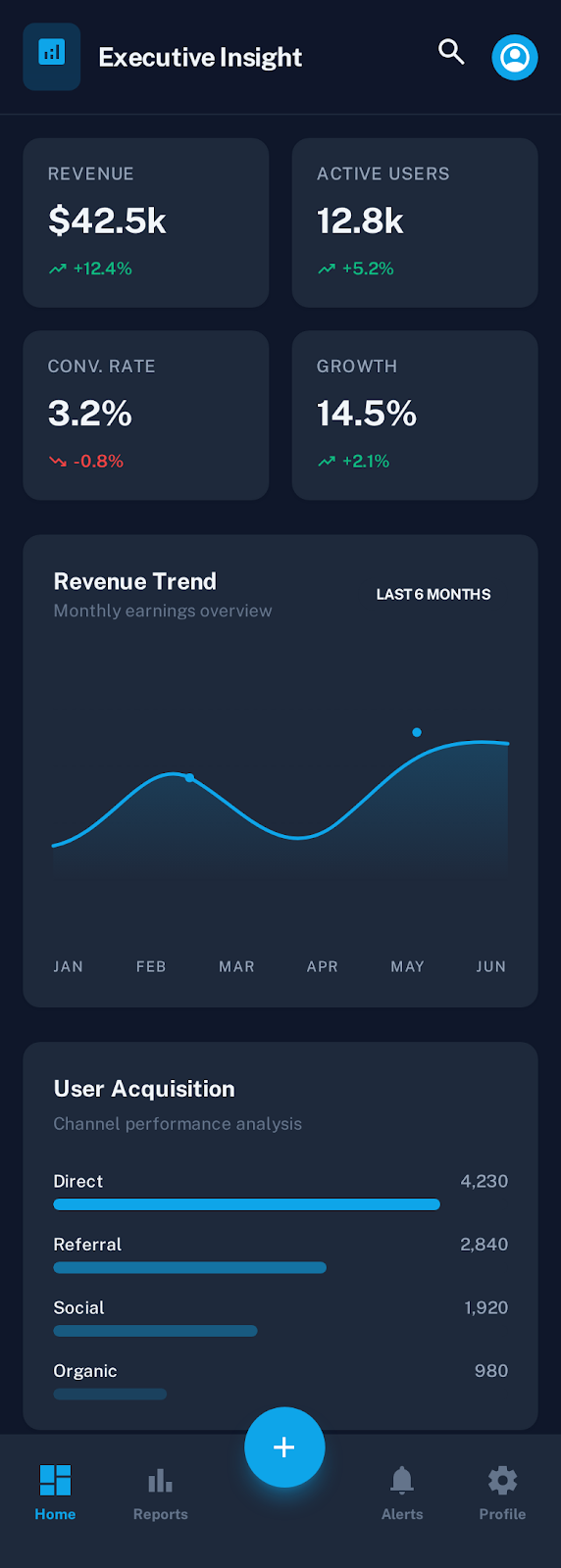
Use Stitch to build a dark mode dashboard.
Card-based layout with stats summary on top, charts below.
The agent calls generate_screen_from_text to create the UI, then get_screen_code to fetch the HTML/CSS.
Here's what Stitch actually produces from a prompt:
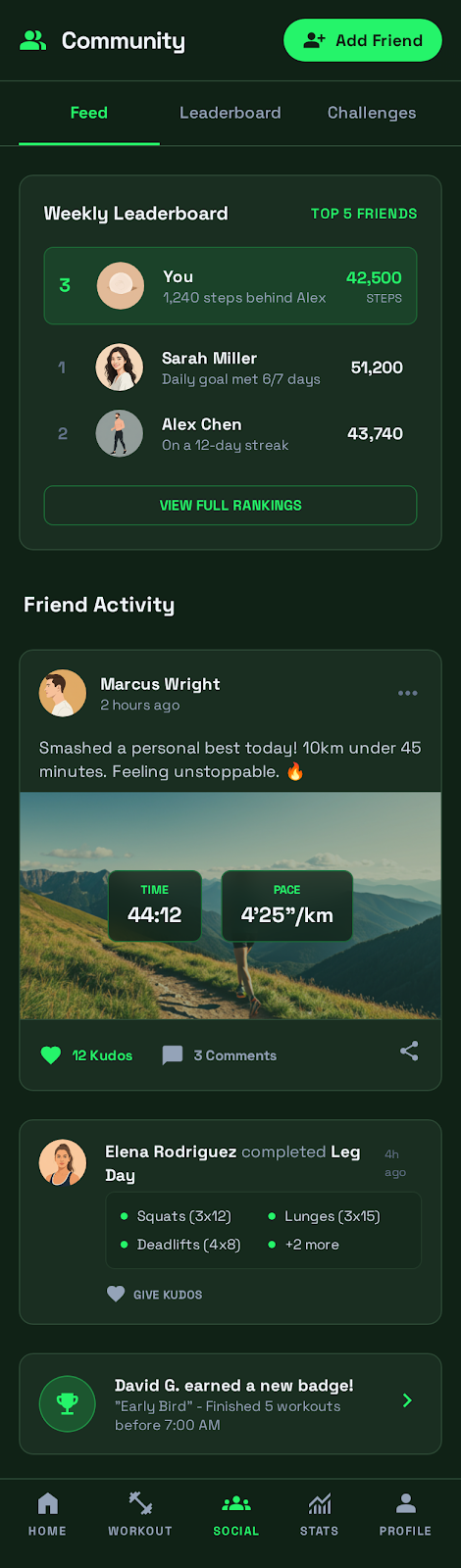
Mobile apps work the same way. One prompt for a fitness tracker:
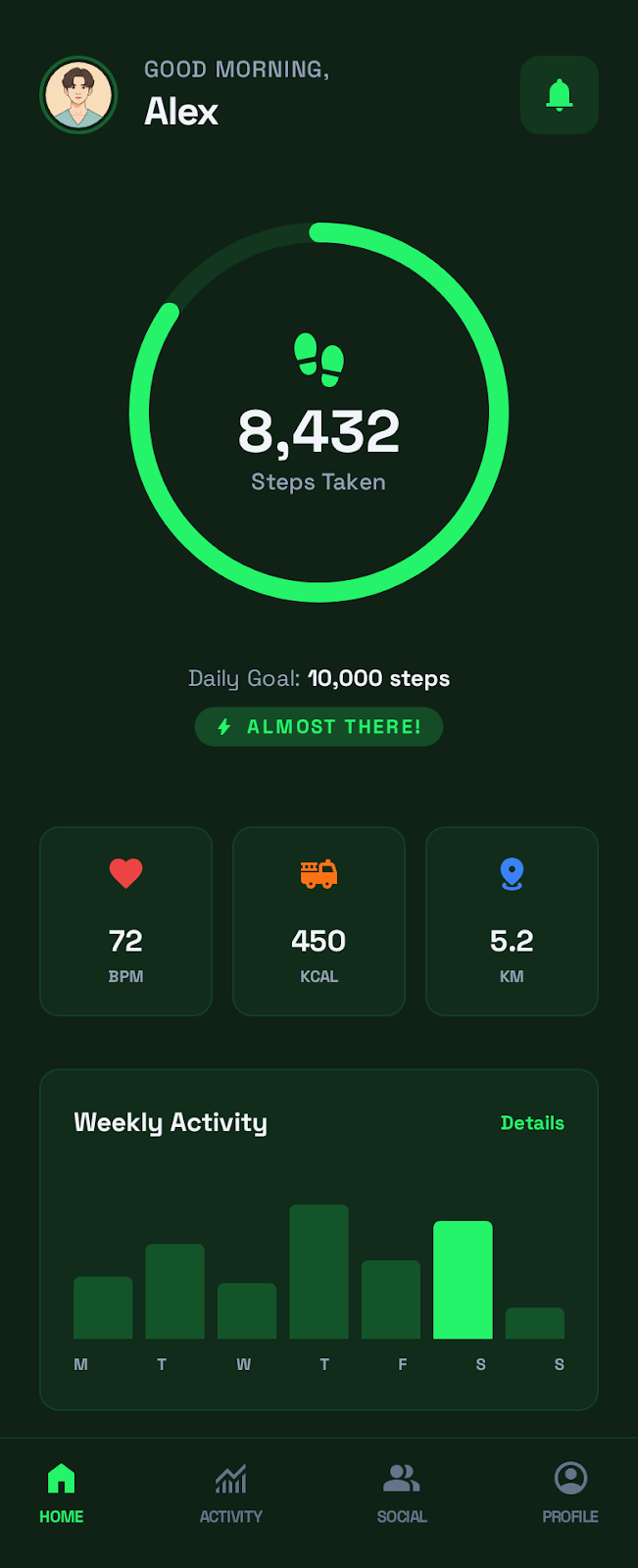
With a well-written prompt, the output quality is surprisingly high. You can use the generated HTML/CSS directly in your project or as a design reference.
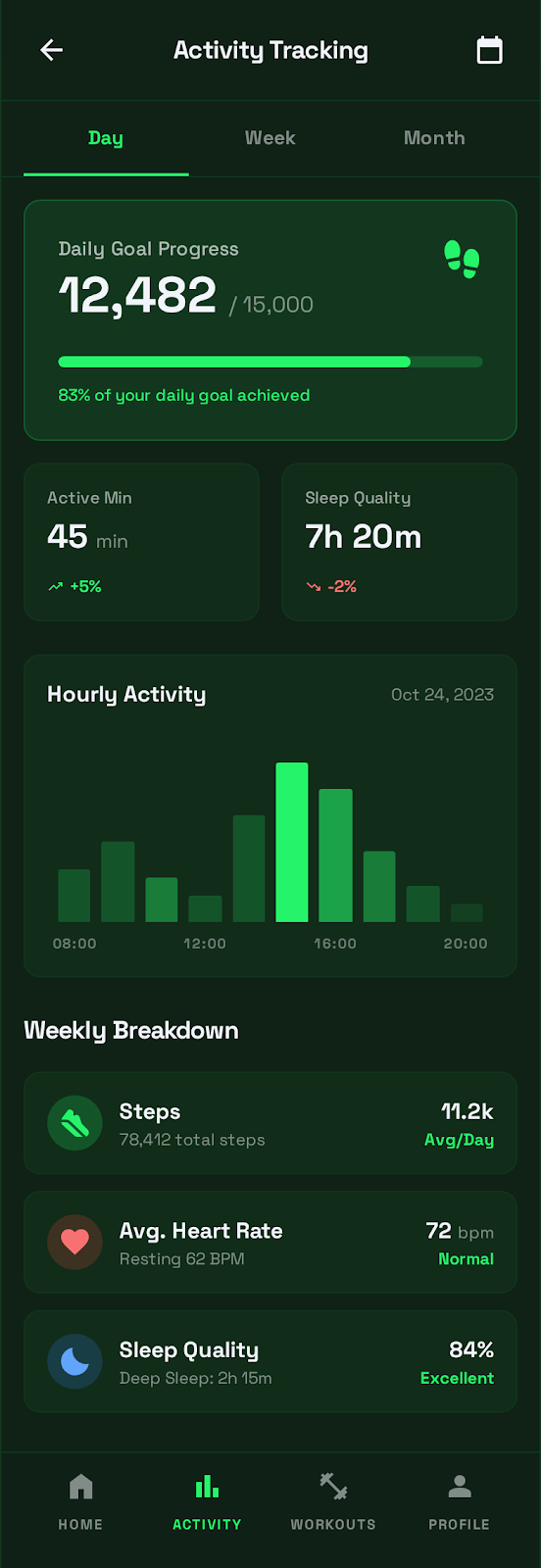
2. Multiple Screens at Once
You can create multiple screens in a single project. For a fitness app, for example:
3. Maintain Consistency with Design DNA
When generating multiple screens, each one looks different because Stitch has no memory of previous designs.
The fix:
Extract the design DNA from the existing dashboard screen.
Generate a new settings page matching that same style.
extract_design_context captures color palettes, typography, and layout patterns. These are passed as context when generating new screens.
3. Auto-Generate Astro Sites
Directly from CLI:
# Preview screens locally
npx @_davideast/stitch-mcp serve -p PROJECT_ID

# Generate Astro project
npx @_davideast/stitch-mcp site -p PROJECT_ID
Map screens to routes and an Astro site is generated automatically.
4. Interactive Browser
npx @_davideast/stitch-mcp view --projectsBrowse projects and screens in the terminal. c to copy, s to preview HTML, o to open in Stitch.
Common Issues
API Keys vs OAuth — It Depends on Which Server You Use
This changed in 2026. The official Gemini CLI extension now supports an API key generated in Stitch's settings (it ships a gemini-extension-apikey.json template), so for Gemini CLI you can skip gcloud entirely. The community @_davideast/stitch-mcp proxy still expects OAuth — set an API key there and you get:
Error: "API keys are not supported by this API.
Expected OAuth2 access token or other authentication credentials."
For the proxy, use gcloud auth application-default login. For the official Gemini CLI extension, either the API key or ADC works.
.env File Conflicts
A .env file in your project directory can break the proxy. If you see invalid character 'd' errors, move or rename the .env file.
Permission Errors
Check your Google Cloud project for:
- Billing enabled
- Stitch API enabled (
gcloud beta services mcp enable stitch.googleapis.com) - Owner or Editor role on your account
Full Reset
When things go wrong:
npx @_davideast/stitch-mcp logout --force --clear-config
npx @_davideast/stitch-mcp init
Tips
- Be specific with prompts. "Dark mode, card-based, minimal" beats "make it look good"
- Mobile UIs tend to produce higher quality results than web
- Stitch and Stitch MCP are still free (August 2026). Third-party trackers report a free-tier quota of about 350 standard + 200 Pro generations per month, with MCP calls counting against it, and paid plans expected later in 2026 — treat those figures as reported, not official.
- Pin versions in production:
@_davideast/stitch-mcp@0.9.0(latest as of May 2026) - There are 3 MCP implementations —
@_davideast/stitch-mcpis the most stable
Bottom Line
Stitch MCP is the tool that makes "tell your agent to build a UI and it actually does" a reality.
Install with npx @_davideast/stitch-mcp init, add MCP config to your AI coding tool, and you're connected. No need to open a separate design tool — just talk to your agent.
References: Stitch Official Site · stitch-mcp GitHub · MCP Setup Docs · MCP Guide