Build Your Own LLM Knowledge Base — A Karpathy-Style Knowledge System
Complete guide to building a permanent personal knowledge system with Obsidian + Claude Code. Wiki + Memory dual-axis architecture.
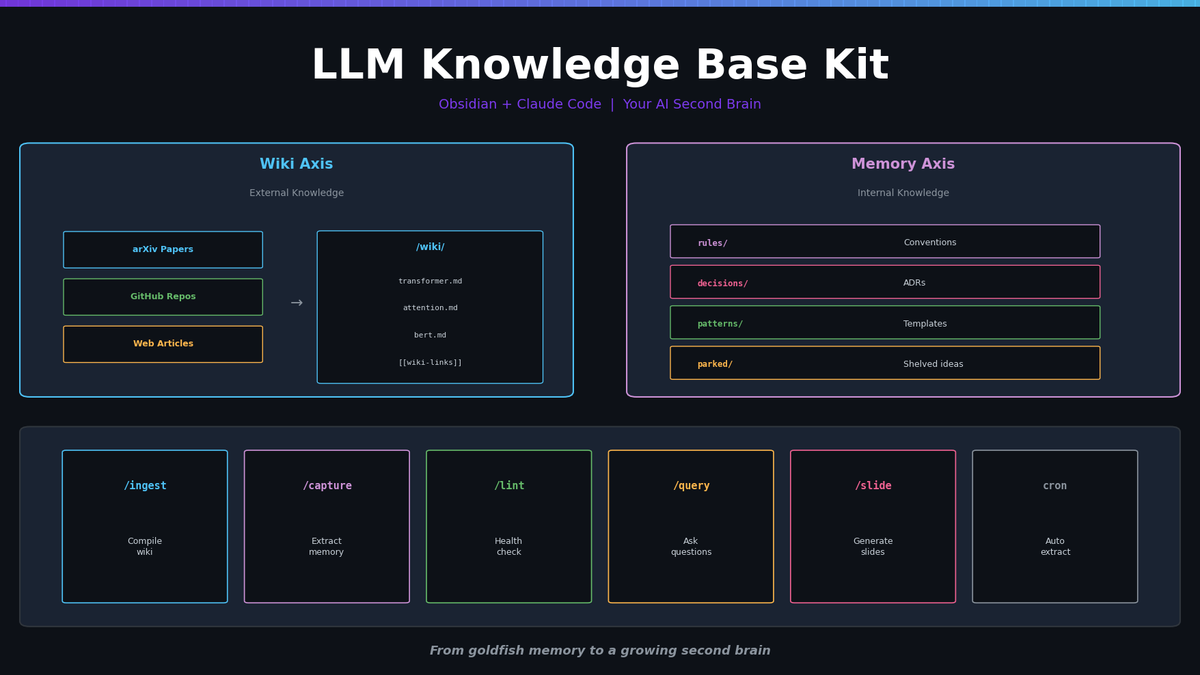
Build Your Own LLM Knowledge Base — A Karpathy-Style Knowledge System
Your AI sessions end, but your knowledge doesn't have to. A complete guide to building a permanent personal knowledge system with Obsidian + Claude Code.
Why You Need a Personal Knowledge Base
In the previous post, we examined the AI memory crisis. karpathy-skills' static rules, claude-mem's auto capture, Cognee's knowledge graph — each approach had its own limitations.
What if we build our own system that combines the best of all three?
| Existing Tool Strength | In Our System |
|---|---|
| karpathy-skills' CLAUDE.md rules | AGENTS.md — agent behavior instructions |
| claude-mem's auto session capture | ingest_conversations.py — auto extraction from session logs |
| Cognee's structured knowledge | Obsidian vault — wiki-linked knowledge graph |
The result is the LLM Knowledge Base Starter Kit — an Obsidian-compatible vault + Claude Code slash commands + Python automation scripts.
Architecture: Two Axes
The core design revolves around two knowledge axes:
Axis 1: Wiki (External Knowledge)
Organize knowledge collected from papers, blogs, and GitHub repos.
Drop sources into /raw/ → LLM agent reads and analyzes → Refined docs in /wiki/For example, drop "Attention Is All You Need" into /raw/, and the agent produces:
wiki/transformer-architecture.md— Architecture overviewwiki/self-attention.md— Self-Attention mechanismwiki/multi-head-attention.md— Multi-Head Attention details
Each concept gets its own wiki document, interconnected via [[wiki-links]].
Axis 2: Memory (Internal Knowledge)
Preserve your personal work rules and decision records from AI conversations.
AI session ends → Session log analysis → Structured files in /memory/Memory is organized into 4 subfolders:
| Folder | Purpose | Example |
|---|---|---|
rules/ | Recurring rules and preferences | "Korean posts always use formal style" |
decisions/ | Technical decision records | "Why we chose Sanity CMS" |
patterns/ | Reusable code/workflow templates | "Sanity upload script pattern" |
parked/ | Deferred tasks, shelved ideas | "UserEvent tracking system design" |
Where the Axes Meet
Wiki and Memory live in the same Obsidian vault, so they cross-reference freely:
<!-- memory/decisions/2026-04-07-attention-library.md -->
Chose FlashAttention v2.
See benchmarks in [[Efficient Attention]].

<!-- wiki/efficient-attention.md -->
For real-world usage, see [[decisions/2026-04-07-attention-library]].
This is fundamentally different from a simple note app or CLAUDE.md. Knowledge isn't isolated — it forms a network.
Full Structure
llm-knowledge-base-kit/
├── vault/                    # Obsidian-compatible vault
│   ├── AGENTS.md             # LLM agent instructions (the brain)
│   ├── CLAUDE.md             # Claude Code project config
│   ├── raw/                  # Raw source input
│   ├── wiki/                 # Refined wiki documents
│   ├── memory/               # Internal knowledge from AI conversations
│   │   ├── rules/            # Recurring rules
│   │   ├── decisions/        # Decision records
│   │   ├── patterns/         # Reusable patterns
│   │   └── parked/           # Shelved ideas
│   ├── outputs/              # Generated artifacts (slides, charts)
│   └── _meta/                # Index, graph, changelog
├── .claude/commands/         # Claude Code slash commands
│   ├── ingest.md             # /ingest — raw → wiki compilation
│   ├── capture.md            # /capture — extract memory from session
│   ├── lint.md               # /lint — vault health check
│   ├── query.md              # /query — ask questions
│   ├── summarize.md          # /summarize — topic summaries
│   └── slide.md              # /slide — Marp presentations
├── scripts/                  # Python automation
│   ├── ingest_arxiv.py       # arXiv paper ingestion
│   ├── ingest_github.py      # GitHub repo ingestion
│   ├── ingest_web.py         # Web page ingestion
│   ├── ingest_conversations.py  # Claude Code sessions → memory
│   └── wiki_stats.py         # Vault statistics
└── notebooks/                # Hands-on tutorials
    ├── 01-setup.ipynb        # Install and first ingestion
    ├── 02-compile.ipynb      # Understanding compilation
    └── 03-advanced.ipynb     # Batch ops, queries, export
Step 1: Vault Setup
Install Dependencies
cd scripts
pip install -r requirements.txt
Required packages:
arxiv— arXiv API clienttrafilatura— web page body extractionrequests— HTTP requestspyyaml— YAML parsinganthropic— Claude API (for auto memory extraction)google-genai— Gemini API (alternative provider)
Open in Obsidian
Open the vault folder in Obsidian via "Open folder as vault." [[wiki-links]] work natively, and Graph View shows your knowledge network visually.
Step 2: Collect External Knowledge (Wiki Axis)
Ingest arXiv Papers
# By paper ID
python scripts/ingest_arxiv.py 1706.03762

# By keyword search
python scripts/ingest_arxiv.py --search "flash attention" --max 5
A file like arxiv-1706.03762-attention-is-all-you-need.md appears in /raw/, with body text, equations, and references converted to markdown.
Ingest GitHub Repos
python scripts/ingest_github.py karpathy/nanoGPTExtracts README, key source code, and directory structure into a single markdown.
Ingest Web Pages
python scripts/ingest_web.py https://jalammar.github.io/illustrated-transformer/Uses trafilatura for clean body extraction.
Manual Input
Drop any .md file directly into /raw/. Meeting notes, lecture notes, idea memos — anything goes.
Step 3: Compile with the LLM Agent
Once raw sources are collected, compile in Claude Code:
/ingestThe agent reads AGENTS.md and performs:
- Detects new files in
/raw/ - Reads each file completely
- Extracts key concepts
- Checks if related wiki articles exist
- Creates new documents in
/wiki/for new concepts - Enriches existing documents for known concepts
- Cross-links related articles via
[[wiki-links]] - Updates
_meta/INDEX.mdand_meta/GRAPH.md
Compilation Quality
Wiki articles follow this structure:
---
title: Self-Attention
sources: [raw/arxiv-1706.03762-attention-is-all-you-need.md]
created: 2026-04-07
updated: 2026-04-07
tags: [attention, transformer, mechanism]
status: final
---

# Self-Attention

## Overview
Self-Attention computes representations where each position
attends to all other positions in the input sequence...

## Key Concepts
### Query, Key, Value
...

## Connections
- Core component of [[Transformer Architecture]]
- Extended by [[Multi-Head Attention]]
- Optimized in [[Efficient Attention]] research
11 sample articles are included so you can see the quality bar immediately.
Step 4: Capture Internal Knowledge (Memory Axis)
Memory can be captured in three ways.
Method 1: Manual Writing
Write files directly in memory/ subfolders. Each folder includes a TEMPLATE.md:
---
title: Korean Writing Style
created: 2026-04-07
updated: 2026-04-07
tags: [writing, korean, style]
status: active
---

# Korean Writing Style

## Rule
Korean blog posts must always use formal 합니다/입니다 style.
Never use casual 반말체 ("~다").

## Context
The user has corrected this multiple times across sessions.
This rule should be applied first in all AI sessions.

## Related
- [[decisions/2026-04-01-blog-platform]]
- [[patterns/sanity-upload-script]]
Method 2: /capture Slash Command
When useful rules or decisions emerge during a Claude Code session:
/captureThe agent analyzes the current conversation and auto-extracts items into 4 categories (rules/decisions/patterns/parked).
Method 3: Automated Batch Extraction
ingest_conversations.py parses Claude Code session logs (JSONL) and extracts memory items via LLM:
# Using Anthropic Claude
export ANTHROPIC_API_KEY=sk-ant-...
python scripts/ingest_conversations.py --vault /path/to/vault

# Using Google Gemini (alternative)
export GEMINI_API_KEY=...
python scripts/ingest_conversations.py --vault /path/to/vault
Key features:
- Going-forward mode: Sets a cutoff on first run, processes only new sessions afterward
- Live session protection:
--idle-minutes 10skips currently active sessions - Dual provider: Auto-detects Anthropic or Gemini from environment variables
- Dry run:
--dry-runpreviews without creating files - Cron-friendly: Automate with cron or launchd timers
# Useful flags
--dry-run           # Preview without file creation
--no-llm            # Parse-only smoke test
--reset-cutoff      # Reset cutoff (treat as first run)
--since 2026-04-07  # Process sessions after specific date
--provider gemini   # Force specific provider
--model gemini-2.5-flash  # Override model
Cron example (hourly):
0 * * * * cd /path/to/kit && python scripts/ingest_conversations.py --vault vault/ >> /tmp/kb-ingest.log 2>&1Step 5: Vault Management
Health Check
/lintThe agent inspects 8 dimensions:
- Orphan detection — articles with no incoming links
- Broken links —
[[wiki-links]]pointing to nonexistent articles - Stale articles — not updated in 30+ days
- Missing sources — wiki articles citing nonexistent
/raw/files - Duplicate topics — overlapping content
- Index sync —
INDEX.mdmatches actual files - Parked aging —
parked/items abandoned for 30+ days (resurfaced) - Rule conflicts — contradictory
rules/files
Knowledge Queries
/query How does FlashAttention reduce memory usage?The agent finds relevant articles from INDEX.md, follows wiki-links for context, and answers with citations.
Presentation Generation
/slide Transformer ArchitectureGenerates Marp-format slides in outputs/slides/. Convert to PDF via Obsidian's Marp plugin or CLI.
Statistics
python scripts/wiki_stats.py vault/Shows vault size, document count, link density, tag distribution at a glance.
Real-World Workflow
Daily Routine
Morning:
1. Drop interesting papers/articles into /raw/
2. Run /ingest → wiki auto-expands

Evening:
3. Run /capture after today's Claude Code sessions
4. Or let cron run ingest_conversations.py automatically

Weekly:
5. Run /lint → check orphans, parked items
6. Browse Obsidian Graph View for knowledge network overview
Practical Example
I use this system for blog operations:
Wiki axis:
- 30+ papers on Transformer, Attention, Diffusion compiled into wiki
- Quick reference via
/querywhen writing blog posts
Memory axis:
- "Korean posts use formal style" →
rules/korean-writing-style.md - "Sanity upload script pattern" →
patterns/sanity-upload-script.md - "UserEvent tracking system" →
parked/userevent-tracking.md(shelved → resumed later)
No more repeating the same rules every session. Set CLAUDE.md to reference AGENTS.md, and all rules load automatically.
How It Differs from Karpathy's CLAUDE.md
Karpathy's CLAUDE.md is "write rules in one file." Powerful but limited:
| Aspect | CLAUDE.md (Static) | Knowledge Base Kit (Dynamic) |
|---|---|---|
| Rule management | All rules in one file | Category-separated + cross-linked |
| Size limit | ~200 lines recommended | Unlimited (Obsidian vault) |
| Knowledge growth | Manual editing only | Auto capture + manual editing |
| External knowledge | Not supported | arXiv/GitHub/web auto-ingestion |
| Search | Ctrl+F | /query + Graph View |
| Health management | None | /lint + auto-aging alerts |
The Knowledge Base Kit is the natural evolution of CLAUDE.md. Starting from a single rules file, it grows into a classified, connected, auto-updating knowledge system.
Starter Kit Download
The LLM Knowledge Base Starter Kit includes:
- Obsidian-compatible vault (complete folder structure + AGENTS.md + CLAUDE.md)
- 11 sample wiki articles (Transformer Architecture series)
- Memory subsystem (4 folders + templates)
- 6 Claude Code slash commands (/ingest, /capture, /lint, /query, /summarize, /slide)
- 4 Python ingestion scripts (arXiv, GitHub, Web, Conversations)
- Dual provider support (Anthropic Claude + Google Gemini)
- 3 hands-on notebooks (setup, compile, advanced)
- Vault statistics + PDF export utilities
After downloading, open the folder in Obsidian and start Claude Code — you're ready to begin building your knowledge.
Conclusion
The AI memory problem isn't solved by a single tool. You need a system.
- Static rules (CLAUDE.md) control baseline behavior
- Auto capture (ingest_conversations.py) preserves session knowledge
- Structured vault (Obsidian + wiki-links) connects knowledge
- Health checks (/lint) maintain knowledge quality
When these four combine, AI is no longer a goldfish. It becomes a growing second brain.
New measurements go out weekly with Paper of the Week — subscribe below if you want the next one.