YOLO26n or YOLO26s? Accuracy and Latency, Measured
We ran YOLO26n and YOLO26s on all 5,000 COCO val2017 images and timed both on an A100. At confidence 0.25, s found 62% of labeled objects and n 50%; for small objects, 40% vs 24%. On the GPU at batch 1, s took 2.00 ms and n 1.69 ms. Where the gap grows, and what to pick.
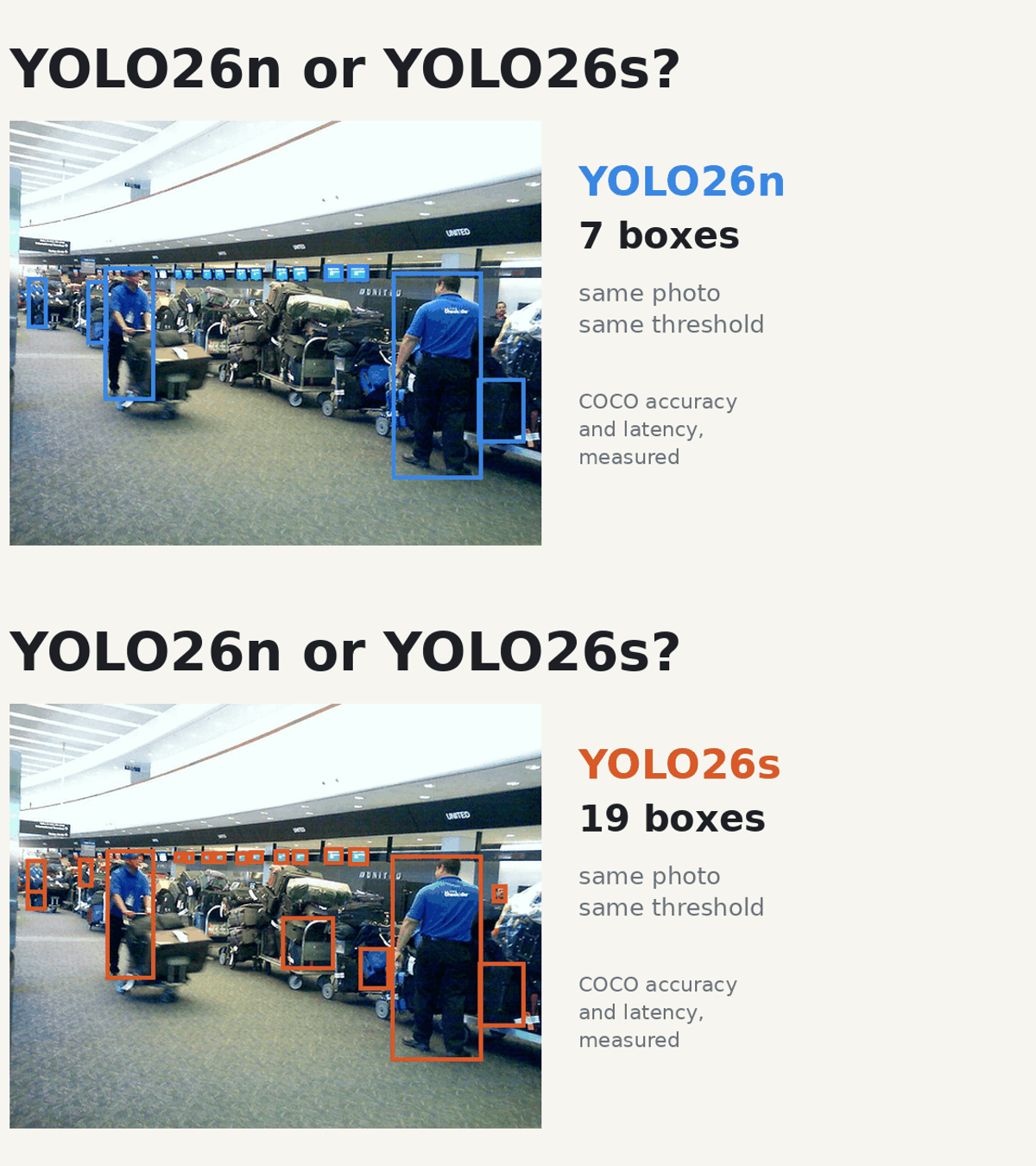
We gave YOLO26n and YOLO26s the same airport photo and kept every box with confidence 0.25 or more. The nano model drew 7 boxes. The small model drew 19. Of the labeled objects in that photo, s found 10 that n missed, and n found none that s missed. Most of the extras were far away: the row of check-in screens and the bags on the carts.
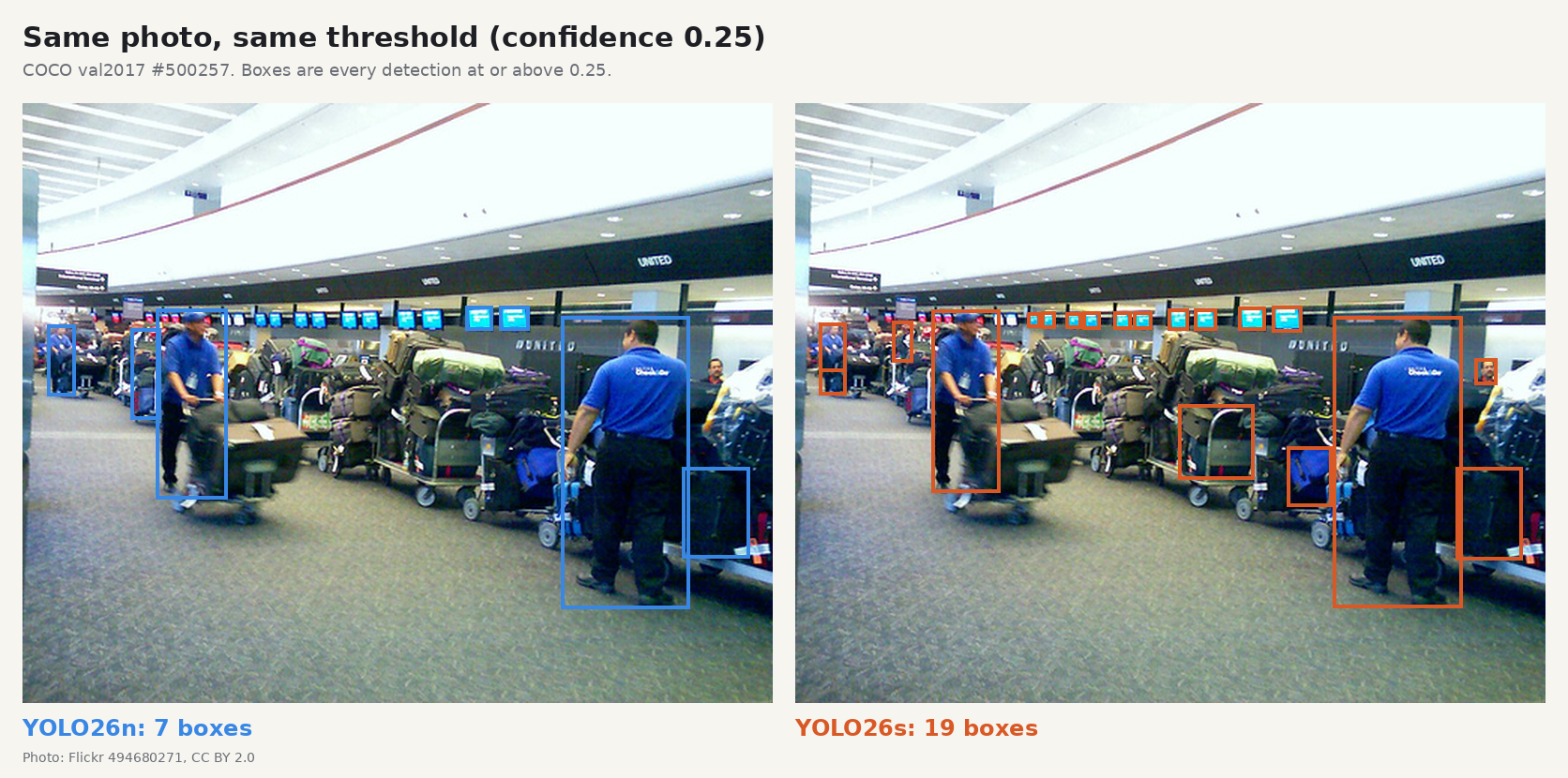
One photo proves little, so we ran both models on all 5,000 COCO val2017 images and timed them on a GPU. The short answer: s finds clearly more, especially small things, and on a GPU it costs about 0.3 ms more per image at batch 1. The rest of this post shows where that cost grows.
The two models
YOLO26 is the detection model family Ultralytics released in January 2026 (our YOLO26 overview covers what changed from YOLO11). It comes in several sizes, and the two smallest, n (nano) and s (small), are the usual candidates for real-time work.
| YOLO26n | YOLO26s | |
|---|---|---|
| Parameters | 2.4M | 9.5M |
| Compute per 640×640 image | 5.5 GFLOPs | 20.9 GFLOPs |
| COCO mAP50-95 (Ultralytics) | 40.9 | 48.6 |
| CPU ONNX latency (Ultralytics) | 38.9 ms | 87.2 ms |
| T4 TensorRT latency (Ultralytics) | 1.7 ms | 2.5 ms |
The table comes from Ultralytics' YOLO26 page. So s has about four times the parameters and compute. The question is what that buys and what it costs on hardware you actually have.
mAP50-95 is COCO's standard accuracy score. For each class it averages how well the ranked detections match the labeled boxes, at overlap thresholds from 0.50 to 0.95, then averages over the 80 classes. It is a good ranking score but hard to picture, so we also counted something more concrete below.
The test
- Accuracy: all 5,000 images of COCO val2017 at 640×640, graded by the official COCO evaluator (pycocotools). Then, at a deployment threshold of confidence 0.25, we counted how many of the 36,335 labeled objects each model found. A labeled object counts as found when a box of the same class overlaps it with IoU 0.5 or more.
- GPU latency: one NVIDIA A100 80GB, FP16, 640×640 input, batch sizes 1 to 64, n and s alternating run by run.
- Head: YOLO26 has two output heads. The default one is followed by NMS (non-maximum suppression, a step that removes duplicate boxes). An optional one-to-one head skips NMS (
nms=False). Accuracy numbers use the default head unless we say otherwise. The GPU timings are the forward pass alone with the NMS-free head, without resizing or post-processing.
Accuracy: at confidence 0.25, s finds about a quarter more objects, small ones most of all
Our mAP50-95 came out at 40.8 for n and 48.6 for s, within 0.1 of the Ultralytics table. The left chart shows what that gap means at confidence 0.25.
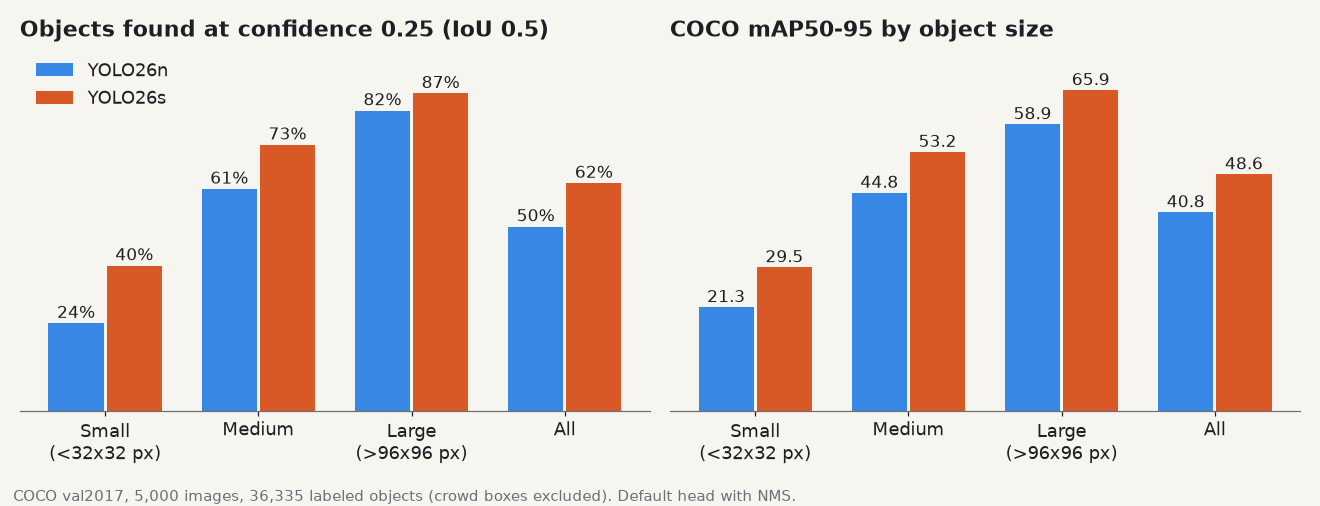
Across all objects, n found 18,309 (50.4%) and s found 22,622 (62.3%). That is about a quarter more. COCO calls an object small when its labeled area is under 32×32 pixels. On those, n found 23.9% and s found 39.7%. On large objects (over 96×96 pixels) the gap shrinks to 82.2% vs 86.9%.
Counted object by object, 5,004 labeled objects were found by s and not by n, and 691 the other way round.
s also drew more boxes that match no label at this threshold: 9,199 against n's 6,302. Some of those are real objects COCO did not label, and a higher threshold for s would trade some of its extra finds for fewer stray boxes. So read the 62% vs 50% as what you get at the common default of 0.25, not as a fixed property of the models.
The gain is uneven across classes. The biggest jumps were baseball bat 24.8 → 40.7 AP, remote 21.9 → 35.2 and toaster 39.6 → 52.2, followed by toothbrush, chair and cell phone at about 12 points each. The smallest were for classes that are hard for both or easy for both: broccoli 23.7 → 25.1, dining table 34.4 → 37.1, cat 71.7 → 74.6.
GPU latency: the 0.3 ms that does not show up
The first timing surprised us. Calling the model one image at a time from PyTorch on the A100, both took about 11 ms: 10.6 ms for n and 11.6 ms for s, and a second run had the order reversed. Our server's CPU was shared and heavily loaded during the test (load average around 250 on 128 threads), which inflates these times. Even so, a model with four times the compute should not be within 1 ms of the small one.
The reason is that at batch 1 the GPU mostly waits. A forward pass is a long chain of small GPU operations, and the CPU has to launch them one by one from Python. To see the GPU time alone, we recorded each model's forward pass as a CUDA graph, which replays all kernels with a single launch. Then the forward pass took 1.69 ms for n and 2.00 ms for s. A second run on another A100 in the same server matched to within 0.02 ms at batch 1.
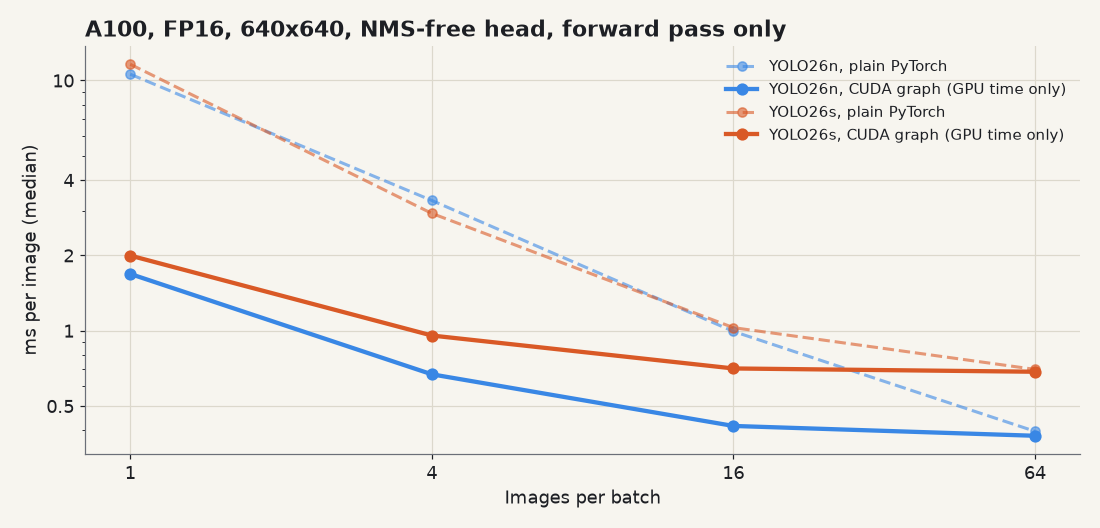
So the GPU work s adds at batch 1 is about 0.3 ms. In our plain PyTorch calls, about 9 ms per image was spent on the CPU side. On a quieter machine that part will be smaller, but the GPU-only difference between n and s stays at about 0.3 ms.
The full Ultralytics predict() call, with resizing and post-processing included, took 22.9 ms for n and 22.2 ms for s at batch 1 on the same loaded host. Across precisions and heads the two stayed within 1.4 ms of each other, sometimes with n ahead and sometimes s, so at batch 1 they are tied on our loaded machine.
The gap opens once the GPU is busy. With 64 images per batch, GPU time per image was 0.38 ms for n and 0.69 ms for s, so s costs 1.8 times as much. A second run on the other A100 gave larger absolute times (0.56 and 1.00 ms) but the same ratio. That is the case that matters if one GPU serves many camera streams batched together: if GPU time is the limit, one card handles a little over half as many streams with s (1/1.8).
The NMS-free head costs 0.7 to 0.8 points
YOLO26 was announced as end-to-end, and the one-to-one head that skips NMS is still there. In the current Ultralytics release (8.4.216) it is opt-in with nms=False; the default head uses NMS. We measured both.
Without NMS, mAP50-95 dropped from 40.8 to 40.1 for n and from 48.6 to 47.8 for s, matching Ultralytics' "e2e" column. At confidence 0.25, n found 47.6% of objects instead of 50.4%, and s 59.0% instead of 62.3%. In return, post-processing in predict() went from 1.5 ms to 0.5 ms. On a GPU server that 1 ms rarely matters. On export targets where NMS is awkward to run, the NMS-free head is what makes deployment simple, and the size choice matters more than the head: s without NMS (47.8) is still far above n with it (40.8).
CPU latency
Ultralytics lists 38.9 ms for n and 87.2 ms for s on CPU with ONNX, a ratio of 2.2. Unlike the 0.3 ms GPU gap at batch 1, on a CPU the extra compute shows up directly in the time.
Which one to pick
- GPU, one or a few streams: pick s. At batch 1 it adds about 0.3 ms of GPU time, which disappears behind the rest of the pipeline, and it finds about a quarter more objects at the same threshold.
- GPU, many streams batched: s costs 1.8 times as much GPU time per image at batch 64. Check whether your card has that headroom: if GPU time is already the limit with n, the same card would handle about 55% as many streams with s.
- Small objects matter (distant people, items on shelves, screens): s found 40% of small objects at confidence 0.25, n found 24%. Turning off NMS lowered these shares by about 3 to 4 points.
- CPU only: by Ultralytics' numbers, expect s to take a little over twice as long as n. Measure on your own CPU at your frame rate first.
Before choosing, run both on 50 to 100 frames from your own cameras and count what each one misses. COCO's "small" may not be your "small", and the one number worth trusting is the one measured on your data.
from ultralytics import YOLO

for name in ["yolo26n.pt", "yolo26s.pt"]:
    m = YOLO(name)
    r = m.predict("frames/", conf=0.25, save=True, project="compare", name=name[:-3])
    print(name, sum(len(x.boxes) for x in r), "boxes")
Setup: Ultralytics 8.4.216, PyTorch 2.7.0 (CUDA 12.6), pycocotools 2.0.11, COCO val2017 (5,000 images), imgsz 640, one NVIDIA A100 80GB PCIe. Example photo: COCO val2017 #500257, Flickr photo 494680271, CC BY 2.0.