LLM Quantization and Compression Hands-On
GPTQ, AWQ, bitsandbytes, GGUF, QLoRA, pruning and distillation: fit LLMs into the memory you have
01
What changes after this course
- ●Instead of downloading Q4_K_M because everyone does, you work out the weight and KV cache memory first and pick the format for a reason
- ●Instead of renting a bigger GPU to fine-tune, you fine-tune a 4-bit model with QLoRA on a single GPU
- ●Instead of trusting a compression benchmark’s headline, you check whether its numbers support the conclusion
02
Why it matters now
A 7B model needs 28 GB in FP32, and naive INT8 breaks it because of activation outliers. Fitting a model into the memory you have means choosing from GPTQ, AWQ, NF4, GGUF and QLoRA. This course sorts that out with the math and with measurements, and says so where a notebook’s simulation is simpler than the real algorithm.
03
What you leave with
- ✓Four notebooks: GPTQ and AWQ, GGUF and QLoRA, pruning, and the full pipeline
- ✓A final project that distills, prunes, quantizes, evaluates and exports one model
- ✓A LICENSES.md covering the research-only practice model and the Llama 2 licence clauses
04
Skills you'll build
- →Size a model’s weights and KV cache and explain why inference is memory-bound
- →Choose between GPTQ, AWQ, bitsandbytes and GGUF, and run a model with llama.cpp
- →Fine-tune a 4-bit model with QLoRA and build a distill, prune, quantize pipeline
Inside the course
Screens from the lectures, showing the notebooks you download running with their outputs on screen. GPTQ, AWQ, bitsandbytes, GGUF and ONNX Runtime are third-party open-source tools.
lectures/en/08_LLM_Quantization_GPTQ_AWQ.ipynb
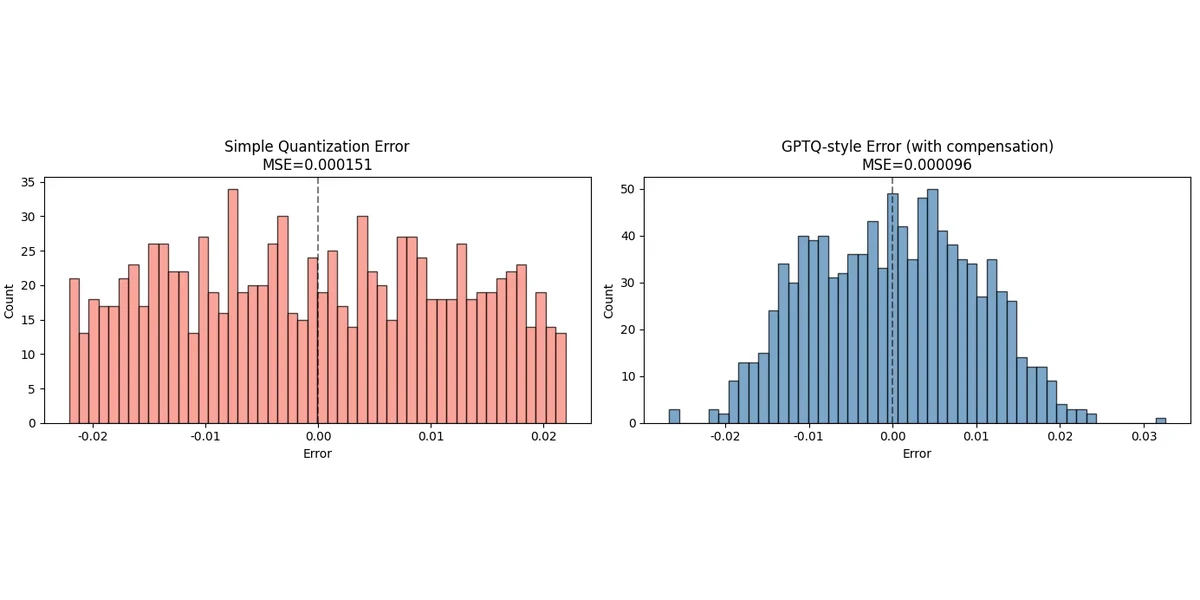
Error compensation lowers the MSE
The same weights quantized two ways. Plain rounding gives an MSE of 0.000151; the GPTQ-style version, which pushes each error onto the weights not yet quantized, gives 0.000096.
Lecture 1.2 · gptq hessian error compensation
lectures/en/08_LLM_Quantization_GPTQ_AWQ.ipynb
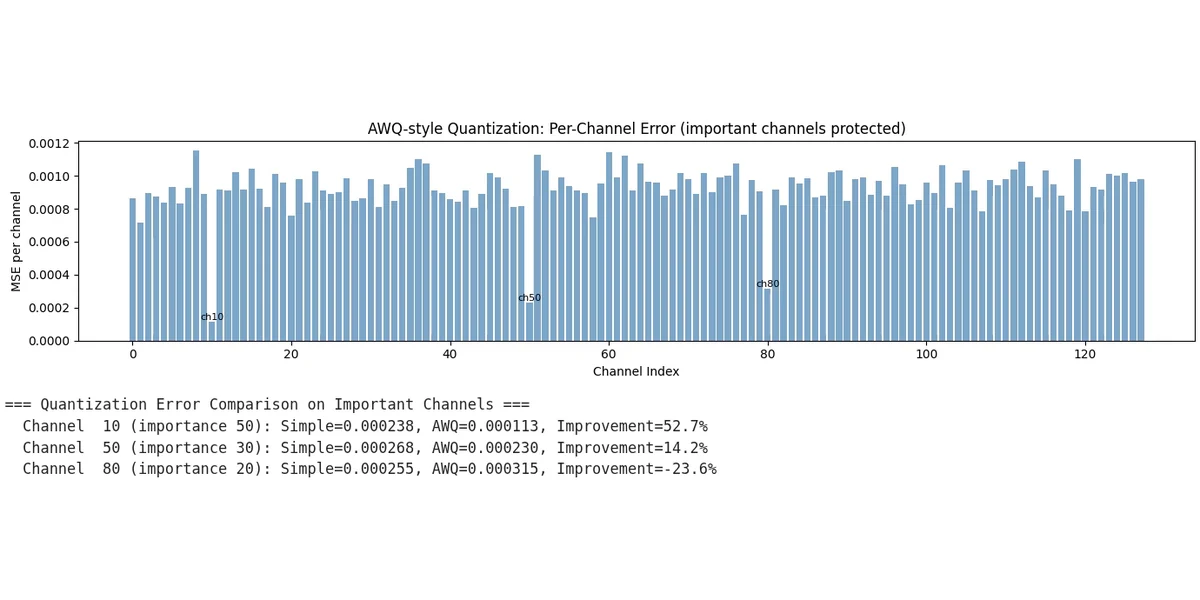
Protecting channels has a cost
AWQ-style scaling cuts the error on channel 10 by 52.7% and on channel 50 by 14.2%, but channel 80 gets 23.6% worse. You see where the trade-off lands, not only the average.
Lecture 1.3 · awq activation aware scaling
lectures/en/09_Advanced_LLM_Quantization_GGUF_QLoRA.ipynb
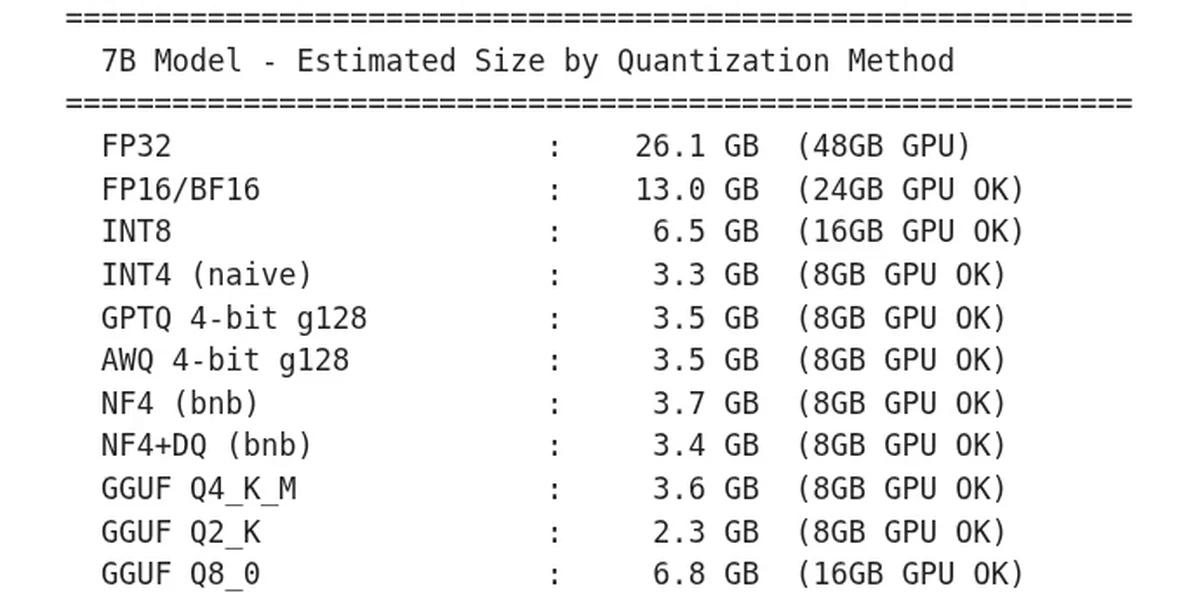
Estimated size of a 7B model: 26.1 GB to 2.3 GB
The notebook estimates the size of a 7B model in each format and the GPU it needs: 26.1 GB in FP32, 13.0 GB in FP16, 3.5 GB with GPTQ or AWQ 4-bit, 2.3 GB as GGUF Q2_K.
Lecture 2.4 · serving with vllm tgi and choosing a method
lectures/en/09_Advanced_LLM_Quantization_GGUF_QLoRA.ipynb
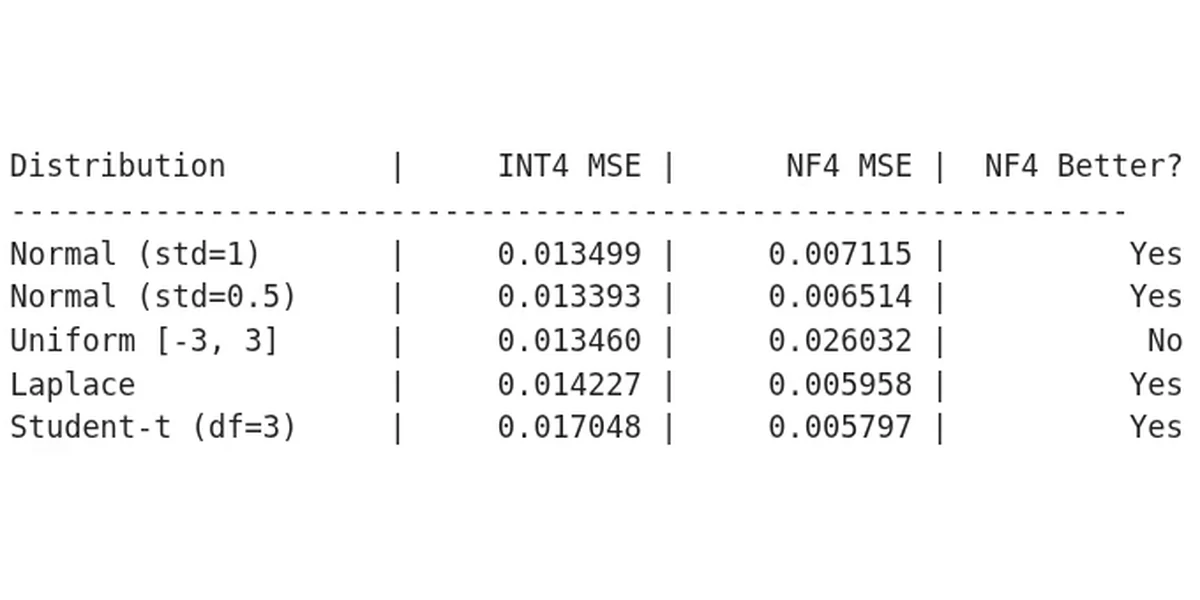
NF4 wins on bell curves, loses on uniform
INT4 and NF4 tested on five distributions. NF4 roughly halves the error on a normal distribution (0.013499 to 0.007115) but doubles it on a uniform one (0.013460 to 0.026032).
Lecture 2.5 · exercises kv cache nf4 study and summary
lectures/en/10_Pruning_Fundamentals.ipynb
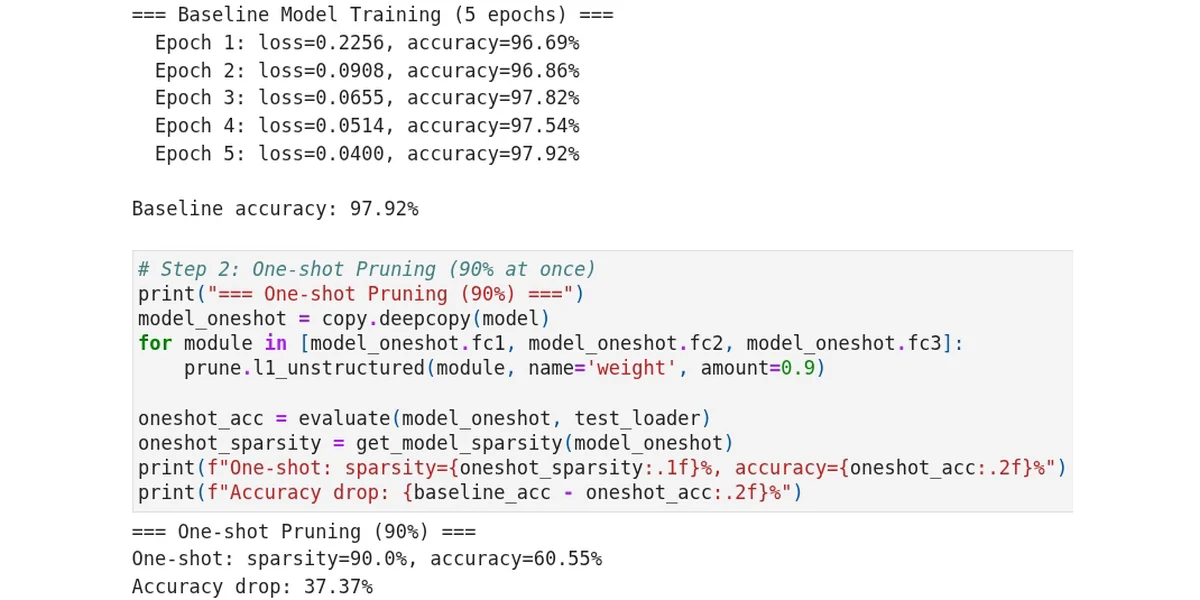
Pruning 90% at once costs 37 points
A model trained to 97.92% is pruned to 90% sparsity in one step and drops to 60.55%. The lecture then repeats it in small steps with fine-tuning in between.
Lecture 3.4 · local vs global one shot vs iterative finetuning
lectures/en/10_Pruning_Fundamentals.ipynb
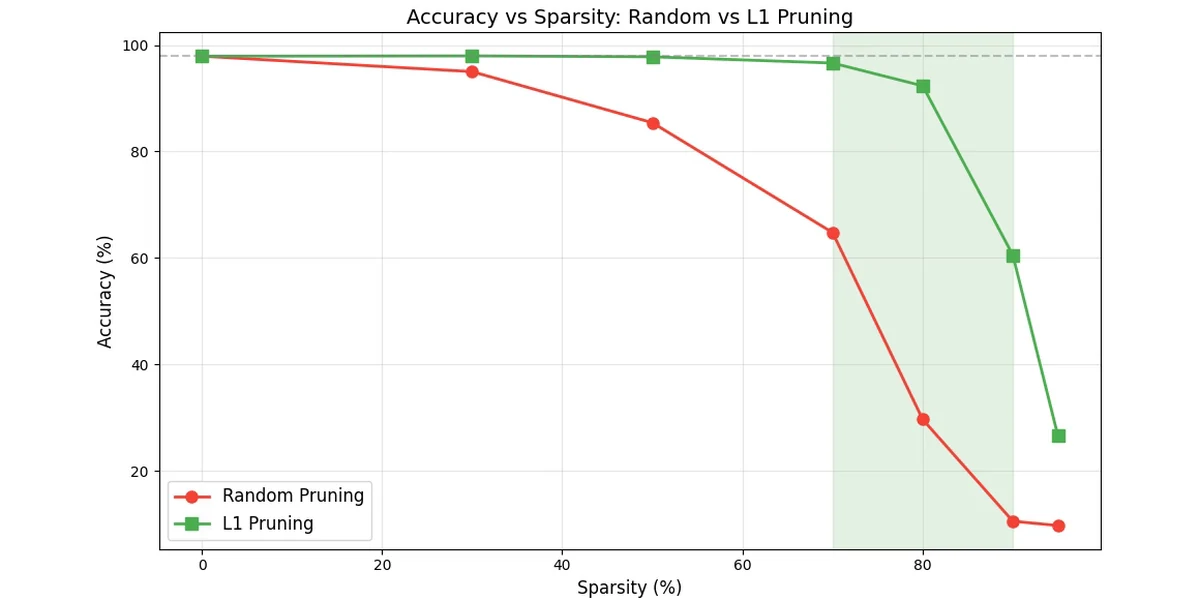
Which weights you remove matters
Accuracy against sparsity for random pruning and L1 (smallest-magnitude) pruning. At 80% sparsity L1 stays above 90% while random falls to about 30%.
Lecture 3.5 · random vs l1 curves summary exercises
What you'll learn
- ✓Explain why LLM inference is memory-bound and size a model's weights and KV cache
- ✓Understand activation outliers and how GPTQ and AWQ preserve accuracy at 4 bits
- ✓Use bitsandbytes (LLM.int8, NF4), convert models to GGUF and run them with llama.cpp
- ✓Fine-tune a 4-bit model with QLoRA and serve quantized models with vLLM or TGI
- ✓Apply unstructured and structured pruning and know when sparsity translates into speed
- ✓Combine distillation, pruning and quantization into one deployment pipeline
About this course
A 7B language model needs 28 GB in FP32. Naive INT8 breaks it because of activation outliers. And the tooling — GPTQ, AWQ, NF4, GGUF, QLoRA — is a zoo. This course sorts it out, with the math and with measurements.
We start with why LLMs are memory-bound and why weight-only quantization is the answer, then study activation outliers and the two algorithms that handle them: GPTQ (Hessian-guided error compensation) and AWQ (activation-aware scaling). Next the ecosystem: bitsandbytes LLM.int8 and NF4 with double quantization, GGUF and llama.cpp for CPU inference, QLoRA fine-tuning on a single GPU, and serving with vLLM and TGI. Then pruning — unstructured, structured, iterative with fine-tuning, and when it actually makes a model faster — and finally knowledge distillation and a complete compression pipeline as the final project: distill, prune, quantize, evaluate, export.
Every session is a notebook shown on screen with the narration explaining each cell's intent. Where a notebook's simulation is simplified relative to the real algorithm, or where a printed conclusion does not match the numbers, the narration says so — you will learn to read compression results critically.
Prerequisite: quantization basics (scale, zero-point, calibration, INT8), from our course *Neural Network Quantization Hands-On: PyTorch and ONNX* or equivalent.
**Licensing.** Quantizing, pruning or distilling a model creates a derivative work that inherits the original licence — GPTQ, AWQ, GGUF and NF4 checkpoints included. The course ships a `Resources/LICENSES.md` with every asset checked against its actual licence text. Two to know now: **`facebook/opt-125m`, the small practice model, is research-only** (its model card declares `commercial: false`), and the Llama-2 and TheBloke checkpoints carry the Llama 2 Community License with its notice and 700M-MAU clauses. All the tooling — AutoGPTQ, AutoAWQ, bitsandbytes, llama.cpp, vLLM, TGI — is MIT or Apache-2.0 and constrains nothing.
Curriculum5 sections · 24 lectures · 3h 19m
Section 0. Welcome
Free previewSection 1. LLM Quantization GPTQ and AWQ
Free preview- ▶section 1 intro0:12
- ▶why llm quantization and activation outliers9:42
- 🔒gptq hessian error compensation9:24
- 🔒awq activation aware scaling8:42
- 🔒bit width group size and hub models10:30
- 🔒summary and exercises hessian gptq10:24
Section 2. GGUF bitsandbytes QLoRA and Serving
- 🔒section 2 intro0:12
- 🔒bitsandbytes llm int8 nf4 double quant12:30
- 🔒gguf and the llama cpp ecosystem9:12
- 🔒qlora fine tuning11:54
- 🔒serving with vllm tgi and choosing a method10:12
- 🔒exercises kv cache nf4 study and summary10:30
Section 3. Pruning
- 🔒section 3 intro0:12
- 🔒pruning intuition lottery ticket three dimensions9:00
- 🔒unstructured pruning random l1 weight orig mask10:48
- 🔒structured pruning channels neurons compaction10:24
- 🔒local vs global one shot vs iterative finetuning11:12
- 🔒random vs l1 curves summary exercises9:06
Section 4. Distillation Full Pipeline and Final Project
- 🔒section 4 intro0:06
- 🔒knowledge distillation10:42
- 🔒pruning quantization combination and nas11:06
- 🔒deployment pipeline and final project setup10:24
- 🔒final project walkthrough and course wrapup11:48
Requirements
- · A computer with Python 3.10+ (a free Google Colab account is enough for most sessions)
- · Comfort reading Python code; you do not need to be an expert
- · Quantization basics: scale, zero-point, calibration, INT8
- · Hugging Face transformers basics; a 16 GB+ GPU or Colab Pro for the LLM labs
- · Awareness that the practice model `facebook/opt-125m` is research-only and Llama-2 checkpoints are gated — see `Resources/LICENSES.md`
Who this is for
- · Engineers who need to run or fine-tune LLMs on limited GPUs or CPUs
- · ML practitioners choosing between GPTQ, AWQ, GGUF and bitsandbytes
- · Graduates of Neural Network Quantization Hands-On: PyTorch and ONNX
- · Anyone who wants to read LLM compression papers and benchmarks critically
Read alongside the course
The voice-over in this course is synthesized with a text-to-speech model from scripts written and reviewed by the instructor, and the on-screen material (notebooks, code, slides) is the instructor's own work.