Does Claude Code Keep Running If You Close Your Laptop? What Pauses, What Survives (tmux Tested)
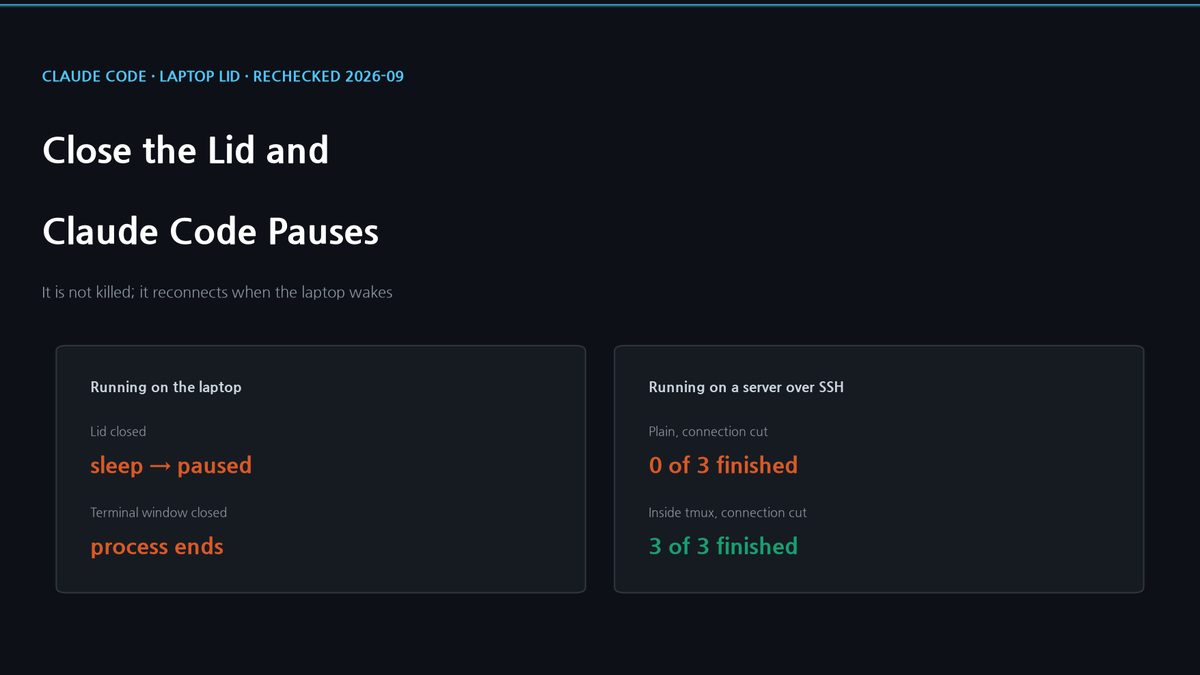
Short answer: yes, if you set it up. By default the lid puts the laptop to sleep and Claude Code pauses until you open it. Set the lid to do nothing (Windows, plugged in), use closed-display mode (Mac), or run claude in tmux on a server (3 of 3 runs finished after a disconnect, 0 of 3 without it) or as a cloud session.
Does Claude Code Keep Running If You Close Your Laptop? What Pauses, What Survives (tmux Tested)
Updated 2026-09-23. The March version of this post said a Remote Control session "dies with the lid". Claude Code now reconnects after sleep, so that was out of date; what changed is listed at the end.
Short answer: yes, if you set it up
Yes, but not out of the box. By default, closing the lid puts a Windows laptop or a MacBook to sleep, and sleep freezes every process on the machine, including claude. To keep it working with the lid shut, either keep the laptop awake (on Windows, set the lid to do nothing; on a Mac, use closed-display mode) or run claude on a machine that never sleeps (a server inside tmux, or a cloud session). Each setup is below.
It is a pause, not a crash. The Remote Control docs say that if your laptop sleeps, Claude Code reconnects automatically when the machine comes back online, and queues messages and permission prompts until then. Open the lid and it reconnects. Whether a reply that was streaming at the moment the lid closed carries on cleanly, the docs do not say, and I did not test it.
Closing the terminal window is different. That ends the claude process itself. When I closed the window while Claude was running a shell loop, the phone showed the background shell as stopped. The conversation can be reopened with claude --continue, but the work that was running is gone.
The reason Remote Control does not change any of this: the model runs in Anthropic's cloud, but the part that reads your files and runs your commands is the claude process on your machine. Your phone is a window into that process. If the machine sleeps, the phone has nothing to talk to.
Windows: tell the lid to do nothing
Control Panel → Hardware and Sound → Power Options → Choose what closing the lid does. Set When I close the lid to Do nothing under Plugged in. Microsoft's lid switch documentation lists the four values: do nothing, sleep, hibernate, shut down. It is a hidden setting, which is why powercfg /query may not show it. Also set Put the computer to sleep to Never while plugged in, or the idle timer will put the machine to sleep anyway.
Two caveats. Most current Windows laptops use Modern Standby, which can keep the network connected while asleep. That does not mean your programs keep working: Microsoft's Modern Standby documentation treats it as the equivalent of traditional sleep, and desktop applications resume only once the machine wakes. And on Microsoft's own Q&A forum, users report laptops that go dark with the lid closed even when it is set to do nothing.
So check it on your machine rather than trusting the setting. Run one of these yourself in a terminal, not through Claude Code, whose shell commands time out after two minutes by default. Then close the lid for five minutes and open lid.log.
# Windows PowerShell
1..90 | % { Get-Date -f HH:mm:ss >> lid.log; Start-Sleep 10 }# macOS, Linux or WSL
nohup sh -c 'for i in $(seq 90); do date +%T >> lid.log; sleep 10; done' &A line every ten seconds means the machine stayed awake. A five-minute gap means it slept.
Mac: closed-display mode is the official way
A MacBook sleeps when you close the lid. The supported way to use one shut is closed-display mode with an external display: Apple's external-display support page says a Mac laptop with its lid closed should be connected to power and use an external keyboard and mouse.
caffeinate is often suggested, but it prevents idle sleep; its manual does not claim to keep the machine awake when the lid closes. Third-party apps such as Amphetamine offer a setting for this. I have not tested them. Use the same lid.log check.
Why a laptop is still a poor host
Even when it works, some laptops shed heat partly through the keyboard deck, which a closed lid covers, and in a bag none of them has anywhere to vent. On battery, "do nothing" means it drains until it is empty. That is why the setting above is only for Plugged in, and why I would not run anything overnight this way.
What actually keeps running: a machine that never sleeps
Work keeps going while your laptop is shut when it runs somewhere else.
A server or desktop, inside tmux. If you SSH into a machine and start claude there, closing your laptop cuts the SSH connection, not the machine. The server notices the connection is gone either at once or, if the laptop just went quiet, only after its keepalive timeout, which can be minutes or hours. Until then a plainly started claude keeps running; once the server notices, it is killed. Whether claude survives depends on how you started it, so I tested the disconnect directly. Each run asked Claude Code for a 1,500-word essay and cut the terminal six seconds in, which is what sshd does once it notices a connection has dropped. A shell command after claude recorded its exit code, so a finished run left a file and a killed one did not.
| Condition | Runs | Finished |
|---|---|---|
| Plain, not cut (control) | 1 | 1 of 1 |
| Plain, cut | 3 | 0 of 3 |
| Inside tmux, not cut (control) | 1 | 1 of 1 |
| Inside tmux, cut | 3 | 3 of 3 |
These runs used claude -p, which answers once and exits, not the interactive screen. Started plainly, claude was gone within three seconds of the cut every time. Inside tmux it finished all three essays in 26 to 30 seconds. The docs give the same advice: to keep a session running on a remote machine after you disconnect from SSH, start it inside tmux or screen. You can still watch it from your phone, by turning on Remote Control in that session or through any SSH app. I use VibeCheck, an open-source web front end I built for this.
A cloud session. claude --cloud "task" runs the session on Anthropic's infrastructure, and the docs say it keeps running after you close your laptop. The trade-off is that it is not your machine. It clones your repository from GitHub, or uploads a bundle if there is no GitHub remote. Anything that only exists on your laptop, like a local database or an MCP server on localhost, is not there.
What changed since March
| The March post said | The docs say now |
|---|---|
| Closing the lid ends the session | It reconnects when the machine wakes |
| A network drop of about 10 minutes ends it | Only in server mode (claude remote-control); an interactive session keeps retrying |
| One session only | One per interactive process, but server mode runs several (32 by default) |
| Max plan required | Pro, Max, Team and Enterprise |
--remote runs Claude in the cloud | The flag is now --cloud; --remote is a deprecated alias |
What this does not show
The Windows and Mac settings come from the vendors' documentation; I did not measure them on a closed laptop. The SSH test is three runs per condition on one Linux server with one prompt. The cloud-session behaviour comes from Anthropic's documentation.
Setup: Claude Code 2.1.280. SSH test: claude -p --model claude-haiku-4-5-20251001, a pseudo-terminal from script, cut by SIGKILL on the terminal holder at 6 seconds, tmux 3.2a, Ubuntu 22.04, 2026-09-23. Terminal-window test: Windows laptop, Remote Control session opened in the Claude app. Documentation checked 2026-09-23.