MiniMax H3 Video + Audio on 8 GB VRAM? Inside FreeVideo's Adaptive Execution Engine
We ran FlashML-org/FreeVideo's live Adaptive Execution Planner across 9 hardware configs and aggregated 146 community benchmarks. On 8 GB VRAM + 16 GB RAM, 0 of 50 transformer blocks stay in VRAM and a single 10s 768p clip reads 76.1 GB from SSD plus 173 GB over PCIe; upgrading system RAM to 32 GB cuts SSD streaming to 0 GB.

Local video generation with synchronized audio has long required 24–80 GB GPUs. FlashML-org/FreeVideo claims to run MiniMax H3 (via OpenVDN's 8-step VDN-H3 model) on as little as 8 GB of VRAM and 16 GB of system RAM, recently adding AI-agent timeline editing (v0.4.0) and 16 MP local image generation (v0.5.0).
To see what actually happens under the hood — and how long a 10-second clip really takes on consumer GPUs and Macs — we cloned the repository, executed FreeVideo's own Adaptive Execution Planner (freevideo_engine.prediction_cli) across 9 hardware tiers, and aggregated all 146 community benchmark reports in docs/community-results.md.
The short answer: 8 GB works through aggressive three-tier streaming (VRAM → Pinned RAM → SSD). For a 1344×768, 10-second clip (243 frames, 72,576 video tokens, 8 steps), an 8 GB VRAM + 16 GB RAM machine keeps 0 of the 50 transformer blocks (21.6 GB) in VRAM. Twenty-eight blocks stay pinned in RAM while the other 22 are re-read from disk on every single step — moving 173.0 GB across PCIe and reading 76.1 GB from SSD for one clip. Simply upgrading system RAM from 16 GB to 32 GB on the exact same 8 GB GPU drops SSD reads to 0.0 GB.
Where the 50 VDN-H3 blocks actually live across 9 hardware configs
The VDN-H3 transformer consists of 50 blocks at 432.5 MB each (~21.6 GB total). Running prediction_cli --json at 1344×768, 10 seconds (243 frames, 8 steps) produces the exact placement table below:
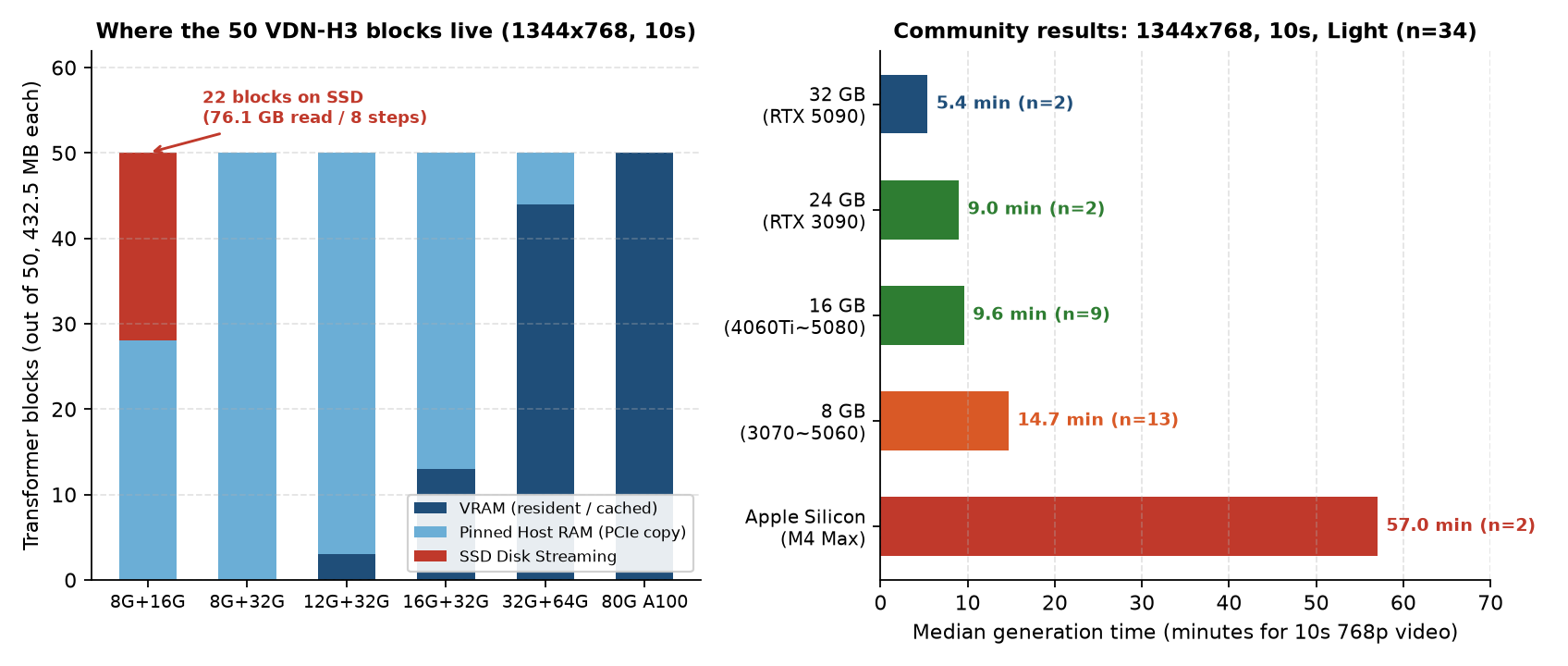
| Hardware (VRAM + RAM) | VRAM resident/cached | Pinned RAM | SSD streamed | Prefetch | Head chunk | PCIe / 8 steps | SSD read / 8 steps |
|---|---|---|---|---|---|---|---|
| 8 GB + 16 GB | 0 blocks | 28 (12.35 GB) | 22 blocks | OFF | 4 | 173.0 GB | 76.1 GB |
| 8 GB + 32 GB | 0 blocks | 50 (21.62 GB) | 0 blocks | OFF | 4 | 173.0 GB | 0.0 GB |
| 12 GB + 16 GB | 3 blocks | 28 (12.35 GB) | 19 blocks | ON | 16 | 162.6 GB | 65.7 GB |
| 12 GB + 32 GB | 3 blocks | 47 (20.33 GB) | 0 blocks | ON | 16 | 162.6 GB | 0.0 GB |
| 16 GB + 32 GB | 8+ blocks | 37 (16.00 GB) | 0 blocks | ON | 16 | 145.3 GB | 0.0 GB |
| 24 GB + 64 GB | 8+ blocks | 17 (7.35 GB) | 0 blocks | ON | 28 | 145.3 GB | 0.0 GB |
| 32 GB + 64 GB | 8+ blocks | 6 (2.60 GB) | 0 blocks | ON | 56 | 145.3 GB | 0.0 GB |
| 80 GB + 128 GB (A100) | 50 blocks | 0 (0.00 GB) | 0 blocks | ON | 56 | 0.0 GB | 0.0 GB |
Three practical thresholds jump out:
- On an 8 GB GPU, the biggest upgrade is 32 GB of system RAM, not a new GPU. Going from 16 GB to 32 GB RAM eliminates 76.1 GB of SSD reads per clip.
- 12 GB VRAM flips two major engine switches. Asynchronous
prefetchturns ON (overlapping PCIe copies with compute) and attentionhead_chunkjumps 4× from 4 to 16. - 24 GB and 32 GB unlock wide attention parallelism.
head_chunkexpands to 28 and 56 while pinned host RAM drops to 7.35 GB and 2.60 GB.
Five memory engineering tricks inside adaptive.py
- Process-isolated text encoder: Runs in a separate subprocess that exits before the transformer loads, guaranteeing zero memory overlap.
- Video DeltaNet hybrid attention + 8-step distillation: Cutting sampling from 30–50 steps down to 8 steps reduces total weight-offloading transfers by 4–6×.
- Architecture-adaptive GEMM: Uses
int8with ConvRot rotation on Ampere (RTX 30-series, A100) and selected GeForce cards, and nativeFP8on Ada (SM89), Hopper (SM90), and Blackwell (SM120). - Streaming 36-block VAE decoder: Below 20 GiB VRAM, only
floor((VRAM - 3.25 GiB) / 268.6 MB)of the 36 VAE blocks (268.6 MB each) stay resident; the rest stream sequentially. - Two-retry OOM recovery + SQLite history: On OOM, FreeVideo retries in a fresh process, progressively shrinking placement,
head_chunk, FF/projection chunks, and CPU attention staging, then saves the winning profile inresource-history.sqlite3.
146 community benchmarks: how long a 10s 768p clip actually takes
Filtering all 146 reports in docs/community-results.md to the exact same workload — 1344×768 (or 768×1344), ~10 seconds, Light quality (n = 34):
| Hardware tier | Samples | Median (10s 768p) | Min – Max | Example GPUs |
|---|---|---|---|---|
| 32 GB NVIDIA | 2 | 5.4 min (324 s) | 4.2 – 6.7 min | RTX 5090 *(official 2-pass best: 2.0 min)* |
| 24 GB NVIDIA | 2 | 9.0 min (540 s) | 6.3 – 11.7 min | RTX 3090 |
| 16 GB NVIDIA | 9 | 9.6 min (575 s) | 4.0 – 18.5 min | RTX 5080 (4.0 min), 5060 Ti, 4060 Ti |
| 8 GB NVIDIA | 13 | 14.7 min (882 s) | 9.8 – 21.1 min | RTX 4070 Laptop, 3070, 4060, 5060 |
| 12 GB NVIDIA | 6 | 16.9 min (1,012 s) | 6.2 – 27.7 min | RTX 5070 Ti Laptop (6.2 min), RTX 3060 |
| Apple Silicon (Unified) | 2 | 57.0 min (3,422 s) | 56.7 – 57.4 min | M4 Max (64–128 GB) |
- 8 GB NVIDIA GPUs genuinely work, at ~15 minutes per 10s 768p clip. Use v0.3.2 half-resolution previews to iterate on prompts, then batch-render winners overnight.
- 16 GB+ modern GPUs (RTX 5060 Ti / 5080 / 5090) bring generation into the 4–9 minute range, practical for iterative prototyping.
- Apple Silicon is still an early preview: M4 Max takes 57 minutes for a 10s 768p clip — 3.9× slower than an 8 GB NVIDIA laptop. Stick to 960×544, 5-second clips on Mac (8.8 min on M5 Pro 48 GB).
Setup checklist before installing
- Disk headroom: Budget 40–50 GB free for the core video/audio packs and ComfyUI runtime, plus ~20 GB if you enable the music model and ~4.9 GB for voice dubbing.
- Linux driver: Requires NVIDIA driver 580 or newer (
docs/Linux.md). - Headless CLI: Preview your exact hardware plan before downloading weights, or generate directly without a browser:
git clone https://github.com/FlashML-org/FreeVideo.git && cd FreeVideo
./setup.sh
./freevideo plan --vram-gib 8 --ram-gib 32 --width 1344 --height 768 --seconds 10
./freevideo generate --prompt-file prompt.txt --out video.mp4
Bottom line: FreeVideo is a strong local option if you already own a 16 GB+ NVIDIA GPU (or an 8 GB GPU paired with 32 GB RAM) and need high-volume drafts, privacy, LoRAs, or agent-driven timeline editing. If you are on an 8 GB + 16 GB laptop or an Apple Silicon Mac making a few clips a day, waiting 15–57 minutes while thrashing 76 GB of SSD reads costs far more in time than a few dollars of cloud video API credits.