What Disappears When You Shrink an Image to 64×64: Stable Diffusion's Latent Space
We passed text, stripes and photos through the VAEs of SD 1.x/2.x, SDXL, FLUX.1 and FLUX.2 and back. With 4 latent channels, 12 px text came back with changed digits (03/18 became 03/28) and 2 px stripes turned gray. FLUX.1's 16 channels kept 12 px text. Code and per-size results included.
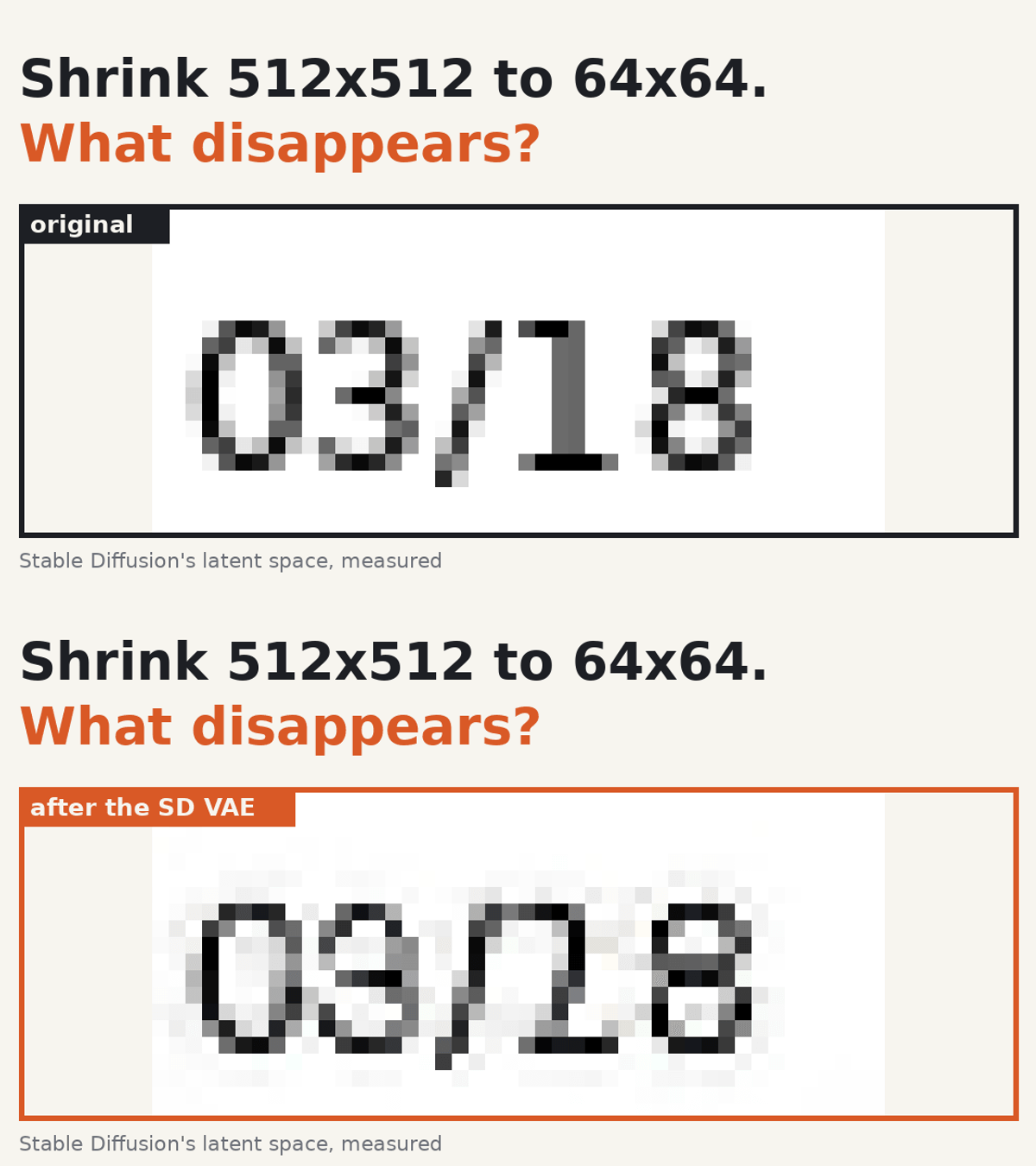
We drew the line "Invoice 4729 due 03/18" at a 12 px font on a white 512×512 page, sent it through Stable Diffusion's VAE and back, and nothing else. No prompt, no denoising. The line that came back still looked like clean type, but the date now read 03/28. The "1" had been redrawn as a "2".
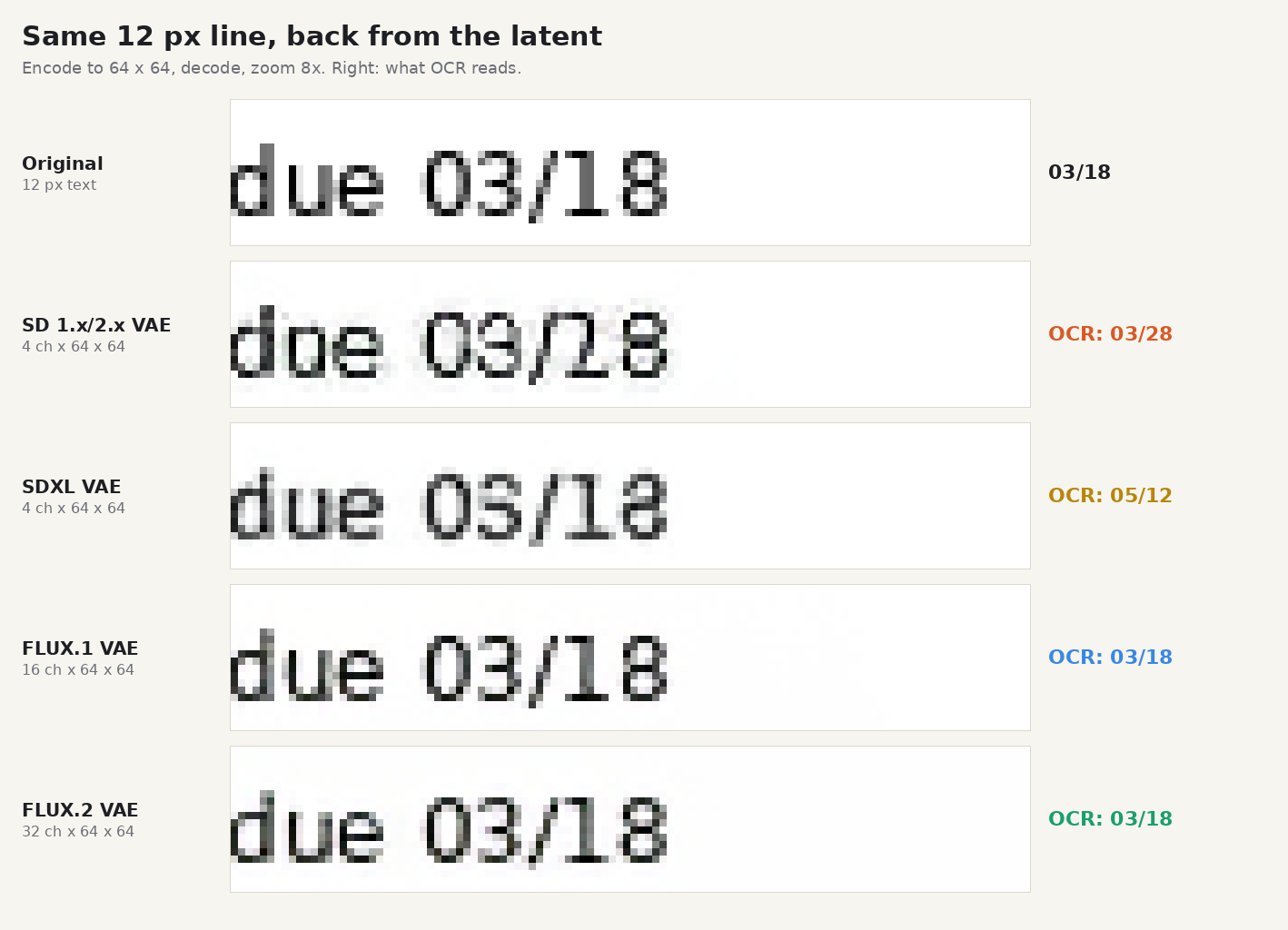
Every Stable Diffusion image comes out through this decoder, and every training image went in through its encoder. This post measures what it drops: how small text can get before it breaks, which patterns turn gray, and how much a photo loses. We tested four VAEs, from the 4-channel one in SD 1.x/2.x to the 32-channel one in FLUX.2.
Where the 64×64 comes from
A diffusion model makes an image by starting from noise and removing a little of it at each step. Stable Diffusion does not do this on pixels. A separate network called a VAE first converts the image into a smaller grid of numbers, the latent, and the denoising happens there. When denoising is done, the VAE's decoder paints pixels back from the latent. Training works the same way: the model only ever sees latents.
For a 512×512 image, Stable Diffusion's latent is 64×64 with 4 numbers (channels) per position. Each position stands in for an 8×8 patch of pixels. That patch holds 8×8×3 = 192 pixel values, and the latent keeps 4.
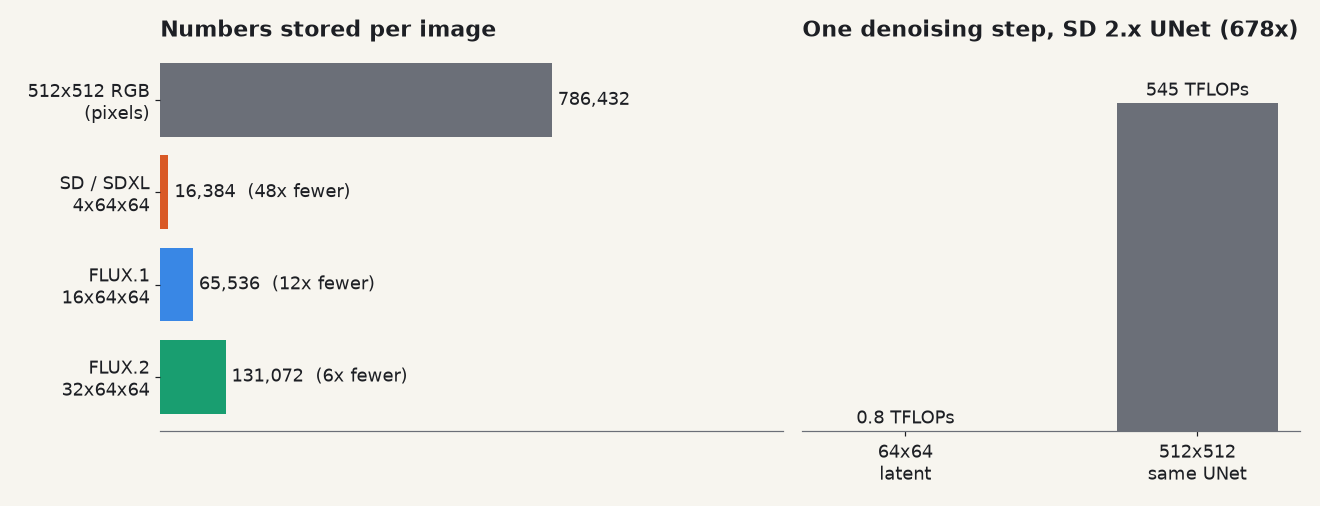
The reason for the squeeze is cost. We counted the operations in one denoising step of the SD 2.x UNet (the network that removes noise, 866M parameters): 0.8 TFLOPs on the 64×64 latent, 545 TFLOPs when the same network takes a 512×512 input. That is about 680 times more work per step. Models that really run on pixels are built differently, so this compares one network at two sizes, not two products. Our earlier post on latent diffusion covers how this idea let models reach higher resolutions.
The price of that saving is whatever does not fit into 4 numbers per 8×8 patch. Newer models pay less of it: FLUX.1 keeps 16 channels per position and FLUX.2 keeps 32, still on a 64×64 grid for a 512×512 image.
The test: encode, decode, compare
We used only the VAE. Each test image went through the encoder, we took the latent's mean (so there is no randomness and no seed), and the decoder turned it back into pixels. The diffusion model is trained only on latents this encoder produced, and everything it draws comes out through this decoder. What the round trip cannot carry, a better denoiser has no way to put back.
We ran four VAEs in fp32 on one A100:
| VAE | Used by | Latent for 512×512 |
|---|---|---|
stabilityai/sd-vae-ft-mse | SD 2.x; common drop-in replacement for SD 1.x | 4×64×64 |
stabilityai/sdxl-vae | SDXL | 4×64×64 |
| FLUX.1-schnell VAE | FLUX.1 | 16×64×64 |
| FLUX.2-dev VAE | FLUX.2 | 32×64×64 |
The VAE shipped with SD 2.x (we loaded it from SD-Turbo) has weights identical to ft-mse and gave identical numbers, so the tables show them as one row labeled SD 1.x/2.x.
There were three kinds of test image:
- Text. Five lines full of digits (an invoice number and date, a room and time, a dollar amount, an order code, a phone number), each drawn at font sizes from 6 to 24 px. Each line starts at a slightly different position so that letters land on different spots of the 8-pixel grid.
- Stripes. Black and white vertical stripes repeating every 2, 3, 4, 6, 8, 12, 16 and 32 pixels, drawn twice: once lined up with the 8-pixel grid and once shifted by 3 pixels.
- Photos. Three public-domain sample photos from scikit-image (a coffee cup, a cat, a rocket), cropped and resized to 512×512.
For text, the grader is a machine reader, tesseract OCR 4.1.1, on a 4× enlargement of each line. A line counts as kept only if OCR reads the decoded line exactly as written. We only count lines that OCR also reads exactly on the original image. At 6 px OCR could not read any original line, and at 8 px it read three of five, so the chart starts at 8 px with three lines.
Text: 4 channels need 16 to 20 px
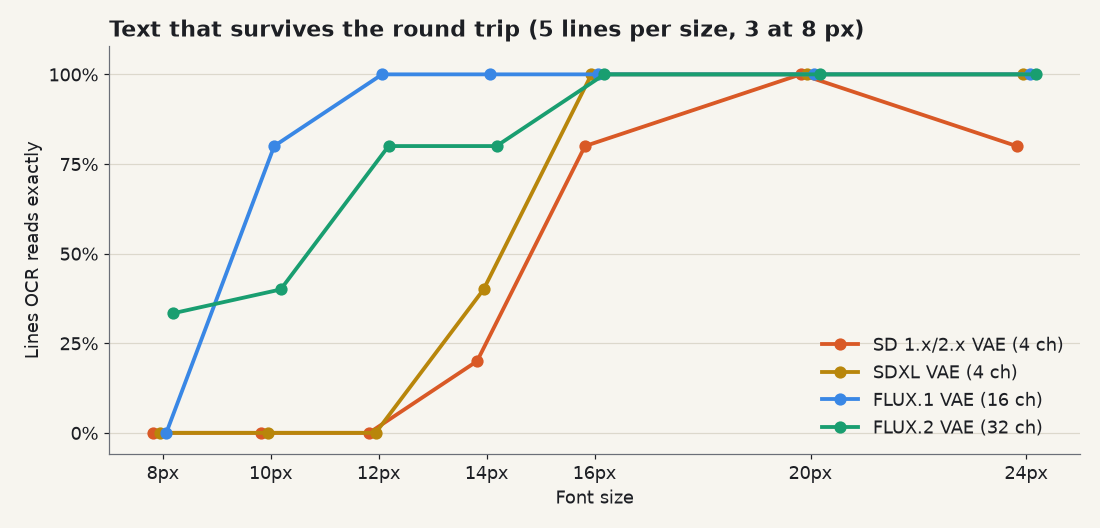
| Lines read exactly | 8 px (of 3) | 10 px | 12 px | 14 px | 16 px | 20 px | 24 px |
|---|---|---|---|---|---|---|---|
| SD 1.x/2.x (4 ch) | 0 | 0/5 | 0/5 | 1/5 | 4/5 | 5/5 | 4/5 |
| SDXL (4 ch) | 0 | 0/5 | 0/5 | 2/5 | 5/5 | 5/5 | 5/5 |
| FLUX.1 (16 ch) | 0 | 4/5 | 5/5 | 5/5 | 5/5 | 5/5 | 5/5 |
| FLUX.2 (32 ch) | 1 | 2/5 | 4/5 | 4/5 | 5/5 | 5/5 | 5/5 |
Both 4-channel VAEs dropped to zero at 12 px. That is not OCR being picky. We looked at all five 12 px lines from the SD 1.x/2.x VAE, and in every one of them at least one digit looks different to the eye: 03/18 became 03/28, $3,862.10 became $3,863.10, 846 became 346, room 615 became 015. At a glance the line still looks like clean type, which makes the changes easy to miss.
Our reading of the threshold is about how many latent numbers each digit gets. In the font we used, a digit is 7.6 px wide at 12 px, about one 8-pixel patch, so roughly one column of positions, 4 numbers each, carries it. At 16 px a digit is 10.2 px wide and spreads over more positions. FLUX.1 uses the same 8×8 grid with 16 numbers per position and read every 12 px line, which fits this reading.
FLUX.1's 16 channels moved the line down to 12 px, where OCR read all five lines exactly. FLUX.2's misses at 12 and 14 px look different from SD's. When we enlarged those lines (a comma read as a period, a 5 read as an S), the decoded text looked the same as the original to us; the strokes changed just enough to flip the OCR. The same holds for the one SD 1.x/2.x miss at 24 px, where OCR read "4729" as "4/29". Its miss at 16 px is real, though: the 3 in "KX-5093" came back bent toward an S.
Stripes: some turn gray, some turn pink
Text has letters the decoder has seen many times. Stripes test pure detail: fine repeats with nothing to guess from.
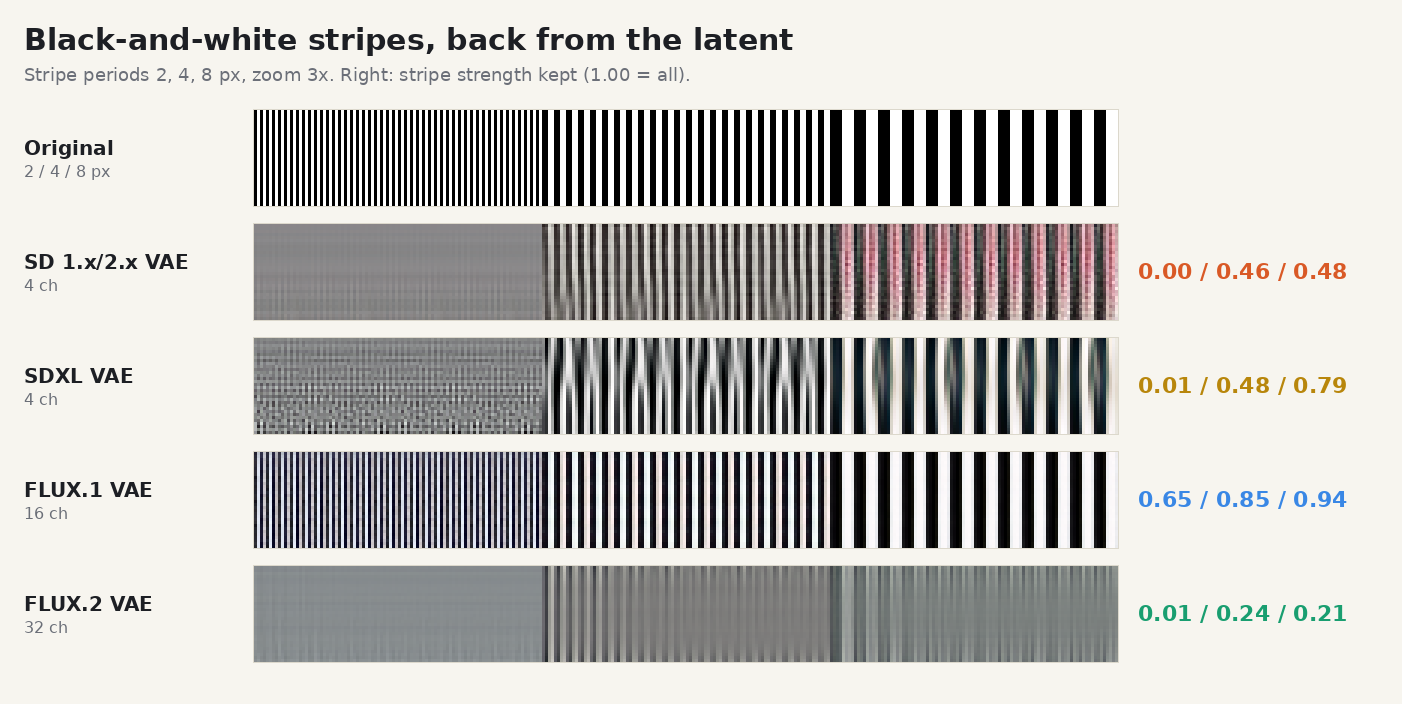
We measured how strong the stripes still are. For each band we averaged the columns and took the strength of the pattern at the stripes' own repeat length, so texture the decoder invents in some other shape does not count. 1.00 means the stripes came back as strong as they went in, 0 means they are gone. Values are for the grid-aligned version, with the 3 px-shifted version in parentheses.
| Stripes kept | 2 px | 4 px | 8 px | 16 px |
|---|---|---|---|---|
| SD 1.x/2.x | 0.00 (0.00) | 0.46 (0.20) | 0.48 (0.75) | 0.95 (0.96) |
| SDXL | 0.01 (0.03) | 0.48 (0.50) | 0.79 (0.87) | 0.98 (0.97) |
| FLUX.1 | 0.65 (0.38) | 0.85 (0.88) | 0.94 (0.96) | 0.99 (0.99) |
| FLUX.2 | 0.01 (0.03) | 0.24 (0.32) | 0.21 (0.18) | 0.96 (0.96) |
Stripes one pixel wide are gone for both 4-channel VAEs. The SD 1.x/2.x band looks like a gray wall. The SDXL band is not flat, but what it shows is a checker texture, not the stripes, so it scores 0.01. FLUX.1 keeps 0.65 of them, or 0.38 when shifted.
The VAEs also invented color. The input is pure black and white, so any difference between the red, green and blue channels in the output is made up. We averaged that difference per pixel on a 0 to 255 scale. For SD 1.x/2.x it was 24.0 on the 8 px stripes lined up with the grid, the pink fringes in the figure. Its next highest value was 11.7, so the tint was strongest there, and shifting those stripes by 3 px dropped it to 2.2. The others did it too in places: SDXL tinted the aligned 8 px stripes dark blue (12.0), and FLUX.1 tinted the 2 px stripes pale violet (15.7, 13.7 when shifted).
FLUX.2 broke the pattern we expected from channel count. It has the most channels and read text nearly as well as FLUX.1, yet it kept 1 to 3% of the 2 px stripes, 24 to 32% of the 4 px stripes and 18 to 21% of the 8 px stripes, at both positions. FLUX.1, with half as many channels, kept 38 to 65%, 85 to 88% and 94 to 96%. More channels did not mean more of every kind of detail.
Photos: less loss, still not lossless
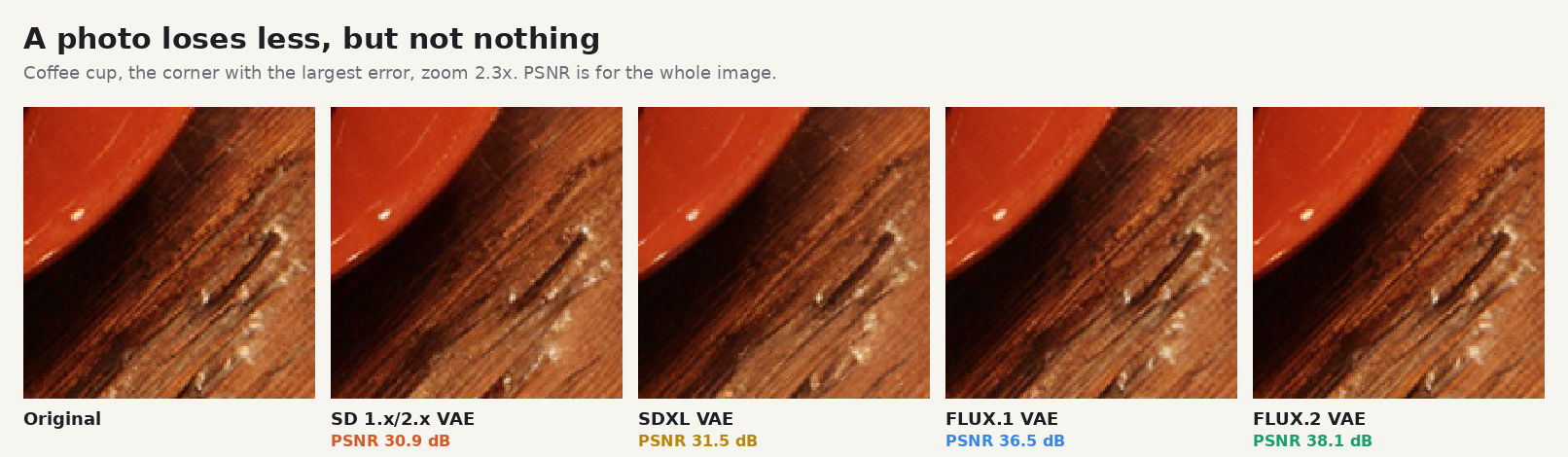
PSNR measures how close the decoded photo is to the original; higher is closer, and each 10 dB is a tenfold drop in squared error.
| PSNR (dB) | Coffee | Cat | Rocket |
|---|---|---|---|
| SD 1.x/2.x | 30.9 | 31.7 | 31.4 |
| SDXL | 31.5 | 32.6 | 32.2 |
| FLUX.1 | 36.5 | 40.0 | 35.9 |
| FLUX.2 | 38.1 | 41.5 | 37.4 |
Even in the zoomed corner, the four versions are hard to tell apart by eye. The gap between the SD 1.x/2.x and FLUX rows, 4.5 to 9.8 dB, is large in the numbers, but in a photo it shows up as slightly softer wood grain, not as changed content. Text and stripes are where the same loss becomes visible.
What to do with this
If you generate images with SD 1.x or SD 2.x, treat 20 px text on a 512×512 image as the smallest that came back intact in our test, and 16 px for SDXL. A better diffusion model does not lift this, because it only learns latents this encoder produced and its output decodes the same way. In our reading, below that size each digit gets too few latent numbers, and the decoder fills in a plausible digit that may not be the right one. For labels, prices and dates, render the image with space left for the text and add the text afterward, or move to a VAE with more channels; in our test FLUX.1 held text down to 12 px.
Before blaming a prompt for mush in fine fabric, screens or fences, run the image you want through the VAE alone. The script below does that. If the round trip already loses the pattern, no prompt will bring it back.
import numpy as np, torch
from PIL import Image
from diffusers import AutoencoderKL

vae = AutoencoderKL.from_pretrained("stabilityai/sd-vae-ft-mse").to("cuda").eval()

@torch.no_grad()
def roundtrip(img):  # img: 512x512 RGB PIL image
    x = torch.from_numpy(np.asarray(img, dtype=np.float32) / 127.5 - 1).permute(2, 0, 1)[None].to("cuda")
    z = vae.encode(x).latent_dist.mean        # 4 x 64 x 64
    y = vae.decode(z).sample.clamp(-1, 1)
    return Image.fromarray(((y[0].permute(1, 2, 0).cpu().numpy() + 1) * 127.5).round().astype(np.uint8))

roundtrip(Image.open("mine.png").convert("RGB").resize((512, 512))).save("mine-roundtrip.png")
For SDXL, swap in stabilityai/sdxl-vae; for FLUX.1, AutoencoderKL.from_pretrained("black-forest-labs/FLUX.1-schnell", subfolder="vae").
Setup: one NVIDIA A100 80GB, fp32, PyTorch 2.7.1, diffusers 0.37.1, tesseract 4.1.1, DejaVu Sans font. The latent is the encoder's mean, so results do not depend on a seed.