Qwen3.8-27B on one or two A100 PCIe cards: 28 to 211 tok/s for one user with vLLM settings alone
On an A100 80GB PCIe at temperature 0, an INT4 checkpoint plus a published vLLM recipe took one user from 28.4 to 211.0 tok/s and 32 users from 587 to about 1,568 tok/s, with no code. With two cards, run two copies for many users and split the model for one.
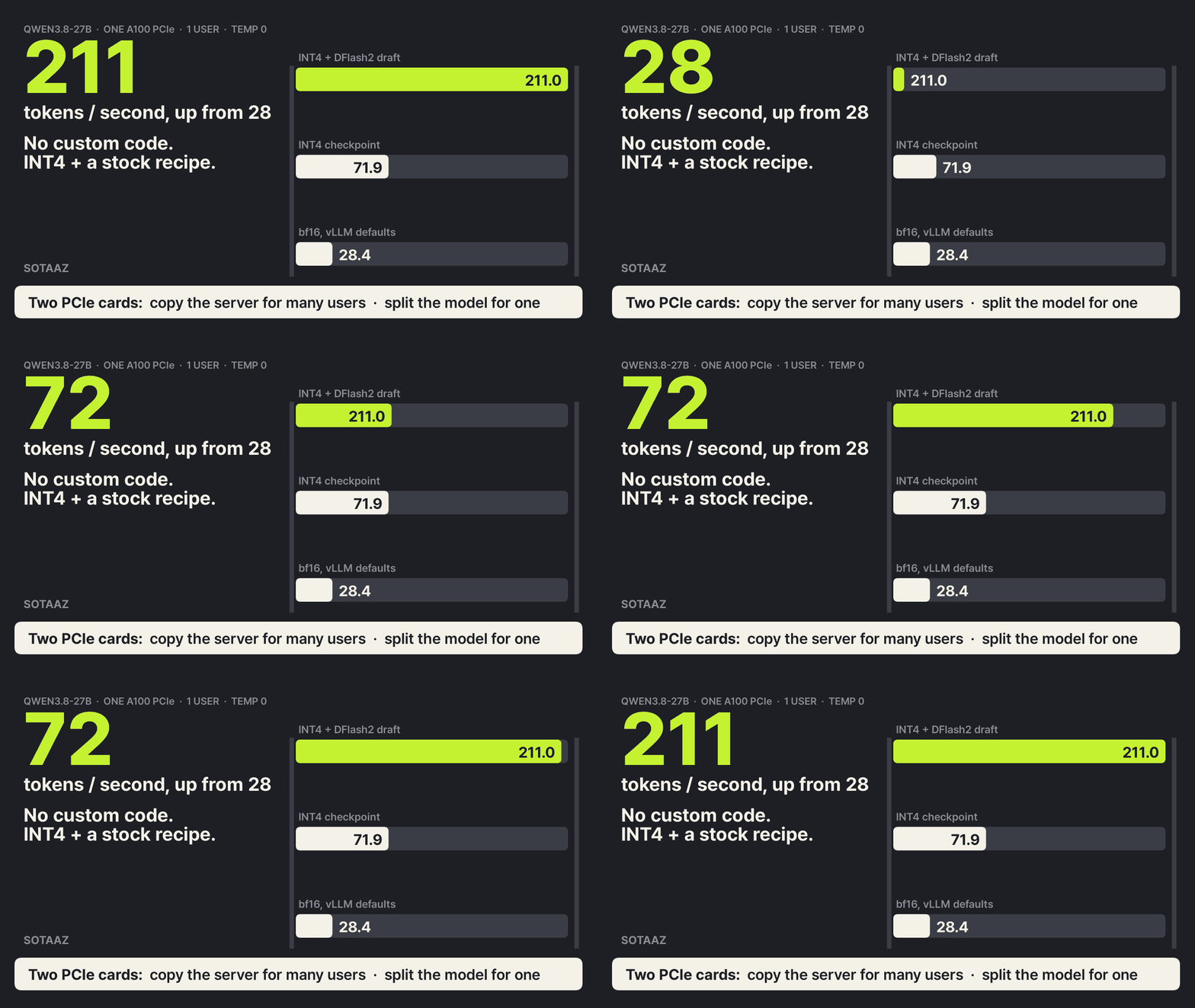
One person typing into Qwen3.8-27B on a single A100 got 28.4 tokens per second with vLLM's defaults. After two steps with no code of our own, an INT4 checkpoint and then a published set of vLLM settings, the same person got 211.0 tokens per second, 7.4 times faster (temperature 0, one user at a time). With 32 people sending requests at once, the card went from 587 to about 1,568 tokens per second, 2.7 times faster.
The second card gave us the result we did not expect. When one model is split across two cards, the cards swap partial results for every token they generate. NVLink is a direct GPU-to-GPU link built for that traffic; without it, the same data goes over the motherboard's PCIe. NVIDIA's A100 spec sheet lists 600 GB/s for NVLink and 64 GB/s for PCIe 4.0, both counting the two directions together. So we predicted that splitting one model across two PCIe cards would lose to simply running two copies, for everyone. Copying did win when many people were waiting. For a single user, splitting won: 138.4 against 102.9 tokens per second. With one user, each card read half the weights, so one decoding step (one pass that reads the weights and emits tokens) dropped from 17.8 ms to 13.2 ms, and the exchange between the cards took about 10% of that step.
This post walks through both ladders: what to turn on for one card, and what to do with a second one.
What a serving engine does, in one paragraph
A serving engine like vLLM keeps a model in GPU memory and answers HTTP requests in the OpenAI format. Generating text is a loop: for each new token, the GPU reads every weight of the model once. For a 27-billion-parameter model that is tens of gigabytes per token, so when only one person is using the card, speed is mostly limited by how fast the card can read its own memory, not by how fast it can multiply. Two ideas follow from that.
- Make the weights smaller. INT4 quantization stores each weight in 4 bits instead of 16, so each token needs a quarter of the reading.
- Get more than one token per read. Speculative decoding lets a small "draft" model guess the next few tokens, and the big model checks all the guesses in one pass. Every guess the big model agrees with is a token gained for free. The big model still decides every token, so the guesses are meant to change speed, not which token is picked. The actual output can still differ, and we check below how much.
When many people use the card at once, the engine batches their requests together, and one read of the weights serves all of them. Then the card is busier with arithmetic, and a recipe tuned for one user can hurt.
What we ran
- Hardware: two A100 80GB PCIe cards, 300 W each, no NVLink between them. One server.
- Software: vLLM 0.31.0, no plugins, no patches.
- Models:
Qwen/Qwen3.8-27B(bf16),RedHatAI/Qwen3.8-27B-INT4, and thez-lab/Qwen3.8-27B-DFlash2draft model, all Apache-2.0, pinned to fixed revisions. - Prompts: 96 we wrote ourselves, 24 each of coding, agent, general and math questions, 40 of them in Korean. Thinking mode was left on as the model's template sets it, with a 1,024-token answer cap. About two thirds of answers (58 to 65 of 96 in every condition) hit that cap, so every condition generated close to the same amount of text.
- Speed for one user is the decode speed of each answer, (tokens − 1) divided by the time from the first token to the last, averaged over the 96 prompts. Speed for many users is total tokens divided by total time, with the median and 95th-percentile time to first token (TTFT p95) next to it.
- Each run started a fresh server. A watcher logged GPU processes every two seconds. Three runs that showed another GPU process or a load above 64 were discarded and run again, so every number here comes from a run that passed both checks. The one-minute load average peaked at 13.0 on a 128-thread machine.
What R1 and R3-32 mean
Names like R1, R3-32 and D1 in the tables and charts are not vLLM options. They are labels we use in this series, taken from its name, the serving ladder. R stands for a rung, and a higher number means more settings stacked on.
- R1: the original bf16 model, vLLM defaults.
- R2: the INT4 checkpoint, vLLM defaults.
- R3-1 and R3-32: INT4 plus a tuned recipe. The number after the dash is how many simultaneous users the recipe targets: R3-1 for one, R3-32 for 32.
- D1, D2 and D3: ways to use two (dual) cards. D1 copies the server, D2 splits the model, D3 runs a different recipe on each card. The two-card section explains each.
Every condition ran once, and close comparisons ran three times. Running the 32-user R3-32 setting three times gave 1,562.3, 1,567.1 and 1,574.0 tokens per second, a range of 0.75%. We measured that range at 32 users and apply the same width to the single one-user runs, so read any single-run number below with that 0.75% in mind. One-user runs that we repeated stayed within 0.1 tokens per second of each other.
The two tuned recipes are not ours. They are the stock vLLM commands that the atdev-serve benchmark page publishes as its "best vLLM settings" baseline, and we used them as written.
Both recipes share five server options: --max-model-len 8192 --kv-cache-dtype bfloat16 --language-model-only --gpu-memory-utilization 0.90 --mamba-ssm-cache-dtype bfloat16. R3-1 adds a speculative config: DFlash2 as the draft model, 7 guessed tokens per step, the draft stored in fp8. R3-32 instead uses the model's built-in predictor (MTP, multi-token prediction) for one guess per step, plus --attention-backend TRITON_ATTN, --no-enable-prefix-caching and the environment variable VLLM_MARLIN_INPUT_DTYPE=int8, which feeds int8 inputs to the INT4 matrix multiplies. Going from plain INT4 to either recipe therefore changes several settings at once, not only the guessing. What MTP is, and how its guesses hold up from task to task, is covered in our speculative decoding by task post.
Running it yourself
Install vLLM 0.31.0 in a Python 3.12 virtual environment. As we did, install vLLM first, then set the three CUDA compiler packages it brings in back to 13.0.88. The second pip line and the last three lines work around the setup problem described right after this block.
python3.12 -m venv .venv && . .venv/bin/activate
pip install vllm==0.31.0
pip install nvidia-cuda-nvcc==13.0.88 nvidia-cuda-crt==13.0.88 nvidia-nvvm==13.0.88
CU13=$(python -c "import nvidia; print(list(nvidia.__path__)[0] + '/cu13')")
mkdir -p $CU13/lib64 && ln -sf ../lib/libcudart.so.13 $CU13/lib64/libcudart.so
export PATH=$CU13/bin:$PATH
One setup note. With a system nvcc from CUDA 12, the server failed to start because FlashInfer's JIT build did not recognize --compress-mode. Putting the CUDA 13 nvcc that pip installs into the virtual environment first on PATH, keeping its version on the 13.0 line to match the headers, and adding a symbolic link nvidia/cu13/lib64/libcudart.so pointing to ../lib/libcudart.so.13 in the virtual environment (the pip package ships only the .so.13 file, so linking failed without it) got the server running without touching vLLM.
Then start a server, one command per rung. We pinned each one-card server to a single card with CUDA_VISIBLE_DEVICES=0. --revision pins the model versions we measured; the draft model is pinned with revision inside --speculative-config. The five options the R3 recipes share go into one variable.
BF16_REV=1d4bf0f2ff6012fd82039f2fa52739d0dd7c60c0
INT4_REV=91bd022d5b49442a868bc35008f6c21e1860edfa

# R1: bf16, defaults
CUDA_VISIBLE_DEVICES=0 vllm serve Qwen/Qwen3.8-27B --revision $BF16_REV --port 8000

# R2: INT4, defaults
CUDA_VISIBLE_DEVICES=0 vllm serve RedHatAI/Qwen3.8-27B-INT4 --revision $INT4_REV --port 8000

# Options shared by both R3 recipes
COMMON="--max-model-len 8192 --kv-cache-dtype bfloat16 --language-model-only --gpu-memory-utilization 0.90 --mamba-ssm-cache-dtype bfloat16"

# R3-1: one user. DFlash2 guesses 7 tokens per step
CUDA_VISIBLE_DEVICES=0 vllm serve RedHatAI/Qwen3.8-27B-INT4 --revision $INT4_REV $COMMON --port 8000 \
  --speculative-config '{"method": "dflash", "model": "z-lab/Qwen3.8-27B-DFlash2", "revision": "50307d4c4cde6860d4eee73e2547cd786fe8e8a4", "num_speculative_tokens": 7, "quantization": "fp8"}'

# R3-32: many users. MTP guesses 1 token per step
CUDA_VISIBLE_DEVICES=0 VLLM_MARLIN_INPUT_DTYPE=int8 vllm serve RedHatAI/Qwen3.8-27B-INT4 --revision $INT4_REV $COMMON --port 8000 \
  --attention-backend TRITON_ATTN --no-enable-prefix-caching \
  --speculative-config '{"method": "mtp", "num_speculative_tokens": 1}'
Once it is up, send a request in the OpenAI format. The model name is whatever you passed to vllm serve.
curl http://localhost:8000/v1/chat/completions -H "Content-Type: application/json" \
  -d '{"model": "RedHatAI/Qwen3.8-27B-INT4", "messages": [{"role": "user", "content": "Hello"}], "max_tokens": 200}'
One card: the ladder
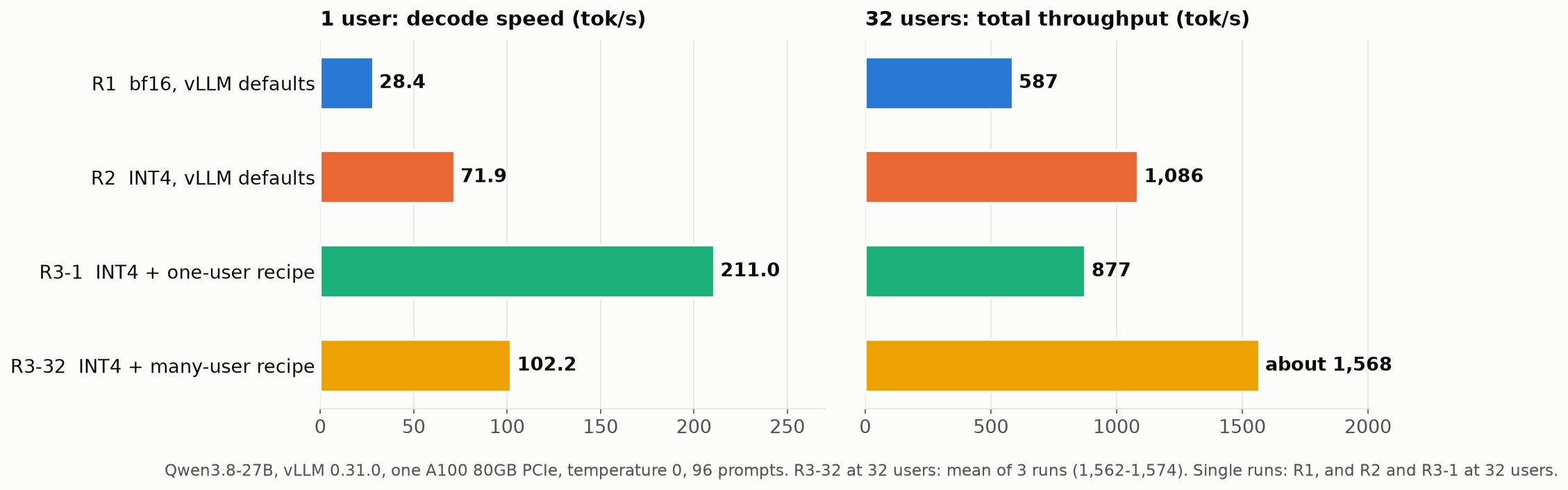
| Setting | 1 user, tok/s | 32 users, tok/s | 32 users, TTFT p95 |
|---|---|---|---|
| R1: bf16, vLLM defaults | 28.4 | 587 | 0.92 s |
| R2: INT4, vLLM defaults | 71.9 | 1,086 | 1.06 s |
| R3-1: INT4 + one-user recipe | 211.0 | 877 | 1.16 s |
| R3-32: INT4 + many-user recipe | 102.2 | about 1,568 | 0.87 to 0.89 s |
All at temperature 0. The R1 row and the 32-user R2 and R3-1 cells are single runs; the rest are three runs.
Step 1, INT4, is the one to do first. Swapping the bf16 weights for the INT4 checkpoint, with no other option, took one user from 28.4 to 71.9 tokens per second (2.5 times) and 32 users from 587 to 1,086 (1.8 times). It is one changed model name.
Step 2 depends on how many people use the card. The two recipes go in opposite directions.
- R3-1 guesses 7 tokens per step with DFlash2. The big model accepted 2.53 guessed tokens per step on average. For one user that is 211.0 tokens per second, 2.9 times R2. For 32 users it is 877, lower than plain INT4's 1,086, even though it still accepted 2.49 tokens per step at that load.
- R3-32 makes one MTP guess per step and accepted 0.81 tokens per step. For 32 users that is about 1,568 tokens per second with the shortest wait (TTFT p95 0.87 to 0.89 s). For one user it gives 102.2, half of R3-1.
So a single card has two answers. If the card serves you alone, use R3-1. If it serves a team, use R3-32. At 64 users R3-32 reached 1,856 tokens per second, but TTFT p95 grew to 1.60 s (single run).
For reference, atdev reports 28.9, 74.9 and 196.5 tokens per second for one user on the same three steps, measured on their A100 SXM with their own prompt set. Because the cards and prompts differ, we do not read those numbers as faster or slower than ours; we use them only to say the order of the steps matches.
At temperature 0.7
Real chat runs warmer than temperature 0. With temperature 0.7 and a fixed seed, R3-1 for one user dropped to 186.8 tokens per second (11% lower) and accepted 2.14 guessed tokens per step instead of 2.53: random sampling makes the big model agree with fewer guesses. Plain INT4 for one user lost far less, 71.9 to 70.3 (three runs each, all three slower). So for one user, guessing gave 2.9 times plain INT4 at temperature 0 and 2.7 times at 0.7, a gain about a tenth smaller. With 32 users the picture is different. R3-32 dropped to 1,382 tokens per second (12% lower) and TTFT p95 rose from 0.87 to 0.89 s to 3.15 s, Plain INT4, which makes no guesses, dropped by a similar amount, from 1,086 to 936 (14% lower), with TTFT p95 at 9.41 s. At 32 users the drop is not something that happens only to the settings that guess. The temperature-0.7 numbers for R3-1 and both 32-user settings are single runs.
Does it still answer the same?
We scored the four single-card settings on GSM8K (all 1,319 test problems), 1,400 MMLU-Pro questions (100 per subject) and 1,125 KMMLU questions (25 per subject). For scoring we turned thinking off and allowed 4,096 tokens, which is a different setting from the speed runs.
| Setting | GSM8K | MMLU-Pro | KMMLU |
|---|---|---|---|
| R1 bf16 | 96.6% ± 1.0 | 78.2% ± 2.2 | 70.9% ± 2.7 |
| R2 INT4 | 96.8% ± 0.9 | 77.1% ± 2.2 | 73.0% ± 2.6 |
| R3-1 | 97.0% ± 0.9 | 76.8% ± 2.2 | 70.4% ± 2.7 |
| R3-32 | 96.2% ± 1.0 | 77.1% ± 2.2 | 70.3% ± 2.7 |
The ± is the 95% interval. Every pair of intervals overlaps on every benchmark, so with this many questions we could not tell the four settings apart. KMMLU's original answer key is unevenly distributed, so we use it only to compare settings here, not as a measure of the model's Korean. The three INT4 settings ran past the 4,096-token limit more often: on MMLU-Pro 86 answers for bf16 against 110 to 115, on KMMLU 17 against 38 to 55. On MMLU-Pro nearly all of those cut-off answers ended without a final choice, which scores as wrong.
We also compared the generated tokens one by one at temperature 0. Plain INT4 with default options did not repeat itself: two runs of the same setting produced identical answers for only 5 to 10 of 96 prompts, diverging around token 90 in the median. R3-1 and R3-32 each repeated exactly, 96 of 96, across three runs. Against plain INT4, R3-1 matched 2 or 3 answers, fewer than the 5 to 10 that plain INT4 matches against itself, so the difference cannot be told apart from plain INT4's own run-to-run drift. R3-32 matched none, with some answers differing from the very first token; it changes the computation in several places, including int8 inputs and a different attention kernel. Because the recipes differ from plain INT4 in more than the guessing, this comparison also cannot isolate the effect of guessing alone. The token comparison therefore cannot show that either recipe gives the same text; the benchmark scores are what we have, and they could not separate the settings.
Two cards: copy for many, split for one
With a second card there are two common choices for a model that already fits on one. A third, putting the draft model on the second card, is not available in vLLM 0.31.0: there is no option to choose the draft model's GPU, and draft_tensor_parallel_size accepts only 1 or the big model's value.
- Copy (D1): run the R3-32 server twice, one per card, and alternate requests between them.
- Split (D2): run one R3-32 server across both cards with
--tensor-parallel-size 2, so each card holds half of every layer and the two talk over PCIe at every step.
The commands are the R3-32 command with a different card selection and, for the split, one extra option (COMMON is the variable defined above).
# D1 copy: one server per card, on different ports
CUDA_VISIBLE_DEVICES=0 VLLM_MARLIN_INPUT_DTYPE=int8 vllm serve RedHatAI/Qwen3.8-27B-INT4 --revision $INT4_REV $COMMON --port 8000 \
  --attention-backend TRITON_ATTN --no-enable-prefix-caching \
  --speculative-config '{"method": "mtp", "num_speculative_tokens": 1}' &
CUDA_VISIBLE_DEVICES=1 VLLM_MARLIN_INPUT_DTYPE=int8 vllm serve RedHatAI/Qwen3.8-27B-INT4 --revision $INT4_REV $COMMON --port 8001 \
  --attention-backend TRITON_ATTN --no-enable-prefix-caching \
  --speculative-config '{"method": "mtp", "num_speculative_tokens": 1}' &

# D2 split: one server using both cards
CUDA_VISIBLE_DEVICES=0,1 VLLM_MARLIN_INPUT_DTYPE=int8 vllm serve RedHatAI/Qwen3.8-27B-INT4 --revision $INT4_REV $COMMON --port 8000 \
  --attention-backend TRITON_ATTN --no-enable-prefix-caching \
  --speculative-config '{"method": "mtp", "num_speculative_tokens": 1}' \
  --tensor-parallel-size 2
For the copy, our benchmark client alternated requests between the two ports. In a shared service, a proxy such as nginx in front of the two servers does the same job.
To split the one-user recipe across both cards, take the R3-1 command, change it to CUDA_VISIBLE_DEVICES=0,1 and add --tensor-parallel-size 2.
| Users | Copy (D1) | Split (D2) |
|---|---|---|
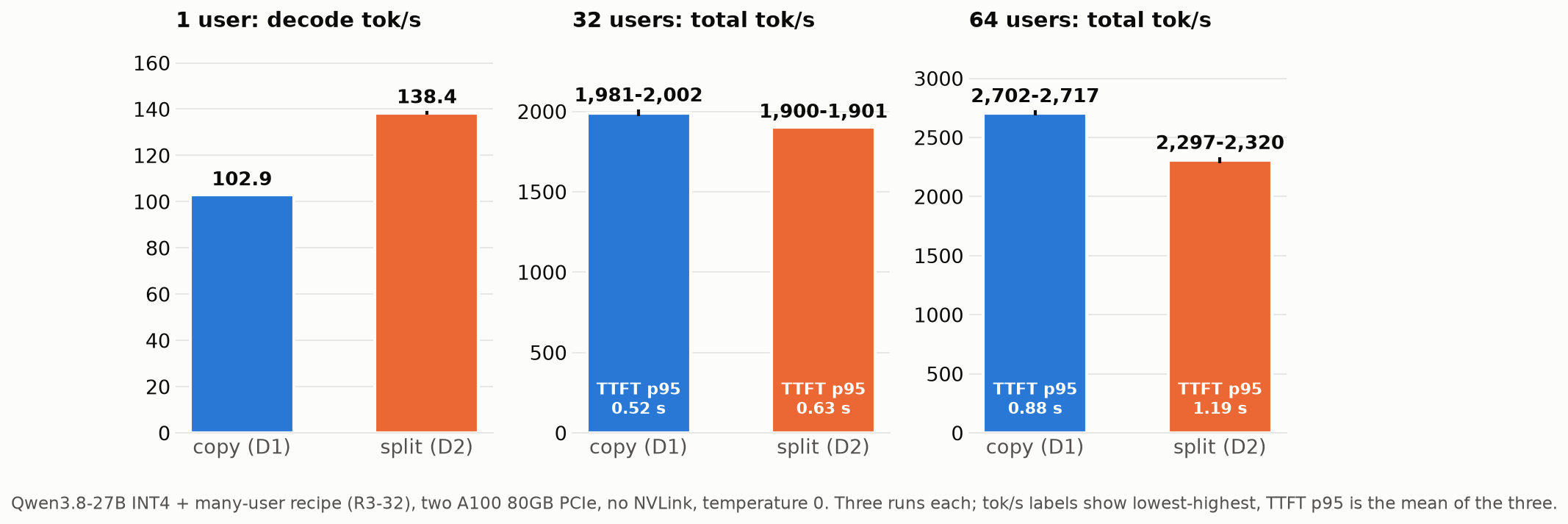
| 1 | 102.9 tok/s | 138.4 tok/s |
| 32 | 1,981 to 2,002, TTFT p95 0.50 to 0.54 s | 1,900 to 1,901, p95 0.63 s |
| 64 | 2,702 to 2,717, p95 0.87 to 0.88 s | 2,297 to 2,320, p95 1.19 to 1.20 s |
Three runs each, temperature 0. Ranges are the lowest and highest of the three.
With many users, copy wins. At 64 users the two copies delivered 2,702 to 2,717 tokens per second against 2,297 to 2,320 for the split, and the slowest first tokens arrived sooner (p95 0.88 s against 1.19 s). At 32 users the gap was smaller but every copy run beat every split run on both measures. Both beat one card at the same load. At 32 users the copies gave 1,981 to 2,002 tokens per second against 1,562 to 1,574 for one card (1.26 to 1.28 times), with p95 0.50 to 0.54 s against 0.87 to 0.89 s, and the split gave 1,900 to 1,901 with p95 0.63 s. At 64 users the copies gave 2,702 to 2,717 against 1,856 for one card (single run), with p95 0.87 to 0.88 s against 1.60 s. We expected two copies at 64 users to reach close to twice one card at 32. They reached 1.73 times.
With one user, split wins, which we predicted wrong. Copying barely changes speed for a single person, because their request lands on one card: in all three runs it was slightly faster than one card alone, 102.9 against 102.2 tokens per second (0.7%). Splitting gave 138.4, 1.35 times the copy. We also ran the one-user recipe split across two cards once: 276.7 tokens per second, against 211.0 on one card.
Split helps one user because each step gets shorter. A step here is one pass in which the big model reads its weights and emits tokens. Tokens per step were nearly the same, 1.805 on one card and 1.799 split: the 0.81 accepted guesses from earlier plus the big model's own token. What changed is the time per step: 17.8 ms down to 13.2 ms.
To see where that time goes, we turned on the torch profiler and ran one 256-token request on each setup, then grouped GPU kernel time by type. It is one request each, but GPU kernel time per step under the profiler, 17.7 ms and 13.2 ms, is close to the normal runs' step times.
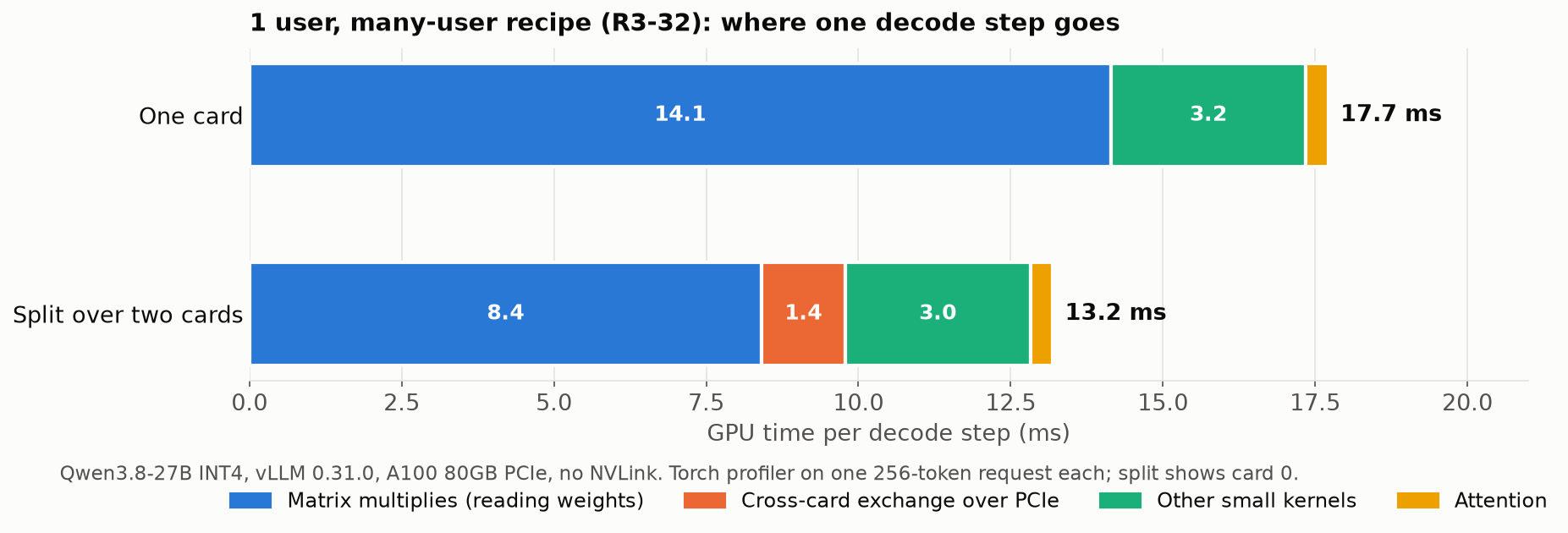
The matrix multiplies that read the weights dropped from 14.1 ms to 8.4 ms, because each card holds half the weights and reads less. In exchange, a new 1.4 ms goes to passing partial results between the cards. Of that, 1.2 ms is about 133 short sums per step, each taking a median of about 8 µs; the remaining 0.15 ms gathers results in one place. With one user, each exchange carries only a couple of tokens' worth of data. The other small kernels stayed about the same, 3.2 ms against 3.0 ms.
We expected split to lose because, without NVLink, that exchange goes over PCIe and we assumed it would be expensive. With one user it came to about 10% of a step, roughly a quarter of the 5.7 ms saved on the matrix multiplies. We also split the plain INT4 setup without speculative decoding (R2) once, and it went from 71.9 to 100.5 tokens per second, so splitting alone speeds up a single user, with or without speculative decoding.
Splitting also changes the output. At temperature 0 the split server matched one card's answers on 0 of 96 prompts (6 of 96 with the one-user recipe), and three split runs agreed with each other on 79 of 96 at worst. The copies matched one card on all 96.
You can have both at once (D3). We ran R3-1 on card 0 for one user while R3-32 on card 1 served 32 users, at the same time, three times. Use the R3-1 command as is, and change the R3-32 command to CUDA_VISIBLE_DEVICES=1 and --port 8001. Card 0 gave 211.0 to 211.1 tokens per second in all three runs, against 211.0 alone, and card 1 gave 1,570 to 1,574, inside its solo range of 1,562 to 1,574. On this machine, neither job slowed the other down.
What we would set up
If you have one card:
- Switch to the INT4 checkpoint. That alone is 2.5 times for one user and 1.8 times for 32 (temperature 0).
- If the card is yours alone, add the DFlash2 draft model (R3-1). Expect about 11% less at temperature 0.7.
- If a team shares it, use R3-32 instead, and keep an eye on TTFT p95 once you pass 32 users.
If you have two PCIe cards and the model fits on one:
- For a team, run two copies (D1).
- For one heavy user, split the model (D2), and use the one-user recipe on it.
- For both kinds of use, give each card its own job (one card R3-1, the other R3-32).
These three come from PCIe cards with no NVLink between them.
Next in this series, we run the same model and the same 96 prompts on SGLang, changing only the engine. If you want to know whether the copy-versus-split answer survives a different engine, the newsletter below sends it when it is out.