The DeepSeek-V2-Lite GGUF We Downloaded Ran Without Its Small KV Cache: Check Two Tensor Names First
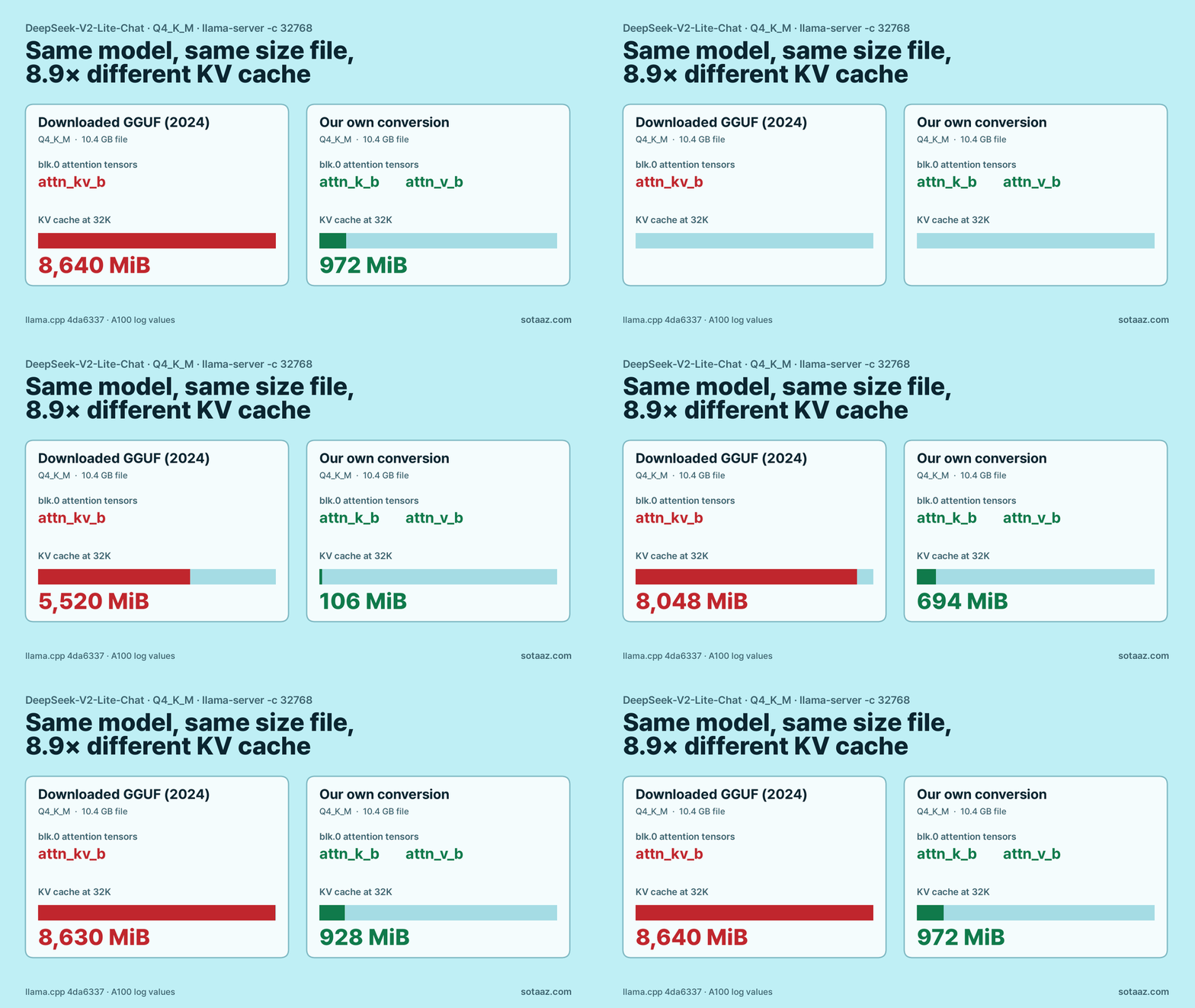
DeepSeek-V2-Lite's attention should keep a 32K-token KV cache at 972 MiB in llama.cpp. The 2024 Q4_K_M GGUF we downloaded used 8,640 MiB because it lacks the attn_k_b and attn_v_b tensors. Converting the original weights ourselves brought the cache back to 972 MiB and the process from 20,162 to 11,330 MiB. Here is how to check a file in one command and convert it if needed.
The DeepSeek-V2-Lite GGUF We Downloaded Ran Without Its Small KV Cache
Before running anything, we wrote down how much memory DeepSeek-V2-Lite's KV cache should take in llama.cpp at a 32K context: 972 MiB. The model uses Multi-head Latent Attention (MLA), which caches one small compressed vector per token instead of full keys and values, so the number is small. We downloaded a Q4_K_M GGUF from Hugging Face, started llama-server, and the log said 8,640 MiB.
The file was not broken. It was converted in July 2024, and it stores the attention weights in an older layout that llama.cpp can only run by caching full keys and values. When we converted the original Hugging Face weights ourselves with the current converter, the cache came back to 972 MiB, and the whole process dropped from 20,162 MiB to 11,330 MiB.
If you run DeepSeek-V2 or V2-Lite in llama.cpp, this post shows how to check your file in one command and what to do if it fails the check.
What you need
- llama.cpp built with CUDA. We used commit
4da6337. - A DeepSeek-V2-Lite GGUF. Ours was
mradermacher/DeepSeek-V2-Lite-Chat-GGUF, Q4_K_M, 10.36 GB. - Only if you need to convert: the original
deepseek-ai/DeepSeek-V2-Lite-Chatweights, a Python environment with llama.cpp's conversion requirements (we used transformers 5.20.2 and torch 2.7.0), and about 42 GB of free disk for the f16 intermediate (31.4 GB) plus the final file.
Step 1: Look for two tensor names
python llama.cpp/gguf-py/gguf/scripts/gguf_dump.py DeepSeek-V2-Lite-Chat.Q4_K_M.gguf \
  | grep -E 'blk\.0\.attn_(k_b|v_b|kv_b)'
This lists the attention tensors of the first layer. It reads only the file header, so it takes a few seconds and needs no GPU.
What you should see
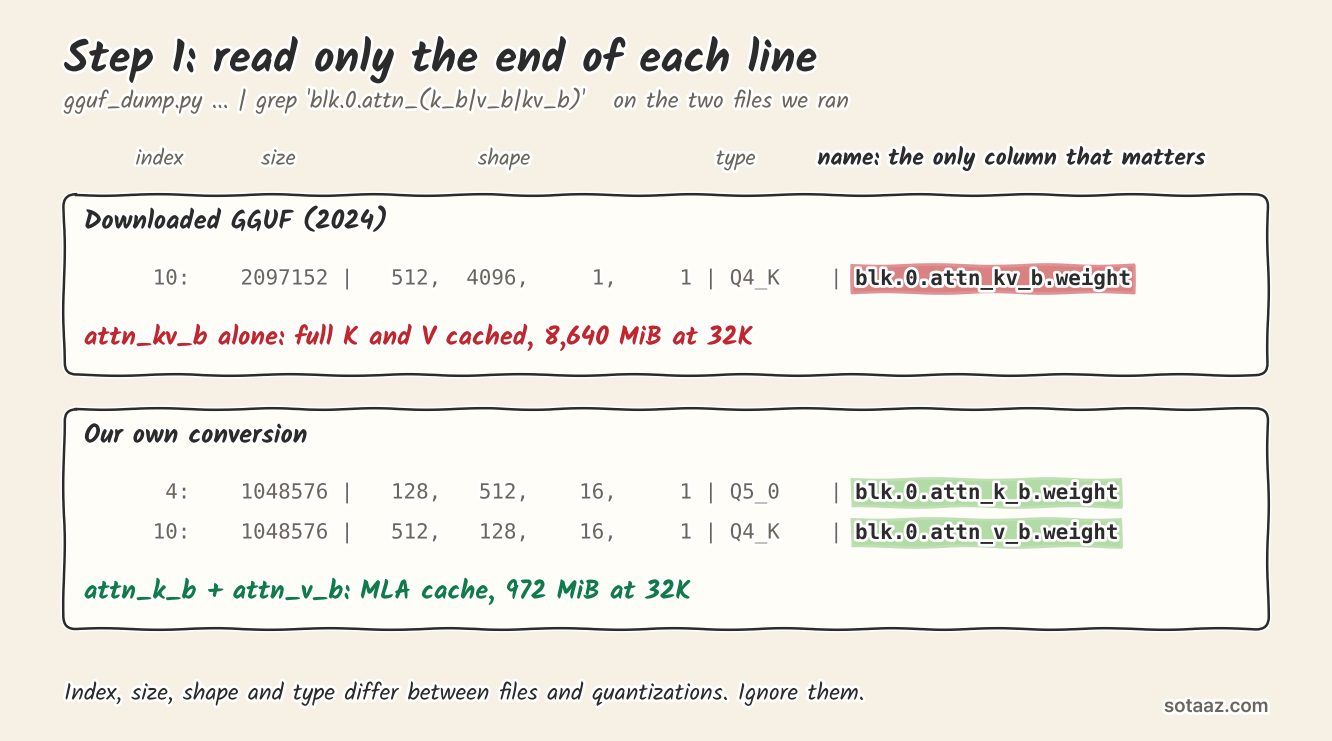
The file we downloaded printed one line:
10: 2097152 | 512, 4096, 1, 1 | Q4_K | blk.0.attn_kv_b.weightOur own conversion printed two:
      4:    1048576 |   128,   512,    16,     1 | Q5_0    | blk.0.attn_k_b.weight
     10:    1048576 |   512,   128,    16,     1 | Q4_K    | blk.0.attn_v_b.weight
The columns before the name are the tensor's index, size, shape and quantization type, and they will differ between files. Only the name at the end of each line matters: attn_k_b and attn_v_b mean MLA caching is available, attn_kv_b alone means it is not.
If you prefer to check by starting the server, the KV cache line tells the same story. This is the command we used (we also added --temp 0 for the questions later in this post):
llama.cpp/build/bin/llama-server -m DeepSeek-V2-Lite-Chat.Q4_K_M.gguf -ngl 99 -np 1 -c 32768 -lv 4-lv 4 raises the log level so the buffer lines are printed. With the downloaded file:
llama_kv_cache: size = 8640.00 MiB ( 32768 cells, 27 layers, 1/1 seqs), K (f16): 5184.00 MiB, V (f16): 3456.00 MiBWith our conversion:
llama_kv_cache: size = 972.00 MiB ( 32768 cells, 27 layers, 1/1 seqs), K (f16): 972.00 MiB, V (f16): 0.00 MiB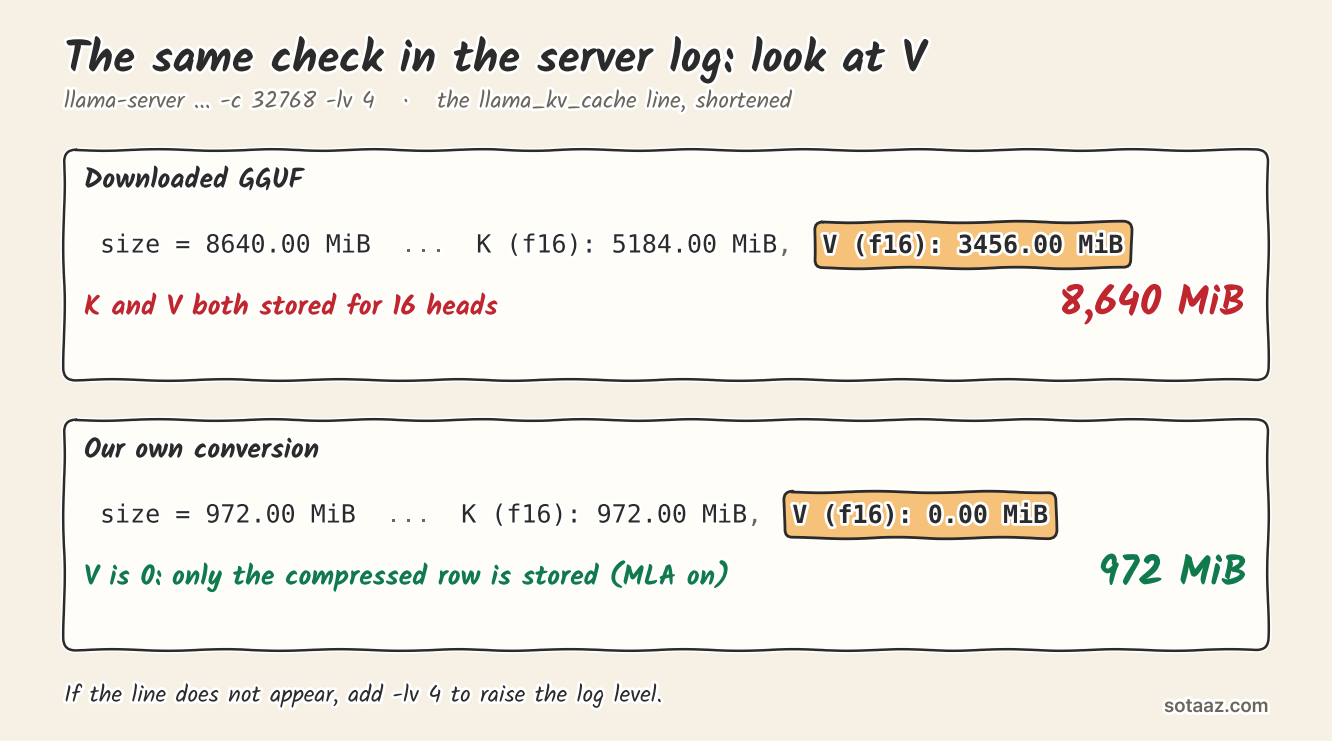
How to read it
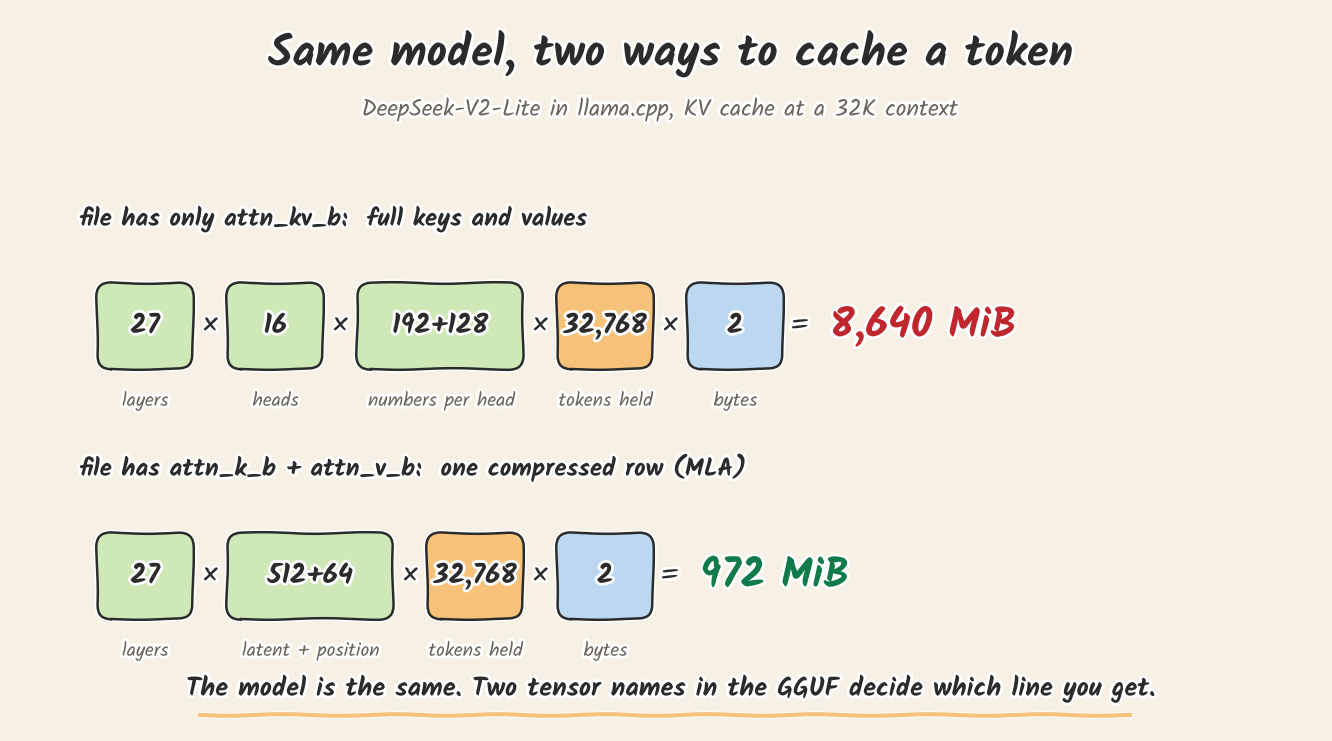
V (f16): 0.00 MiB is the sign that MLA caching is on. llama.cpp keeps only the compressed vector, 512 numbers plus 64 for position, per token per layer, and never rebuilds full keys and values. During attention it uses attn_k_b to move each query into that compressed space, attends over the stored rows directly, and uses attn_v_b to turn the result back into each head's output. Values reuse the first 512 numbers of the same row, which is why V shows 0.00 MiB. That needs the split attn_k_b and attn_v_b tensors. A file with only attn_kv_b falls back to caching full keys and values for all 16 heads.
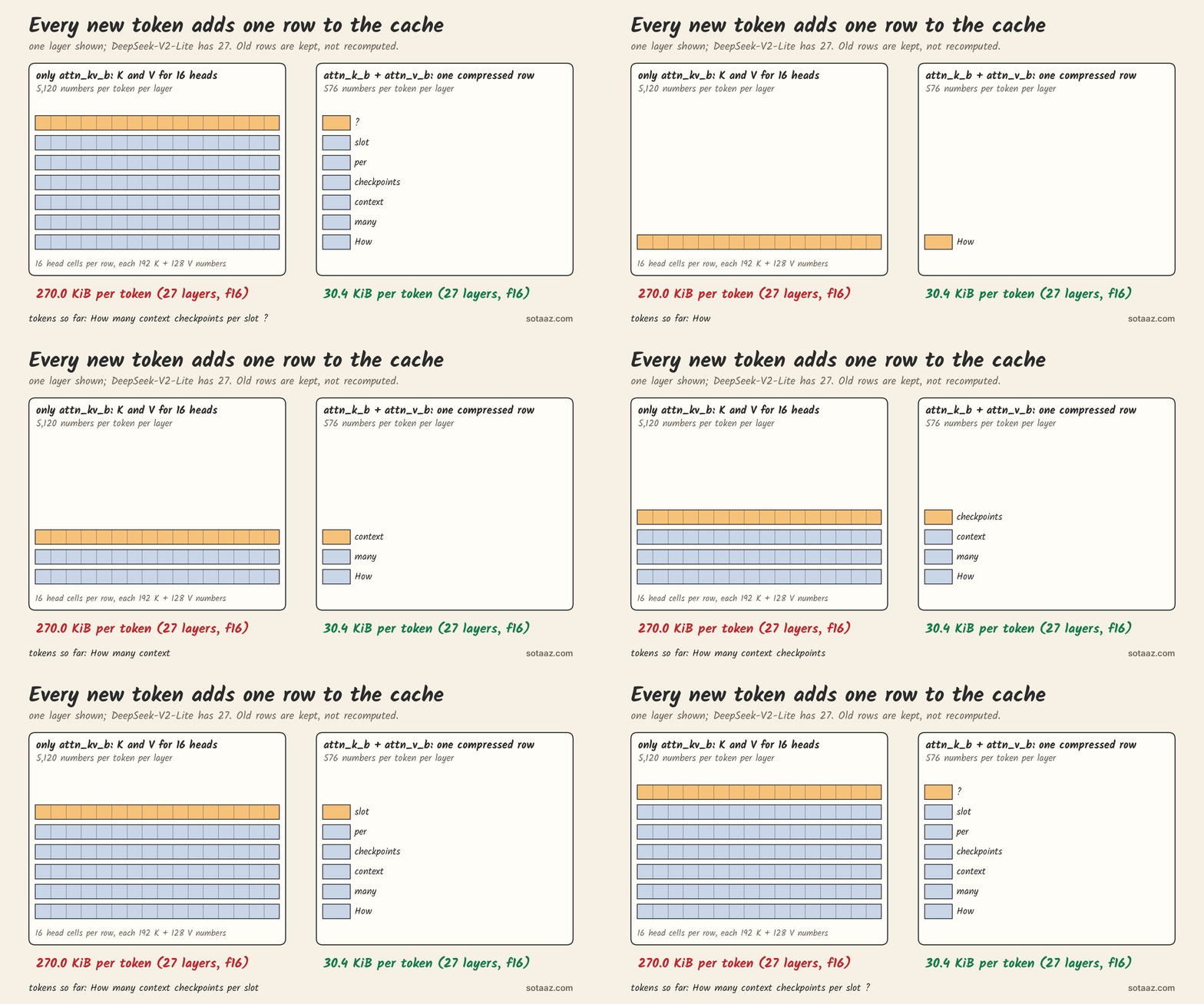
Multiply one row by the layers and the tokens you keep, and you get both numbers in the log (calculated):
The fallback costs more than the cache. With the downloaded file, llama.cpp turned Flash Attention off. The log says only "Flash Attention is assigned to device CPU (usually due to missing support)" and "Flash Attention not supported, set to disabled"; our guess is that the full-K/V path for this model has no GPU kernel, but the log does not say why. With our conversion it stayed on. The compute buffer was 1,276 MiB instead of 108 MiB.
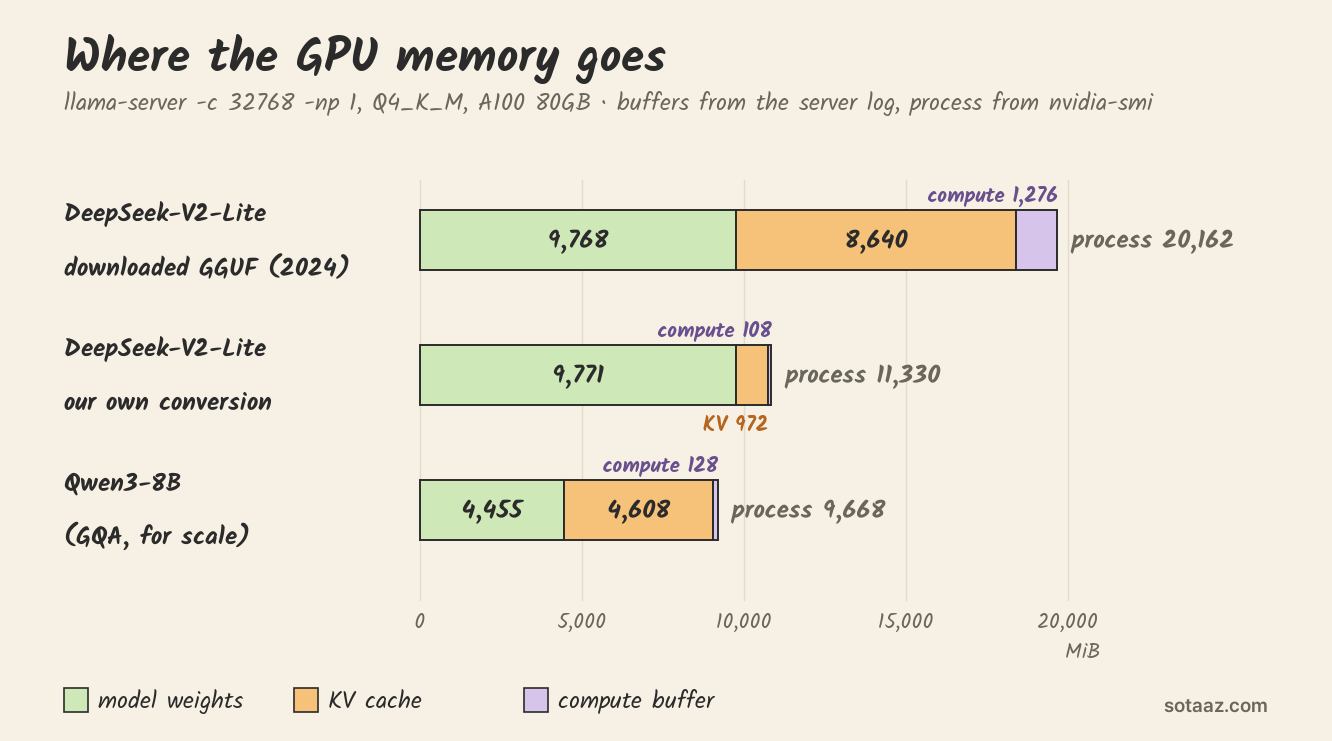
Same weights, same quantization type, files 3.5 MB apart in size (10,364,416,768 and 10,367,958,112 bytes): the process needed 8,832 MiB less after our conversion (measured with nvidia-smi right after loading). The bars come from the server log; the process totals from nvidia-smi are about 480 MiB larger because they include the CUDA context.
If your file has only attn_kv_b: convert it yourself
First try the plain converter. At commit 4da6337 it stopped with BPE pre-tokenizer was not recognized for this model, because it did not recognize the tokenizer's hash. The older GGUF we downloaded names that pre-tokenizer deepseek-llm, so we passed the same name with a small wrapper and changed nothing else:
# convert_deepseek.py — tested only at llama.cpp 4da6337
import runpy, sys
LLAMA_CPP = "/path/to/llama.cpp"
sys.path.insert(0, LLAMA_CPP)
import conversion.base as base
base.TextModel.get_vocab_base_pre = lambda self, tokenizer: "deepseek-llm"
sys.argv = ["convert_hf_to_gguf.py"] + sys.argv[1:]
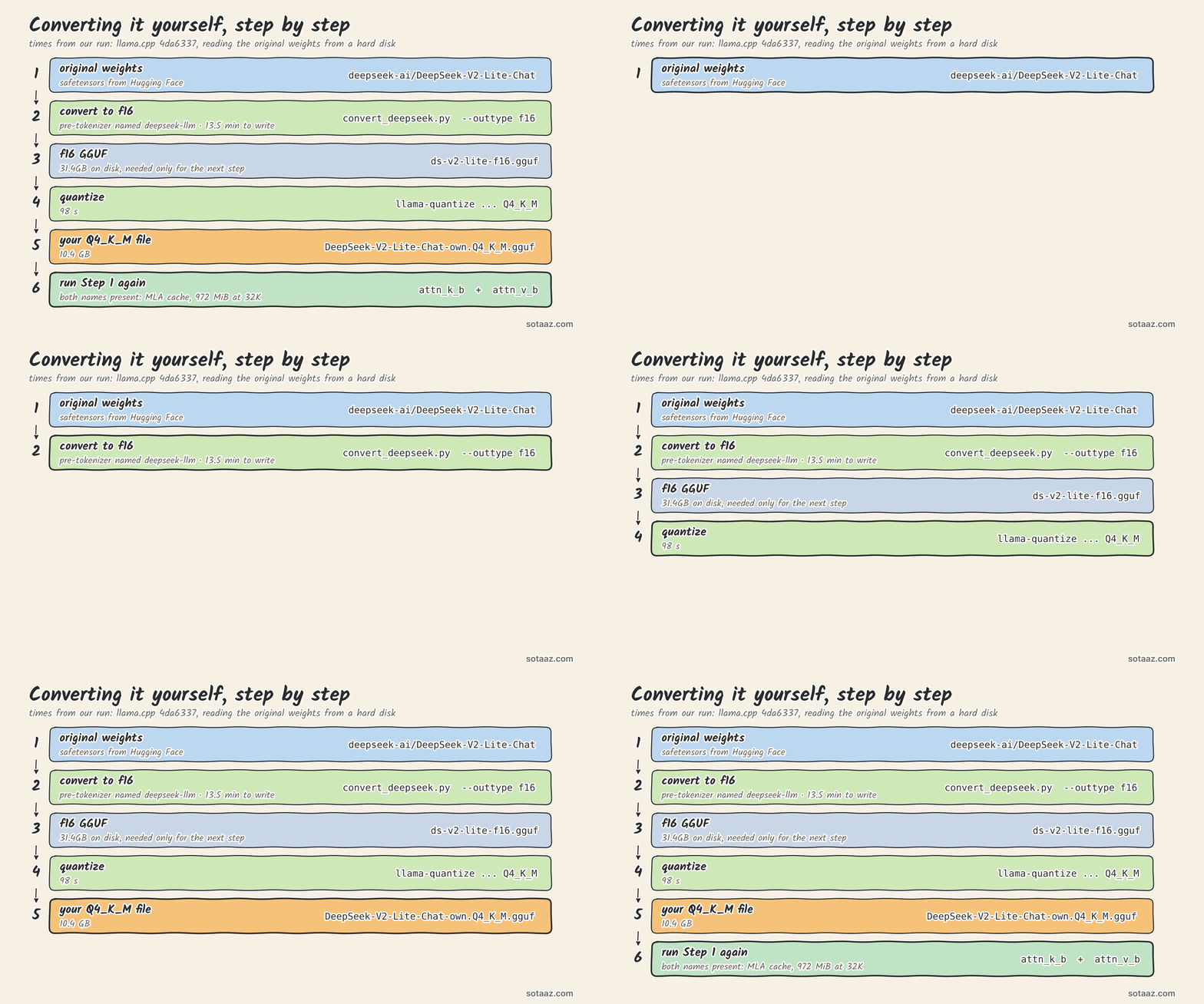
runpy.run_path(f"{LLAMA_CPP}/convert_hf_to_gguf.py", run_name="__main__")python convert_deepseek.py /path/to/DeepSeek-V2-Lite-Chat --outtype f16 --outfile ds-v2-lite-f16.gguf
llama.cpp/build/bin/llama-quantize ds-v2-lite-f16.gguf DeepSeek-V2-Lite-Chat-own.Q4_K_M.gguf Q4_K_MOn our machine, reading from a hard disk, writing the f16 file took 13 minutes 31 seconds (we did not log the loading time before it), and quantizing took 98 seconds. Then run Step 1 again on the new file and look for the two names.
The document token count was the same for both files (30,179), which is what we expected from using the same pre-tokenizer name. One metadata flag did differ: the current converter wrote add_bos_token = false, while the downloaded file has true. The chat template inserts the BOS token itself, so the first chat request was 30,233 tokens with both files. If you send raw text to /completion, start the server with --override-kv tokenizer.ggml.add_bos_token=bool:true or add the token yourself.
Did it still read the document?
We gave both files a 30,179-token excerpt of the llama.cpp server README and asked seven questions whose answers sit at the start, middle and end. Each got 6 of 7 by our string-match rule, and so did Qwen3-8B, which we ran on the same excerpt for comparison. The downloaded file missed a default value; ours gave the wrong error type on the last question, and Qwen3-8B missed the same question by quoting a different error example. That question was ambiguous, since the excerpt contains more than one error example. Seven questions only show that the model reads the whole document, not which file is more accurate.
One number we recorded but did not predict: generation speed. Median decode was 23.7 tokens per second with the downloaded file and 149.0 with ours, one run each. The two DeepSeek runs used two different cards of the same model (A100 80GB PCIe), so treat it as a hint, not a benchmark.
What we predicted, and where we were wrong
We wrote predictions down before measuring. The C predictions were written after we saw the downloaded file's result, and committed while the f16 conversion was already running, before we quantized or loaded the new file. C1 is the same calculation as P1. Three of nine were wrong.
| Prediction | Result | |
|---|---|---|
| P1: KV cache 972 MiB with the downloaded file | 8,640 MiB | wrong |
| P2: Qwen3-8B KV cache 4,608 MiB | 4,608 MiB | right |
| P3: DeepSeek's process no smaller than Qwen3-8B's, within 1.5 GiB | 10.2 GiB larger (downloaded), 1.62 GiB larger (own) | wrong |
| P4: Qwen3-8B 6/7 or better, DeepSeek 4/7 or better | 6/7 for all three | right |
| P5: DeepSeek processes the prompt faster (about 2.4B active parameters vs 8B) | 2,732 and 3,241 vs 3,518 tokens/s | wrong |
| C1: own conversion KV 972 MiB | 972 MiB | right |
| C2: own conversion process 11,000-12,500 MiB | 11,330 MiB | right |
| C3: same document token count, 30,179 | 30,179 | right |
| C4: own conversion 5/7 or better | 6/7 | right |
P5 is one run each, and the prompts differ in length: the first request (excerpt plus question) was 30,233 tokens for DeepSeek's tokenizer and 26,764 for Qwen's, and the 3,241 came from a different card than the other two. Fewer active parameters did not make DeepSeek-V2-Lite faster at reading a long prompt here.
What to do
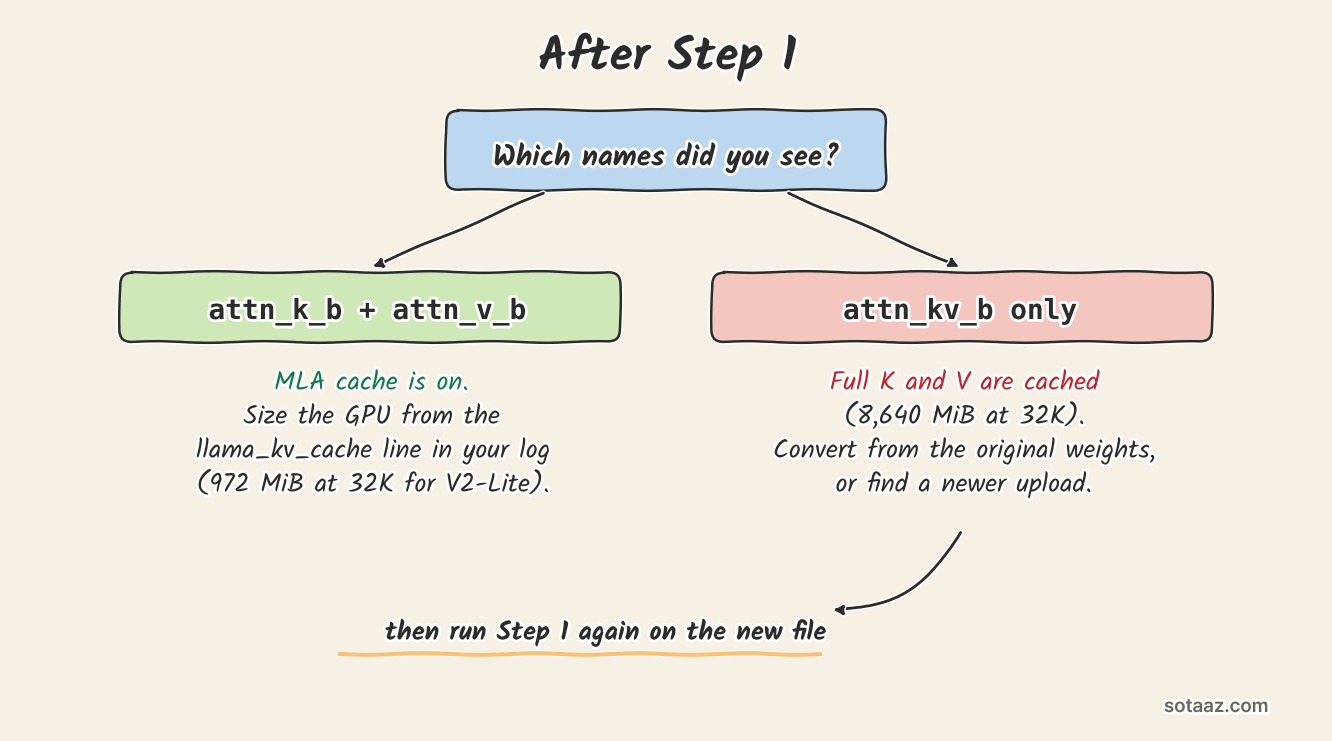
- Run Step 1 on every DeepSeek-V2 or V2-Lite GGUF before you size a GPU for it.
- If you see only
attn_kv_b, convert from the original weights, or look for a newer upload and check it the same way. - When you plan memory, use the KV line from your own server log, not the model card.
Limits
- We measured on A100 80GB PCIe cards: the downloaded file and Qwen3-8B on one, our conversion on another of the same model. On paper, our conversion's 11,330 MiB at 32K is under a 12 GB card's 12,288 MiB, and the downloaded file's 20,162 MiB is not. But llama.cpp's default
-fitalso tries to leave 1,024 MiB free, and 11,330 + 1,024 is 12,354 MiB, so on a 12 GB card it may shrink the context or move layers off the GPU. We have no 12 GB card to run either on, and driver overhead differs by card. - We checked one downloaded file. Other uploads may have been reconverted; Step 1 tells you which kind you have.
- The wrapper is tested only at
4da6337. A newer converter may recognize the tokenizer on its own. - Speed numbers are single runs. Prompt speed was predicted (P5); decode speed was not.