DeerFlow 2.0 Multi-Agent Workflow Deep Dive — StateGraph, Plan-Execute, Human-in-the-Loop
Code-level analysis of DeerFlow's LangGraph StateGraph-based Multi-Agent Workflow. Supervisor routing, Plan-Execute pattern, and dynamic sub-agent spawning.
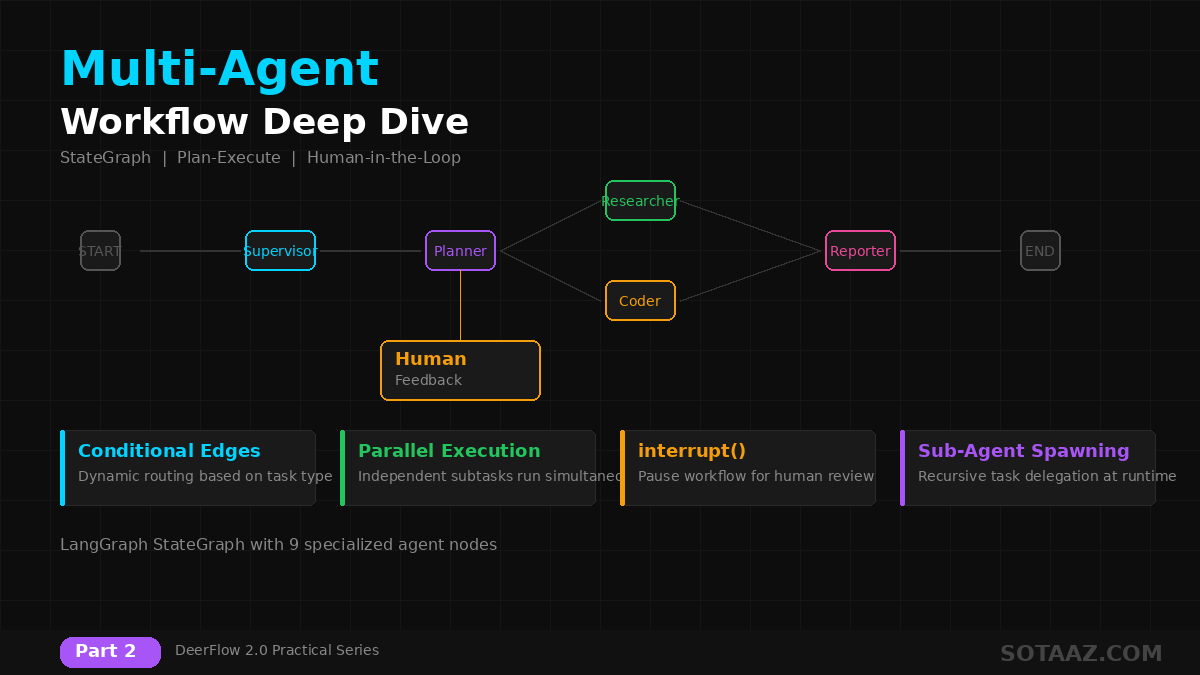
DeerFlow 2.0 Multi-Agent Workflow Deep Dive — StateGraph, Plan-Execute, Human-in-the-Loop
In Part 1, we covered DeerFlow's architecture and installation. This post analyzes DeerFlow's core: the Multi-Agent Workflow at the code level.
We'll examine how DeerFlow decomposes complex tasks, delegates to agents, and synthesizes results.
1. LangGraph StateGraph Fundamentals
DeerFlow's workflow is built on LangGraph StateGraph.
What is StateGraph?
StateGraph defines agent flow as a directed graph. Each node is an agent, and edges are state transitions.
from langgraph.graph import StateGraph, START, END

# Define state
class AgentState(TypedDict):
    messages: list[BaseMessage]
    plan: list[dict]
    current_step: int
    results: dict

# Build graph
workflow = StateGraph(AgentState)
workflow.add_node("supervisor", supervisor_node)
workflow.add_node("researcher", researcher_node)
workflow.add_node("coder", coder_node)
workflow.add_node("reporter", reporter_node)

# Define edges
workflow.add_edge(START, "supervisor")
workflow.add_conditional_edges("supervisor", route_to_agent)
workflow.add_edge("reporter", END)
DeerFlow's State Structure
DeerFlow extends this basic pattern to connect 9 nodes. The state object includes:
messages— inter-agent message historyplan— execution plan generated by Plannercurrent_step— currently executing stepresults— output from each agentmemory— persistent memory contextartifacts— generated files/documents
2. Supervisor: The Orchestration Hub
The Supervisor is the entry point and decision-maker of DeerFlow's workflow.
Responsibilities
- Task analysis: Parse user input to understand intent
- Plan generation: Create structured execution plans
- Agent selection: Assign appropriate agents to subtasks
- Result verification: Review subtask results and decide on re-execution
Supervisor Decision Flow
def supervisor_node(state: AgentState) -> AgentState:
    # 1. Analyze task
    task_analysis = llm.invoke(
        f"Analyze this task and determine the best approach: {state['messages'][-1]}"
    )

    # 2. Routing decision
    if task_analysis.requires_research:
        return {"next": "researcher"}
    elif task_analysis.requires_code:
        return {"next": "coder"}
    elif task_analysis.is_complex:
        return {"next": "planner"}  # Complex task → delegate to Planner
    else:
        return {"next": "reporter"}  # Simple task → straight to report
Routing Patterns
The Supervisor uses conditional edges to determine the next agent:
| Task Type | Routes To | Example |
|---|---|---|
| Simple question | Reporter directly | "What is DeerFlow?" |
| Research needed | Researcher | "Latest AI trends" |
| Coding needed | Coder | "Write a Python script" |
| Complex task | Planner | "Report + code execution" |
| Needs confirmation | Human Feedback | "Is this approach correct?" |
3. Planner: Task Decomposition
Complex tasks are broken down by the Planner into smaller units.
Plan-Execute Pattern
DeerFlow uses the Plan-Execute pattern:
- Plan: Decompose the full task into a subtask list
- Execute: Each subtask runs on the appropriate agent (sequential or parallel)
- Verify: Validate results and re-execute if needed
# Plan structure generated by Planner
plan = {
    "goal": "Write a comparison report on AI agent frameworks",
    "steps": [
        {
            "id": 1,
            "agent": "researcher",
            "task": "Research DeerFlow 2.0 features and architecture",
            "depends_on": [],
        },
        {
            "id": 2,
            "agent": "researcher",
            "task": "Research CrewAI, AutoGen, LangGraph features",
            "depends_on": [],  # Can run in parallel with step 1
        },
        {
            "id": 3,
            "agent": "analyst",
            "task": "Organize collected data into comparison tables",
            "depends_on": [1, 2],  # Runs after steps 1 and 2
        },
        {
            "id": 4,
            "agent": "reporter",
            "task": "Write the final comparison report",
            "depends_on": [3],
        },
    ],
}
Parallel Execution
Steps with empty depends_on or references to already-completed steps run in parallel. In the example above, steps 1 and 2 execute simultaneously:
Step 1 (Researcher) ─┐
                     ├→ Step 3 (Analyst) → Step 4 (Reporter)
Step 2 (Researcher) ─┘
4. Agent Node Details
4-1. Researcher
Gathers information through web search and includes citations.
Tools used:
- Tavily/Brave/DuckDuckGo search
- Arxiv paper search
- Web crawling
Output format:
{
  "findings": [
    {
      "title": "DeerFlow 2.0 Architecture",
      "summary": "...",
      "source": "https://...",
      "relevance": 0.95
    }
  ],
  "citations": ["[1] https://..."]
}
4-2. Coder
Executes code within sandboxed environments.
Tools used:
bash— shell commandswrite_file— create filesread_file— read filesstr_replace— modify files
# Coder agent execution flow
def coder_node(state: AgentState) -> AgentState:
    # 1. Generate code
    code = llm.invoke(f"Write code for: {state['current_task']}")

    # 2. Execute in sandbox
    result = sandbox.execute(code)

    # 3. Auto-fix on error
    if result.error:
        fixed_code = llm.invoke(f"Fix this error: {result.error}\nCode: {code}")
        result = sandbox.execute(fixed_code)

    return {"results": {state["current_step"]: result}}
4-3. Analyst
Handles data analysis and visualization:
- Structures collected data
- Creates comparison tables and charts
- Derives statistical insights
4-4. Reporter
Synthesizes all results into final deliverables:
- Markdown reports
- Proper citations
- Structured sections (summary, body, conclusion)
5. Human-in-the-Loop
DeerFlow leverages LangGraph's interrupt() to support human intervention.
Interrupt Points
from langgraph.types import interrupt

def human_feedback_node(state: AgentState) -> AgentState:
    # Pause workflow — wait for human response
    feedback = interrupt({
        "question": "Should we proceed with this plan?",
        "plan": state["plan"],
        "options": ["approve", "modify", "reject"],
    })

    if feedback["decision"] == "approve":
        return {"next": "execute"}
    elif feedback["decision"] == "modify":
        return {"next": "planner", "modifications": feedback["notes"]}
    else:
        return {"next": END}
Use Cases
- Plan review: Human approves execution plan for complex tasks
- Intermediate validation: Verify research is heading in the right direction
- Dangerous operation approval: File deletion, external API calls
- Quality gates: Review before publishing final reports
Web UI Behavior
In the DeerFlow UI, interrupts display as approval requests in the chat. The user selects approve/modify/reject, and the workflow resumes.
6. Sub-Agents and Dynamic Spawning
One of DeerFlow's powerful features is spawning sub-agents at runtime.
Task Tool
When a Supervisor or other agent calls the Task tool, a new sub-agent is created:
# Task tool invocation example
task_result = task_tool.invoke({
    "description": "Research the latest developments in DeerFlow",
    "agent_type": "researcher",
    "context": "Focus on v2.0 architecture changes",
})
Sub-Agent Characteristics
- Isolated context: Each sub-agent maintains independent state
- Parallel execution: Multiple sub-agents can run simultaneously
- Result synthesis: Parent agent collects and combines sub-agent results
Recursive Delegation
Sub-agents can call the Task tool themselves, enabling recursive task decomposition. Depth limits prevent infinite recursion.
7. Error Handling and Recovery
Retry Mechanism
When agent execution fails, DeerFlow retries automatically:
- LLM call failure: Exponential backoff retry
- Tool execution failure: Pass error to LLM for alternative generation
- Timeout: Timeout handling for long-running tasks
Fallback Strategy
# Supervisor decides alternatives on error
def handle_agent_failure(state: AgentState) -> AgentState:
    error = state["last_error"]

    if error.type == "tool_error":
        # Use alternative tool
        return {"next": "retry_with_alternative_tool"}
    elif error.type == "timeout":
        # Break into smaller steps
        return {"next": "planner", "instruction": "Break this into smaller steps"}
    else:
        # Escalate to human
        return {"next": "human_feedback"}
8. Building Custom Workflows
Extend DeerFlow's default workflow with custom agent nodes.
Adding a Custom Agent Node
from deerflow.harness import register_agent

@register_agent("translator")
def translator_node(state: AgentState) -> AgentState:
    """Translation agent — translates research results to other languages"""
    content = state["results"].get("reporter", "")

    translated = llm.invoke(
        f"Translate the following report to Korean:\n\n{content}"
    )

    return {"results": {"translator": translated}}
Connecting to Workflow
# Add translator agent to existing workflow
workflow.add_node("translator", translator_node)
workflow.add_edge("reporter", "translator")
workflow.add_edge("translator", END)
Summary
What we covered:
- LangGraph StateGraph — foundation of DeerFlow's workflow
- Supervisor — orchestration hub with conditional routing
- Plan-Execute pattern — task decomposition and parallel execution
- 9 agent nodes — roles and tools for each
- Human-in-the-Loop —
interrupt()-based human intervention - Sub-agents — dynamic spawning and recursive delegation
- Error handling — retries, fallbacks, and human escalation
In the next post, we'll cover custom skills, MCP server integration, and the sandbox system. We'll build custom tools, connect external services, and execute code in isolated environments.
This post is Part 2 of the DeerFlow 2.0 Practical Series.
- Part 1: DeerFlow 2.0 Introduction + Setup + First Task
- Part 2: Multi-Agent Workflow Deep Dive (this post)
- Part 3: Custom Skills + MCP + Sandbox
- Part 4: Production Deployment + Message Gateways
Part 2 of 4 complete
2 more parts waiting for you
From theory to production deployment — subscribe to unlock the full series and all premium content.