llama.cpp's New FP8 KV Cache vs q8_0: Should You Switch? Measured on Qwen3-8B and Llama 3.1 8B
f8_e4m3 makes the KV cache 6% smaller than q8_0, moves the model's output about 8-10x further from f16, and decodes 12-13% slower at 32K on an A100. Stay on q8_0 unless your GGUF ships KV scales.
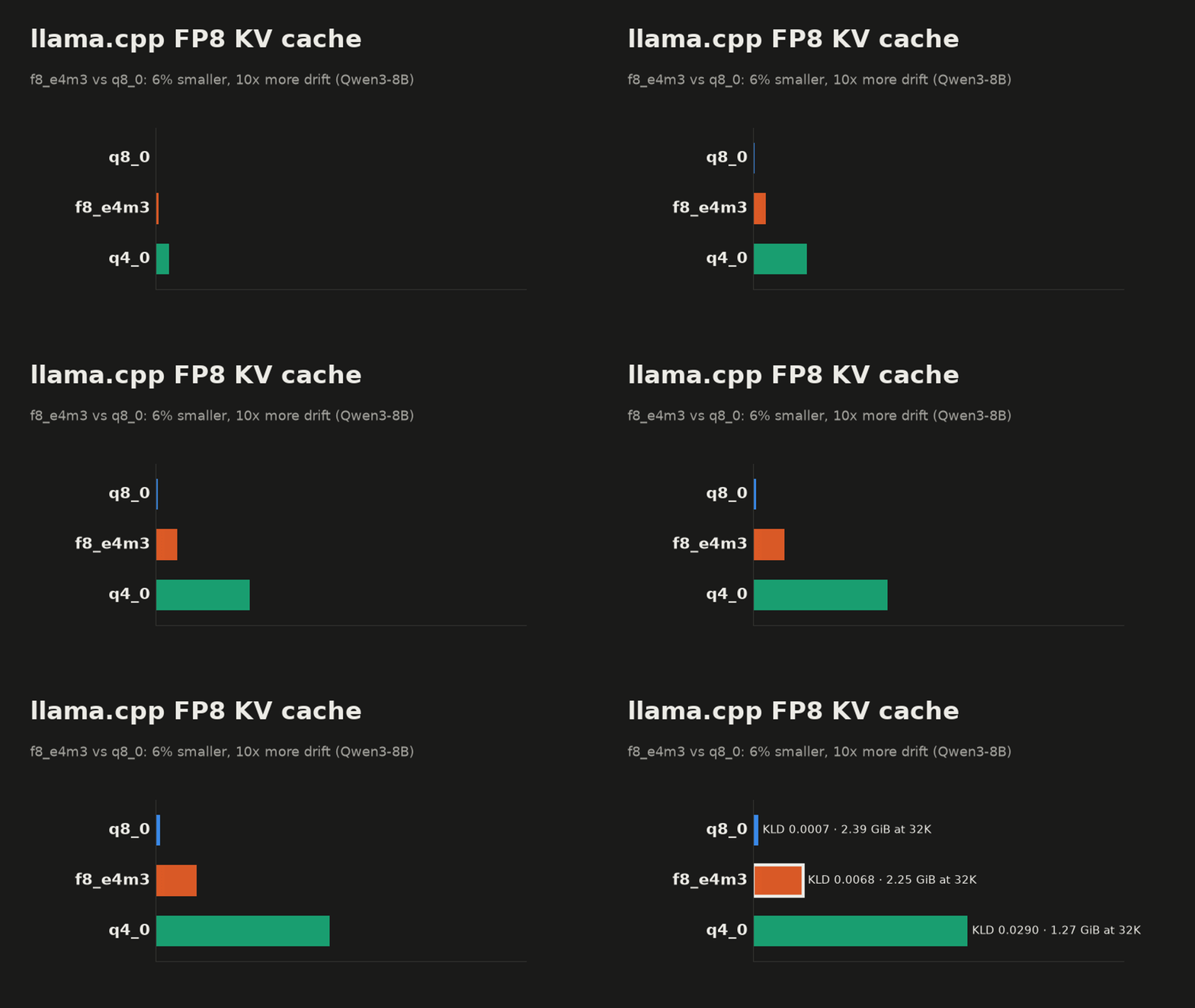
Short answer. If you already run -ctk q8_0 -ctv q8_0, keep it. On two 8B models, the new f8_e4m3 cache type saved only 6% of cache memory against q8_0 (144 MiB at 32K tokens on Qwen3-8B). It moved the model's next-token predictions 8 to 10 times further from the f16 cache. And with 32K tokens in the cache it decoded 12 to 13% slower on our A100. It lands between q8_0 and q4_0 on quality, and much closer to q8_0 on size.
The 50% saving you may have read about is against f16, not against q8_0. That difference decides the whole question, so it is worth seeing where it comes from.
What f8_e4m3 stores, and why 8 bits is not the same as 8 bits
llama.cpp added f8_e4m3 as a KV cache type in build b12274 (pull request #28392). We tested build b12307.
The KV cache holds, for every token already processed, the key and value vectors that attention reads again when the next token is generated. Its size grows with context length, which is why people shrink it. Both q8_0 and f8_e4m3 store one byte per number, but they spend that byte differently. If KV cache quantization is new to you, our llama.cpp KV cache quantization guide covers the basics.
The names describe the formats. In q8_0, q is for quantized, 8 is the bits per number, and _0 marks llama.cpp's block type that stores only a scale per block (_1 types also store a minimum). In f8_e4m3, f8 is an 8-bit floating-point number, and e4m3 means 4 exponent bits and 3 mantissa bits.
q8_0 cuts each row into blocks of 32 numbers. It stores one 16-bit scale per block, set by the largest value in the block, and each number becomes an integer from -127 to 127 times that scale. The rounding error is at most half a step, about 0.4% of the block's largest value. The cost is the scale: 34 bytes per 32 numbers, or 8.5 bits per number.
f8_e4m3 stores each number as a very small floating-point value: 1 sign bit, 4 exponent bits and 3 mantissa bits. Three mantissa bits mean neighbouring values are 12.5% apart in relative terms, so a number can be rounded by up to about 6% of itself. The largest value it can hold is 448. There is no per-block scale, so it costs exactly 8 bits per number.
That is the trade in one line: f8_e4m3 drops the scale to save half a bit per number, and in exchange each number is stored with coarser rounding.
The format allows a fix. llama.cpp can read per-layer k_scale and v_scale tensors from the GGUF and use them to stretch the values into the FP8 range. They are optional, and the GGUFs most people download today, including the two we used, do not have them. Without them, keys and values go into FP8 as they are.
The commands
# the same two flags as q8_0; K and V should be the same type
llama-server -m model.gguf -ngl 99 -fa on -ctk f8_e4m3 -ctv f8_e4m3 -c 32768
Three things to know before you try it:
- K and V must both be
f8_e4m3on a default CUDA build. The defaultGGML_CUDA_FA_QUANTSlist compiles thef8_e4m3/f8_e4m3flash attention kernel and no mixed pair that includes FP8. - Some architectures refuse it at load. The code rejects FP8 cache for models that use MLA attention and for a list of DeepSeek and GLM style architectures. This is in the source code.
- You need a recent build. Anything older than b12274 does not know the type.
Setup
- llama.cpp b12307 (
4180722ee), CUDA build for sm80, one A100 80GB. The A100 has no FP8 tensor cores, so FP8 values are converted in software on this card. - Qwen3-8B Q4_K_M (36 layers) and Meta-Llama-3.1-8B-Instruct Q4_K_M (32 layers). Both have 8 KV heads of size 128.
- K and V always the same type,
-fa on -ngl 99. - Quality:
llama-perplexityon the wikitext-2 test set, 4,096-token windows, 40 windows. We saved thef16-cache output first, then compared every other cache type against it. - Speed:
llama-bench -p 4096 -n 128 -d 0,8192,32768 -r 2.
Every number below is from one card and these two models. Your card can rank the types differently on speed. The memory column is arithmetic and will hold on any card.
Memory: 6% against q8_0
The KV buffer that llama-server printed at load, -c 32768, one slot:
| Cache type | Qwen3-8B | Llama 3.1 8B | vs f16 |
|---|---|---|---|
| f16 | 4,608 MiB | 4,096 MiB | 100% |
| q8_0 | 2,448 MiB | 2,176 MiB | 53% |
| f8_e4m3 | 2,304 MiB | 2,048 MiB | 50% |
These match the bits per number exactly: 16, 8.5 and 8. On Qwen3-8B, moving from q8_0 to f8_e4m3 frees 144 MiB at 32K tokens.
Part of that comes back elsewhere. The compute buffer llama-server reserved next to the cache was 200 MiB with q8_0 and 208 MiB with f8_e4m3 on both models (136 and 148 MiB with f16). The net saving on Qwen3-8B is 136 MiB.
Quality: perplexity can hide the difference
Perplexity is the usual check, and on Qwen3-8B it points the wrong way. Perplexity with the f8_e4m3 cache came out 0.20% below f16, and with q8_0 0.01% above. Read alone, that makes FP8 better than the uncompressed cache. On Llama 3.1 8B perplexity ranked them the right way round (+0.32% against +0.02%), so it is not always misleading, but you cannot tell in advance which case you are in.
Perplexity averages how likely the correct next word was. Errors that push some predictions up and others down can cancel in that average. KL divergence does not let them cancel. For every position it measures how far the whole next-token distribution moved away from what the f16 cache produced, and then averages that. "Same top token" is simpler still: the share of positions where the model's first choice stayed the same.
We added q4_0 as a reference point. Its cache at 32K is 1.27 GiB on Qwen3-8B by the same arithmetic (4.5 bits per number).
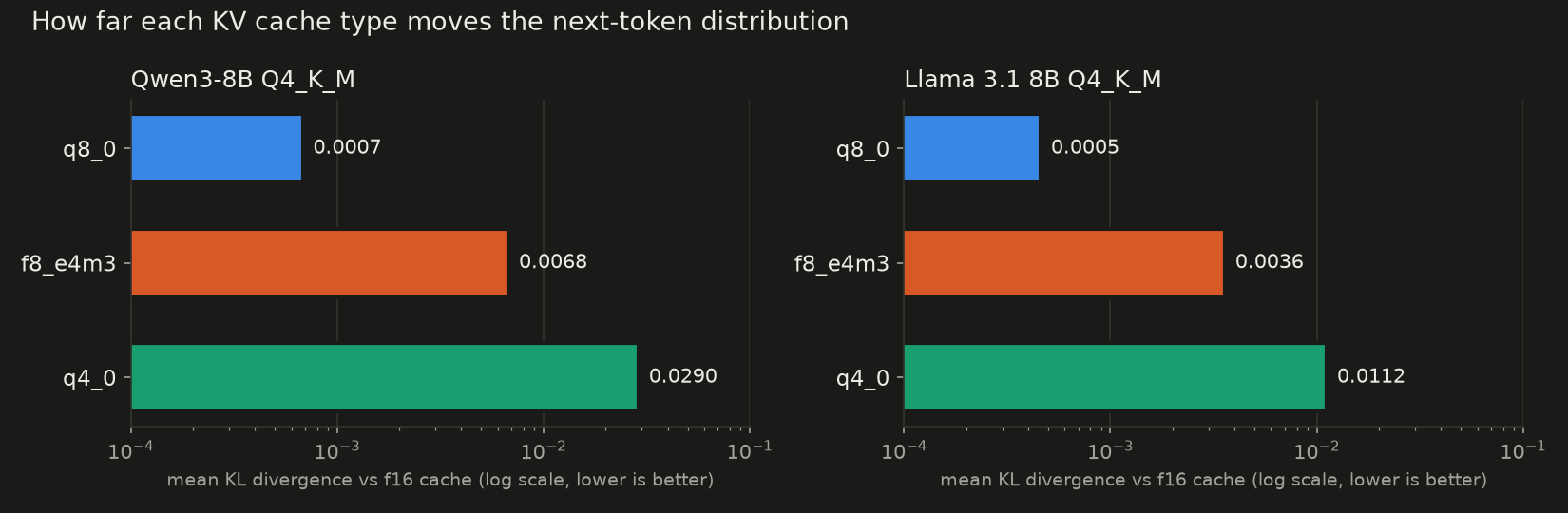
| Mean KLD | 99th pct KLD | Same top token | Perplexity vs f16 | |
|---|---|---|---|---|
| Qwen3-8B | ||||
| q8_0 | 0.00068 | 0.0056 | 98.87% | +0.01% |
| f8_e4m3 | 0.00679 | 0.0562 | 96.66% | -0.20% |
| q4_0 | 0.02895 | 0.2684 | 93.45% | +0.55% |
| Llama 3.1 8B | ||||
| q8_0 | 0.00046 | 0.0032 | 98.92% | +0.02% |
| f8_e4m3 | 0.00359 | 0.0263 | 97.21% | +0.32% |
| q4_0 | 0.01119 | 0.0862 | 95.18% | +1.14% |
On Qwen3-8B the FP8 cache moved the output about 10 times as far as q8_0. On Llama 3.1 8B it was about 8 times. In both models FP8 sits between q8_0 and q4_0: 3.1 to 4.3 times closer to f16 than q4_0 by mean KLD, at about 1.8 times q4_0's memory.
The "same top token" column is the easiest to picture. With q8_0, about 1 position in 90 picks a different first token than the f16 cache. With FP8, about 1 in 30 on Qwen3-8B and 1 in 36 on Llama 3.1 8B.
We guessed Llama 3.1 would suffer more, because it lacks the normalization that Qwen3 applies to queries and keys, so its keys can take larger values. It was the other way round: Llama 3.1 lost less, by mean KLD and by same top token.
Speed: prefill slightly faster, decode at depth slower
Tokens per second, A100 80GB:
| f16 | q8_0 | f8_e4m3 | f8 vs q8_0 | |
|---|---|---|---|---|
| Qwen3-8B, prefill 4096 | ||||
| empty cache | 4,672 | 4,555 | 4,629 | +1.6% |
| 32K in cache | 2,358 | 2,261 | 2,316 | +2.5% |
| Qwen3-8B, decode | ||||
| empty cache | 149.6 | 146.1 | 144.1 | -1.4% |
| 8K in cache | 132.6 | 111.8 | 104.8 | -6.3% |
| 32K in cache | 103.5 | 67.7 | 59.2 | -12.5% |
| Llama 3.1 8B, decode | ||||
| empty cache | 157.7 | 153.9 | 152.1 | -1.1% |
| 8K in cache | 141.1 | 119.2 | 111.9 | -6.1% |
| 32K in cache | 111.1 | 73.8 | 64.4 | -12.7% |
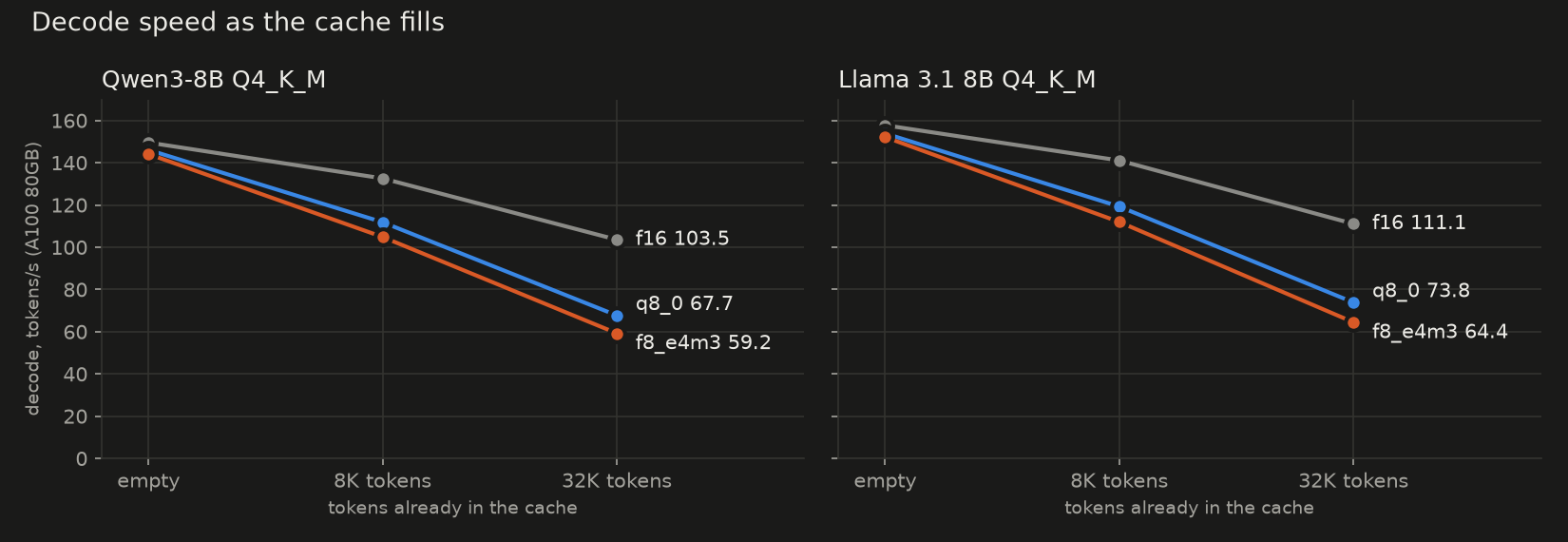
Prefill with FP8 was 1.3% to 2.5% faster than q8_0 on both models at every depth we ran. Decode is where it matters, and there the gap opens as the cache fills: about 1% slower when empty, about 6% at 8K, 12 to 13% at 32K. Each new token reads the whole cache, so a cost per stored number grows with the cache.
The likely cause is the conversion. The A100 has no FP8 hardware, so every FP8 value is turned back into a wider number in software before attention uses it. On cards with FP8 support (Ada, Hopper, Blackwell) this cost can be smaller.
When f8_e4m3 does make sense
- Your GGUF ships
k_scaleandv_scale. The rounding problem above is the unscaled case. With scales, values are stretched to use the FP8 range, and the quality numbers here do not apply. - You are about 120 to 140 MiB short of loading. At 32K on these two 8B models, FP8 freed that much against
q8_0once the larger compute buffer is counted. If that decides whether the model loads at all, FP8 costs less quality than dropping toq4_0, which frees about 1.0 to 1.1 GiB more thanq8_0by the same arithmetic but drifts 3.1 to 4.3 times as far as FP8. - You serve other engines' FP8 checkpoints and want the same format end to end. That is a compatibility reason, not a quality or speed one.
For everyone else, on a card like ours, q8_0 is smaller in drift, faster at depth and only 6% larger.
Check it on your own model
The quality numbers above come from two commands. The first saves what the model predicts with the f16 cache; the second runs again with FP8 and compares. Each run took 1.5 to 2 minutes on our card.
llama-perplexity -m model.gguf -f wiki.test.raw -c 4096 -b 2048 --chunks 40 -ngl 99 -fa on \
  -ctk f16 -ctv f16 --kl-divergence-base base.kld
llama-perplexity -m model.gguf -c 4096 -b 2048 --chunks 40 -ngl 99 -fa on \
  -ctk f8_e4m3 -ctv f8_e4m3 --kl-divergence-base base.kld --kl-divergence
At the end of the second run, read "Mean KLD" and "Same top p". If FP8 lands close to q8_0 on your model, or your card has FP8 hardware and decodes faster with it, switching is reasonable. Otherwise stay on q8_0.
For the other cache types and how they behave at 64K, see our llama.cpp KV cache quantization guide. If you want the next measurement in your inbox, the newsletter form is just below.