llama.cpp vs vLLM: Deployment Methods and Strategies, Part 1: Memory
Deploying the same models on llama.cpp and vLLM, part 1: memory. What each runtime reserves for the KV cache and why (Gemma 3 4B at 32K: 814 MiB against 2,682 MiB), the settings that move it (-ub, --swa-full, max_num_batched_tokens, prefix caching), and four other differences: lengths past training, --parallel, GGUF conversion and vLLM's startup kernel build.
llama.cpp vs vLLM: Deployment Methods and Strategies, Part 1: Memory
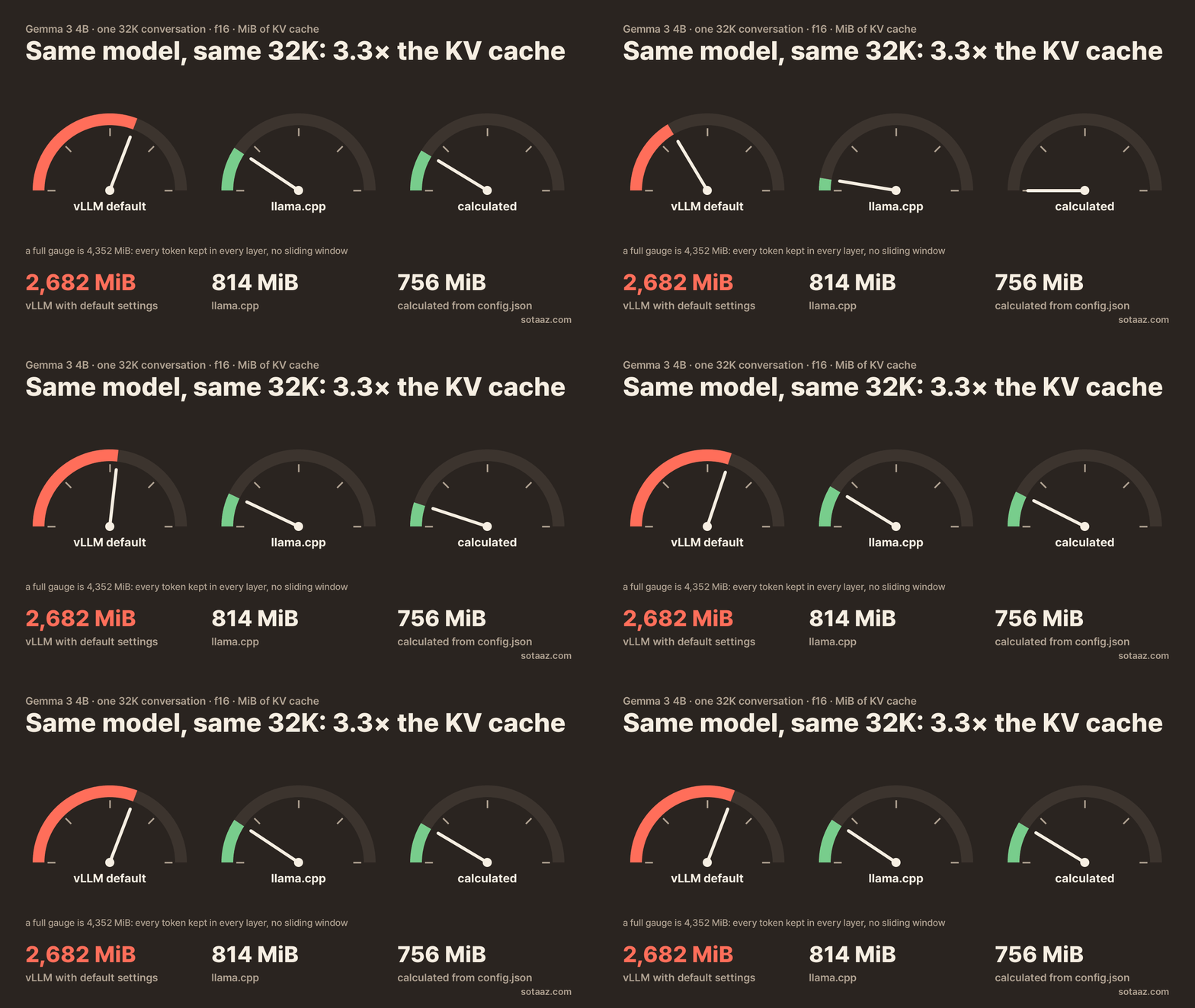
Gemma 3 4B runs 29 of its 34 layers as sliding-window layers that only look at the last 1,024 tokens. If a runtime keeps only those tokens, a 32K conversation needs about 756 MiB of KV cache instead of the 4,352 MiB it would take to keep every token in every layer. We calculated that from the model's configuration before starting either runtime. llama.cpp came close: it allocated 814 MiB. vLLM, started through its Python LLM class with default settings, reserved 2,682 MiB for the same 32K request. Same model, same length, same 16-bit cache, more than three times the memory.
Neither runtime has a bug here. They promise to hold different things, and the saving the model's design offers only reaches your GPU when the runtime and its settings let it through. This post is about those differences: what each runtime reserves, the settings that move the number, and four other places where deploying the same model on llama.cpp and vLLM went differently for us.
The numbers come from the measurement in the previous post, which covers six models with four kinds of KV cache. Here we take the runtime's side of the same data. This part is about memory. These runs measured no speed, and vLLM never generated text in them (section 6 says why), so nothing below says which runtime is faster. Part 2 measures speed and concurrent requests on both runtimes in separate runs.
Setup. llama.cpp build 4da6337, llama-server -ngl 99 -fa on --parallel 1 -c <length>. vLLM 0.29.1rc1 through its Python LLM class, with max_model_len set to each length, gpu_memory_utilization 0.85 and eager mode, on one A100 80GB. f16/bf16 cache unless we say otherwise.
1. What each runtime promises to hold
llama.cpp sizes the cache from -c. You ask for a context of N tokens and it allocates the cache for N tokens at startup, then prints the size per part (KV self size, and a separate recurrent state for hybrid models). For a plain model that number is the calculation exactly: Qwen3-8B got 576, 4,608 and 18,432 MiB at 4K, 32K and 128K.
-c is the total across all slots. In this build, without a unified cache, --parallel 4 -c 32768 gives each of four slots 8,192 tokens, not 32,768 each (the source divides n_ctx by the number of sequences). We ran --parallel 1 only, so we did not measure that case; plan it as -c = slots × the length one conversation needs.
vLLM takes a share of the GPU and fills it with cache. It loads the model, measures what is left inside gpu_memory_utilization (we used 0.85 of 80 GB), and turns all of it into KV cache blocks. For Gemma 3 4B at 32K that was 58.33 GiB of cache, whatever the length of your conversations. The question vLLM answers is not "how big is the cache" but "how many requests fit."
It prints the answer in two forms:
Available KV cache memory: 58.33 GiB
GPU KV cache size: 729,735 tokens, Maximum concurrency for 32,768 tokens per request: 22.27x
The token count is not the number of conversation tokens the cache can hold. vLLM computes it as the number of maximum-length requests that fit, times the maximum length: 22.27 × 32,768. So the cache memory divided by that token count is what vLLM reserves for one maximum-length request, divided by its length. For Gemma that is 85,828 bytes per token, 2,682 MiB per 32K request. For a plain full-attention model the two readings agree. For a model with sliding layers or a fixed state they do not, and the next two sections are about those two cases.
2. Sliding-window models: the reserve, not the window
Gemma 3 4B has 5 full-attention layers and 29 sliding layers with a 1,024-token window. gpt-oss-20b alternates 12 full layers with 12 sliding layers whose window is 128 tokens. Both runtimes stop the sliding layers from growing. They differ in how much room they hold beside the window.
llama.cpp: window plus one micro-batch. At 32K it allocated 814 MiB for Gemma and 786 MiB for gpt-oss. The sliding layers hold the window plus one micro-batch (-ub, 512 by default), rounded up to a multiple of 256: 1,024 + 512 = 1,536 cells per layer for Gemma, and 128 + 512 = 640, rounded to 768, for gpt-oss. We worked this out after the main run and checked it by changing -ub:
-ub | Gemma 3 4B, 32K | gpt-oss-20b, 32K |
|---|---|---|
| 256 | 785 MiB | 780 MiB |
| 512 (default) | 814 MiB | 786 MiB |
| 1024 | 872 MiB | 798 MiB |
--swa-full | 4,352 MiB | 1,536 MiB |
--swa-full makes the sliding layers keep every token, and the cache goes back to the full size exactly. You would turn it on only if a feature you need requires it; for memory, the default is the saving.
vLLM: window plus everything in flight. For each sliding layer, vLLM reserves the window plus every token the scheduler can have in flight: two batches of max_num_batched_tokens, 2 × 8,192 = 16,384 tokens at the LLM class's default on an A100, capped at the request length. For Gemma at 32K that is about 17,400 tokens per sliding layer instead of 1,024. (vLLM packs Gemma's 29 sliding layers into 6 groups of 5, so it reserves for 30.) That formula predicts 143,840, 85,820 and 36,815 bytes per token at 4K, 32K and 128K. vLLM measured 143,833, 85,828 and 36,813, within 0.01%. For gpt-oss the window is only 128 tokens, so the in-flight part is nearly all of it: 1,155 MiB per 32K request against llama.cpp's 786.
The reserve has a purpose. It lets the scheduler take large chunks of a prompt in one step without running out of room in the middle of a batch. But at 8,192 it hands back about half of what the sliding window saves. Of the 3,596 MiB Gemma could save at 32K (4,352 down to 756), vLLM still saves 1,670 MiB, 46%, and gives back the rest. For gpt-oss it saves 381 of 765 MiB.
The setting that moves it: max_num_batched_tokens. We wrote down what the reserve formula predicts for 2,048 and 512 before running them:
max_num_batched_tokens | Gemma 3 4B, per 32K request | gpt-oss-20b, per 32K request |
|---|---|---|
8,192 (LLM class default on A100) | 2,682 MiB | 1,155 MiB |
2,048 (vllm serve default on A100) | 1,242 MiB | 867 MiB |
| 512 | 882 MiB | 795 MiB |
All eight measurements (two models, 4K and 32K, two settings) landed within 0.01% of the prediction. At 512, Gemma is close to llama.cpp's 814 MiB. A smaller value means vLLM processes prompts in smaller chunks per step. Part 2 measures what that costs: a 32,000-token prompt reached its first token in 1.73 s at 512 against 1.36 s at 8,192.
Which default you start from depends on how you start vLLM and on the GPU. In this build's source, on an A100 the Python LLM class uses 8,192 and the vllm serve server 2,048; on H100-class GPUs, 16,384 and 8,192. A default server on an A100 is already on the 2,048 row.
3. Hybrid models: prefix caching doubles the fixed state
Qwen3.5-9B keeps tokens in only 8 of its 32 layers (32 KiB per token). The other 24 are Gated DeltaNet layers that keep a fixed-size state per conversation instead of tokens. llama.cpp printed the two parts separately: 1,024 MiB of KV at 32K, plus a 50.25 MiB recurrent state at every length. The state matches the calculation from config.json exactly.
In vLLM the fixed part was about twice that. vLLM stores this model's cache in blocks of 528 tokens, 16.5 MiB each. A 32K request reserved 69.02 blocks. The attention layers need 63 of them (32,768 ÷ 528, rounded up), which leaves 6.02 blocks, about 99 MiB, for the state: two blocks for each of the three groups of linear layers.
vLLM's log gives the reason for the second block. With prefix caching on, which is the default, it sets its state cache mode to "align". We predicted that turning prefix caching off would leave 3 blocks instead of 6, then ran it. The measurements were 3.00, 3.02 and 3.08 blocks at 4K, 32K and 128K, about 49.5 MiB per request, in line with llama.cpp's 50 MiB. We did not confirm in vLLM's source why align mode needs the extra block.
What this means for planning:
- In both runtimes the fixed state multiplies with the number of conversations held at once (
--parallelslots in llama.cpp, concurrent requests in vLLM), not with their length. - In vLLM, budget about twice the state per request while prefix caching is on.
enable_prefix_caching=Falsehalves it, at the cost of recomputing any repeated prompt prefix instead of reusing it. In Part 2, requests sharing an 8,000-token start reached their first token in 0.09 s with caching on and 0.66 s with it off. - An 8-bit cache in llama.cpp (
-ctk q8_0 -ctv q8_0) shrank only the attention part (1,024 to 544 MiB at 32K); the 50.25 MiB state stayed the same.
4. Lengths past the training context: vLLM refuses, llama.cpp allocates and caps
We asked both runtimes for 128K on Qwen3-8B, whose config says 40,960 positions, and Mistral-7B-v0.3, which says 32,768.
vLLM refused to start:
User-specified max_model_len (131072) is greater than the derived max_model_len
(max_position_embeddings=40960.0 ...). To allow overriding this maximum, set the env var
VLLM_ALLOW_LONG_MAX_MODEL_LEN=1.
The message goes on to warn that positions past that limit produce NaN with RoPE models.
llama.cpp started, and allocated the full 128K cache: 18,432 MiB for Qwen3-8B. Its log printed two warnings:
n_ctx_seq (131072) > n_ctx_train (40960) -- possible training context overflow
the slot context (131072) exceeds the training context of the model (40960) - capping
and then n_slots = 1, n_ctx_slot = 40960. In this build the server limits each slot to the model's training length (n_ctx_slot() takes the smaller of the two). So the server holds memory for 131,072 tokens while one conversation can use at most 40,960 of them. We did not send a request that long to see the behavior at the limit. The planning point holds either way: with llama.cpp, -c above the training length costs memory without giving a single conversation more room. Set -c from the length you need and the model's n_ctx_train, which the load log prints.
5. Model files: vLLM reads the checkpoint, llama.cpp needs a GGUF
vLLM loads the Hugging Face checkpoint directly. llama.cpp needs the model in GGUF, which you download from someone who converted it or convert yourself. For DeepSeek-V2-Lite we converted it with the converter from the same llama.cpp build. It stopped because it did not recognize the model's tokenizer, and we had to tell it which tokenizer it was before it would finish.
The file it produced stored the compressed MLA cache, as it should: 972 MiB at 32K, matching the calculation and what vLLM reserved at the same length (31,102 bytes per token, also 972 MiB in total). A conversion that unpacked the latent into 16 full heads would have loaded and run all the same; it would have cost about nine times the memory (8,640 MiB at 32K). So after converting, or downloading a GGUF someone else converted, compare the KV size in the load log with what the architecture should store. A sliding-window or MLA model whose cache looks like a full-attention one is a sign the file lost the design on the way.
6. Startup: vLLM builds kernels on first use
Of our 29 vLLM runs (including the 11 added afterwards for sections 2 and 3), 24 printed the cache size and then stopped while warming up the sampler. Two more were the 128K refusals above. vLLM was compiling a FlashInfer kernel with the CUDA compiler on the machine, and our system compiler (nvcc 12.1) failed on an option it did not know:
nvcc fatal : Unknown option '--compress-mode=size'The cache is allocated before that step, so the memory numbers in this post are complete for those runs. They just never reached a serving engine. DeepSeek-V2-Lite compiled its RoPE kernel before allocating the cache, so it failed before printing anything. We pointed vLLM at the newer CUDA 13.4 compiler that came with its Python environment, and the three DeepSeek runs reached a ready engine.
The general point: a vLLM install can depend on the CUDA toolkit on the machine, not only on the Python packages, and the failure may only appear at first start, after the model has loaded. If you deploy on a server with an older system CUDA, check which nvcc vLLM will find before you rely on the first start working. This is one machine's experience, and the details depend on the vLLM and FlashInfer versions.
Checklist
| llama.cpp | vLLM | |
|---|---|---|
| What you size | -c: total tokens across all slots | gpu_memory_utilization: a share of the GPU, all of it turned into cache |
| What the log tells you | Cache size per part, in MiB | Requests of max_model_len that fit ("Maximum concurrency") |
| Sliding-window models | Window + -ub, rounded to 256; keep --swa-full off | Window + 2 × max_num_batched_tokens; lower it to recover the saving |
| Linear-attention hybrids | Fixed state per slot | About twice the state per request with prefix caching on |
| Length past training | Allocates -c, caps each slot at the training length | Refuses unless overridden by an environment variable |
| Model file | GGUF; check the KV size after conversion | Hugging Face checkpoint |
| First start | No problems in our runs | Kernel builds may need a recent CUDA compiler |
Limits
- One build of each runtime. Sliding-window and hybrid handling change between versions; the reserve formulas above are from these builds.
- Memory only in this part; speed is in Part 2. No answer quality, including for the settings we suggest changing.
- vLLM figures are the reserve for one maximum-length request, not the memory a real workload ends up using.
--paralleland the training-length cap come from this build's source and logs, not from requests we sent.- Six models, one GPU (A100 80GB).