Run OpenAI Text-to-Speech Code on a Local llama-server: The Two Lines You Have to Change
OpenAI's TTS example ran against llama-server's /v1/audio/speech after two edits: the voice name and the output file name. Streaming started sound in 0.05 s on an A100. In English, units read fine; a port number did not until it was written out.
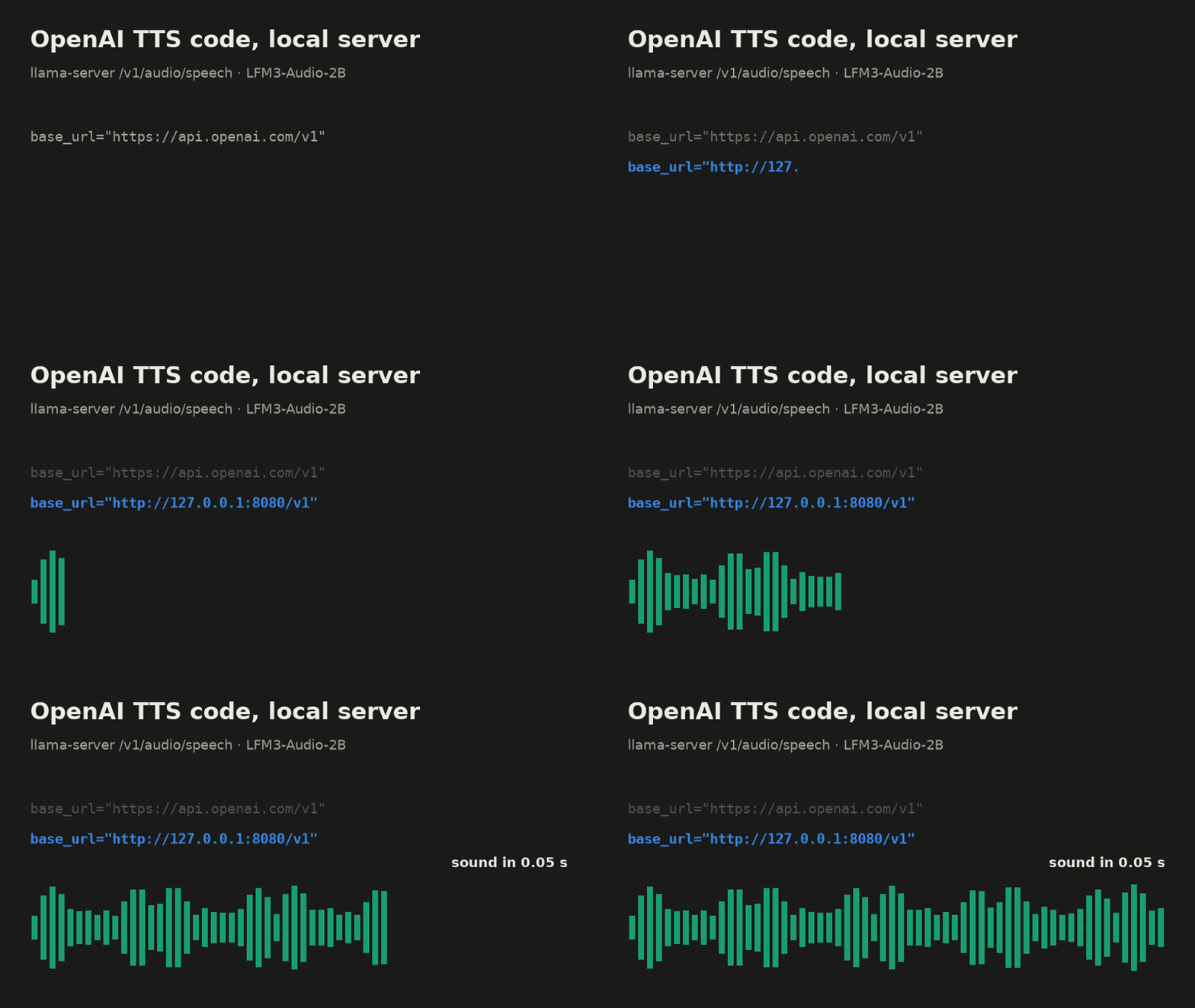
We took the text-to-speech example from OpenAI's documentation, pointed it at a llama-server on our own machine, and ran it. It needed two edits to work correctly: the voice name, and the name of the file it saves. With one more option the first sound arrived 0.05 seconds after the request, and a 6.6-second sentence was fully generated in 0.8 seconds on an A100.
There is one trap the edits do not fix: numbers. The voice read "3:15 PM", "2.1 GB" and "24 kHz" correctly every time, but got "port 8080" right in only 2 of 10 clips. Writing it out as "eighty eighty" fixed it. Inside Korean text the same problem was much worse, and one product name never came out right. That part is further down.
What changed in llama-server
OpenAI's speech API is one HTTP call: you send text, a model name and a voice name to /v1/audio/speech, and you get audio back. The official SDKs wrap that call, so a lot of code in the wild looks the same.
llama-server, the HTTP server that ships with llama.cpp, now answers the same path. If the model you load can produce speech, the SDK call reaches it unchanged. The only question is how much of OpenAI's request it understands. We tested build b12307.
The model we used is LiquidAI's LFM3-Audio-2B in GGUF form, at Q8_0: a 1.85 GB model file plus a 0.30 GB audio projector file. It has two built-in voices, female and male, and no voice cloning, so there is no voice sample to supply.
Start the server
llama-server -m LFM3-Audio-2B-Q8_0.gguf -mm mmproj-LFM3-Audio-2B-Q8_0.gguf \
  -ngl 99 -np 1 -c 4096 --port 8080
-mm loads the audio projector; without it the model cannot speak. We ran on port 18932; the examples on this page use llama-server's default 8080.
On our A100, after one speech request, nvidia-smi showed 3,094 MiB in use on the card with -np 1 -c 4096. With the defaults (four slots and the model's full context) it used 4,680 MiB. Both fit an 8 GB budget.
Step 0: OpenAI's example with only the address changed
from pathlib import Path
from openai import OpenAI

client = OpenAI(base_url="http://127.0.0.1:8080/v1", api_key="sk-no-key-required")

with client.audio.speech.with_streaming_response.create(
    model="gpt-4o-mini-tts",
    voice="alloy",
    input="Today is a wonderful day to build something people love!",
    instructions="Speak in a cheerful and positive tone.",
) as response:
    response.stream_to_file(Path("speech.mp3"))
This is the shape of OpenAI's guide, with base_url and api_key changed (openai-python 2.33.0). llama-server without --api-key accepts any key string.
It failed on the first call:
openai.BadRequestError: Error code: 400 - {'error': {'code': 400,
  'message': 'unknown voice "alloy", see "voices" in GET /props', ...}}
llama-server does not map OpenAI's voice names onto the model's voices. alloy, nova and the rest mean nothing to LFM3-Audio. The error tells you where to look: GET /props lists the voices the loaded model has.
Step 1: a real voice, and a file that is not an MP3
Changing voice="alloy" to voice="female" made the call succeed. It wrote speech.mp3. The file starts with RIFF: it is a WAV file, 16-bit, 24 kHz, mono, 3.68 seconds long.
That happens because the SDK only sends response_format when you set it, OpenAI's server defaults to MP3, and llama-server defaults to WAV. Most players open it anyway, since they look at the header and not the extension. Code that hands the file to an MP3 decoder, or uploads it with an MP3 content type, will not. The smallest fix is to name the file for what it is:
with client.audio.speech.with_streaming_response.create(
    model="gpt-4o-mini-tts",                                # ignored by llama-server
    voice="female",                                          # edit 1: a voice the model has
    input="Today is a wonderful day to build something people love!",
    instructions="Speak in a cheerful and positive tone.",  # accepted, ignored
) as response:
    response.stream_to_file(Path("speech.wav"))              # edit 2: it is a WAV
That is the whole port for the basic case: two lines. If you would rather not depend on the server's default, also pass response_format="wav"; the server accepts it.
What the server accepts
We sent each OpenAI option on its own and recorded the answer.
| Option | What happened |
|---|---|
response_format="mp3" or "opus" | 400: "Only 'wav' and 'pcm' response_format are supported for speech" |
response_format="pcm" | 200, raw 16-bit samples, content type audio/pcm;rate=24000;encoding=signed-int;bits=16 |
speed=1.25 | 400: "'speed' is not supported for speech" |
speed=1.0 | accepted |
stream_format="sse" | 400: "Only 'audio' stream_format is supported for speech" |
stream_format="audio" | 200, audio sent as it is generated |
model="tts-1", instructions="..." | accepted and ignored |
The last row is the one to watch. The request succeeds, so nothing tells you that the cheerful-tone instruction did nothing. The audio comes back at the model's own rate, 24 kHz for this model; according to the server README, llama-server does not resample it. Requests with the same seed gave byte-identical files, and a different seed gave a different file.
Streaming: same total time, sound 0.75 s sooner
Without stream_format, the server sends nothing until the whole clip is generated. With it, audio leaves as the model produces it. In OpenAI's SDK the option goes through extra_body:
with client.audio.speech.with_streaming_response.create(
    model="tts", voice="female", input=text, response_format="wav",
    extra_body={"stream_format": "audio"},
) as response:
    for chunk in response.iter_bytes():
        player.write(chunk)   # your audio sink
We timed a 20-word English sentence, which came out as 6.64 seconds of audio. Five runs after one warm-up, A100 80GB:
| First audio arrives | Request finished | |
|---|---|---|
without stream_format | 0.79 s | 0.79 s |
stream_format="audio" | 0.05 s | 0.79 s |
The finish times are the median of five runs through the SDK. The first-audio time with streaming is from a separate set of five runs that timed the first byte of audio after the header; those runs finished in 0.80-0.81 s.
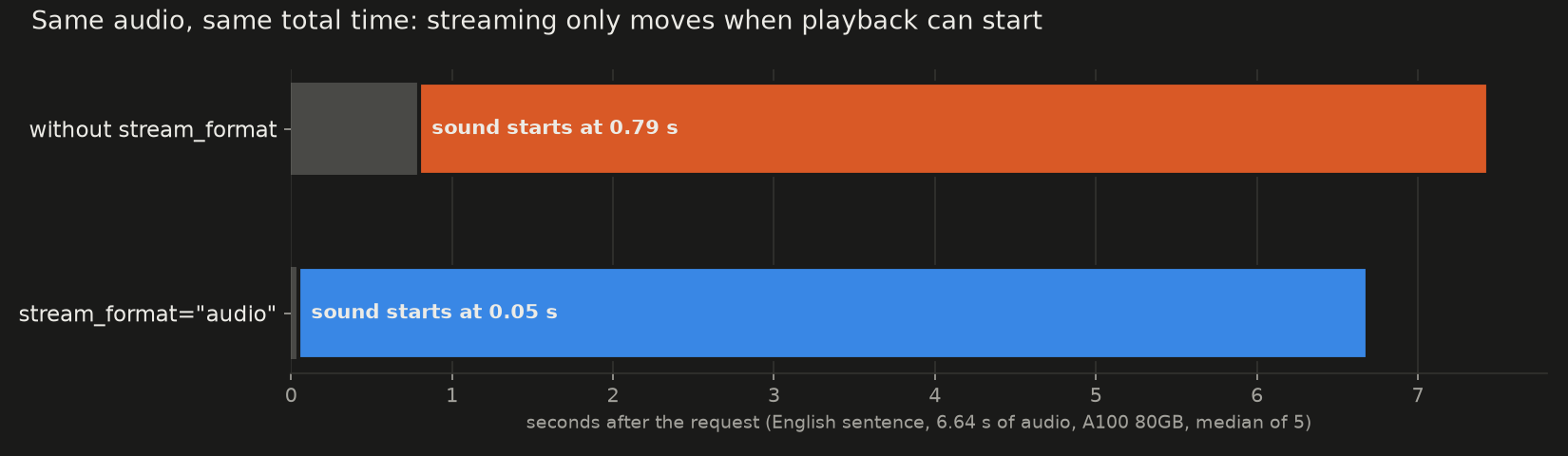
The total time did not change, and neither did the audio: the two files differ only in the 8 bytes of the WAV header that hold the length, which a stream cannot know in advance. Streaming only moves when playback can start.
The first chunk already held audio, not just the header. The stream arrived in 84 chunks in all, about 80 ms of sound each, and at every point in every run the audio received was ahead of the time elapsed, so a player fed directly from the stream would not have run dry. Generation ran at about 8.4 times real time for this sentence on this card.
The Korean sentence behaved the same: 0.80 s total, first audio at 0.04-0.05 s.
Numbers and names: where the voice slips
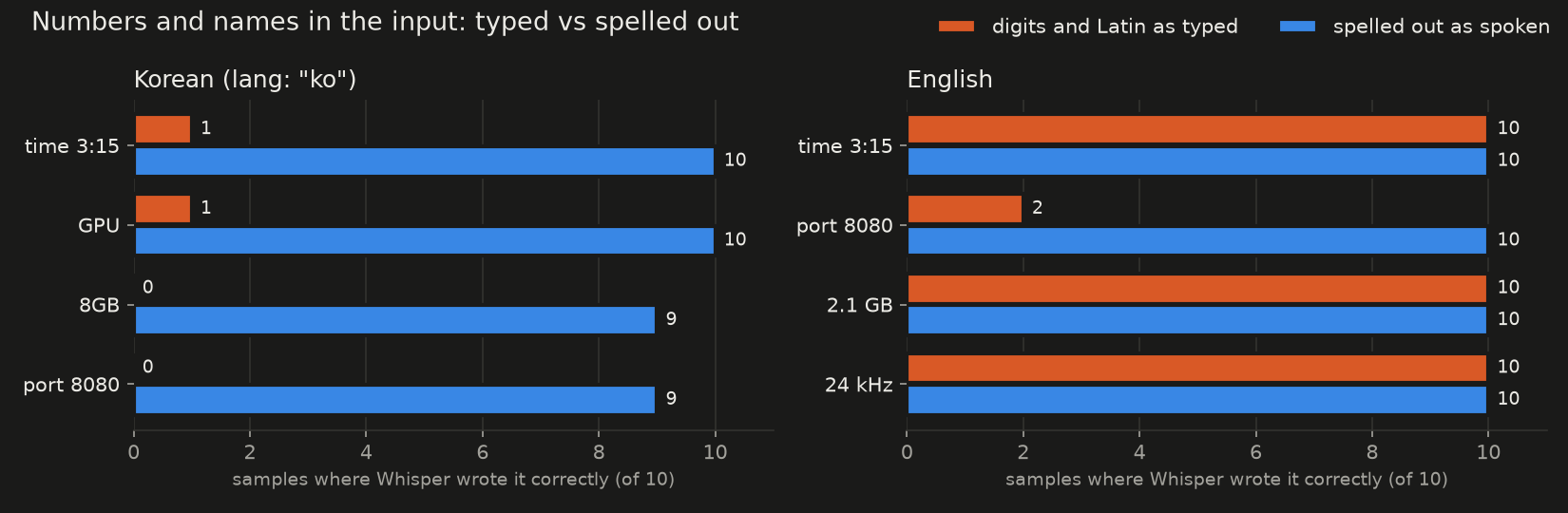
We checked intelligibility by machine. Whisper large-v3 transcribed every clip, two voices and five seeds, so 10 clips per sentence, and we compared its text with what we sent. A plain English sentence and a plain Korean one came back with a character error rate of 0 in all 10 clips.
Then we wrote the kind of sentence an app for developers actually sends: "At 3:15 PM we started llama-server on port 8080 with a 2.1 GB model and 24 kHz audio." The time, "2.1 GB" and "24 kHz" came back right in 10 of 10 clips. The port did not. "8080" was right in 2 of 10; the wrong ones included "8880", "808080", "88E" and "80DC", and two had the right digits with an extra sound after them, such as "8080A". Written as "port eighty eighty", it was right in 10 of 10.
So in English, units and short decimals were safe, and a bare string of digits was not. Ports, version numbers and IDs are the text to write out before the call.
Names are harder to check this way. "llama-server" came back as "Lama server" in all 20 English clips, typed and spelled out. That is how "llama" is said, so the transcript cannot show whether the name sounded right. Inside Korean text the trouble was plain. We sent "오후 3시 15분에 GPU 8GB 카드에서 llama.cpp 서버를 8080번 포트로 띄웠습니다" (at 3:15 PM we started a llama.cpp server on port 8080 on a GPU 8GB card) with extra_body={"lang": "ko"}. Whisper got the time right in 1 clip of 10, "GPU" in 1, and "8GB" and "8080" in none. Writing the sentence out the way it is spoken in Korean brought those to 10, 10, 9 and 9. "llama.cpp" stayed wrong in all 10 clips both ways, even written out as 라마 쩜 씨쁠쁠; it came back as, for example, "라마출시++" and "라마쯔 10++".
If your app speaks text it did not write (chat replies, notifications, file names), put a step in front of the speech call that writes out digit strings. For product names, listen once to each name your app will say. The ones that come out wrong need a different spelling, or a sentence that avoids saying them.
Licence
LFM3-Audio-2B is released under LiquidAI's LFM Open License v1.0. It allows commercial use for organisations under 10 million US dollars in annual revenue; above that, commercial use is not licensed. Read the licence file that ships with the model before you build on it.
Before you switch
- Read the voice names from
GET /propsand map your OpenAI voices onto them. - Save the file as
.wav, or passresponse_format="wav", and check any code that expects MP3. - Pass
stream_format="audio"throughextra_bodyif anything waits for the first sound. - Write out ports, versions and other digit strings before the speech call.
- Listen once to every product name your app says.
If you want the next local-model measurement in your inbox, the newsletter form is just below.