On-Device GPT-4o Has Arrived? A Deep Dive into MiniCPM-o 4.5
OpenBMB's MiniCPM-o 4.5 achieves GPT-4o-level vision performance with just 9B parameters, running on only 11GB VRAM with Int4 quantization. A deep analysis of the architecture, benchmarks, and practical deployment guide.
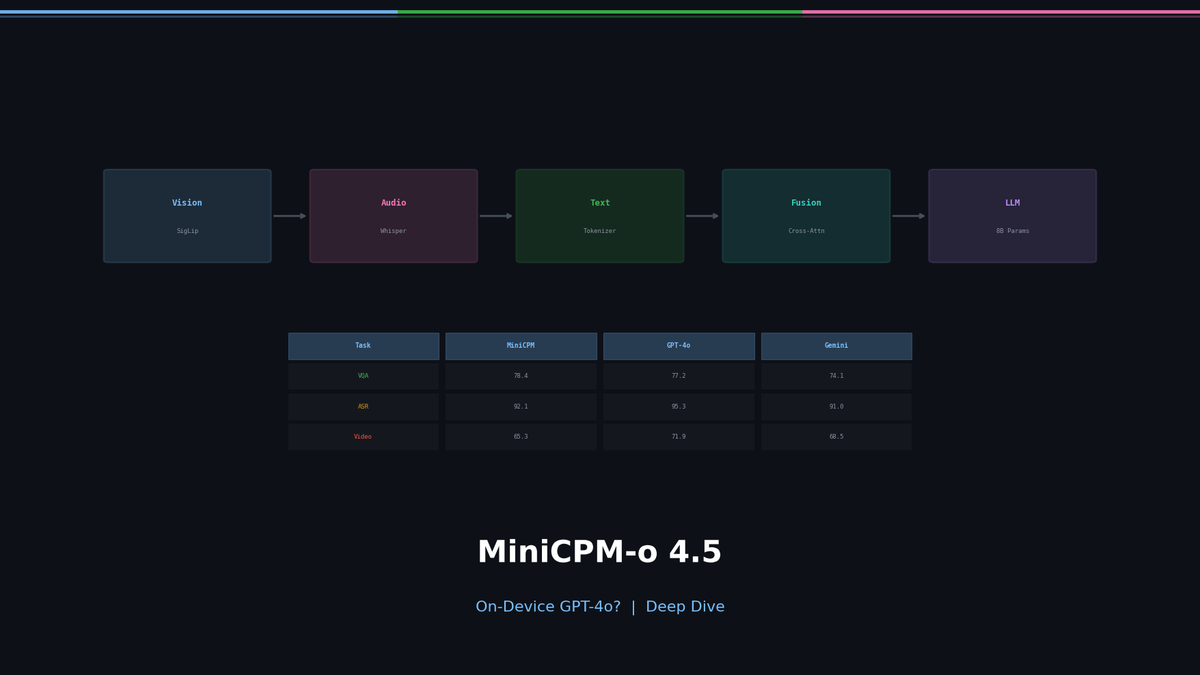
On-Device GPT-4o Has Arrived? A Deep Dive into MiniCPM-o 4.5
When using AI models, we always face trade-offs. Want performance? You need massive GPU clusters. Want on-device? Sacrifice performance. But recently, a model has appeared that breaks this formula entirely.
MiniCPM-o 4.5 from OpenBMB achieves GPT-4o-level vision performance with just 9B parameters, while running on only 11GB VRAM with Int4 quantization. It processes text, images, and speech in a single model — a true Omni model.
In this article, we go beyond a simple introduction. We'll explore why MiniCPM-o's architecture is so efficient, what those benchmark numbers actually mean in practice, and how you can leverage it in your own projects.
The Current State of Multimodal AI: Why Omni Models?
Let's step back and look at the big picture.
Until 2023, AI models were mostly single-modality specialists. GPT for text, CLIP for images, Whisper for speech. We combined them to build multimodal systems, but information loss between modules was inevitable.
GPT-4o changed this paradigm in 2024. By processing text, images, and speech end-to-end in a single model, conversations became natural and response speeds improved dramatically.
The problem? GPT-4o is closed-source, and API costs add up quickly.
MiniCPM-o bridges this gap. Released under the Apache 2.0 license, anyone can fine-tune and deploy it on their own hardware.
Architecture: How a Small Model Beats Larger Ones
Understanding MiniCPM-o 4.5's architecture explains why 9B parameters deliver this level of performance.
The key insight: "Place the optimal specialist for each modality, then unify them through a single language model."
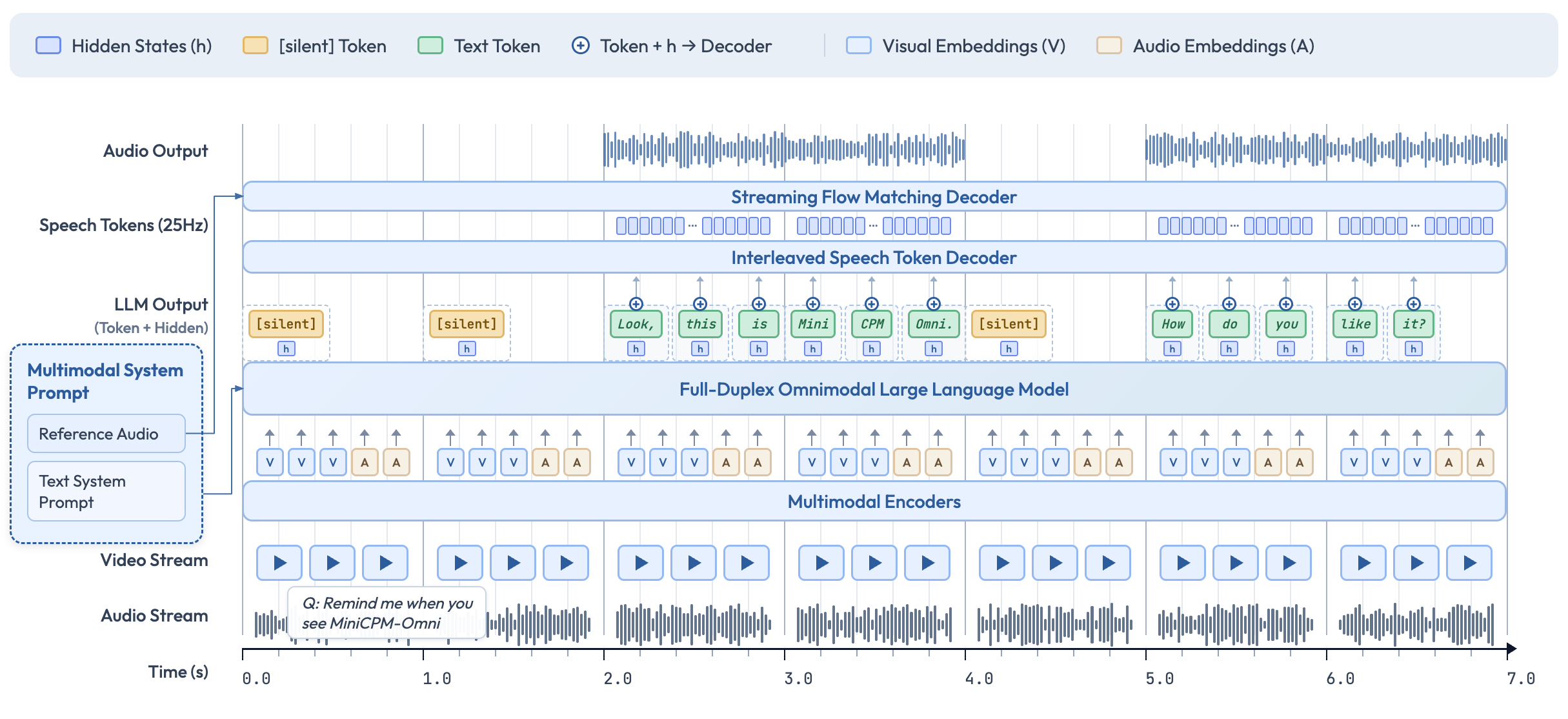
| Role | Model | Why This Choice? |
|---|---|---|
| Vision | SigLip2 | Up to 1.8M pixel high-res processing. Strong at OCR |
| Speech Recognition | Whisper-medium | The de facto standard for multilingual ASR |
| Speech Synthesis | CosyVoice2 | Voice cloning, emotion control support |
| Language | Qwen3-8B | 30+ language support, powerful reasoning |
The choice of Qwen3-8B is particularly notable. Among 8B-class language models, Qwen3 excels at reasoning and supports both instruct and thinking modes in a single model. MiniCPM-o leverages both modes.
Benchmarks: The Story Behind the Numbers
Listing benchmark numbers alone is meaningless. Let's unpack what each score actually means in practice.
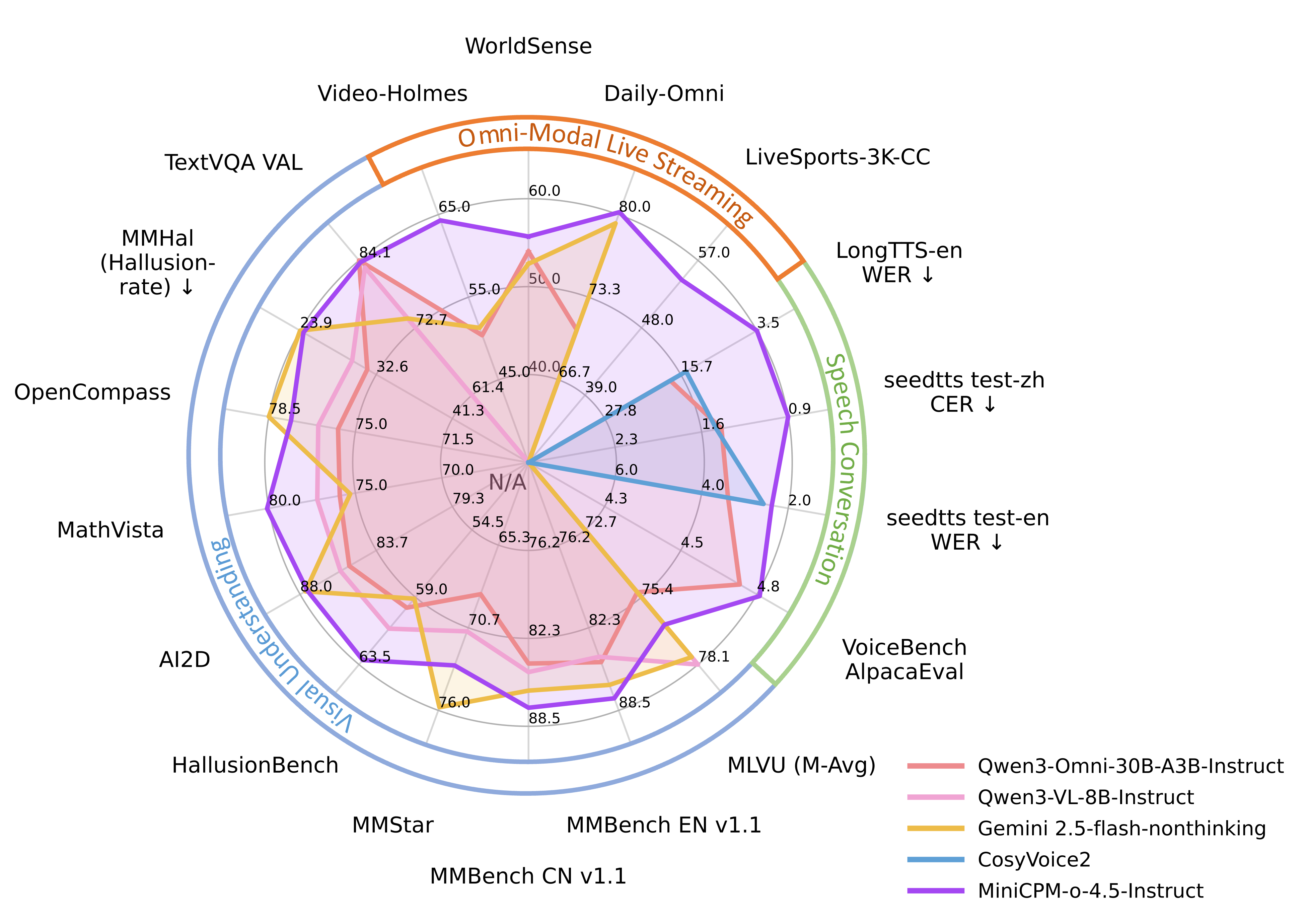
Vision Understanding
| Benchmark | MiniCPM-o 4.5 | Gemini 2.5 Flash | What It Means |
|---|---|---|---|
| OpenCompass avg | 77.6 | 78.5 | Comprehensive visual understanding. A 0.9-point gap is effectively the same tier |
| MMBench EN | 87.6 | 85.8 | Everyday image understanding. MiniCPM-o leads |
| MathVista | 80.1 | 75.3 | Mathematical visual reasoning. A 5-point gap is significant |
| OCRBench | 876 | - | Text recognition accuracy in documents |
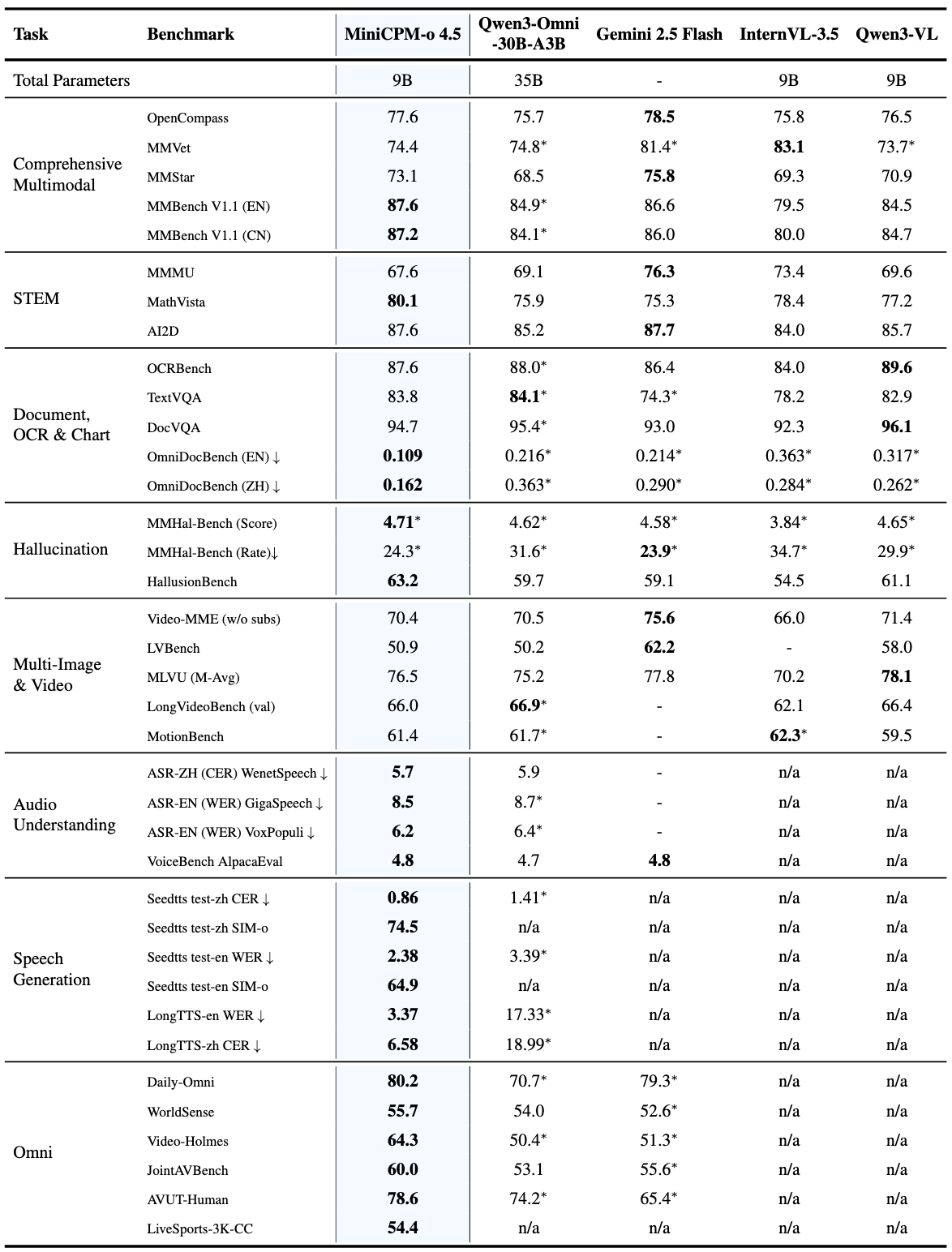
OpenCompass 77.6 might not mean much to you. Think of it this way: it surpasses GPT-4o and sits within 1 point of Google's latest model. With a fraction of the parameters.
OCR: This Is Where It Gets Shocking
Look at the OmniDocBench document parsing results (edit distance, lower is better):
| Model | Score |
|---|---|
| MiniCPM-o 4.5 | 0.109 |
| DeepSeek-OCR 2 | 0.119 |
| Gemini-3 Flash | 0.155 |
| GPT-5 | 0.218 |
A 9B model parses documents 2x more accurately than GPT-5. This is the power of architecture. SigLip2's high-resolution processing (up to 1.8M pixels) catches even the smallest text in documents.
What this means in practice: you can process contracts, receipts, and academic papers locally. No need to send sensitive documents to external APIs.
Inference Speed: The Heart of On-Device
| Metric | MiniCPM-o (BF16) | MiniCPM-o (Int4) | Qwen3-Omni-30B (Int4) |
|---|---|---|---|
| Decoding Speed | 154.3 tok/s | 212.3 tok/s | 147.8 tok/s |
| Time to First Token | 0.6s | 0.6s | 1.0s |
| GPU Memory | 19.0 GB | 11.0 GB | 20.3 GB |
With Int4 quantization, it hits 212 tokens/s. Faster than Qwen3-Omni-30B, which is 3x larger. 11GB VRAM means you can run this on an RTX 3060 or RTX 4060.
TTFT (Time to First Token) of 0.6 seconds is essential for real-time conversational AI. The threshold where users stop feeling like they're "waiting" is right around 1 second.
Speech: Beyond Simple STT
MiniCPM-o's speech capabilities go far beyond "converting speech to text":
- Real-time bidirectional voice conversation (Full-Duplex)
- Voice cloning: replicate a specific voice from reference audio
- Emotion control: adjust tone for joy, sadness, surprise, etc.
- Long TTS: English WER 3.37% (vs CosyVoice2's 14.80%)
- Simultaneous video + audio streaming input/output
Full-Duplex means the user can interrupt while the model is speaking. Natural conversation, just like a phone call.
Practical Guide: Up and Running in 30 Minutes
Step 1: Installation
# Basic (vision + text)
pip install "transformers==4.51.0" accelerate "torch>=2.3.0,<=2.8.0" "torchaudio<=2.8.0" "minicpmo-utils>=1.0.2"

# Including speech
pip install "transformers==4.51.0" accelerate "torch>=2.3.0,<=2.8.0" "torchaudio<=2.8.0" "minicpmo-utils[all]>=1.0.2"
Step 2: Image Understanding Test
from transformers import AutoModel, AutoTokenizer
from PIL import Image

model = AutoModel.from_pretrained('openbmb/MiniCPM-o-4_5', trust_remote_code=True, torch_dtype='auto')
model = model.eval().cuda()
tokenizer = AutoTokenizer.from_pretrained('openbmb/MiniCPM-o-4_5', trust_remote_code=True)

image = Image.open('your_image.jpg').convert('RGB')
question = 'Describe this image in detail.'

msgs = [{'role': 'user', 'content': [image, question]}]
answer = model.chat(msgs=msgs, tokenizer=tokenizer)
print(answer)
Step 3: Resource-Constrained Environments
# Easy with Ollama (CPU capable)
ollama run minicpm-o

# Or GGUF quantized version via llama.cpp
# Runs on iOS/iPad too
Step 4: Production Deployment
# High-throughput serving with vLLM
python -m vllm.entrypoints.openai.api_server \
    --model openbmb/MiniCPM-o-4_5 \
    --trust-remote-code
MiniCPM-V Cookbook: A Treasure Trove for Practical Use
The MiniCPM-V CookBook on GitHub lets you go from idea to implementation immediately:
Inference Recipes
- Multi-image comparison analysis
- Video understanding and summarization (up to 10fps)
- PDF/webpage document parsing
- Visual grounding (locating specific objects in images)
- Voice cloning and TTS
Fine-tuning
- Custom data training with LLaMA-Factory
- Parameter-efficient tuning with SWIFT
- LoRA/QLoRA support
Deployment
- vLLM/SGLang: GPU serving
- llama.cpp: CPU inference on PC, iPhone, iPad
- Gradio + WebRTC: Real-time streaming web demo
Real-World Use Cases
Areas where MiniCPM-o particularly shines:
- Enterprise document automation: Parse contracts, receipts, and reports locally. No sensitive data leaves your network
- Real-time translation device: 11GB VRAM is enough. Bidirectional real-time translation on edge devices
- Visual assistance: Analyze camera feeds in real-time and describe scenes via speech
- Educational AI tutor: Student shows a photo of a problem, the model explains the solution via voice
- Industrial inspection: Take a photo of a product, instantly determine defect status
Limitations and Honest Assessment
Every model has limitations:
- Optimized for English/Chinese speech. Other languages still limited for voice
- May fall behind GPT-4o on complex multi-turn reasoning
- Full-Duplex streaming is still experimental
- Vision performance approaches Gemini 2.5 Flash but hasn't fully surpassed it
But remember — this is open-source and only 9B parameters. With fine-tuning, you can achieve even better performance on specific domains.
Conclusion
MiniCPM-o 4.5 shatters the assumption that "small models mean low performance."
9B parameters, 11GB VRAM, Apache 2.0 license. The possibilities from this combination are endless. The era of running GPT-4o-class multimodal AI on your laptop, smartphone, or Raspberry Pi has arrived.
Get started now.
Links
- HuggingFace: openbmb/MiniCPM-o-4_5
- GitHub: OpenBMB/MiniCPM-o
- Cookbook: MiniCPM-V CookBook
- License: Apache 2.0