Qwen 3.5 Local Installation & Setup Guide — From Ollama to vLLM
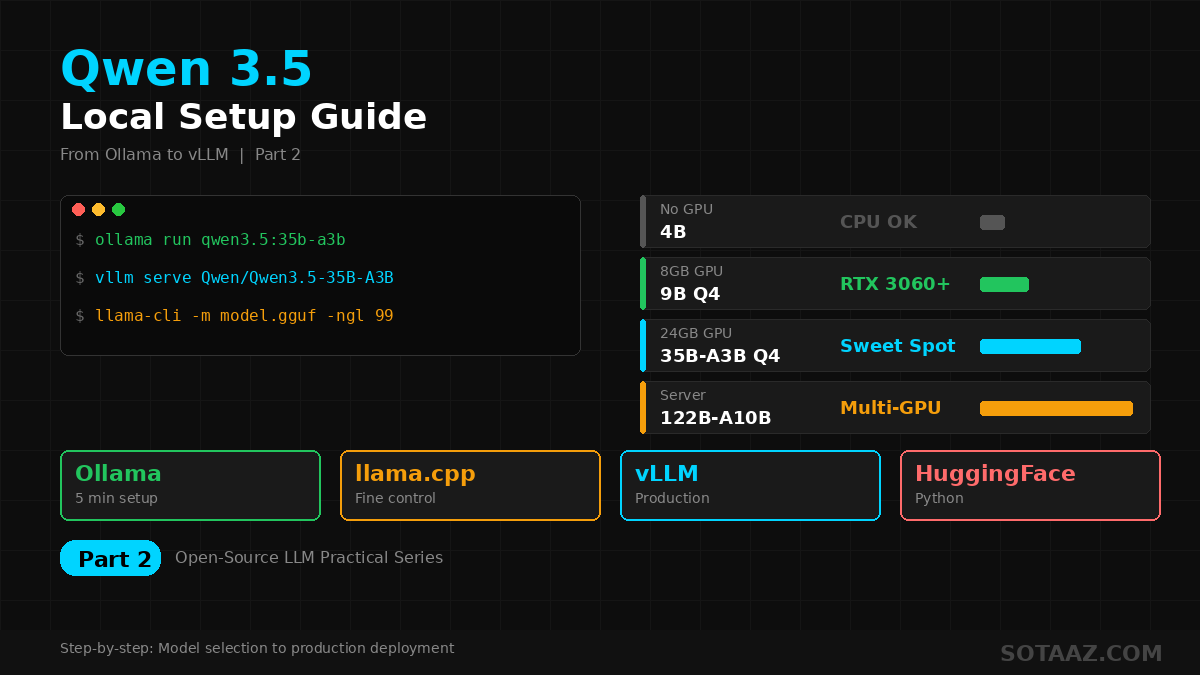
Step-by-step guide to running Qwen 3.5 locally. From 5-minute Ollama setup to production vLLM servers, plus optimal model size selection per GPU.
Qwen 3.5 Local Installation & Setup Guide — From Ollama to vLLM
In the previous post, we compared Qwen 3.5 and DeepSeek V3.2. Now let's get Qwen 3.5 running locally on your machine, step by step.
From a 5-minute Ollama setup to a production-grade vLLM API server, plus optimal model size selection per GPU — this guide covers everything.
1. Which Size Should You Pick?
Qwen 3.5 comes in 8 sizes. Matching the right model to your GPU is step one.
| Model | Type | VRAM (Q4_K_M) | Recommended GPU | Performance Level |
|---|---|---|---|---|
| 0.8B | Dense | ~500MB | CPU / Any device | Simple text tasks |
| 2B | Dense | ~1.5GB | Any GPU | Light chatbot |
| 4B | Dense | ~2.5GB | GTX 1660+ | GPT-3.5 level |
| 9B | Dense | ~5GB | RTX 3060 (8GB+) | Practical minimum |
| 27B | Dense | ~17GB | RTX 4090 (24GB) | Approaching GPT-4 |
| 35B-A3B | MoE | ~20GB | RTX 4090 (24GB) | Best value |
| 122B-A10B | MoE | GPU + 256GB RAM | GPU + CPU offload | Sonnet 4.5 level |
| 397B-A17B | MoE | ~214GB | Server-grade | Flagship |
Recommendations:
- No GPU → 4B (runs on CPU)
- 8GB GPU → 9B Q4
- 24GB GPU → 35B-A3B Q4_K_M (sweet spot)
- Server/Multi-GPU → 122B-A10B
Why 35B-A3B is the sweet spot: total parameters are 35B but only 3B are active per token, making inference fast while outperforming the 27B dense model.
2. Method 1: Ollama — 5-Minute Setup
The easiest approach. Ollama is an all-in-one tool for running local LLMs.
2-1. Install Ollama
Linux/WSL:
curl -fsSL https://ollama.com/install.sh | shmacOS:
brew install ollamaWindows:
Download the installer from ollama.com.
Verify installation:
ollama --version2-2. Download & Run Qwen 3.5
# 9B model (recommended for 8GB GPU)
ollama run qwen3.5:9b

# 35B MoE model (recommended for 24GB GPU, sweet spot)
ollama run qwen3.5:35b-a3b

# 4B model (lightweight)
ollama run qwen3.5:4b

# 0.8B model (CPU-only OK)
ollama run qwen3.5:0.8b
The first run downloads the model. ~5GB for 9B Q4, ~20GB for 35B-A3B Q4.
2-3. Basic Usage
You can chat immediately after launch:
>>> Write a Python function that generates Fibonacci numbersType /bye to exit.
2-4. Using as an API Server
Ollama automatically provides a REST API:
# Load model in background
ollama serve &

# API call
curl http://localhost:11434/api/generate -d '{
  "model": "qwen3.5:9b",
  "prompt": "Write a REST API server in Python",
  "stream": false
}'
OpenAI-compatible API is also supported:
curl http://localhost:11434/v1/chat/completions -d '{
  "model": "qwen3.5:9b",
  "messages": [{"role": "user", "content": "Hello!"}]
}'
This means existing code using the OpenAI SDK can switch to a local model by just changing the endpoint.
3. Method 2: llama.cpp + GGUF for Fine-Grained Control
When you need more control than Ollama provides, use llama.cpp directly.
3-1. Install llama.cpp
git clone https://github.com/ggerganov/llama.cpp
cd llama.cpp
cmake -B build -DGGML_CUDA=ON
cmake --build build --config Release -j
CPU-only (no CUDA):
cmake -B build
cmake --build build --config Release -j
3-2. Download GGUF Models
Download GGUF files from HuggingFace:
# Install huggingface-cli
pip install huggingface_hub

# Download 35B-A3B Q4_K_M (sweet spot)
huggingface-cli download bartowski/Qwen_Qwen3.5-35B-A3B-GGUF \
  --include "Qwen3.5-35B-A3B-Q4_K_M.gguf" \
  --local-dir ./models
Key quantization options:
| Quantization | Size (35B-A3B) | Quality | Use Case |
|---|---|---|---|
| Q2_K | ~8GB | Low | Extreme VRAM savings |
| Q4_K_M | ~20GB | Recommended | Best quality/size balance |
| Q6_K | ~28GB | High | When VRAM is available |
| Q8_0 | ~35GB | Very high | Near-original quality |
3-3. Run
./build/bin/llama-cli \
  -m ./models/Qwen3.5-35B-A3B-Q4_K_M.gguf \
  -c 8192 \
  -ngl 99 \
  --temp 0.7 \
  -p "You are a helpful assistant."
Key options:
-c 8192: Context length (tokens)-ngl 99: Layers on GPU (99 = all)--temp 0.7: Temperature (creativity control)-t 8: CPU threads (for CPU usage)
3-4. llama.cpp API Server
./build/bin/llama-server \
  -m ./models/Qwen3.5-35B-A3B-Q4_K_M.gguf \
  -c 8192 \
  -ngl 99 \
  --host 0.0.0.0 \
  --port 8080
Now you can use the OpenAI-compatible API at http://localhost:8080.
4. Method 3: vLLM for Production API Servers
For multi-user API servers with concurrent requests, vLLM is the optimal choice.
4-1. Install vLLM
pip install vllm4-2. Launch Qwen 3.5 Server
vllm serve Qwen/Qwen3.5-35B-A3B \
  --dtype auto \
  --max-model-len 32768 \
  --tensor-parallel-size 1 \
  --gpu-memory-utilization 0.9
Multi-GPU:
vllm serve Qwen/Qwen3.5-122B-A10B \
  --dtype auto \
  --max-model-len 32768 \
  --tensor-parallel-size 2 \
  --gpu-memory-utilization 0.9
4-3. API Calls
vLLM provides an OpenAI-compatible API automatically:
from openai import OpenAI

client = OpenAI(
    base_url="http://localhost:8000/v1",
    api_key="not-needed"
)

response = client.chat.completions.create(
    model="Qwen/Qwen3.5-35B-A3B",
    messages=[
        {"role": "system", "content": "You are a helpful assistant."},
        {"role": "user", "content": "Explain quantum computing in simple terms."}
    ],
    temperature=0.7,
    max_tokens=1024
)

print(response.choices[0].message.content)
vLLM vs Ollama
| Feature | Ollama | vLLM |
|---|---|---|
| Setup difficulty | Very easy | Moderate |
| Use case | Personal use, dev | Production API |
| Concurrent requests | Limited | Excellent (continuous batching) |
| Throughput | Moderate | High (PagedAttention) |
| Quantization | GGUF auto | FP16, AWQ, GPTQ |
| Recommended for | Quick start | Service deployment |
5. Method 4: HuggingFace Transformers (Python)
For direct model loading in Python code:
from transformers import AutoModelForCausalLM, AutoTokenizer
import torch

model_name = "Qwen/Qwen3.5-9B"

tokenizer = AutoTokenizer.from_pretrained(model_name)
model = AutoModelForCausalLM.from_pretrained(
    model_name,
    torch_dtype=torch.bfloat16,
    device_map="auto"
)

messages = [
    {"role": "system", "content": "You are a helpful assistant."},
    {"role": "user", "content": "Write a web scraper in Python"}
]

text = tokenizer.apply_chat_template(messages, tokenize=False, add_generation_prompt=True)
inputs = tokenizer(text, return_tensors="pt").to(model.device)

outputs = model.generate(
    **inputs,
    max_new_tokens=1024,
    temperature=0.7,
    do_sample=True
)

response = tokenizer.decode(outputs[0][inputs.input_ids.shape[-1]:], skip_special_tokens=True)
print(response)
Using GPTQ quantized model:
model = AutoModelForCausalLM.from_pretrained(
    "Qwen/Qwen3.5-35B-A3B-GPTQ-Int4",
    torch_dtype=torch.bfloat16,
    device_map="auto"
)
6. Using Thinking Mode
One of Qwen 3.5's special features is Thinking Mode — step-by-step reasoning for complex problems.
Thinking Mode in Ollama
ollama run qwen3.5:9b
>>> /set parameter num_ctx 32768
>>> Think step by step: Solve this math problem.
>>> Find the sum of natural numbers from 1 to 100 that are multiples of 3 but not multiples of 5.
Thinking Mode in Python
messages = [
    {"role": "system", "content": "You are a helpful assistant. Think step by step before answering."},
    {"role": "user", "content": "Prove that the square root of 2 is irrational."}
]

text = tokenizer.apply_chat_template(
    messages,
    tokenize=False,
    add_generation_prompt=True,
    enable_thinking=True  # Enable thinking mode
)
When thinking mode is on, reasoning appears inside <think>...</think> tags, followed by the final answer. Accuracy improves significantly for math, coding, and logic problems.
7. Multimodal Usage (Image/Video)
Qwen 3.5 is natively multimodal — it can understand images and videos directly.
Image Analysis in Python
from transformers import AutoProcessor, AutoModelForCausalLM
import torch

model_name = "Qwen/Qwen3.5-9B"
processor = AutoProcessor.from_pretrained(model_name)
model = AutoModelForCausalLM.from_pretrained(
    model_name,
    torch_dtype=torch.bfloat16,
    device_map="auto"
)

messages = [
    {
        "role": "user",
        "content": [
            {"type": "image", "url": "https://example.com/chart.png"},
            {"type": "text", "text": "Analyze this chart. What are the key trends?"}
        ]
    }
]

inputs = processor.apply_chat_template(messages, return_tensors="pt").to(model.device)
outputs = model.generate(**inputs, max_new_tokens=1024)
print(processor.decode(outputs[0], skip_special_tokens=True))
8. Performance Optimization Tips
GPU Memory Savings
# Ollama: reduce context
ollama run qwen3.5:35b-a3b
>>> /set parameter num_ctx 4096

# llama.cpp: enable Flash Attention
./build/bin/llama-cli -m model.gguf -c 8192 -ngl 99 -fa
CPU Offloading (When VRAM Is Insufficient)
Load only some layers on GPU with llama.cpp:
# Only 40 layers on GPU (rest on CPU)
./build/bin/llama-cli -m model.gguf -c 4096 -ngl 40
KV Cache Quantization
For long contexts, KV cache consumes significant memory:
# llama.cpp: quantize KV cache to Q8
./build/bin/llama-cli -m model.gguf -c 32768 -ngl 99 -ctk q8_0 -ctv q8_0
9. Troubleshooting
"CUDA out of memory"
- Lower quantization level (Q4_K_M → Q2_K)
- Reduce context length (-c 8192 → -c 4096)
- Lower
-nglto offload some layers to CPU
Ollama Model Running Slow
- Check loaded models with
ollama ps - Unload unused models with
ollama stop <model> - Verify NVIDIA GPU drivers are up to date
vLLM Server Won't Start
- Lower
--gpu-memory-utilizationto 0.8 - Reduce
--max-model-len - Check PyTorch CUDA version matches GPU driver
Conclusion
Running Qwen 3.5 locally is easier than you think:
- Quick start: Ollama →
ollama run qwen3.5:9b— one line - Fine control: llama.cpp + GGUF for quantization, context, layer placement tuning
- Production: vLLM for concurrent request handling API servers
- Code integration: HuggingFace Transformers for direct Python embedding
With a single 24GB GPU, the 35B-A3B model delivers commercial-grade performance locally, for free.
Next up: fine-tuning this model with your own data.
This post is Part 2 of the Open-Source LLM Practical Series.
- Part 1: Qwen 3.5 vs DeepSeek V3.2 Comparison
- Part 2: Qwen 3.5 Local Installation & Setup Tutorial (this post)
- Part 3: Qwen 3.5 Fine-Tuning Practical Guide
Want to run GPTQ, AWQ, GGUF and QLoRA yourself instead of reading our numbers? That is LLM Quantization and Compression — 24 lectures, first 3 free.
Subscribe to Newsletter
Related Posts
llama.cpp KV Cache Quantization: Why q8_0 Costs 9% of Throughput — or 22%
Mainline llama.cpp on one A100, Qwen3-8B Q4_K_M, llama-server with 1 to 32 concurrent slots. On a 32K prompt, q8_0 cost 9% of server throughput when each request generated 128 tokens and 22% when it generated 1,024, because prefill dominates the short case and prefill is unaffected by the KV type. Per-token decode was 34% slower, matching llama-bench. VRAM in use after startup fell from 41.0 GiB to 25.1 GiB at four 64K slots.
llama.cpp KV Cache Quantization, Measured on One A100 — q8_0 Is Free at 4K and Costs Half Your Decode Speed at 64K
Mainline llama.cpp, Qwen3-8B, one A100: -ctk q8_0 -ctv q8_0 matches f16 perplexity and cuts the 32K cache by 2.1 GiB, but decode at 64K depth drops to 55% of f16 (q4_0: 50%). Two other settings, q5_1 and a q8_0/q4_0 mix, silently ran prefill on the CPU at 43 and 63 tokens per second.
Paper of the Week #3 — Half the FLOPs Is Not Half the Time
One integer halves a fine-grained MoE's expert compute (arXiv 2609.04575) and its Table 5 replicates on one A100 to within a point. The paper never reports time, so I measured it: nothing in HF transformers, nothing at batch 1 in the vLLM you run today, 1.35x at batch 8. Plus the OLMoE control and the iso-cost harness control promised in issue #2.