Qwen 3.5 Fine-Tuning Practical Guide — Build Your Own Model with LoRA
Complete guide to fine-tuning Qwen 3.5 with LoRA/QLoRA. From 8GB GPU QLoRA setup to Unsloth optimization, GGUF conversion, and Ollama deployment.
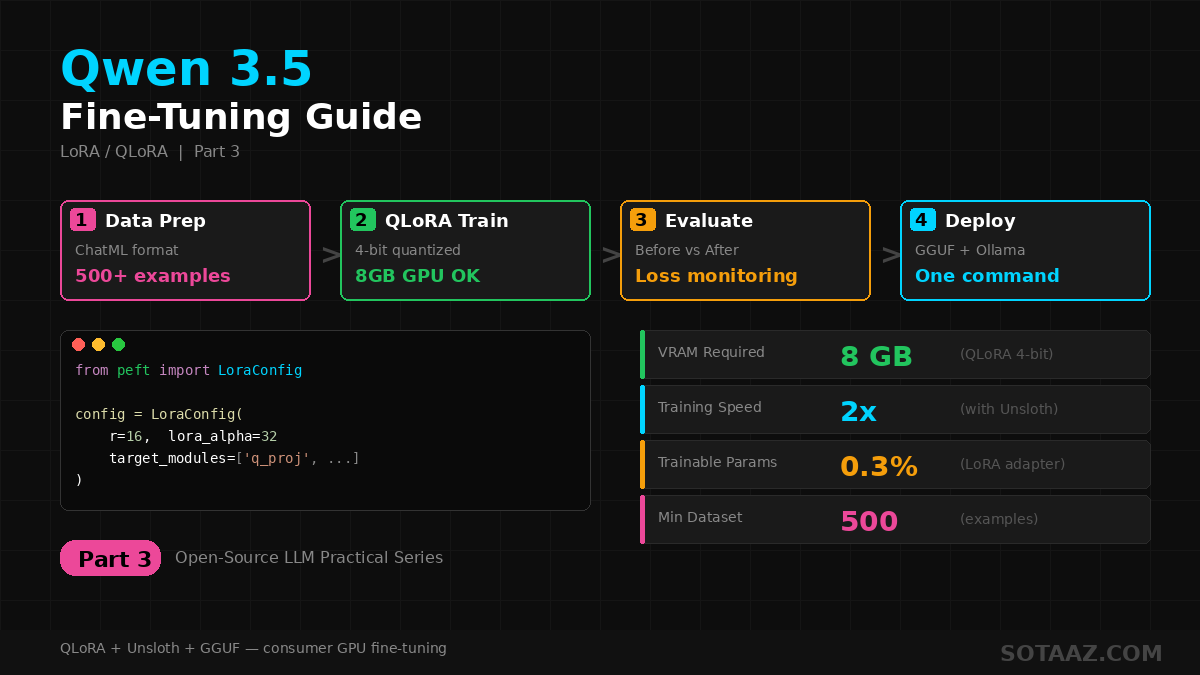
Qwen 3.5 Fine-Tuning Practical Guide — Build Your Own Model with LoRA
In the previous post, we covered installing and running Qwen 3.5 locally. Now let's go one step further: fine-tuning the model with your own data.
With LoRA/QLoRA, you can fine-tune Qwen 3.5 on consumer GPUs. This guide covers the entire process from data preparation to training, evaluation, and deployment.
1. Why Fine-Tune?
Qwen 3.5 is a general-purpose model. It handles most tasks well, but fine-tuning is needed when:
- Domain expertise: Medical, legal, financial — when specialized terminology and knowledge are required
- Consistent output format: JSON, specific templates, or structured responses
- Brand tone/style: Matching your service's voice and personality
- Language improvement: Boosting quality for specific languages
- Cost reduction: Fine-tuning a smaller model to match larger model performance
Full Fine-Tuning vs LoRA
| Method | VRAM Required | Speed | Quality | Recommended For |
|---|---|---|---|---|
| Full Fine-Tuning | Very high (all params updated) | Slow | Best | Server-grade GPUs |
| LoRA | Moderate | Fast | High | 24GB GPU |
| QLoRA | Low (4-bit quantized) | Fast | Good | 8GB GPU |
This guide focuses on QLoRA — the most practical method for fine-tuning Qwen 3.5 on an 8GB GPU.
2. Recommended Model by Hardware
| GPU VRAM | Model | Method | Est. Time (1K samples) |
|---|---|---|---|
| 8GB | Qwen3.5-4B | QLoRA (4bit) | ~30 min |
| 12GB | Qwen3.5-9B | QLoRA (4bit) | ~45 min |
| 24GB | Qwen3.5-9B | LoRA (bf16) | ~30 min |
| 24GB | Qwen3.5-27B | QLoRA (4bit) | ~2 hours |
| 48GB+ | Qwen3.5-35B-A3B | LoRA (bf16) | ~1 hour |
Sweet spot: 9B + QLoRA + 12GB GPU is the most practical combination.
3. Environment Setup
3-1. Required Packages
pip install torch transformers accelerate
pip install peft trl datasets
pip install bitsandbytes  # For QLoRA quantization
3-2. Install Unsloth (Optional, 2x faster training)
Unsloth is an optimization library that speeds up LoRA training by 2x and saves VRAM.
pip install unsloth4. Data Preparation
Fine-tuning success depends entirely on data quality.
4-1. Data Format
Qwen 3.5 uses the ChatML format:
[
  {
    "messages": [
      {"role": "system", "content": "You are a helpful medical assistant."},
      {"role": "user", "content": "I've had a headache for 3 days. What should I do?"},
      {"role": "assistant", "content": "A headache lasting more than 3 days can have several causes..."}
    ]
  },
  {
    "messages": [
      {"role": "user", "content": "Can I eat grapefruit while taking blood pressure medication?"},
      {"role": "assistant", "content": "Grapefruit can interact with certain blood pressure medications..."}
    ]
  }
]
4-2. Data Quality Checklist
- Minimum 500 examples (1,000–5,000 recommended)
- Verify response lengths fall within a consistent range
- Remove duplicates: Eliminate identical or near-identical examples
- Format consistency: Ensure all examples follow the same structure
- Error check: Verify no incorrect information or grammar errors
4-3. Loading Data
from datasets import load_dataset

# Load from JSON file
dataset = load_dataset("json", data_files="train_data.json", split="train")

# Or load from HuggingFace Hub
# dataset = load_dataset("your-username/your-dataset", split="train")

# Train/validation split
split = dataset.train_test_split(test_size=0.1, seed=42)
train_dataset = split["train"]
eval_dataset = split["test"]

print(f"Train: {len(train_dataset)}, Eval: {len(eval_dataset)}")
5. QLoRA Fine-Tuning (HuggingFace PEFT + TRL)
5-1. Load Model (4-bit Quantized)
import torch
from transformers import AutoModelForCausalLM, AutoTokenizer, BitsAndBytesConfig

model_name = "Qwen/Qwen3.5-9B"

# 4-bit quantization config (QLoRA)
bnb_config = BitsAndBytesConfig(
    load_in_4bit=True,
    bnb_4bit_quant_type="nf4",
    bnb_4bit_compute_dtype=torch.bfloat16,
    bnb_4bit_use_double_quant=True,
)

tokenizer = AutoTokenizer.from_pretrained(model_name)
tokenizer.pad_token = tokenizer.eos_token

model = AutoModelForCausalLM.from_pretrained(
    model_name,
    quantization_config=bnb_config,
    device_map="auto",
    attn_implementation="flash_attention_2",  # Speed boost
)
5-2. LoRA Configuration
from peft import LoraConfig, get_peft_model, prepare_model_for_kbit_training

model = prepare_model_for_kbit_training(model)

lora_config = LoraConfig(
    r=16,                      # LoRA rank (8–64, higher = better quality, more VRAM)
    lora_alpha=32,             # Usually 2x the rank
    target_modules=[           # Qwen 3.5 attention modules
        "q_proj", "k_proj", "v_proj", "o_proj",
        "gate_proj", "up_proj", "down_proj",
    ],
    lora_dropout=0.05,
    bias="none",
    task_type="CAUSAL_LM",
)

model = get_peft_model(model, lora_config)
model.print_trainable_parameters()
# Output example: trainable params: 26M || all params: 9.0B || trainable%: 0.29%
5-3. Training
from trl import SFTTrainer, SFTConfig

training_args = SFTConfig(
    output_dir="./qwen35-finetuned",
    num_train_epochs=3,
    per_device_train_batch_size=2,
    gradient_accumulation_steps=4,   # Effective batch size = 2 × 4 = 8
    learning_rate=2e-4,
    weight_decay=0.01,
    warmup_ratio=0.03,
    lr_scheduler_type="cosine",
    logging_steps=10,
    save_strategy="epoch",
    eval_strategy="epoch",
    bf16=True,
    max_seq_length=2048,
    gradient_checkpointing=True,     # Save VRAM
    report_to="none",
)

trainer = SFTTrainer(
    model=model,
    args=training_args,
    train_dataset=train_dataset,
    eval_dataset=eval_dataset,
    processing_class=tokenizer,
)

trainer.train()
5-4. Save Model
# Save LoRA adapter only (tens of MB)
trainer.save_model("./qwen35-finetuned/final")
tokenizer.save_pretrained("./qwen35-finetuned/final")

# Merge into full model (optional)
from peft import PeftModel

merged_model = model.merge_and_unload()
merged_model.save_pretrained("./qwen35-finetuned/merged")
tokenizer.save_pretrained("./qwen35-finetuned/merged")
6. 2x Faster Training with Unsloth
Unsloth uses custom kernels to speed up LoRA training by up to 2x.
from unsloth import FastLanguageModel

model, tokenizer = FastLanguageModel.from_pretrained(
    model_name="Qwen/Qwen3.5-9B",
    max_seq_length=2048,
    load_in_4bit=True,
)

model = FastLanguageModel.get_peft_model(
    model,
    r=16,
    lora_alpha=32,
    target_modules=[
        "q_proj", "k_proj", "v_proj", "o_proj",
        "gate_proj", "up_proj", "down_proj",
    ],
    lora_dropout=0.05,
)
The rest of the training code is identical to the SFTTrainer setup above. Unsloth applies optimizations internally.
Unsloth vs Standard PEFT
| Feature | Standard PEFT | Unsloth |
|---|---|---|
| Training speed | 1x | ~2x |
| VRAM usage | Baseline | ~40% savings |
| Install | pip install peft | pip install unsloth |
| Compatibility | All models | Major models supported |
7. Testing the Fine-Tuned Model
7-1. Inference Test
from peft import PeftModel
from transformers import AutoModelForCausalLM, AutoTokenizer
import torch

# Load base model + LoRA adapter
base_model = AutoModelForCausalLM.from_pretrained(
    "Qwen/Qwen3.5-9B",
    torch_dtype=torch.bfloat16,
    device_map="auto",
)
model = PeftModel.from_pretrained(base_model, "./qwen35-finetuned/final")
tokenizer = AutoTokenizer.from_pretrained("./qwen35-finetuned/final")

# Test
messages = [
    {"role": "user", "content": "Enter a question relevant to your fine-tuning data"}
]

text = tokenizer.apply_chat_template(messages, tokenize=False, add_generation_prompt=True)
inputs = tokenizer(text, return_tensors="pt").to(model.device)

outputs = model.generate(**inputs, max_new_tokens=512, temperature=0.7, do_sample=True)
response = tokenizer.decode(outputs[0][inputs.input_ids.shape[-1]:], skip_special_tokens=True)
print(response)
7-2. Before/After Comparison
def compare_models(question, base_model, finetuned_model, tokenizer):
    messages = [{"role": "user", "content": question}]
    text = tokenizer.apply_chat_template(messages, tokenize=False, add_generation_prompt=True)
    inputs = tokenizer(text, return_tensors="pt").to(base_model.device)

    # Base model response
    base_out = base_model.generate(**inputs, max_new_tokens=256, temperature=0.7, do_sample=True)
    base_response = tokenizer.decode(base_out[0][inputs.input_ids.shape[-1]:], skip_special_tokens=True)

    # Fine-tuned model response
    ft_out = finetuned_model.generate(**inputs, max_new_tokens=256, temperature=0.7, do_sample=True)
    ft_response = tokenizer.decode(ft_out[0][inputs.input_ids.shape[-1]:], skip_special_tokens=True)

    print("=== Base Model ===")
    print(base_response)
    print("\n=== Fine-tuned Model ===")
    print(ft_response)
8. Convert to GGUF for Ollama
Convert your fine-tuned model to GGUF format to run it in Ollama.
8-1. Convert Merged Model to GGUF
# Install llama.cpp (see Part 2)
cd llama.cpp

# Convert model
python convert_hf_to_gguf.py ./qwen35-finetuned/merged \
  --outfile qwen35-finetuned-q4_k_m.gguf \
  --outtype q4_k_m
8-2. Register with Ollama
# Create Modelfile
cat > Modelfile << 'EOF'
FROM ./qwen35-finetuned-q4_k_m.gguf

TEMPLATE """{{- if .System }}<|im_start|>system
{{ .System }}<|im_end|>
{{ end }}<|im_start|>user
{{ .Prompt }}<|im_end|>
<|im_start|>assistant
"""

PARAMETER temperature 0.7
PARAMETER top_p 0.9
PARAMETER stop "<|im_end|>"
EOF

# Register with Ollama
ollama create my-qwen35 -f Modelfile

# Run
ollama run my-qwen35
Now you can run your fine-tuned model with a single ollama run my-qwen35 command.
9. Practical Tips
Learning Rate
- QLoRA:
2e-4to5e-4is typical - LoRA (bf16):
1e-4to2e-4 - With small datasets (<500), use lower learning rates
LoRA Rank
- r=8: Light tasks (tone/style changes)
- r=16: General recommendation
- r=32–64: Complex domain knowledge
Preventing Overfitting
- Monitor validation loss throughout training
- Stop training when validation loss starts increasing
- Set
lora_dropout=0.05–0.1 - With small datasets, reduce epochs (1–2)
MoE Model (35B-A3B) Fine-Tuning Notes
- MoE models have router layers
- Keep router layers frozen during fine-tuning for stability
- Do NOT include router modules in
target_modules - Use slightly lower learning rates than dense models
10. Troubleshooting
"CUDA out of memory"
- Reduce
per_device_train_batch_sizeto 1 - Increase
gradient_accumulation_stepsto maintain effective batch size - Verify
gradient_checkpointing=Trueis set - Reduce
max_seq_length(2048 → 1024)
Loss Not Decreasing
- Verify data format is correct (ChatML format)
- Check if learning rate is too high or too low
- Check for noisy or low-quality data
Performance Degrades After Fine-Tuning
- Overfitting: Reduce epochs
- Data quality: Re-review your dataset
- Learning rate: Too high a rate destroys existing knowledge
Conclusion
Key takeaways for Qwen 3.5 fine-tuning:
- QLoRA + 9B model: Fine-tune on a 12GB GPU — the most practical setup
- Data is king: 500+ high-quality examples matter more than model size
- Unsloth: 2x training speed, 40% VRAM savings
- GGUF conversion: Run your fine-tuned model in Ollama instantly
Fine-tuning isn't a massive undertaking. With 500 good examples and an 8GB GPU, you can get started.
This post is Part 3 of the Open-Source LLM Practical Series.
- Part 1: Qwen 3.5 vs DeepSeek V3.2 Comparison
- Part 2: Qwen 3.5 Local Installation & Setup Tutorial
- Part 3: Qwen 3.5 Fine-Tuning Practical Guide (this post)
Want to run GPTQ, AWQ, GGUF and QLoRA yourself instead of reading our numbers? That is LLM Quantization and Compression Hands-On — 24 lectures, first 3 free.