Build a ReAct Agent on a Local Model: Qwen3.5 4B Answered All 48, 0.8B at Most 14
A ReAct loop in plain Python against llama-server, two tools, 54 questions about a made-up knowledge base. Qwen3.5 4B, 9B and Qwen3.6 27B answered 46-48 of 48 in both a hand-written text loop and native tool calling; 0.8B got 14 in the text loop and 0 with tool calling. One look-alike company name fooled every model from 4B up.
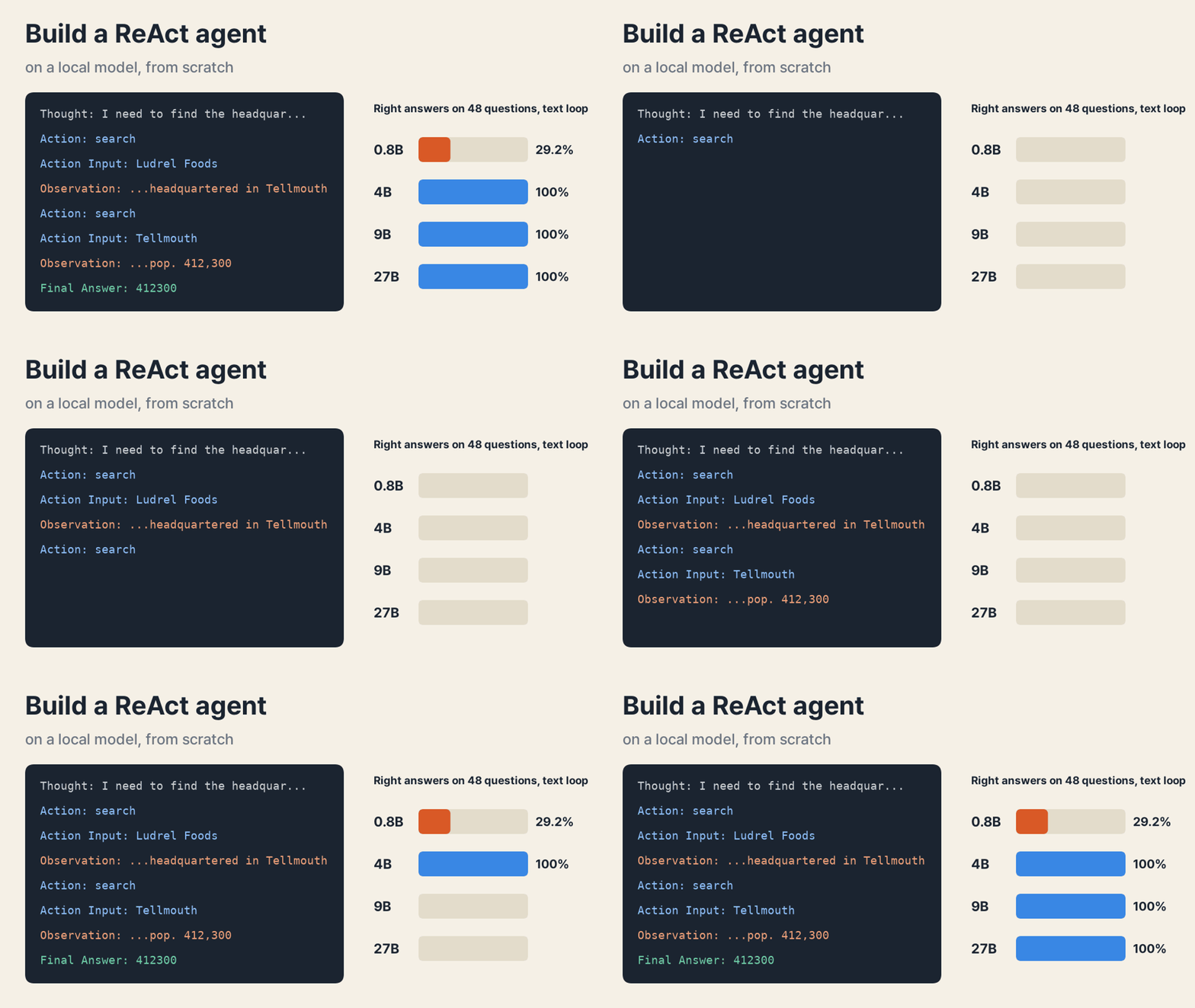
We wrote a ReAct agent in one Python file, pointed it at a local llama-server, and asked it 54 questions about companies and cities that do not exist. Qwen3.5 4B answered all 48 answerable questions, both when it wrote the classic Thought / Action / Observation text and when it used native tool calls. Qwen3.5 0.8B answered 14 of 48 in the text loop and none with tool calls, and the two failures look nothing alike: in one it searched the same city seven times with the answer already on screen, in the other it never searched at all.
The most interesting miss was at the top. Asked about "Astrolume Labs", a company that is not in the knowledge base, every model from 4B to 27B returned the employee count of a different company called "Astrolume".
This post builds the agent step by step, shows the code, follows one question through the loop, and then goes through what each model size did. If you have not met the pattern before, our AI agents intro with ReAct covers the idea with a hosted model; here everything runs on one local GPU.
What a ReAct agent is
A language model on its own can only write text. It cannot look anything up, so for a question like "what is the population of the city where Ludrel Foods is headquartered?" it either knows the answer from training or it guesses.
ReAct (Yao et al., 2022) gives the model a way out: it alternates between reasoning and acting. The model writes a short thought, then names a tool and its input. Our program, the harness, runs that tool and pastes the result back as an observation. The model reads it and decides the next step, until it writes a final answer.
The model never runs anything itself. It writes text, and the harness decides what that text means.
That raises a common question: is "tool calling" in modern chat APIs a different thing from ReAct? It is the same loop with a different wire format. In the text version, the model writes Action: search and we parse it with a regular expression. In the native version, the chat template teaches the model a special tool-call format, and llama-server parses it into JSON for us. We built both on the same tools and questions so we could compare them directly.
The test: a knowledge base no model has seen
If we asked about real companies, a model could answer from memory and we would not know whether the agent worked. So every fact is made up: 8 cities and 16 companies, 24 short documents like this one.
Ludrel Foods makes frozen bread. It was founded in 1952, is headquartered in Tellmouth, and has 12,340 employees.
There are 54 questions in five types:
| type | example | lookups | count |
|---|---|---|---|
| A | How many employees does Kindral Health have? | 1 | 12 |
| B | What is the population of the city where Ludrel Foods is headquartered? | 2 | 12 |
| C | How many more employees does X have than Y? | 2 + subtraction | 12 |
| D | What is the combined population of the cities where X and Y are headquartered? | 4 + addition | 12 |
| E | How many employees does Faldry Instruments have? (not in the base) | - | 6 |
An answer counts as correct when its last number equals the expected one. For type E, it counts as correct when the answer says "not found" and contains no number.
Three of the six E names get no search result at all. The other three are look-alikes: "Corvane Logistics" when the base has "Corvane Systems", "Ludrel Drinks" next to "Ludrel Foods", and "Astrolume Labs" next to "Astrolume". For those, search returns the other company's document, and the agent has to notice the name does not match.
Step 1: two tools
The search tool scores each document by how many words it shares with the query, counts title words double, and returns the top two. The calculator only accepts digits and + - * / ( ).
def search(query, corpus):
    q = toks(query)                     # lowercase words minus stop words
    scored = []
    for d in corpus:
        s = 2 * len(q & toks(d["title"])) + len(q & toks(d["text"]))
        if s:
            scored.append((-s, d["title"], d))
    if not scored:
        return "No results. Search for a company or city name."
    scored.sort()
    return "\n".join(f"[{d['title']}] {d['text']}" for _, _, d in scored[:2])


def calculator(expr):
    e = expr.strip().replace(",", "")
    if not re.fullmatch(r"[0-9+\-*/(). ]+", e):
        return "Error: only numbers and + - * / ( ) are allowed."
    try:
        v = eval(e, {"__builtins__": {}}, {})
    except Exception as ex:
        return f"Error: {type(ex).__name__}"
    return str(int(v)) if float(v).is_integer() else f"{v:.4f}"
Returning two documents instead of one matters later. A search for "Tellmouth" brings back the city and a company headquartered there, so the model has to read which line answers its question.
Step 2: the prompt for the text loop
The system prompt spells out the format the model must write. The last line tells it what to do when the base has no answer.
You answer questions about companies and cities using tools. You know nothing about them yourself.

Tools:
search: look up a company or a city in the knowledge base. Input: a name.
calculator: evaluate arithmetic such as 1200-345. Input: the expression.

Use exactly this format:
Thought: what to do next
Action: search or calculator
Action Input: the input
Observation: the tool result (it will be given to you)
... (Thought / Action / Action Input / Observation can repeat)
Thought: I now know the answer
Final Answer: the number only

If the knowledge base does not have the information, write: Final Answer: not found
Step 3: the loop
Stripped of logging, the whole agent is this function. Each pass sends the conversation to llama-server's OpenAI-compatible endpoint with stop: ["Observation:"], so the model halts right where the tool result should go. We parse the action, run the tool, and send the result back as the next user message. There is a cap of 8 model calls per question.
ACTION = re.compile(r"Action:\s*(.+?)\s*\n\s*Action Input:\s*(.+?)\s*$", re.S)
FINAL = re.compile(r"Final Answer:\s*(.+)", re.S)

def episode_text(question, corpus):
    msgs = [{"role": "system", "content": TEXT_SYSTEM},
            {"role": "user", "content": f"Question: {question}"}]
    for step in range(8):
        r = post({"messages": msgs, "stop": ["Observation:"], "temperature": 0, "seed": 1,
                  "max_tokens": 512, "chat_template_kwargs": {"enable_thinking": False}})
        out = r["choices"][0]["message"]["content"]
        fm, am = FINAL.search(out), ACTION.search(out.split("Final Answer:")[0])
        if fm and not am:
            return fm.group(1).strip()                      # done
        if am:
            name = am.group(1).strip().lower()
            arg = am.group(2).strip().strip('"').splitlines()[0]
            obs = search(arg, corpus) if name == "search" else calculator(arg)
        else:
            obs = "Invalid format. Write 'Action:' and 'Action Input:' lines, or 'Final Answer:'."
        msgs += [{"role": "assistant", "content": out},
                 {"role": "user", "content": f"Observation: {obs}"}]
    return None                                             # ran out of steps
post is a short urllib call to http://127.0.0.1:8093/v1/chat/completions, with no framework and no extra packages. We turned thinking off (enable_thinking: false) because the format already asks for one Thought: line per step.
One question through the loop
Here is Qwen3.5 4B on a type D question, "What is the combined population of the cities where Ludrel Foods and Nettlefield Energy are headquartered?". It took six model calls.
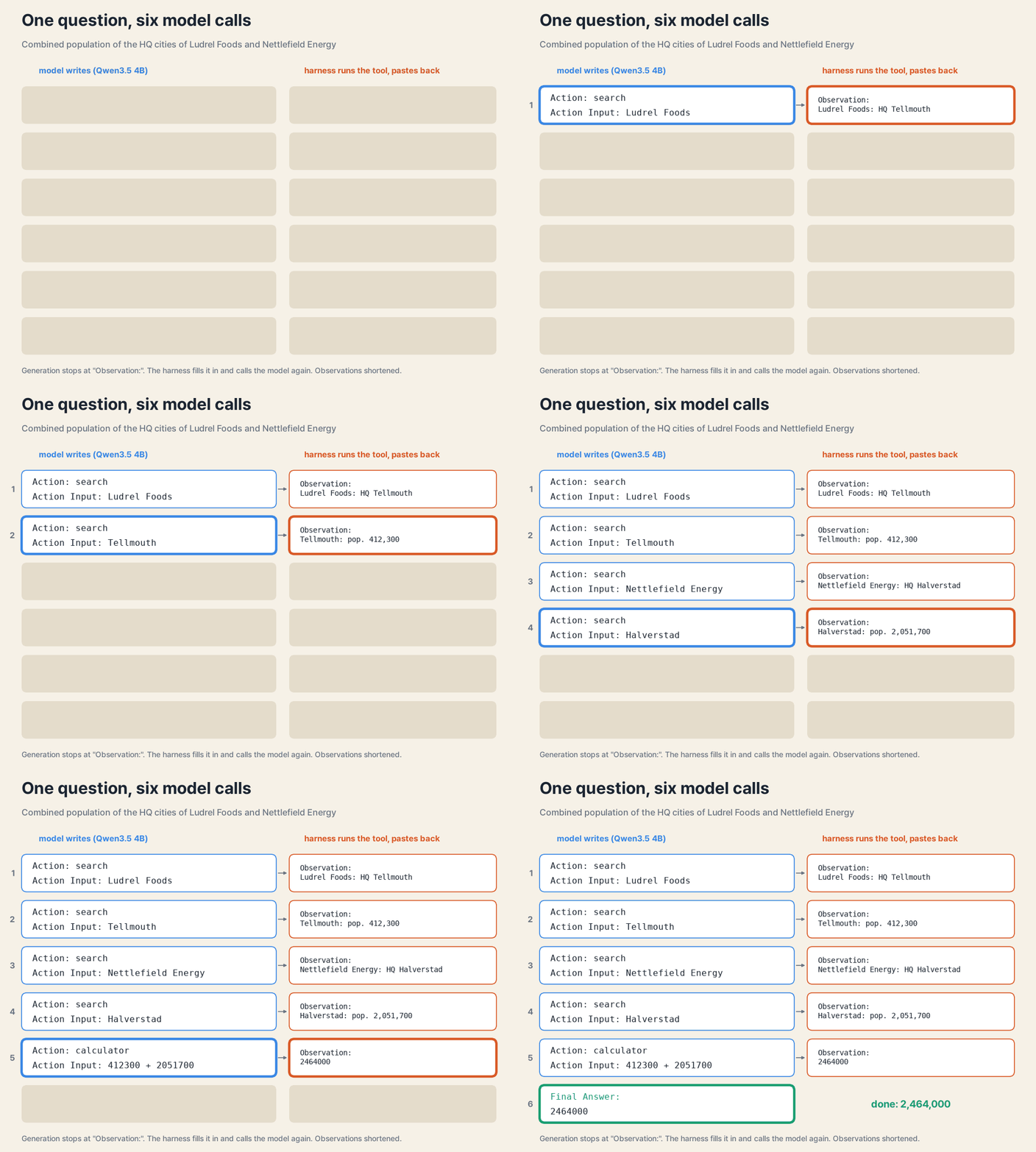
The first call writes a plan and Action: search, Action Input: Ludrel Foods, then stops. The harness runs the search and pastes back the document saying Ludrel Foods is headquartered in Tellmouth.
The second call reads that, writes "I know Ludrel Foods is headquartered in Tellmouth. Now I need to find the population of Tellmouth," and searches Tellmouth (412,300). Calls three and four do the same for Nettlefield Energy and Halverstad (2,051,700).
The fifth call sends 412300 + 2051700 to the calculator. The sixth writes Final Answer: 2464000, which matches the expected answer.
Step 4: the same agent with native tool calls
For the second loop, we describe the same two tools as JSON schemas, start llama-server with --jinja so it applies the model's own chat template, and read tool_calls from the response instead of parsing text:
TOOLS = [
  {"type": "function", "function": {"name": "search",
     "description": "Look up a company or a city in the knowledge base.",
     "parameters": {"type": "object", "properties": {"query": {"type": "string", "description": "a company or city name"}}, "required": ["query"]}}},
  {"type": "function", "function": {"name": "calculator",
     "description": "Evaluate arithmetic such as 1200-345.",
     "parameters": {"type": "object", "properties": {"expression": {"type": "string"}}, "required": ["expression"]}}},
]

# GEN = the same temperature, seed, max_tokens and enable_thinking as in the text loop
m = post({"messages": msgs, "tools": TOOLS, **GEN})["choices"][0]["message"]
if not m.get("tool_calls"):
    return m["content"]                                     # done
msgs.append({"role": "assistant", "content": m.get("content") or "", "tool_calls": m["tool_calls"]})
for tc in m["tool_calls"]:
    args = json.loads(tc["function"]["arguments"])
    obs = search(args["query"], corpus) if tc["function"]["name"] == "search" else calculator(args["expression"])
    msgs.append({"role": "tool", "tool_call_id": tc["id"], "content": obs})
The system prompt shrinks to three lines, since the format now lives in the template. One practical difference showed up right away: from 4B up, the models often asked for both company searches in a single turn. The tool-calling loop averaged 2.7-2.9 model calls per question, against 3.6-3.7 for the text loop.
Results across four model sizes
We ran Qwen3.5 0.8B, 4B and 9B, and Qwen3.6 27B (one release newer than the other three). All were Q4_K_M GGUF files on llama.cpp b12611, with temperature 0, seed 1, and an 8K context. That is 54 questions, two loops and four models, 432 episodes in all, on one A100 80GB.
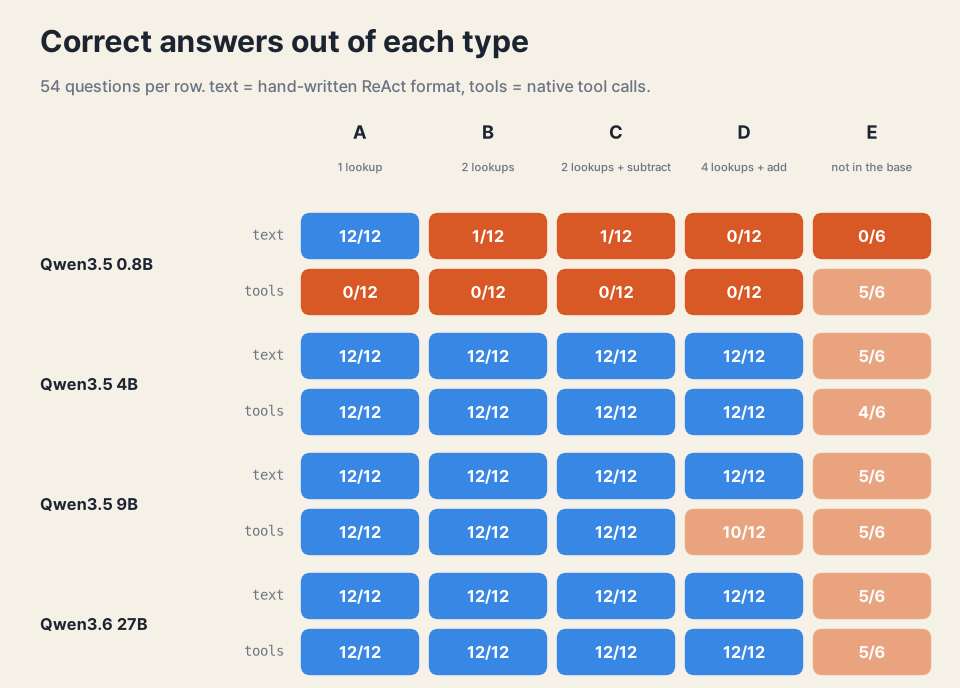
On the 48 questions that have an answer (A-D):
| model | text loop | tool calls | seconds per question (text / tools) |
|---|---|---|---|
| Qwen3.5 0.8B | 14 / 48 | 0 / 48 | 1.33 / 0.08 |
| Qwen3.5 4B | 48 / 48 | 48 / 48 | 1.68 / 0.84 |
| Qwen3.5 9B | 48 / 48 | 46 / 48 | 1.99 / 0.86 |
| Qwen3.6 27B | 48 / 48 | 48 / 48 | 5.04 / 3.75 |
The seconds are A100 80GB speeds. There were no format errors anywhere: every model wrote parseable Action: lines or valid tool-call JSON on every turn.
Of the sizes we ran, 4B was the smallest that answered every A-D question. It answered every A-D question in both loops, with no repeated calls and no question running out of steps. The larger models added nothing on these questions except time: 27B took 3 to 4.5 times longer per question than 4B.
0.8B fails in two different ways
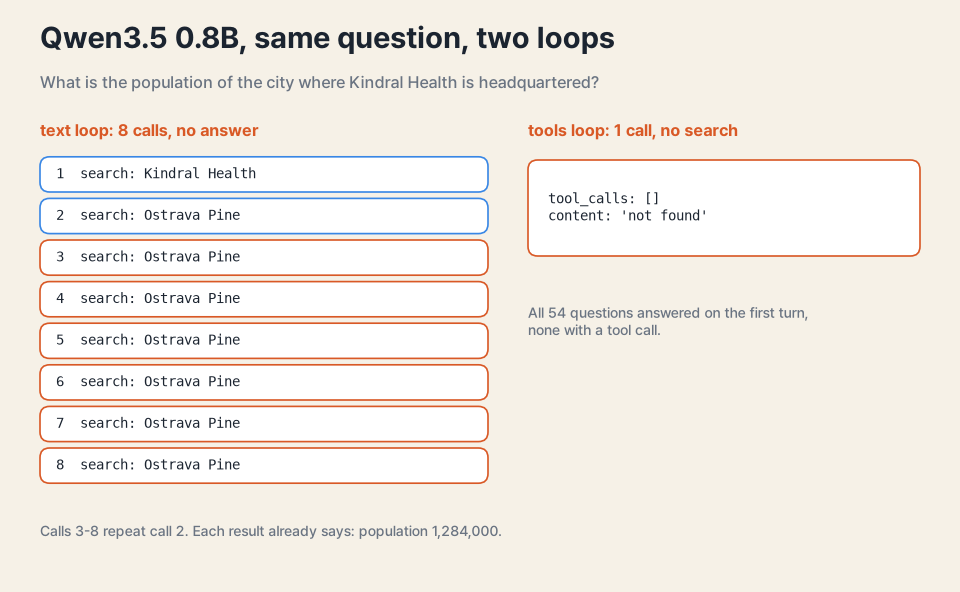
In the text loop, 0.8B handled one-lookup questions perfectly (12 of 12) and then fell apart at two. On "What is the population of the city where Kindral Health is headquartered?" it found the city, searched Ostrava Pine, got back "Its population is 1,284,000," and searched Ostrava Pine again six more times until the 8-call cap.
That was the common pattern rather than an exception. 39 of its 54 episodes hit the cap. Of the 34 A-D questions it got wrong, 26 had already searched every name the answer needed.
With tool calls, 0.8B never called a tool. All 54 questions were answered on the first turn: 21 with "not found", 14 with a bare number, and the rest with sentences, some placing the company in a real city that is not in the base ("New York City"). Its 5 of 6 on type E comes from the same reflex, not from checking. The template rendered correctly (the /apply-template endpoint showed the expected empty thinking block), so this is the model's output, not a parsing failure.
We tried two small fixes on 0.8B after seeing this:
- Text loop: a repeated identical call gets "You already ran this action. Its result was: ... Do not repeat it. Use the result, or write the Final Answer." The model read it and issued the same search anyway; all 54 results were identical to the plain run.
- Tool calls:
tool_choice: "required"on the first turn. On thisllama-serverbuild, 31 of 54 first turns still came back with no tool call, and A-D accuracy went from 0 to 3 of 48.
Neither fix changed 4B, which was already at 48 of 48.
9B skipped the calculator twice
9B's two misses with tool calls were arithmetic. On D08 it searched all four names correctly, then answered 617400 instead of 412,300 + 2,051,700 = 2,464,000 without calling the calculator. With tool calls, 9B used the calculator on 12 of the 24 C and D questions; 4B, 27B, and 9B's own text loop used it on all 24.
One look-alike name fooled every model from 4B up
On the three names with no search result at all, every model from 4B up answered "not found" in both loops. The look-alikes were different:
- Astrolume Labs (the base has "Astrolume", 3,460 employees): 4B, 9B and 27B answered
3460in both loops, and so did 0.8B's text loop. - Corvane Logistics (the base has "Corvane Systems"): only 4B with tool calls took the bait, answering 4,820.
- Ludrel Drinks (the base has "Ludrel Foods"): no model took the bait in the main runs. Only 0.8B with
tool_choice: "required"(the fix below) answered 12,340, Ludrel Foods' count.
"Astrolume Labs" is the most ambiguous of the three, since a reader could fairly take it as the same company with a longer name. Still, that is exactly the shape of a real agent mistake: search returns something close, and the model treats close as the same.
What to take into your own agent
For a lookup-and-arithmetic agent on a local GPU, start with a 4B model. On our 48 answerable questions it was as accurate as 27B in a third of the time per question or less. Either loop works at that size. Tool calls saved 0.7 to 1 model call per question, and the text loop lets you print and read every step.
Below 4B, check two things on your own questions before adding prompt fixes: whether the model repeats a call it already has the answer to, and whether it calls a tool at all. Those were the two ways 0.8B failed, and neither the repeat message nor tool_choice: "required" brought it back.
One change we would make next is to have the search tool say when no result title matches the query. "Astrolume Labs" returning a document titled "Astrolume" with no comment is the gap every model from 4B up fell into.
Setup: llama-server -m <model>.gguf -c 8192 -ngl 99 -fa on --parallel 1 --jinja --port 8093, Qwen3.5 0.8B/4B/9B and Qwen3.6 27B Q4_K_M, llama.cpp b12611, temperature 0, seed 1, thinking off, 8-call cap, one A100 80GB PCIe.
If you want the next build in this format, the newsletter below sends it when it is out.