Swapping vLLM for SGLang: the two-card answer held, but on one card 5 of 32 users waited in line
Same Qwen3.8-27B and two A100 PCIe cards, swapping vLLM for SGLang 0.5.23. Two-card winners held (split for 1 user, copies for 64), but on one card SGLang capped concurrency at 27, leaving 5 of 32 users in line with 14.4 s TTFT p95.

We swapped vLLM for SGLang and kept everything else from episode 1: the same Qwen3.8-27B, the same two A100 80GB PCIe cards with no NVLink, the same 96 prompts. On two cards, episode 1's answer held. For one user, splitting the model across both cards beat running two copies, 174.9 against 125.5 tokens per second. For 64 users, two copies beat the split, 1,640 against 1,455.
The surprise came on one card. We sent 32 users to the server with each engine's many-user recipe. vLLM ran all 32 requests at once. SGLang ran 27 and left 5 waiting until a running answer finished, so the slowest first tokens (TTFT p95) came after 14.4 s instead of 0.88 s. The total was 881 tokens per second against about 1,568 on vLLM. The line explains only part of that; the 27 running requests were also slower, 37.0 against 57.9 tokens per second each. Nothing failed. The only sign was one line in the server log, where SGLang had set its limit at startup.
Below we look at where that limit comes from, then the two-card results, then how the two engines compare setting by setting for one user. The commands and how to check or raise the limit are at the end.
What changed from episode 1
Only the engine. SGLang 0.5.23 replaces vLLM 0.31.0. The hardware, the model checkpoints and their revisions, the 96 prompts (24 each of coding, agent, general and math, 40 in Korean), the 1,024-token answer cap and the way we measure speed are the same as in episode 1. Speed for one user is the decode speed of each answer, averaged over the 96 prompts. Speed for many users is total tokens divided by total time, with TTFT p95 next to it. Every run started a fresh server and passed the same check for other GPU processes and machine load; no run was discarded this time.
On the measuring day we reran two vLLM settings from episode 1 as a check on the machine. R3-32 with 32 users gave 1,572.5 tokens per second, inside episode 1's range of 1,562 to 1,574, and R1 for one user, run twice more so that both engines had three runs, gave 28.4 again. So the vLLM numbers below are episode 1's, and the machine had not drifted.
The labels follow episode 1, with S for SGLang:
- S1: the bf16 model, SGLang defaults.
- S2: the INT4 checkpoint, SGLang defaults.
- S3-1 and S3-32: INT4 plus SGLang's published recipe for one user and for many users.
- SD1 and SD2: two cards. SD1 copies the S3-32 server, one per card. SD2 splits one S3-32 server over both cards.
The S3 recipes come from SGLang's Qwen3.8-27B cookbook page. It has no A100 entry, so we took its H200 bf16 command, which offers two serving strategies, Low-Latency and High-Throughput. We used them as written, with one exception: three options that size memory for a 141 GB H200 (--mem-fraction-static 0.85, --chunked-prefill-size 32768, --max-prefill-tokens 32768) ran out of memory on our 80 GB card, so we left them out and let SGLang size itself, as it does for S1 and S2.
- S3-1 (Low-Latency): DFlash, the same z-lab DFlash2 draft model as vLLM's R3-1, guessing 7 tokens per step, the same count as vLLM's R3-1 (SGLang's
--speculative-num-draft-tokens 8counts the current token too). - S3-32 (High-Throughput): the model's built-in predictor (MTP), which SGLang runs under its EAGLE algorithm: 3 guesses per step in a single chain.
Both share the cookbook's options for an fp8 KV cache, the FlashInfer attention backend, the Qwen3 reasoning and tool-call parsers and a float32 state for the model's linear-attention layers. --mamba-full-memory-ratio is the value the cookbook's calculator gives for its default request length of 5,120 tokens: 11.93 for S3-1 and 7.34 for S3-32.
The vLLM recipes from episode 1 were tuned by a different group, so the recipe rows compare two published recipes, not just two engines. vLLM's many-user recipe guesses 1 token per step; SGLang's guesses 3.
One card, 32 users: five waited in line
With 32 users, all four SGLang settings delivered less than their vLLM counterparts. The gap is largest on bf16, where SGLang's running limit is smallest (5).
When --max-running-requests is not given, SGLang sets at startup how many requests it will process at once and prints the number in the server log. On this model the number comes from the space SGLang reserves for the state of the linear-attention layers; the S3-32 server log prints this exact line:
max_running_requests is capped to 27 by the mamba state cache (max_mamba_cache_size=111, 4 state slots per request). To raise it: increase --mamba-full-memory-ratio or --max-mamba-cache-size, or halve the state size with --mamba-ssm-dtype bfloat16.vLLM's default limit on an A100 is 256, so all 32 of our requests ran together. SGLang chose 5 for bf16, 27 for INT4 and for the many-user recipe, and 18 for the one-user recipe. Requests beyond that limit wait until a running one finishes. We kept SGLang's choice as it is, since that is what the cookbook command, minus the three H200 sizing options, gets on this card.
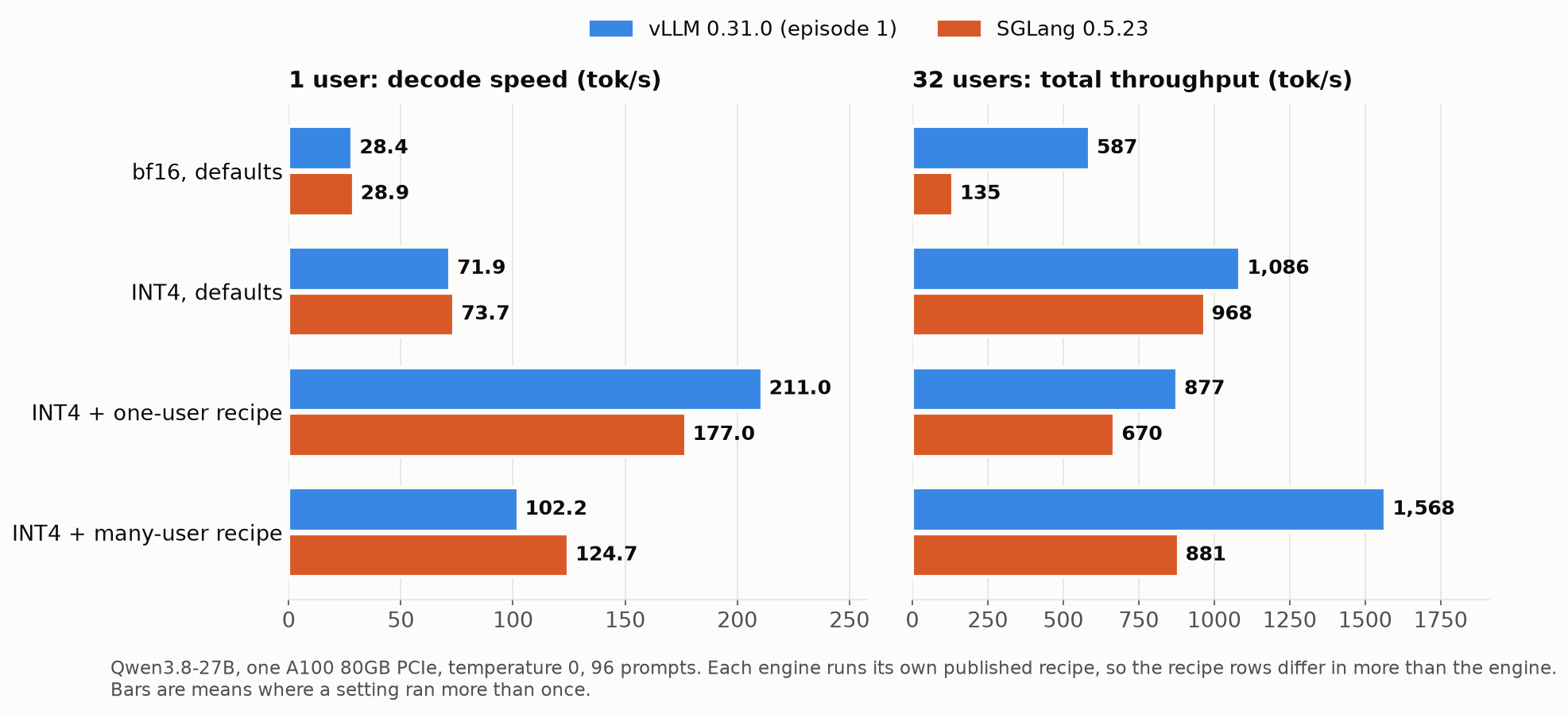
| Setting | 1 user, vLLM | 1 user, SGLang | 32 users, vLLM | 32 users, SGLang | SGLang running limit |
|---|---|---|---|---|---|
| bf16, defaults | 28.4 | 28.9 | 587 (p95 0.92 s) | 134.7 (p95 189.4 s) | 5 |
| INT4, defaults | 71.9 | 73.7 | 1,086 (p95 1.06 s) | 966 to 970 (p95 15.5 to 16.0 s) | 27 |
| INT4 + one-user recipe | 211.0 | 177.0 | 877 (p95 1.16 s) | 669.9 (p95 27.2 s) | 18 |
| INT4 + many-user recipe | 102.2 | 124.7 | about 1,568 (p95 0.87 to 0.89 s) | 870.7 to 891.0 (p95 13.7 to 15.3 s) | 27 |
All in tokens per second at temperature 0. SGLang ran three times for one user on bf16 and INT4 and for 32 users on the many-user recipe, twice for 32 users on INT4, and once otherwise. Its three 32-user runs on the many-user recipe spread over 2.31% of their mean, against 0.75% for vLLM's.
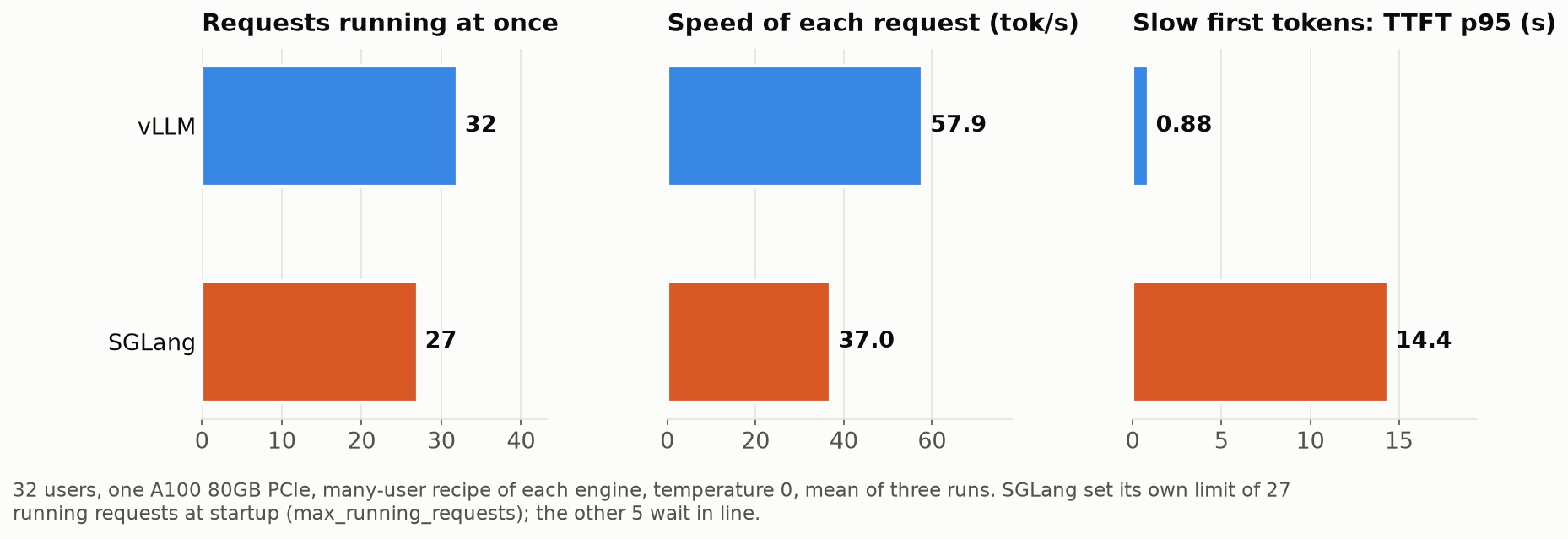
For the many-user recipe, two things add up.
- Five requests wait. With 27 running and 5 in line, the slowest first tokens arrived after 13.7 to 15.3 s instead of 0.87 to 0.89 s. Those five start only when an answer of up to 1,024 tokens ends.
- The running requests are slower too. Each request decoded at 37.0 tokens per second on average, against 57.9 on vLLM with 32 running. That is measured after each request's first token, so the wait in line does not enter it.
Adding more users did not raise the total: 64 users gave 882.8 tokens per second (single run), the same as 32, while TTFT p95 grew to 44.8 s. vLLM's many-user recipe gave 1,856 at 64 users with TTFT p95 1.60 s.
The bf16 row shows the limit at its most extreme. With only 5 requests running, 32 users got 134.7 tokens per second in total, and the slowest first tokens took 189.4 s. vLLM with the same weights gave 587 tokens per second with TTFT p95 0.92 s.
The two-card results below give a second look at the same limit, because there the line disappears at 32 users.
Two cards: episode 1's answer held
The copy runs one S3-32 server per card. The split runs one S3-32 server over both cards with --tp-size 2, SGLang's name for tensor parallelism. As in episode 1, our client alternated requests between the two copies; a proxy in front of them does the same job in a shared service.
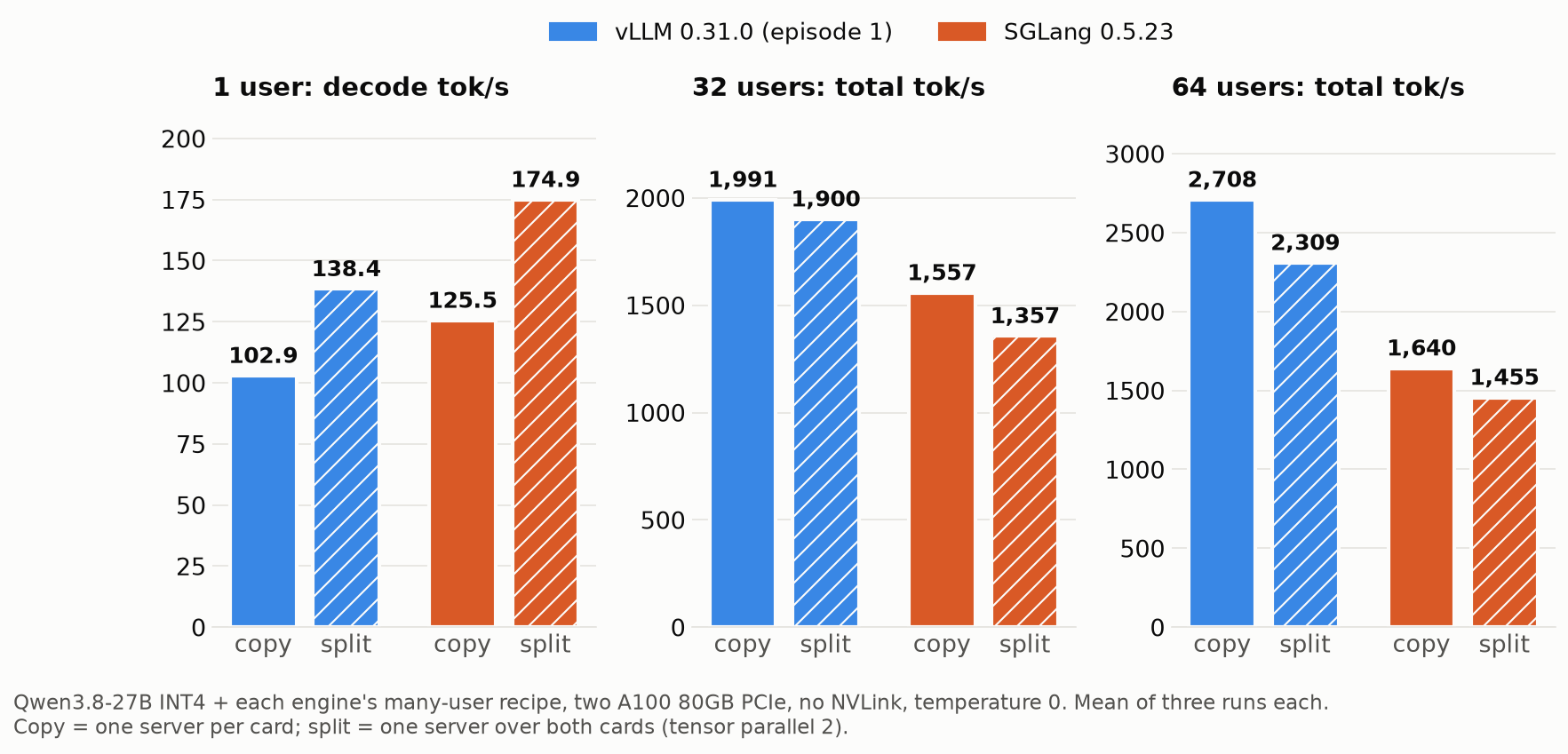
| Users | vLLM copy | vLLM split | SGLang copy | SGLang split |
|---|---|---|---|---|
| 1 | 102.9 | 138.4 | 125.3 to 125.7 | 174.7 to 175.0 |
| 32 | 1,981 to 2,002, p95 0.50 to 0.54 s | 1,900 to 1,901, p95 0.63 s | 1,515 to 1,582, p95 0.55 to 0.62 s | 1,341 to 1,369, p95 0.76 to 1.13 s |
| 64 | 2,702 to 2,717, p95 0.87 to 0.88 s | 2,297 to 2,320, p95 1.19 to 1.20 s | 1,631 to 1,652, p95 17.9 to 18.7 s | 1,449 to 1,465, p95 27.2 to 27.9 s |
Tokens per second, three runs each, temperature 0, ranges are the lowest and highest run.
For one user, split wins on SGLang too. With copies, each request lands on one card, so one user got 125.5 tokens per second, against 124.7 on one card alone. Splitting gave 174.9, 1.39 times the copy; on vLLM the same ratio was 1.35. Every split run beat every copy run.
SGLang's split for one user was also faster than vLLM's split on its many-user recipe (138.4). With its one-user recipe split over two cards, vLLM reached 276.7 in episode 1.
For many users, copy wins on SGLang too. At 32 users the copies gave 1,515 to 1,582 tokens per second against 1,341 to 1,369 for the split, and at 64 users 1,631 to 1,652 against 1,449 to 1,465. Every copy run beat every split run at both loads.
The running limit shows up here as well. Each copy runs at most 27 requests, and with 32 users the two copies ran about half each, at most 21 on one card, so nobody waited. The slowest first tokens then took 0.55 to 0.62 s, close to vLLM's copies at 0.50 to 0.54 s. At 64 users, the two copies run 54 together and 10 wait, and TTFT p95 jumped to 17.9 to 18.7 s. The split server chose a limit of 48, so it had no line at 32 users (p95 0.76 to 1.13 s) and 16 waiting at 64 (p95 27.2 to 27.9 s). When no request waited, SGLang's slowest first tokens arrived within about half a second of vLLM's.
The total was still lower without a line. Two SGLang copies with 32 users gave 1,557 tokens per second on average, about what vLLM gave on one card (1,562 to 1,574). Each request decoded at 58.1 tokens per second on average, against 74.2 on vLLM's copies.
One user on one card
The one-user columns of the one-card table above look different from the 32-user ones.
For one user, the first two steps scale almost the same on both engines. INT4 instead of bf16 took SGLang from 28.9 to 73.7 tokens per second, 2.55 times, against 2.53 times for vLLM's 28.4 to 71.9. With default settings SGLang was 1.7% faster on bf16 and 2.6% faster on INT4, in every one of three runs each.
The one-user recipe is slower on SGLang, the many-user recipe faster. SGLang's DFlash recipe gave 177.0 against vLLM's 211.0. The guessing went about equally well: the big model kept 3.48 tokens per step on SGLang and 3.53 on vLLM, counting its own token. Dividing tokens per step by decode speed gives about 19.6 ms per step on SGLang against 16.7 ms on vLLM, so the difference is in how long each step takes, not in how many guesses survive. Both recipes guess 7 tokens per step, but they differ in other options, so this does not isolate the engine.
With the many-user recipe the order flips: 124.7 against 102.2 tokens per second, 22% faster on SGLang.
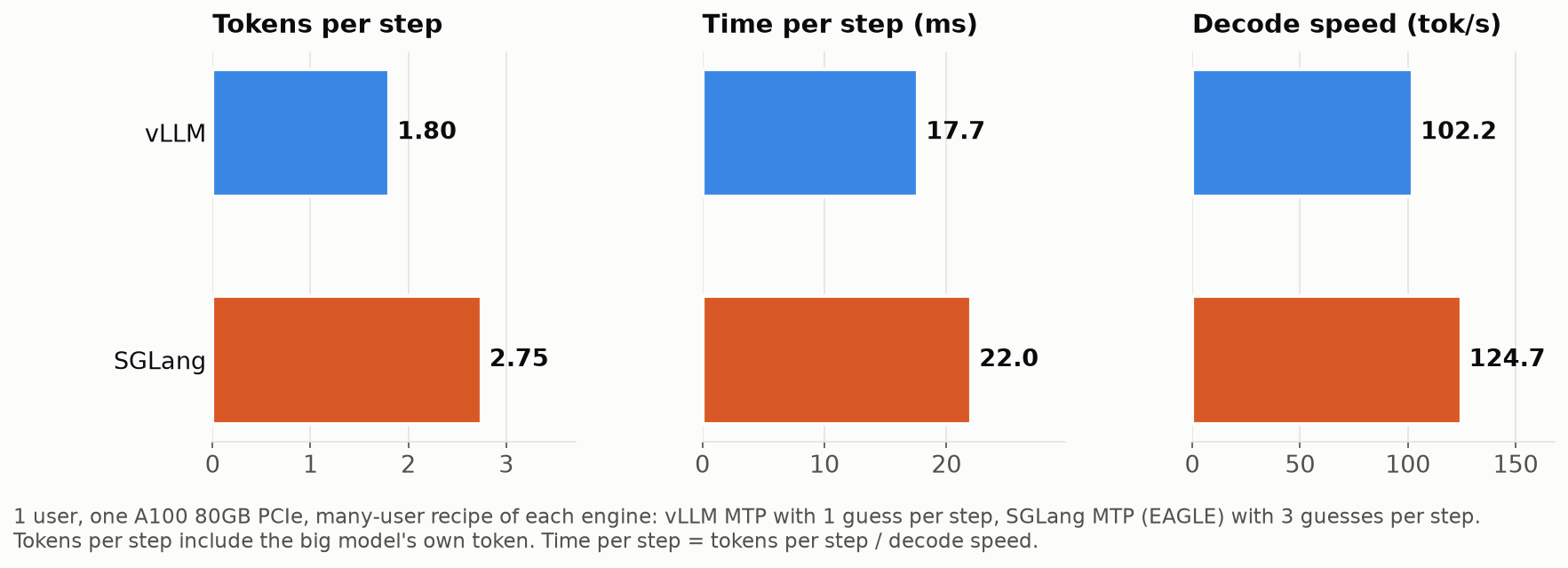
SGLang's recipe makes 3 guesses per step instead of 1, and the big model kept 2.75 tokens per step against 1.80. Each step took longer, about 22.0 ms against 17.7 ms (tokens per step divided by decode speed; episode 1's profiled step time for the same vLLM setting was 17.8 ms), but the extra tokens more than paid for it. For a single user, the many-user recipe is still well behind the one-user recipe on either engine (124.7 against 177.0 on SGLang).
At temperature 0.7 with a fixed seed, the one-user recipe lost less on SGLang. It gave 171.5 tokens per second, 3% below its 177.0 at temperature 0, and kept 3.47 tokens per step against 3.48. On vLLM the same change cost 11% (211.0 to 186.8), with tokens per step dropping from 3.53 to 3.14. The many-user recipe with 32 users dropped from 881 to 814.3 tokens per second (8% lower), with tokens per step going from 2.74 to 2.57; vLLM's dropped 12%. The temperature-0.7 runs are single runs.
Does it still answer the same?
We scored the three SGLang INT4 settings the same way as in episode 1: all 1,319 GSM8K test problems, 1,400 MMLU-Pro questions and 1,125 KMMLU questions, with thinking off and 4,096 tokens allowed.
| Setting | GSM8K | MMLU-Pro | KMMLU |
|---|---|---|---|
| S2 INT4, SGLang | 97.0% ± 0.9 | 77.8% ± 2.2 | 72.3% ± 2.6 |
| S3-1, SGLang | 97.0% ± 0.9 | 77.9% ± 2.2 | 71.7% ± 2.6 |
| S3-32, SGLang | 96.8% ± 0.9 | 77.1% ± 2.2 | 71.9% ± 2.6 |
| R2 INT4, vLLM | 96.8% ± 0.9 | 77.1% ± 2.2 | 73.0% ± 2.6 |
| R3-1, vLLM | 97.0% ± 0.9 | 76.8% ± 2.2 | 70.4% ± 2.7 |
| R3-32, vLLM | 96.2% ± 1.0 | 77.1% ± 2.2 | 70.3% ± 2.7 |
The ± is the 95% interval, and every pair overlaps on every benchmark, so with this many questions we could not tell the six settings apart. As before, KMMLU is used only to compare settings, not as a measure of the model's Korean.
Token by token at temperature 0, SGLang's plain INT4 server with one user gave identical answers on all 96 prompts across three runs; vLLM's matched itself on only 5 to 10. With 32 users, two SGLang runs matched on 7 of 96. SGLang and vLLM with the same INT4 weights matched on 2 to 5 of 96, depending on which vLLM run we compared, so the same weights and the same prompts did not give the same text on the two engines.
Running it yourself
Install SGLang 0.5.23 with Python 3.12. --prerelease=allow is needed because SGLang pulls in a pre-release of flash-attn-4; the cookbook installs it the same way. As in episode 1, FlashInfer's JIT build failed with a CUDA compiler that did not match the CUDA 13.0 headers, so we pinned the three compiler packages to 13.0.88 and added the same libcudart.so link.
uv venv --python 3.12 .venv-sglang && . .venv-sglang/bin/activate
uv pip install --prerelease=allow "sglang[all]==0.5.23"
uv pip install nvidia-cuda-nvcc==13.0.88 nvidia-cuda-crt==13.0.88 nvidia-nvvm==13.0.88
CU13=$(python -c "import nvidia; print(list(nvidia.__path__)[0] + '/cu13')")
mkdir -p $CU13/lib64 && ln -sf ../lib/libcudart.so.13 $CU13/lib64/libcudart.so
export PATH=$CU13/bin:$PATH CUDA_HOME=$CU13
Then start one server per setting. The first start of S3-1 took seven to nine minutes on our machine.
BF16_REV=1d4bf0f2ff6012fd82039f2fa52739d0dd7c60c0
INT4_REV=91bd022d5b49442a868bc35008f6c21e1860edfa
DRAFT_REV=50307d4c4cde6860d4eee73e2547cd786fe8e8a4

# S1: bf16, defaults
CUDA_VISIBLE_DEVICES=0 python -m sglang.launch_server --model-path Qwen/Qwen3.8-27B --revision $BF16_REV --port 8000

# S2: INT4, defaults
CUDA_VISIBLE_DEVICES=0 python -m sglang.launch_server --model-path RedHatAI/Qwen3.8-27B-INT4 --revision $INT4_REV --port 8000

# Options shared by both S3 recipes (cookbook, minus the three H200 sizing options)
DOC="--trust-remote-code --kv-cache-dtype fp8_e4m3 --attention-backend flashinfer --reasoning-parser qwen3 --tool-call-parser qwen3_coder --mamba-ssm-dtype float32"

# S3-1: one user (Low-Latency). DFlash2 draft, 7 guessed tokens per step
CUDA_VISIBLE_DEVICES=0 python -m sglang.launch_server --model-path RedHatAI/Qwen3.8-27B-INT4 --revision $INT4_REV $DOC --port 8000 \
  --speculative-algorithm DFLASH --speculative-draft-model-path z-lab/Qwen3.8-27B-DFlash2 --speculative-draft-model-revision $DRAFT_REV \
  --speculative-num-draft-tokens 8 --mamba-radix-cache-strategy extra_buffer --mamba-full-memory-ratio 11.93

# S3-32: many users (High-Throughput). Built-in MTP, 3 guesses per step
CUDA_VISIBLE_DEVICES=0 python -m sglang.launch_server --model-path RedHatAI/Qwen3.8-27B-INT4 --revision $INT4_REV $DOC --port 8000 \
  --speculative-algorithm EAGLE --speculative-num-steps 3 --speculative-eagle-topk 1 --speculative-num-draft-tokens 4 \
  --mamba-radix-cache-strategy extra_buffer_lazy --mamba-full-memory-ratio 7.34
The server speaks the OpenAI format on the same /v1/chat/completions path as vLLM, so the request from episode 1 works unchanged.
For the two-card setups, start the S3-32 command per card for the copy, or once over both cards with --tp-size 2 for the split:
# SD1 copy: one server per card, on different ports
CUDA_VISIBLE_DEVICES=0 python -m sglang.launch_server --model-path RedHatAI/Qwen3.8-27B-INT4 --revision $INT4_REV $DOC --port 8000 \
  --speculative-algorithm EAGLE --speculative-num-steps 3 --speculative-eagle-topk 1 --speculative-num-draft-tokens 4 \
  --mamba-radix-cache-strategy extra_buffer_lazy --mamba-full-memory-ratio 7.34 &
CUDA_VISIBLE_DEVICES=1 python -m sglang.launch_server --model-path RedHatAI/Qwen3.8-27B-INT4 --revision $INT4_REV $DOC --port 8001 \
  --speculative-algorithm EAGLE --speculative-num-steps 3 --speculative-eagle-topk 1 --speculative-num-draft-tokens 4 \
  --mamba-radix-cache-strategy extra_buffer_lazy --mamba-full-memory-ratio 7.34 &

# SD2 split: one server over both cards
CUDA_VISIBLE_DEVICES=0,1 python -m sglang.launch_server --model-path RedHatAI/Qwen3.8-27B-INT4 --revision $INT4_REV $DOC --port 8000 \
  --speculative-algorithm EAGLE --speculative-num-steps 3 --speculative-eagle-topk 1 --speculative-num-draft-tokens 4 \
  --mamba-radix-cache-strategy extra_buffer_lazy --mamba-full-memory-ratio 7.34 --tp-size 2
What we would set up on SGLang
One card:
- Switch to the INT4 checkpoint first. It is about 2.5 times faster for one user, on SGLang as on vLLM.
- For one user, the cookbook's Low-Latency recipe (S3-1) was the fastest SGLang setting at 177.0 tokens per second.
- For a team, check the
max_running_requestsline in the server log at startup. On our 80 GB card it was 27 for the High-Throughput recipe, so a 28th user waits for an answer to finish. The same log line names what sets it, the cache for the linear-attention state, and the options that raise it, such as--mamba-full-memory-ratio;--max-running-requestsalone does not go past it. If your load goes past the limit, measure with your own prompts before changing either.
Two PCIe cards, model fits on one:
- For a team, run two copies. Below the running limit of each copy, nobody waits.
- For one heavy user, split the model with
--tp-size 2.
The newsletter below sends the next episode of this series when it is out.
Files for this post
Reproduction package
The harness, raw logs and result CSVs behind this post. No account needed; the README has a command that recomputes the tables without a GPU.
serve-ladder-sglang-repro.zip · 15,772 KB