How to Run Multimodal Models on an 8 GB GPU: All Four LFM3 Models Peak Under 5 GiB
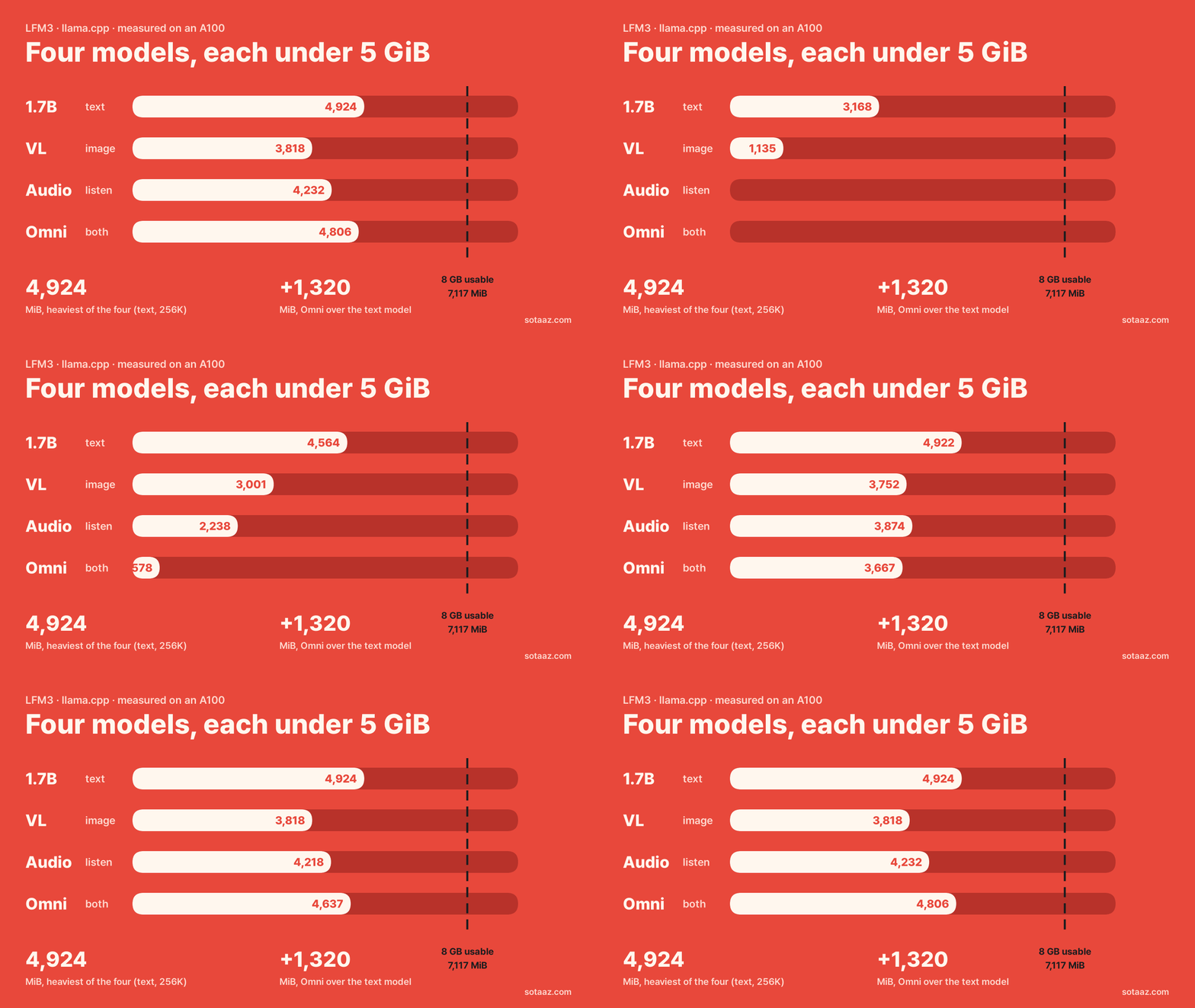
A model-by-model guide to running LiquidAI's LFM3 text, vision, audio and omni models with llama.cpp. At full context, with an image or audio clip going in (a long prompt for the text model), the heaviest moment for each model took 3.7 to 4.8 GiB, inside an 8 GB card's usable memory (measured on an A100). Also: how to size a model for your card from two short test runs, and why the VL model can hand back an empty answer.
How to Run Multimodal Models on an 8 GB GPU: All Four LFM3 Models Peak Under 5 GiB
LiquidAI has released LFM3, a family of small models built to run on phones and laptops. Alongside the text model, LFM3-1.7B, there is VL, which reads images; Audio, which listens and speaks; and Omni, which does both. The three multimodal models carry "2B" in their names.
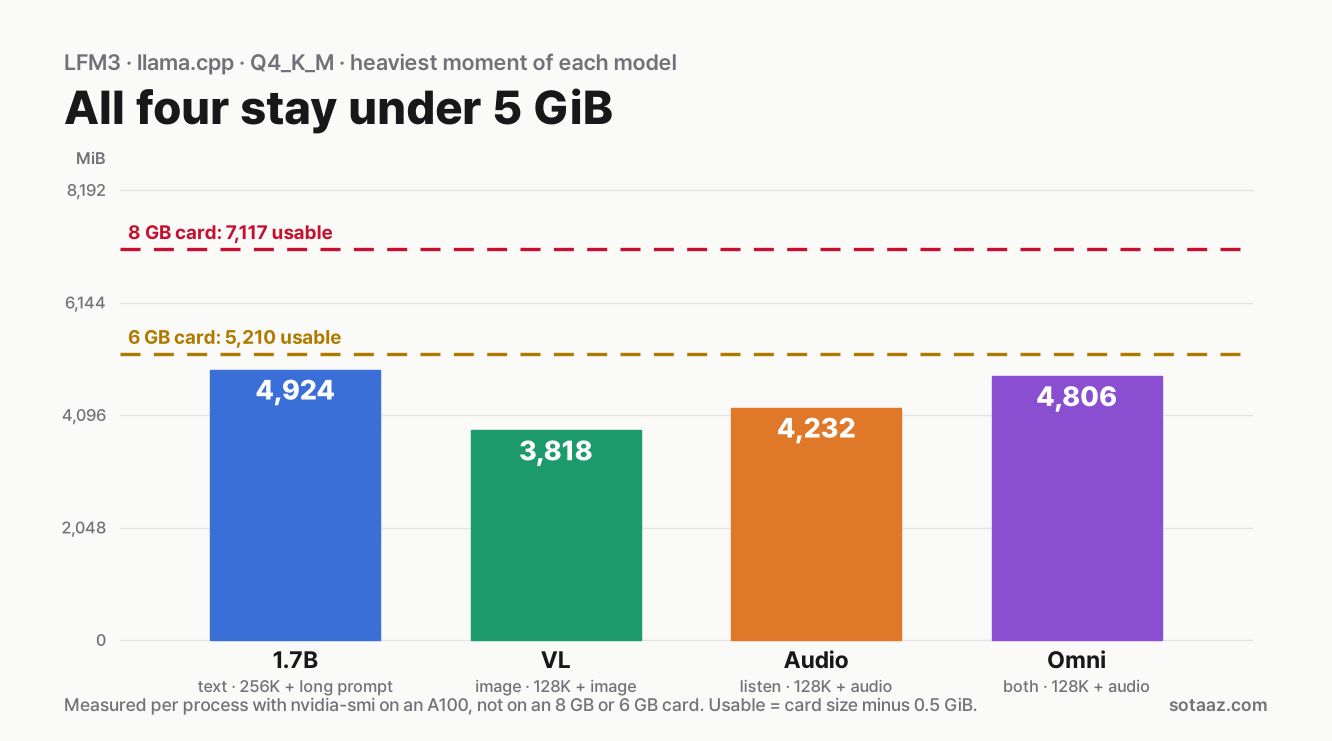
Can one 8 GB GPU run all four? We loaded each with llama.cpp at its full context, sent it images and audio, and measured GPU memory. (Context is how many tokens a model can read at once.) The heaviest moment across all four was 4,924 MiB (4.8 GiB), inside the roughly 6.95 GiB an 8 GB card has left after the desktop takes its share. These are A100 measurements, not runs on an 8 GB card.
The surprise was which model was heaviest: not Omni, which takes both images and audio, but the text model, because its full context is twice as long. At the same context, the multimodal models take 568 to 1,320 MiB more than the text model. Split up using the server's own log, that extra came within 12 MiB of three pieces: the mmproj file, the mmproj compute buffer, and a larger text-side compute buffer in the two models that take audio.
This post walks through starting each of the four models, how much memory each one takes, and how to size that memory from two short runs.
What you need
- An 8 GB NVIDIA GPU. All four models fit at full context with an image or audio clip going in. On a 6 GB card the memory adds up, but every model would leave less free than llama-server's startup fit step aims for, and we did not test that (see the card table). These are A100 numbers compared against each card's memory; we did not run on smaller cards.
- llama.cpp b11960 or newer. The model cards name b11960 as the first build with LFM3 support. We used b11976.
- About Ollama and LM Studio. The VL and Omni model cards list Ollama for macOS only and LM Studio for image input only; the Audio card lists neither. We tried neither; this post uses llama.cpp.
We leave out the separate d1 decision models and the base model.
Step 1: get llama.cpp
On Windows, download llama-b11976-bin-win-cuda-12.4-x64.zip (or a newer build) from the llama.cpp releases page and unzip it. Wherever the commands below say ./build/bin/llama-server, run llama-server.exe from the unzipped folder.
On Linux, the release has llama-b11976-bin-ubuntu-cuda-12.8-x64.tar.gz, but it did not start on our Ubuntu 22.04 server: GLIBC_2.38 not found and GLIBCXX_3.4.32 not found. It asks for a newer C library (glibc 2.38) and C++ library than 22.04 ships (2.35). Ubuntu 24.04 ships 2.39, though we did not run it there. If you are on 22.04, build from source. You need the CUDA toolkit (nvcc), cmake and a C++ compiler; the GPU driver alone is not enough.
git clone https://github.com/ggml-org/llama.cpp
cd llama.cpp
git checkout b11976
cmake -B build -DGGML_CUDA=ON -DCMAKE_CUDA_ARCHITECTURES=80 -DCMAKE_BUILD_TYPE=Release -DLLAMA_CURL=OFF
cmake --build build -j --target llama-server llama-cli llama-tts
llama-tts generates speech, so you only need it for Audio and Omni. -DCMAKE_CUDA_ARCHITECTURES=80 builds for our A100. For your own card, leave that flag out and cmake builds for the GPU it finds; we did not build that variant. The server's startup log prints its own build number (ours said build 803 (2e0d86beb)), which is not the release tag, so check the tag with git describe --tags.
Step 2: download the models
A multimodal model comes as two files: the main model, which produces the text, and a smaller file that turns an image or audio into something the model can read. llama.cpp calls that second file the mmproj. We used the 4-bit Q4_K_M main files and the Q8_0 mmproj files that the model cards' speech example uses.
python3 -m venv hf-env
. hf-env/bin/activate
pip install -U huggingface_hub
hf download LiquidAI/LFM3-1.7B-GGUF LFM3-1.7B-Q4_K_M.gguf --local-dir models
hf download LiquidAI/LFM3-VL-2B-GGUF LFM3-VL-2B-Q4_K_M.gguf mmproj-LFM3-VL-2B-Q8_0.gguf --local-dir models
hf download LiquidAI/LFM3-Audio-2B-GGUF LFM3-Audio-2B-Q4_K_M.gguf mmproj-LFM3-Audio-2B-Q8_0.gguf --local-dir models
hf download LiquidAI/LFM3-Omni-2B-GGUF LFM3-Omni-2B-Q4_K_M.gguf mmproj-LFM3-Omni-2B-Q8_0.gguf --local-dir models
Download only the ones you want. On Ubuntu, python3 -m venv needs the python3-venv package. Each main file is 1.10 GB; the mmproj files are 203 MB (VL), 338 MB (Audio) and 541 MB (Omni).
The files tell you something already. In the GGUF metadata, the text part of all three "2B" models has 1,728,801,600 parameters, the same as LFM3-1.7B, with the same layer layout. The "2B" appears to include the mmproj. That is why, as the numbers below show, a multimodal model's memory is the text model's memory plus what the mmproj adds.
llama.cpp can also download a model and its mmproj for you with -hf LiquidAI/LFM3-VL-2B-GGUF:Q4_K_M, but only if it was built with HTTPS support. Our source build was not (no OpenSSL headers on the server), and it stopped with HTTPS is not supported. hf download avoids that.
Step 3: the text model, LFM3-1.7B
./build/bin/llama-server -m models/LFM3-1.7B-Q4_K_M.gguf \
  -ngl 99 -c 262144 -fa on --parallel 1 \
  --temp 0.1 --top-k 50 --repeat-penalty 1.1 \
  --port 8080
-c is the context length llama-server reserves memory for: the most tokens of prompt plus answer one conversation can hold. -c 262144 asks for this model's maximum (about 256K), and -ngl 99 puts every layer on the GPU. We measured with -fa on (flash attention) and --parallel 1. Without --parallel 1 this build opened 4 slots sharing one cache, and we did not measure memory in that setup. On a smaller card, lower -c, and check the startup log's n_ctx and common_fit_params lines for what you actually got.
The sampling settings are the model card's recommendation for chat, tool use and agents; we used them because our test question was a chat question. For math and science the card suggests --temp 1.0 --top-p 0.95 --top-k 20 but does not say why. Our guess: a long chain of reasoning at a low temperature tends to repeat itself, and a higher temperature lets it try other paths while top-p and top-k cut off unlikely tokens so it does not wander off. We did not test this.
Ask a question:
curl -s localhost:8080/v1/chat/completions -H 'Content-Type: application/json' -d '{
  "messages": [{"role": "user", "content": "In two sentences, what is a KV cache in an LLM?"}],
  "max_tokens": 4096
}'
This model thinks before it answers. Our first request set max_tokens to 300, and the answer came back with an empty content: all 300 tokens had gone into reasoning_content. With max_tokens at 4096, the same question used 412 tokens and returned a two-sentence answer; with thinking off, 69. That is one question, not a measurement of what thinking costs in general. To turn it off for one request, add this to the request body:
"chat_template_kwargs": {"enable_thinking": false}The model card warns that turning it off "can be inconsistent, especially for reasoning-heavy tasks."
One more line in the server log is worth knowing about. By default llama-server keeps earlier turns' reasoning in the conversation ("may use more tokens, disable via --no-reasoning-preserve"). The model card describes the opposite default: reasoning from earlier turns "is removed unless preserve_thinking=True." In a long chat on llama-server, that kept reasoning takes up context. We did not measure how much.
Step 4: LFM3-VL-2B, which reads images
./build/bin/llama-server -m models/LFM3-VL-2B-Q4_K_M.gguf \
  --mmproj models/mmproj-LFM3-VL-2B-Q8_0.gguf \
  -ngl 99 -c 128000 -fa on --parallel 1 \
  --temp 0.1 --top-p 1.0 --top-k 50 --min-p 0.0 --repeat-penalty 1.1 \
  --no-reasoning-preserve --port 8080
The difference from the text model is --mmproj, which loads the second file. The three multimodal models have a 128,000-token maximum context, hence -c 128000. The sampling settings and --no-reasoning-preserve follow the model card.
Images and audio go into the request body as base64 text. Even a modest file is too long for a curl command line, so we used a short Python script. Give it a .wav file and it sends audio; anything else is sent as a PNG image.
# ask.py: python3 ask.py photo.png   or   python3 ask.py speech.wav
import base64, json, sys, urllib.request

path = sys.argv[1]
data = base64.b64encode(open(path, "rb").read()).decode()
if path.endswith(".wav"):
    messages = [{"role": "system", "content": "Perform ASR in English."},
                {"role": "user", "content": [{"type": "input_audio", "input_audio": {"data": data, "format": "wav"}}]}]
else:
    messages = [{"role": "user", "content": [{"type": "image_url", "image_url": {"url": "data:image/png;base64," + data}},
                                             {"type": "text", "text": "Describe this image."}]}]
body = {"messages": messages, "max_tokens": 2048, "chat_template_kwargs": {"enable_thinking": False}}
req = urllib.request.Request("http://localhost:8080/v1/chat/completions", json.dumps(body).encode(),
                             {"Content-Type": "application/json"})
print(json.load(urllib.request.urlopen(req))["choices"][0]["message"]["content"])
Given one of our blog's memory charts (a 1250×660 PNG), VL read the chart's title word for word and described its axes and lines. We did not grade answer quality.
VL also thinks first by default. Without the script's enable_thinking: False line, you can get an empty answer back. Our measurement request left thinking on with max_tokens at 1,024; all 1,024 tokens went into thinking and the answer was empty. Raising the limit to 16,384, as in the model card's example, the same description took 6,318 tokens; with thinking off it took 103. Each was a single run.
Which to use depends on the task. The model card says thinking helps most with math, charts and multi-step visual questions. For a plain description, turning it off is faster and uses less context. If you leave it on, give max_tokens plenty of room. To turn it off for the whole server, add --reasoning off; that also gave the same 103-token answer.
Step 5: LFM3-Audio-2B, which listens and speaks
./build/bin/llama-server -m models/LFM3-Audio-2B-Q4_K_M.gguf \
  --mmproj models/mmproj-LFM3-Audio-2B-Q8_0.gguf \
  -ngl 99 -c 128000 -fa on --parallel 1 --temp 0 --port 8080
For transcription (speech recognition), give the script above a .wav file. Following the model card, the system message is Perform ASR in English.; Perform ASR. lets the model pick the language. We sent 53 seconds of English narration from one of our videos (16 kHz wav). It came back word for word against the narration script, starting "The file is 4.68 gigs. Loaded with a 32k context, it took 9.44 on the card." (Our on-screen subtitles write these amounts as GiB, MiB and KiB; the narration says them aloud, e.g. "half a gig" for 0.47 GiB.) The clip was 686 tokens. The Audio model transcribed without thinking first.
Speech output comes from llama-tts, not the server:
./build/bin/llama-tts -m models/LFM3-Audio-2B-Q4_K_M.gguf \
  -mm models/mmproj-LFM3-Audio-2B-Q8_0.gguf -ngl 99 \
  -p "The file is 4.68 GiB. Loaded with a 32K context, it took 9.44 GiB on the card." \
  -o out.wav
That produced a 9-second, 24 kHz wav file. According to the model card, --tts-voice male switches to a male voice and --tts-lang picks the language. We used only the defaults (female, English).
We fed the generated speech back into the Audio model to transcribe. The words came back right, but the numbers did not: "4.68 GiB" became "4CHGB" and "9.44 GiB" became "9 more 4GB". The same numbers in our video narration had transcribed correctly. The narration was a different voice and said the units as "gigs", not "GiB". From this alone we cannot tell whether the speech generation misread the numbers or the transcription misheard them. We did not listen to check, and this is one sentence. If the numbers in a sentence matter, listen to the output yourself.
Step 6: LFM3-Omni-2B, which does both
./build/bin/llama-server -m models/LFM3-Omni-2B-Q4_K_M.gguf \
  --mmproj models/mmproj-LFM3-Omni-2B-Q8_0.gguf \
  -ngl 99 -c 128000 -fa on --parallel 1 --reasoning off --temp 0 --port 8080
The model card calls Omni a non-reasoning model and says to use --reasoning off. The same ask.py sends both images and audio. Omni read the same chart's title and described it, and transcribed the same narration character for character as Audio did. For speech output, swap the Omni files into the llama-tts command above. Our clip came out 8 seconds long. Transcribed back by the Audio model, its numbers garbled differently ("4.68 GiB" became "4-set show, GB").
The model card also describes video input and real-time voice conversation (/v1/realtime). We did not try either.
Memory by model
We started each model at three context lengths, twice each, and read the server process's memory in nvidia-smi three seconds after loading. Both runs gave the same number every time. Then we sent an image or audio clip to the full-context server and recorded the peak, reading every 0.2 seconds. For the text model, the input was a 249,036-token prompt.
| Model | Loaded at 4K | Loaded at 32K | Loaded at full context | Peak with input |
|---|---|---|---|---|
| LFM3-1.7B | 1,638 MiB | 2,002 MiB | 4,914 MiB (256K) | 4,924 MiB (long prompt) |
| LFM3-VL-2B | 2,206 MiB | 2,570 MiB | 3,780 MiB (128K) | 3,818 MiB (image) |
| LFM3-Audio-2B | 2,384 MiB | 2,748 MiB | 3,956 MiB (128K) | 4,232 MiB (53 s of audio) |
| LFM3-Omni-2B | 2,958 MiB | 3,322 MiB | 4,530 MiB (128K) | 4,806 MiB (53 s of audio) |
Speech output (llama-tts) runs as its own program and peaked at 3,974 MiB for Audio and 4,548 MiB for Omni.
Three things stand out. All four models grew by exactly 364 MiB from 4K to 32K: the text part is the same model, so the cache that grows with context is the same. At any given context, each multimodal model takes a fixed amount more than the text model, 568 MiB for VL, 746 for Audio and 1,320 for Omni, and that gap stayed within 1 MiB across context lengths. And the inputs themselves added little: 38 MiB for the image, 276 MiB for the audio.
Why the text model takes so much less than the estimate
Put LFM3-1.7B into a common VRAM estimate and its full context comes to 13.0 GiB, too much even for a 12 GB card. It actually took 4,914 MiB (4.8 GiB).
| Context | Common estimate | Measured | Difference |
|---|---|---|---|
| 4,096 | 1,241 MiB | 1,638 MiB | estimate 397 MiB low |
| 32,768 | 2,585 MiB | 2,002 MiB | estimate 583 MiB high |
| 131,072 | 7,193 MiB | 3,250 MiB | estimate 3,943 MiB high |
| 262,144 | 13,337 MiB | 4,914 MiB | estimate 8,423 MiB high |
The estimate is the GGUF file plus a 16-bit key-value (KV) cache in all 24 layers. The KV cache stores a key and a value for every token the model has read: 24 layers × 4 KV heads × 128 values × 2 (key and value) × 2 bytes = 48 KiB per token.
LFM3 does not keep a cache in all 24 layers. Its config lists 13 short convolution layers, 5 sliding-window attention layers that look back only 256 tokens, and 6 global attention layers. Only the 6 global layers store every token, which is 12 KiB per token, a quarter of the estimate. llama-server's own log agrees: the KV cache was 384 MiB at 32K and 3,072 MiB at 256K. The sliding-window layers held a fixed 7.5 MiB at every length, and the convolution state 0.61 MiB. The three multimodal models share this layout, and their KV cache at 128K was the same 1,500 MiB.
At short context the estimate is low for a different reason. It leaves out two things: llama.cpp's compute buffer, which holds intermediate results (66 MiB at 4K, 318 MiB at 256K), and 477 MiB that appears in nvidia-smi but in no line of the server log. The CUDA context is the likely bulk of it; we did not break it down further. That is close to the 476 to 481 MiB we found on three other models in our post on picking -c from two short runs.
The model card says LFM3-1.7B at 4-bit "takes about 1 GB of memory." That matches the weights: the file is 1.10 GB (1,049 MiB). A running server adds the KV cache, the compute buffer and the unlisted 477 MiB, which comes to 1,638 MiB even at 4K.
Sizing a multimodal model
To find the longest -c that fits your card:
- Start the multimodal model with
--mmprojtwice, briefly, and draw a line. The line through our 4K and 32K readings gives 3,779 MiB for VL, 3,957 for Audio and 4,531 for Omni at 128K. The measurements were 3,780, 3,956 and 4,530, within 1 MiB. The same method got the text model's 3,250 MiB at 128K and 4,914 MiB at 256K. It is the method from the earlier post. - Send one real input and add what it adds. Our image added 38 MiB and our 53-second clip 276 MiB. This can depend on image size and clip length, so check it with the input you will actually send.
Do not leave --mmproj off for the two runs. As the next part shows, the mmproj's share is much larger than its file.
Where the extra over the text model comes from
We split this up from the logs after measuring. The multimodal models' extra memory over the text model comes in three pieces.
| Model | mmproj file | mmproj compute buffer | Extra text compute buffer | Sum | Measured gap |
|---|---|---|---|---|---|
| VL | 194 MiB | 372 MiB | 0 | 566 MiB | 568 MiB |
| Audio | 322 MiB | 215 MiB | 205 MiB | 742 MiB | 746 MiB |
| Omni | 516 MiB | 372 + 215 MiB | 205 MiB | 1,308 MiB | 1,320 MiB |
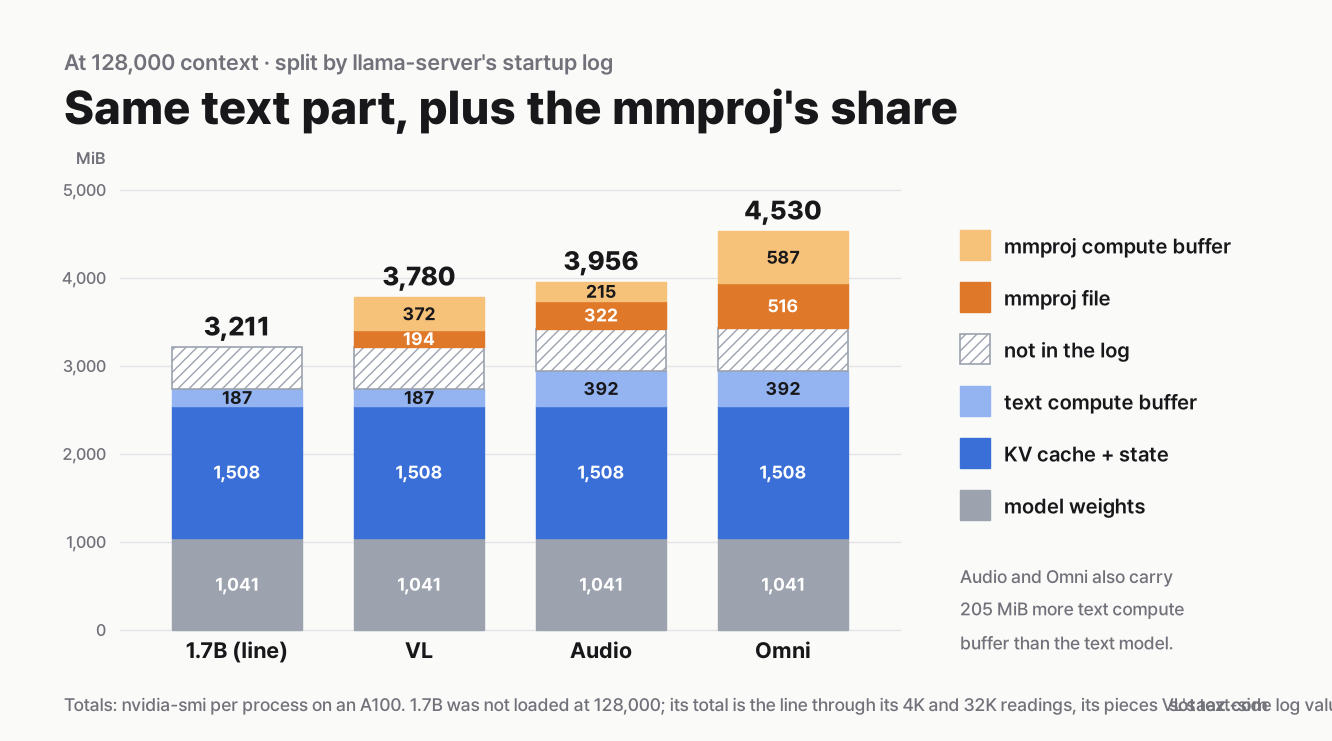
The first piece is the mmproj file itself, which goes onto the GPU at its file size. The second is the compute buffer the mmproj uses while it processes an image or audio. It is the reserve_compute_meta: CUDA0 compute buffer size line in the startup log: 372 MiB for images, 215 MiB for audio, and Omni reserves both.
The third is the one we did not expect. The text-side compute buffer is the sched_reserve: CUDA0 compute buffer size line. The text model has one too, so compare it with the text model's value at the same context and count only the difference. At 4K the text model and VL both had 66 MiB, while Audio and Omni, the two models that take audio, had 271 MiB. That 205 MiB gap held at every context.
The startup log also prints a line called [mtmd] estimated worst-case memory usage of mmproj (591 MiB for VL, 540 for Audio, 1,136 for Omni). The name suggests it is the mmproj's whole share, but it does not include the 205 MiB of extra text compute buffer in the audio models. Adding only that line undercounts Audio and Omni.
Which card holds what
We use the same rule as our 8 GB context budget post: a card sold as N GB has N × 10⁹ bytes, and we leave 0.5 GiB for the desktop and driver. That leaves 3,303 MiB on a 4 GB card, 5,210 MiB on 6 GB and 7,117 MiB on 8 GB. The table shows what remains at each model's full context with an input going in.
| Card | LFM3-1.7B (256K) | VL (128K) | Audio (128K) | Omni (128K) |
|---|---|---|---|---|
| 8 GB | 2,193 MiB spare | 3,299 MiB spare | 2,885 MiB spare | 2,311 MiB spare |
| 6 GB | 286 MiB spare | 1,392 MiB spare | 978 MiB spare | 404 MiB spare |
| 4 GB | does not fit | does not fit | does not fit | does not fit |
On an 8 GB card, all four models hit their own maximum context before they run out of memory. We did not run on these cards; this table compares A100 measurements against their usable memory, and the card rows were worked out after measuring.
One more check matters on small cards. At startup llama-server's fit step tries to leave some GPU memory free (will leave ... >= N MiB in the log), and the amount differs by model: 1,024 MiB for 1.7B, 1,589 for VL, 1,561 for Audio and 2,133 for Omni in our logs. On the 8 GB row every model keeps more than that, though Omni clears it by only 178 MiB. On the 6 GB row all four keep less, and we did not test what the fit step does then. On a 4 GB card the straight line says you would need a shorter context (about 134K tokens for 1.7B, 87K for VL, 54K for Audio, 9K for Omni). That arithmetic leaves nothing free, so with the fit step's margin you would have to go shorter still.
What we predicted
For both the text model and the multimodal models, we wrote down predictions before the first run. All six text-model predictions held (for example, at most 6,000 MiB at full context, and the common estimate at least 7,000 MiB too high). Four of the five multimodal predictions held.
| Prediction | Result | |
|---|---|---|
| F1 | At 128K, all three at most 5,000 MiB | 3,780 / 3,956 / 4,530 MiB |
| F2 | Extra over the text model between the mmproj file size and 400 MiB above it | VL 568 MiB held; Audio 746 MiB and Omni 1,320 MiB missed |
| F3 | 346 to 382 MiB more from 4K to 32K | 364 MiB for all three |
| F4 | An image or audio input adds no more than 512 MiB | 38 MiB, 276 MiB |
| F5 | llama-tts at most 7,117 MiB | 3,974 / 4,548 MiB |
F2 missed because of the third piece above. We allowed 400 MiB for the mmproj compute buffer alone. Audio went over because of its 205 MiB of extra text compute buffer, and Omni went further over because it reserves two mmproj compute buffers on top of that.
Limits
- We measured on an A100, not on an 8 GB card. The 477 MiB that no log line lists (probably mostly the CUDA context) can differ by GPU and driver. Your desktop's share is your own.
- Memory only. We did not measure speed or the quality of answers, transcripts or speech. The examples above show that things work, not how well.
- One input each. One 1250×660 image and one 53-second English clip. A larger image or a longer clip may add a different amount. We did not try video input or real-time voice.
- No other languages. The model cards list Korean and many others; we tested English only.
- Benchmark scores in the model cards are LiquidAI's own numbers. We did not rerun them.
- One quantization and a 16-bit cache. We did not try Q8_0 main files or an 8-bit KV cache. We also did not measure the QAD Q4_0 files the model cards recommend (checkpoints trained to recover Q4_0's loss).
- Two install traps from one server. The Ubuntu 22.04 and HTTPS issues are what we hit on our machine; a newer system may not hit them.
Next step
To find the longest -c for another multimodal model on your own card, start that model with --mmproj for two short runs and draw a straight line, then add what one real input adds. For a sense of how many tokens real tasks take (a 20-turn coding chat, a 76-page PDF), see the 8 GB context budget post.