Serve llama.cpp as an API for curl, Python and Open WebUI, and Stop Cut-Off Answers
Run llama-server on an 8 GB budget and call it from curl, Python and Open WebUI. Open WebUI attached 38 tool definitions to a one-line question, a 7,217-token prompt, and answers stopped with \"Context size has been exceeded.\" Turning the thinking off fixed it; switching the tools off alone did not.
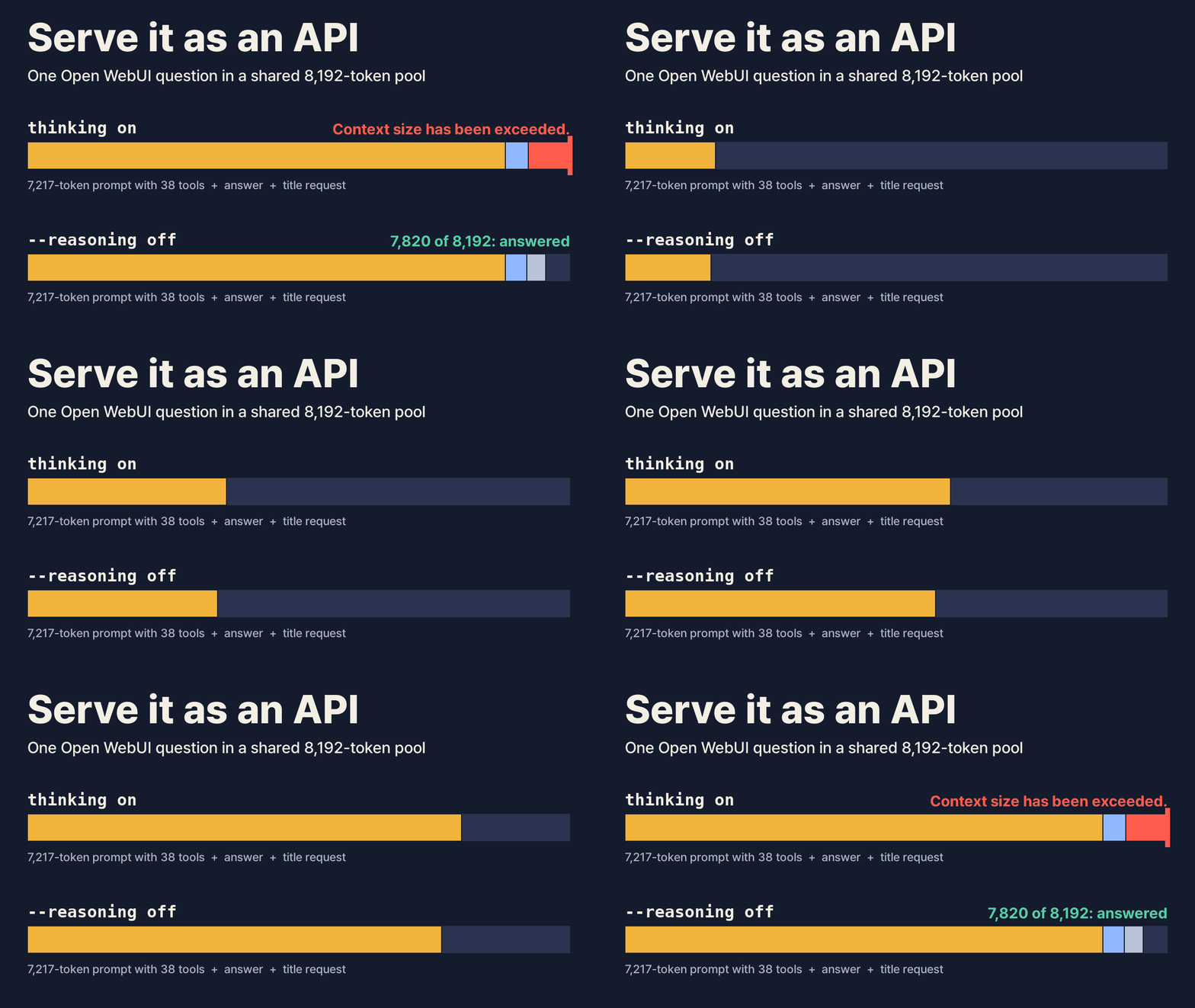
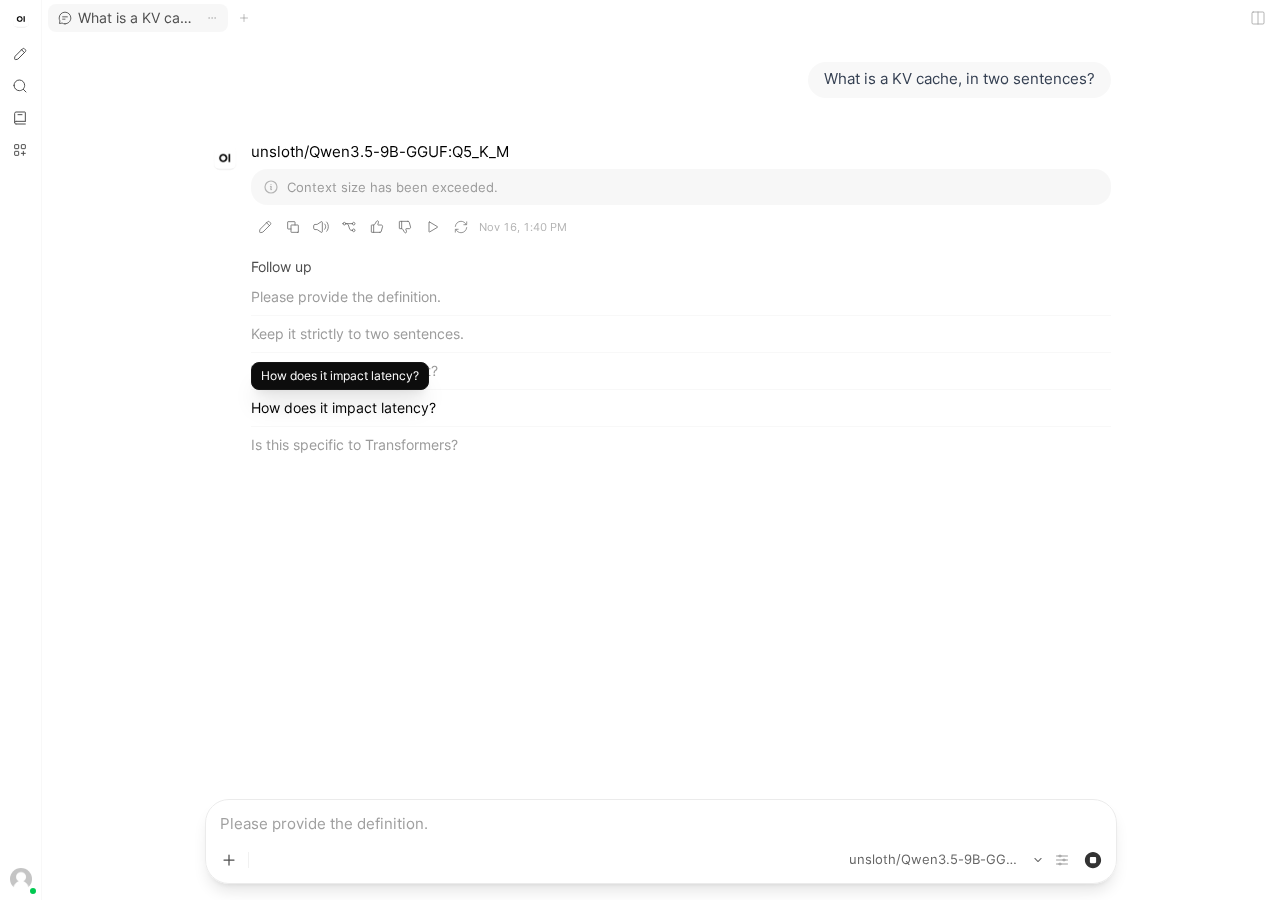
We typed "Explain in three paragraphs what a GPU does." into Open WebUI, and our server received a 7,217-token prompt. Open WebUI had attached the definitions of 38 built-in tools to the question: a clock, memory, notes, a calendar and more. On our 8 GB budget the server keeps 8,192 tokens of context for everyone at once, so that one prompt took most of it. With the model's thinking on, the first answer stopped mid-sentence after 5.7 seconds with "Context size has been exceeded."
This is episode 3 of our series on running llama.cpp on your own server. By the end you will have the model from episode 2 running as a server that answers curl, Python and Open WebUI, with the first visible word in about 0.1 seconds. Episode 1 covers installing llama.cpp.
What we ran
The model is Qwen3.5-9B Q5_K_M from unsloth/Qwen3.5-9B-GGUF, the file episode 2 picked for 8 GB. We used llama.cpp build 12429 (commit 9fba51d2c), built as in episode 2 with -DGGML_CUDA_NCCL=OFF. To match it, run git fetch origin and git checkout 9fba51d2c in your llama.cpp folder and repeat the two build commands.
Everything ran on an A100 told to act as if 7,680 MiB were free, the same 8 GB budget as episode 2. Our commands add a large -fitt value to create that budget. Leave it out on a real card; the commands below are what you would type. Speeds are A100 speeds, so compare them with each other and expect your own to differ. Each speed and time below comes from three runs unless the text says otherwise.
Step 1: start the server
./build/bin/llama serve -hf unsloth/Qwen3.5-9B-GGUF:Q5_K_M --no-mmproj -c 8192When it prints listening on http://127.0.0.1:9931, it is ready. On our budget that took about 3.4 seconds once the file was downloaded. llama serve is the same server as the llama-server program in the same folder, so either name works.
The two flags come from episode 2. With only -hf, the server also loaded the vision file, cut the context to 4,096, and moved 6 of the model's 33 layers to the CPU. It answered at 35.8 tokens per second. With --no-mmproj -c 8192 every layer stayed on the GPU, as episode 2 showed, and it ran at about 123 tokens per second, peaking at 6,650 MiB.
One detail matters later. The server starts 4 slots, so it can answer 4 requests at the same time, and all 4 share one pool of 8,192 tokens. Each request's prompt and answer take room from that pool until it finishes.
Step 2: call it with curl
curl -sS http://127.0.0.1:9931/v1/chat/completions \
  -H "Content-Type: application/json" \
  -d '{"messages": [{"role": "user", "content": "Explain in three paragraphs what a GPU does."}]}'
The address and the shape of the answer follow OpenAI's chat API, which is why the tools in the next steps work without changes. The answer is a JSON object. Three parts of it are worth knowing:
| Field | What is in it |
|---|---|
choices[0].message.content | The answer |
choices[0].message.reasoning_content | The model's thinking before the answer |
timings | llama.cpp's own numbers. predicted_per_second is the generation speed, prompt_n the prompt tokens it had to read |
That second field is why the first answer felt slow. Qwen3.5 thinks before it answers by default. Over six plain requests, the thinking ran to 3,347-6,699 characters against 1,485-1,935 for the answer, and each request took 8.5-14.1 seconds. With "stream": true in the body and -N on curl, tokens start arriving after about 0.11 seconds, but they are thinking tokens. Over six streamed requests from curl and Python, the first word of the answer came after 8.9-10.0 seconds.
A max_tokens limit makes this worse. With "max_tokens": 128, all six requests came back with an empty answer: the model spent all 128 tokens thinking, and finish_reason said length.
Step 3: call it from Python
The openai package works if you point it at your server. The API key can be any text.
from openai import OpenAI

client = OpenAI(base_url="http://127.0.0.1:9931/v1", api_key="none")
r = client.chat.completions.create(
    model="any",
    messages=[{"role": "user", "content": "Explain in three paragraphs what a GPU does."}],
)
print(r.choices[0].message.content)
print(r.model_extra["timings"]["predicted_per_second"])
The server answers with the one model it loaded, whatever model says. reasoning_content and timings are not part of OpenAI's format, so the package keeps them in model_extra. Python gave the same picture as curl: 121.6-122.6 tokens per second, and the first answer word after 9.2-10.0 seconds when streaming.
Step 4: turn the thinking off
For a chat or a script that wants the answer, start the server with thinking off:
./build/bin/llama serve -hf unsloth/Qwen3.5-9B-GGUF:Q5_K_M --no-mmproj -c 8192 --reasoning offThe first answer word then arrived after 0.085-0.112 seconds, and a whole three-paragraph answer took 2.5-3.1 seconds. Speed did not change: 121.9-124.0 tokens per second, against 121.6-123.9 with thinking on. The time went to the thinking tokens, and those are gone. "max_tokens": 128 now returns 710-758 characters of answer.
To keep thinking on for some requests and off for others, leave the server as in Step 1 and add this to a request's body:
"chat_template_kwargs": {"enable_thinking": false}In Python, pass it as extra_body={"chat_template_kwargs": {"enable_thinking": False}}. That request got its first word after 0.081-0.13 seconds at 121.8-122.9 tokens per second, the same as the server-wide switch.
Step 5: connect Open WebUI
Open WebUI gives you a chat page in the browser. We installed version 0.13.3 in its own Python 3.11 environment:
python3.11 -m venv owui
. owui/bin/activate
pip install open-webui==0.13.3
OPENAI_API_BASE_URL=http://127.0.0.1:9931/v1 OPENAI_API_KEY=none \
ENABLE_OLLAMA_API=False WEBUI_AUTH=False \
open-webui serve --host 127.0.0.1 --port 8090
Then open http://127.0.0.1:8090. WEBUI_AUTH=False skips the login, which suits a machine only you use; --host 127.0.0.1 keeps the page off your network.
What one question sends
We put a small logging proxy between Open WebUI and the server. Each typed question became four requests: the answer itself, and three side tasks that ask the same model for a chat title, 1-3 tags and 3-5 suggested follow-up questions. The title request starts at the same moment as the answer. The other two run one after the other once the answer ends.
The answer request is the large one. Open WebUI attaches its built-in tools so the model can call them: the current time and date arithmetic, your knowledge bases, memory, notes, saved chats, a calendar and automations, 38 definitions and 27,838 characters in all. The server read that as a 7,217-token prompt for the one line we typed.
Why the answers stopped
With the Step 1 server, thinking on, all three of our questions ended with "Context size has been exceeded." On the first, the answer had printed most of three paragraphs when it stopped, 5.7 seconds in. The server log shows the arithmetic: the answer had used 7,562 tokens of the shared pool and the title request, thinking too, 631. Together that is one more than 8,192.
The next two questions failed within about 2 seconds. A side request from the question before was still thinking, and next to the new 7,217-token prompt there was no room.
What fixes it
Turn the thinking off with --reasoning off from Step 4. With the same 8,192 tokens, none of the three questions failed. The answer and its prompt took about 7,536 tokens and the title request about 286, which fits. The answers finished 0.7-5.0 seconds after we pressed Enter; on the first question, 1.9 of those seconds went to reading the 7,217-token prompt. The two longer answers ran at 117.0 and 120.5 tokens per second, close to the 121.6-124.0 of a single request.
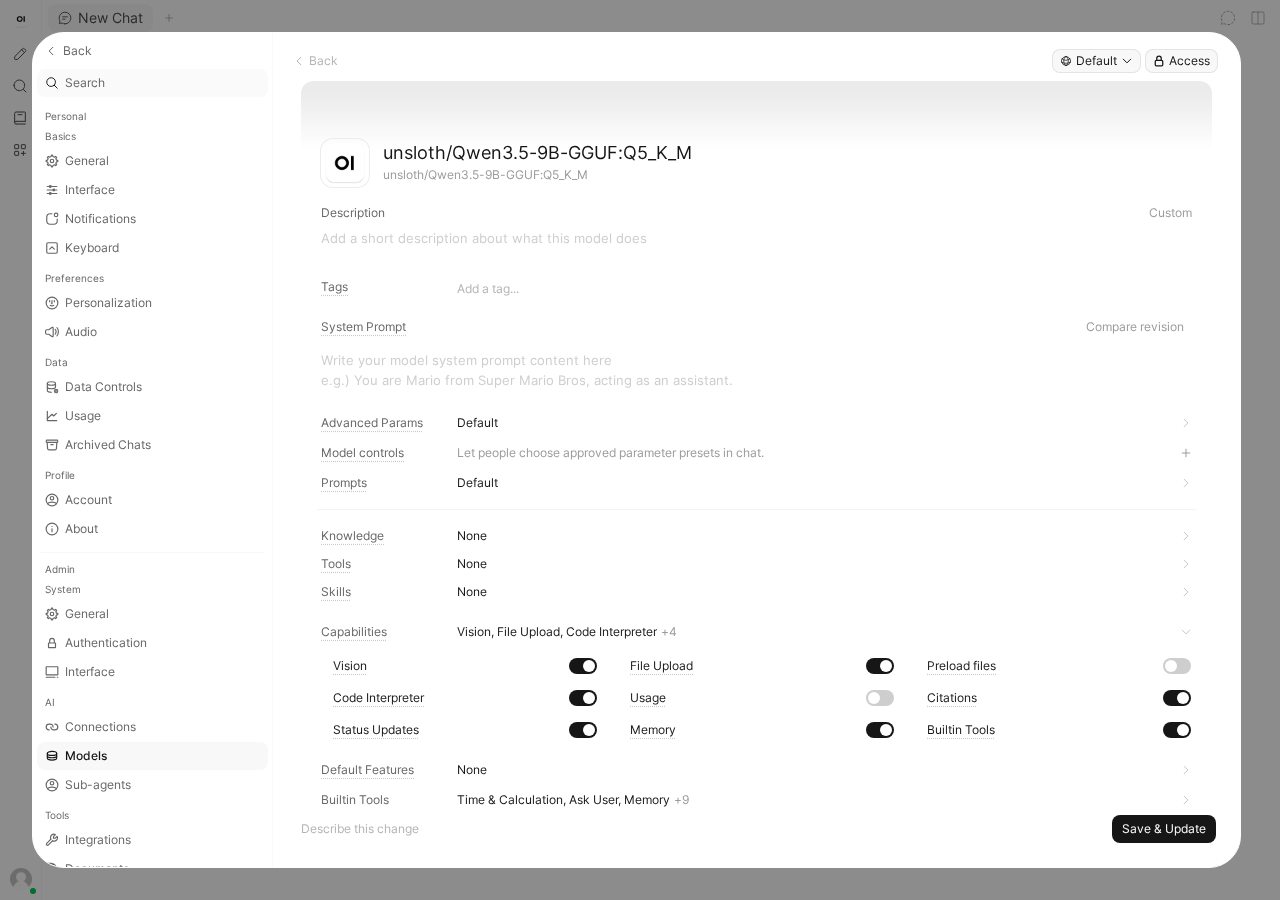
Turning the built-in tools off is not enough on its own with thinking on. In Open WebUI the switch is under Settings, then Models under Admin: edit your model, open Capabilities, switch off Builtin Tools, and press Save & Update. We switched the same capability off through Open WebUI's model API. The answer request then shrank from 27,989 characters to 140, and the server read a 20-token prompt instead of 7,217.
We ran the same three questions with the tools off and thinking still on. The first two answered in full. The third stopped after 19.5 seconds with the same error. Open WebUI had still been generating tags for the two earlier chats, and both tag requests were still thinking, holding 4,305 and 2,162 tokens. With the new answer at 1,727 tokens, the pool needed 8,194. The tools filled the pool in one prompt; the thinking side requests can fill it too, a little at a time. Switching the tools off is still worth doing if you do not use them, since each answer no longer holds about 7,200 tokens of the shared pool, but on 8,192 tokens it is the thinking that has to go.
Why not a bigger context
-c 32768 also removed the error, with thinking on. On 8 GB it costs speed. The larger pool did not fit next to the whole model, so the server moved 5 of the 33 layers to the CPU, and a single request ran at 41.3 tokens per second in one run, against about 123. Inside Open WebUI, with the title request thinking beside it, the answer ran at 25.2-31.4 tokens per second and finished 5.1-16.3 seconds after we pressed Enter. On a card with room to spare, a bigger context is the simple fix; on 8 GB, turning the thinking off keeps the speed.

If it breaks
| What you see | Cause | Fix |
|---|---|---|
"content": "" and finish_reason length | The model spent max_tokens thinking | --reasoning off, or "chat_template_kwargs": {"enable_thinking": false}, or a larger max_tokens |
| The first word takes 9-10 seconds, then text flows fast | Thinking tokens come first | Same as above |
| About 36 tokens per second instead of 120 | Started with only -hf, so the vision file loaded and layers moved | --no-mmproj -c 8192 (episode 2) |
| Open WebUI: "Context size has been exceeded." | A 7,217-token prompt with the built-in tools plus thinking overflow the shared 8,192 | --reasoning off (switching off Builtin Tools shrinks the prompt but did not stop the error) |
| curl: connection refused | Server not ready, or a different port | Wait for the listening line; the default port is 9931 |
What you have now
A server on port 9931 that answers curl, Python and Open WebUI, with the first word in about 0.1 seconds at about 123 tokens per second on our budget. If you connect another chat app, look at the prompt_n in timings for one typed question first. That number shows how much of your context the app uses before you have typed anything.