vLLM or llama.cpp on One GPU: Which to Run Depends on How Many Requests Overlap
We ran Qwen3-8B in bf16 on one A100 80GB. One request at a time, both runtimes generated about 86 tok/s. With 64 requests at once, vLLM's throughput was about twice that of llama.cpp with its prompt cache turned off. Memory use and the prompt cache setting compared as well.
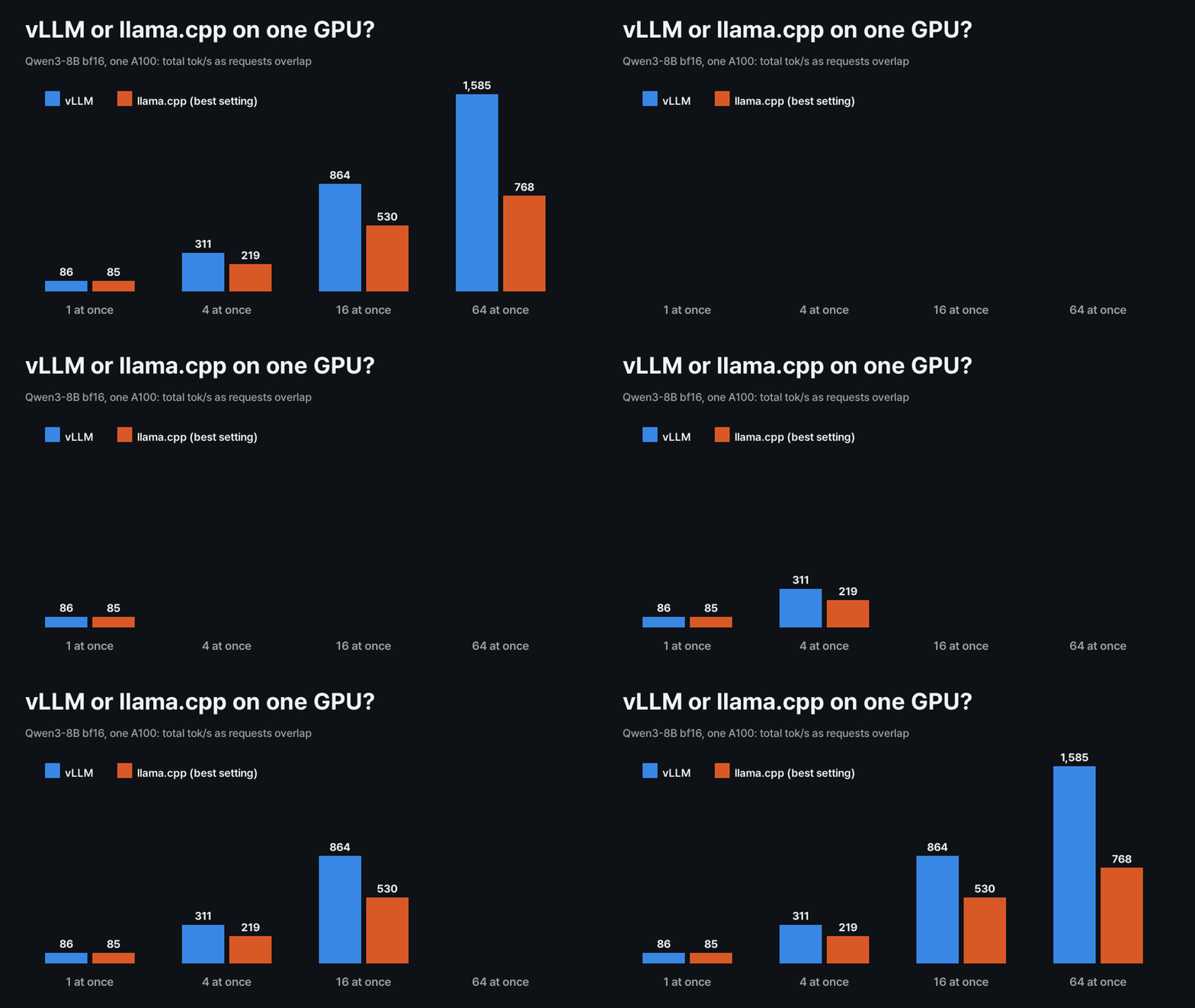
We put Qwen3-8B in bf16 on one A100 80GB and sent requests one at a time. llama.cpp generated 86.5 tokens per second and vLLM 86.0. When we sent 64 requests at once, the two came apart: vLLM's total throughput was 1,585 tok/s, and llama.cpp reached 768 tok/s with its prompt cache turned off. A server for one person and a server that takes many requests at once are not chosen by the same measure.
The numbers come from our earlier speed comparison and memory comparison of the two runtimes; nothing here is newly measured. Both runtimes ran on the same A100 80GB, with llama.cpp build 4da6337 and vLLM 0.29.1rc1.
One request at a time: look at memory
llama.cpp serves a GGUF model through llama-server, and vLLM loads a Hugging Face checkpoint and serves it. With the same Qwen3-8B bf16 weights and one request at a time, generation speed was within 1% at both prompt lengths.
| Qwen3-8B bf16, one request | llama.cpp | vLLM |
|---|---|---|
| Generation, 4,096-token prompt | 86.5 tok/s | 86.0 tok/s |
| Generation, 32,000-token prompt | 70.2 tok/s | 70.6 tok/s |
| Time to first token, 4,096-token prompt | 0.86 s | 0.33 s |
| Time to first token, 32,000-token prompt | 9.15 s | 4.13 s |
After a long prompt, vLLM got to the first token sooner, by about 5 seconds at 32,000 tokens. The llama.cpp numbers above, though, include time spent saving the previous conversation into its default prompt cache. With that cache turned off, its time to first token was about 0.44 s at 4,096 tokens and about 6.15 s at 32,000. vLLM was still faster, but by less.
Memory is where the gap is large. Under load with one slot of 2,048 tokens, llama.cpp used 15,337 MiB of GPU memory. vLLM, with gpu_memory_utilization at 0.85, used 69,585 MiB. vLLM reserves its share at startup for the KV cache and the rest, and that share can be lowered. llama.cpp sizes its cache from the context length you set.
llama.cpp also lets you pick a GGUF quantization. With the same model as Q4_K_M, generation after the 4,096-token prompt rose from 86.5 to 129.6 tok/s, while time to first token grew from 0.86 s to 1.35 s. This compares weight formats inside llama.cpp only. When you pick a quantization, check answer quality on the work you will actually give it.
So if requests arrive one at a time and the GPU's memory has other work to do, llama.cpp is worth trying first. If the wait for a reply to start after a long input matters to you, test vLLM alongside it.
When requests overlap, throughput splits
We raised the number of concurrent requests and measured total output tokens per second. These are whole-server throughput, not the speed of one request.
| Requests at once | 1 | 4 | 16 | 64 |
|---|---|---|---|---|
| vLLM | 86 tok/s | 311 tok/s | 864 tok/s | 1,585 tok/s |
llama.cpp, --cache-ram 0 | 530 tok/s | 768 tok/s | ||
| llama.cpp, defaults | 85 tok/s | 219 tok/s | 466 tok/s | 430 tok/s |
At 4 requests vLLM produced 1.4 times the tokens of llama.cpp at its defaults, and at 64 about twice those of llama.cpp with the cache off. The median time to first token at 64 requests was 2.83 s on vLLM and 4.65 s on llama.cpp with --cache-ram 0.
The 430 tok/s for llama.cpp's defaults is the median of two runs, 761 and 100 tok/s. In the slow run every request waited 144 to 153 seconds for its first token. The server log showed old entries being evicted one at a time from a full host-memory prompt cache. No earlier conversation came back under this load, so the cache gave no reuse benefit either. With the cache turned off by --cache-ram 0, the two runs gave nearly the same throughput.
If llama.cpp takes many different requests, compare settings with a smaller prompt cache limit or with the cache off. If the same conversations come back to your server often, measure what the cache saves before you turn it off.
Sending the same start again and again
When requests share a system prompt or a document, a cache that skips recomputing the shared start helps. In a separate test we sent eight requests in a row to Qwen3.5-9B, each with the same 8,000-token start. On vLLM in bf16, the median time to first token for requests 2 to 8 was 0.089 s with prefix caching on and 0.662 s with it off. That feature was on by default in this vLLM setup.
llama.cpp with one slot reused the start too and got 0.199 s. That run used a Q4_K_M file, though, so 0.199 s against vLLM's 0.089 s is not a direct runtime comparison. What this test shows is that both servers can make use of a repeated start. The effect when many users send the same start has to be checked against your own request pattern.
Settings to check before you start
The speeds above were measured with the server already running. Getting it started differed too.
- Model file: vLLM loads a Hugging Face checkpoint and llama.cpp a GGUF. Check first which format your model is available in.
- Context length: we asked for 128K on Qwen3-8B, which is configured for at most 40,960 tokens. vLLM refused to start without an override environment variable. llama.cpp started with memory for 131,072 tokens but allowed only 40,960 per conversation. Set
-cfrom the length the model supports and the length you actually need. - First start: on our server vLLM failed while compiling kernels, because the system nvcc 12.1 did not understand a build option. The error came only after the model had loaded. Check a first start in the real environment before you deploy.
- GPU memory: vLLM sets its reserved share with
gpu_memory_utilization. If other processes share the card, decide this value first.
On one A100 80GB with requests arriving one at a time, llama.cpp matched vLLM's generation speed while using less GPU memory. As concurrent requests grew, vLLM's throughput pulled ahead. To choose a server, look first at how much your requests actually overlap and how often you send long prompts, rather than at how many people will use it.
If you are sizing a team server, our serving ladder test shows the wait times as a 27B model goes from one concurrent request to 32.
The newsletter below sends our next serving test when it is out.