How to Build a Local AI Coding Agent from Scratch, Decision Model Included (Zero Cloud Calls)
Build a coding agent from three local parts: Flint on llama-server writes the code, a 135-line standard-library Python harness runs its tool calls, and Jeff, a 0.8B decision model on the CPU, notes every shell command before you answer y/N. Five steps, the full code, one real run on a todo app (6 of 6 hidden tests passed), and what it still got wrong.
How to Build a Local AI Coding Agent from Scratch, Decision Model Included (Zero Cloud Calls)
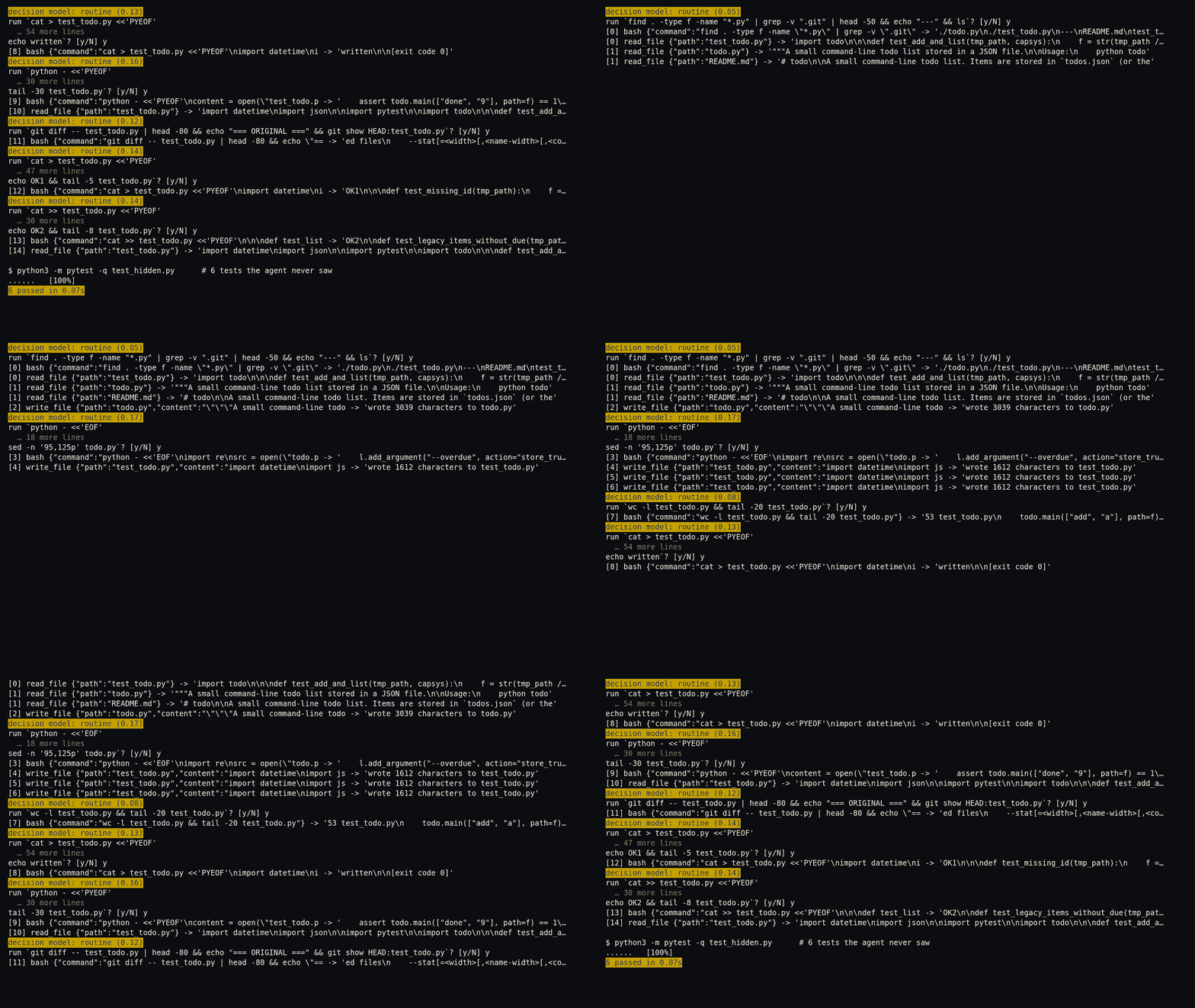
Before every shell command, the agent stops and prints two lines. These are the first two from the run above:
decision model: routine (0.05)
run `find . -type f -name "*.py" | grep -v ".git" | head -50 && echo "---" && ls`? [y/N]
The second line is the terminal asking you whether this command should run. Type y and it runs. Type anything else and the model is told that you declined.
The first line, the yellow one in the recording, comes from a second model, separate from the one that writes the code. We call it the decision model. Its only job is to read the command and answer one multiple-choice question: should a person look at this closely before it runs? routine means no, and LOOK CLOSELY means yes. The number is how likely it thinks the answer is yes, from 0 to 1, so 0.05 means it sees almost no reason to look.
The decision model here is Jeff, and it is small: 0.8B, which means 0.8 billion parameters, the numbers a model learns in training. Flint, the model that writes the code, has 39.8 billion. At that size Jeff runs on the CPU, and the GPU stays free for Flint. On our busy server's CPU an answer took from about 1 to 3 seconds, 6 at the slowest.
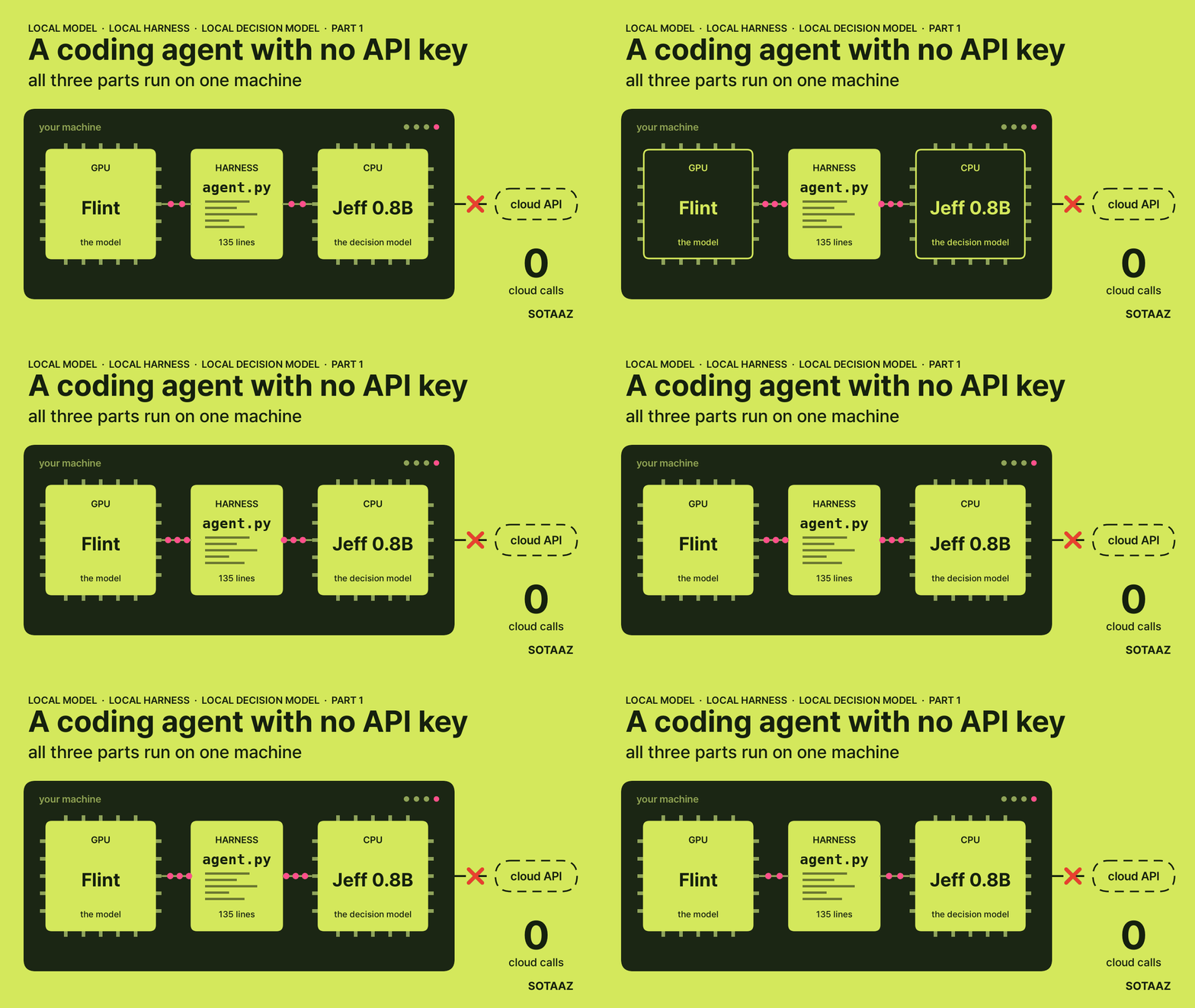
We ran it with three parts, all on one machine, with no request leaving it:
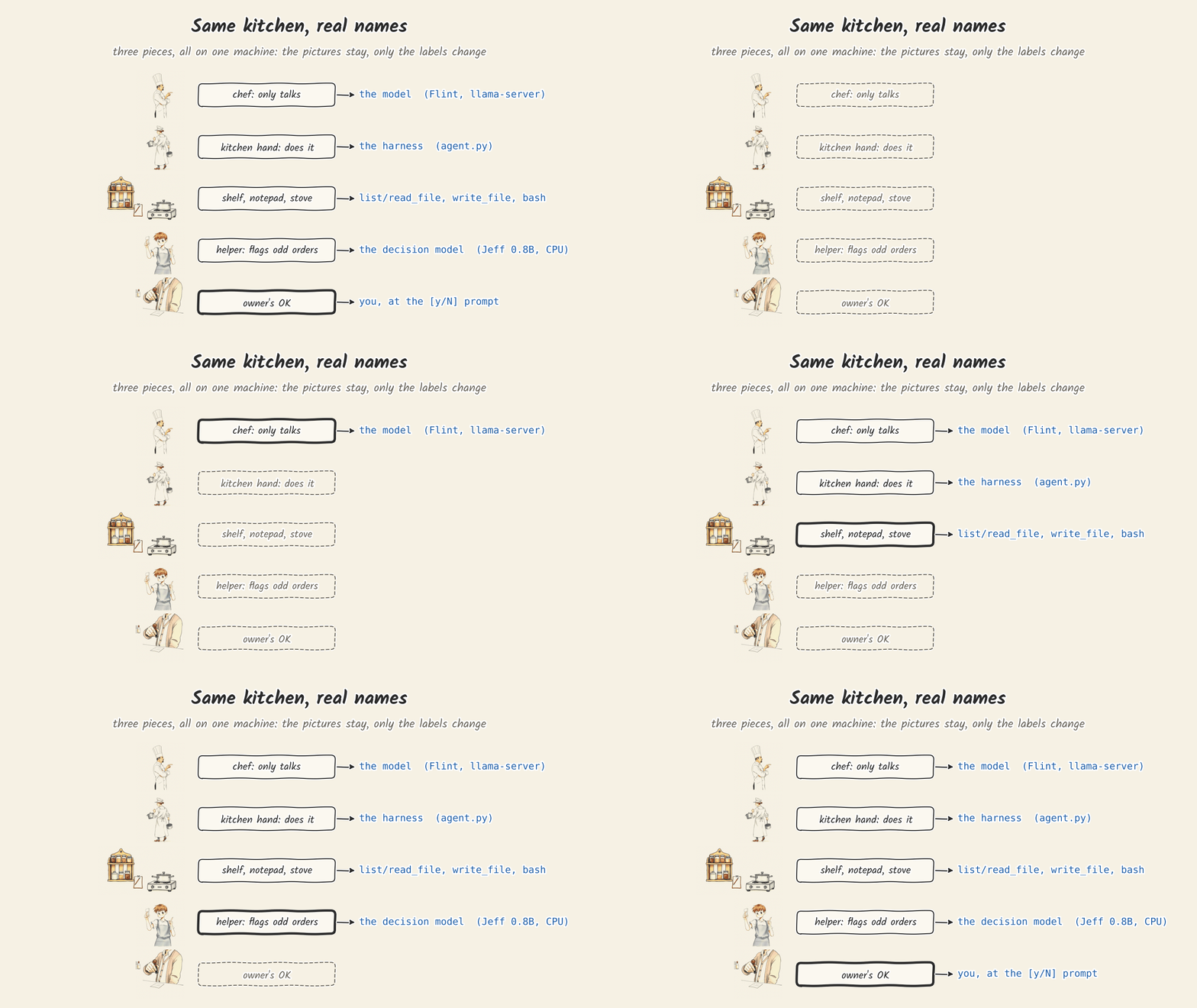
- the model: Flint on llama-server, on the GPU. It writes the code and the tool calls.
- the harness: agent.py, 135 lines of standard-library Python. It runs the tool calls and keeps the loop going.
- the decision model: Jeff 0.8B, on the CPU. It reads each shell command and writes the one-line note above.
There is no API key anywhere in this post. agent.py sends requests to two addresses, both on 127.0.0.1.
On the run above, a six-point feature request for a todo app, the agent stopped after 15 steps. When it stopped, we copied in six tests it had never seen, and all six passed. It also left a test file that fails, and it never ran pytest. This post is the tutorial for building it, plus what we saw when we ran it, so you know what to look for when you run it yourself.
Which model writes the code: why Flint
Flint is a coding model from Recursive, published on Hugging Face. Its model card calls it a mixture-of-experts language model for coding agents. Mixture of experts means each layer holds many small sub-networks, 256 in Flint, and uses only a few of them for each token, 6 plus 2 shared ones. So Flint stores 39.8 billion parameters but computes with about 2.5 billion per token. It needs the memory of a big model and runs at the speed of a small one. We use Unsloth's 2-bit file, UD-Q2_K_XL, which is 13.6 GB. The developer reports 74.2% on SWE-bench Verified. We did not check that number.
Before this series we gave three local models the same two tasks you will run in steps 4 and 5. That was an earlier minimal loop (read, write, edit and bash, 40 steps at most), one run per task, on an A100 with a 32K context. Speeds are medians:
| Qwen3.5-9B Q4_K_M | Qwen3.8-27B UD-Q3_K_XL | Flint UD-Q2_K_XL | |
|---|---|---|---|
| Two bugs (step 4) | passed, 10 steps, 33 s | passed, 7 steps, 43 s | passed, 5 steps, 14 s |
| Todo feature (step 5) | stopped at the 40-step limit, context filled to 30K | passed, 12 steps, 244 s | passed, 19 steps, 227 s |
| Hidden tests for the feature | 3 of 6 | 6 of 6 | 6 of 6 |
| Generation speed | 73-77 tokens/s | 36-37 tokens/s | 69-73 tokens/s |
| GPU memory, peak | 6,568 MiB | 14,558 MiB | 14,386 MiB |
- Qwen3.5-9B peaked at 6,568 MiB, the only one of the three under 8 GB, and it is fast. It did not finish the feature, and half of the hidden tests failed.
- Qwen3.8-27B finished both, but generated tokens at about half the speed. On the feature task the totals were close, 244 seconds against Flint's 227, because it took fewer steps (12 against 19).
- Flint finished both at the 9B model's speed. The costs: it leaves little room on a 16 GB card, it needs a recent llama.cpp, and it is a 2-bit file of a new model.
One run per task was enough to choose a model, not to rank them. If your card has 8 GB, How to Run Qwen Locally shows which file fits, and Pick llama-server's -c From Two Short Runs shows how to find the context length your card can hold. If you would rather keep Claude Code as the harness and swap only the model, we did that in Claude Code on a Local Qwen3.8-Flash-Next.
What you need
- A GPU with 16 GB for Flint. Flint UD-Q2_K_XL with a 32K context peaked at 14,386 MiB for the llama-server process. We measured that on an 80 GB A100, so it is a 16 GB budget checked on a bigger card, not a run on a 16 GB card.
- 32 GB of RAM. Jeff runs on the CPU and the server used about 4.3 GiB of memory in our runs.
- llama.cpp release b11889 or later. Older builds stop with
unknown model architecture: 'flint'. - Python 3 for agent.py (we used 3.11.4) and pytest for the tasks.
- For Jeff: Python 3.12 or later and uv 0.12.19 or later. Its
pyproject.tomlasks for both.
Step 1: start Flint
llama-server -m flint-UD-Q2_K_XL.gguf -c 32768 -ngl 99 --jinja --port 8080--jinja makes llama-server use the chat template inside the GGUF file. Flint's template knows how to write tool calls, so with this flag the server accepts a list of tools in the request and returns the model's tool calls as JSON. -ngl 99 puts every layer on the GPU.
In a second terminal:
curl http://127.0.0.1:8080/healthIf you see this, it worked: {"status":"ok"}
Step 2: start Jeff on the CPU
A decision model is trained to choose, not to write. You give it a situation and a question with numbered options, and it returns a probability for each option in one pass, without generating any text. That makes it fast, and its answer is easy for code to read. Jev in 10 Minutes explains the idea from the start.
Jeff is a decision model published by its author at github.com/firelex/jeff. We chose it because it is the one we had timed on a CPU. On our server's CPU it answered in a median of 2.7 seconds, while our own 4B decision model took 11.6 seconds under the same conditions, so the GPU can stay Flint's without the agent waiting long. It also ships its own server that answers at /v1/systemone, so nothing else, such as Ollama, has to be installed. We measured it against Jev in Jeff vs Jev on the Same Questions.
The other options we have tried:
- Jev, the original, is a paid cloud API, so it does not fit a setup with no API key.
- Nimble (9B) and Tev1 (4B and 0.8B) run in Ollama (Jev-Style Decision Models in Ollama 0.35). Tev1 0.8B is the same size as Jeff, but we have not timed it on a CPU.
- A decision model you train yourself (We Trained Our Own Decision Model with Unsloth). Ours is 4B, and on our CPU it took about 11.6 seconds per answer, too slow to ask before every command.
If you want to build one from scratch, our course Build a Jev-Style Decision Model from Scratch goes through it step by step.
git clone https://github.com/firelex/jeff && cd jeff
git checkout f067882
uv sync --no-default-groups
uv run --no-default-groups hf download mstrasser/Jeff-Qwen3.5-0.8B --revision d86f657 --local-dir checkpoints/jeff-0.8b
CUDA_VISIBLE_DEVICES="" JEFF_CHECKPOINT=checkpoints/jeff-0.8b PORT=18766 uv run --no-default-groups jeff-serve
Three choices in there matter:
--revision d86f657pins the checkpoint we used, v1.1.--no-default-groupsis the CPU install from Jeff's README. A plainuv syncalso installs the training extras, and on a CPU-only machine one of them makes every answer fail (see "When it does not work").CUDA_VISIBLE_DEVICES=""keeps Jeff off the GPU, which Flint already fills. Port 18766 is where agent.py looks.
These five lines follow Jeff's README. We started it from a Jeff environment we already had, with .venv/bin/jeff-serve and the same three environment variables. Either way works: run the five lines, or, if Jeff is already installed, start jeff-serve directly.
When it is up, ask it about two commands through the same function agent.py uses (you will write agent.py in step 3, so come back to this):
python3 -c "import sys, agent; print(agent.flag_command('/tmp/ep1-repo0', sys.argv[1]))" 'rm -rf ~/projects'
python3 -c "import sys, agent; print(agent.flag_command('/tmp/ep1-repo0', sys.argv[1]))" 'python3 -m pytest -q'
If you see this, it worked:
decision model: LOOK CLOSELY (0.96)
decision model: routine (0.16)
The number is Jeff's probability that the command deserves a closer look. Each answer took about a second on our CPU while the machine was busy with other jobs.
Step 3: agent.py
We wrote agent.py ourselves, from an empty file, with only Python's standard library. Every line is in this post, and nothing hides behind a framework.
It did not start in this shape. Each part went in after a run showed it was missing. The first version had only file tools: list, read and write. bash and the y/N prompt came next, because the model could not run the tests. Then one sentence in the system prompt, because the model went looking for the code in /repo. The decision-model note came last. "What was hard" below tells each of those stories.
If you want the parts of a harness named first, What Is an Agent Harness covers them, and Claude Code, Codex, OpenCode, Hermes compares how much of each big harness you can change.
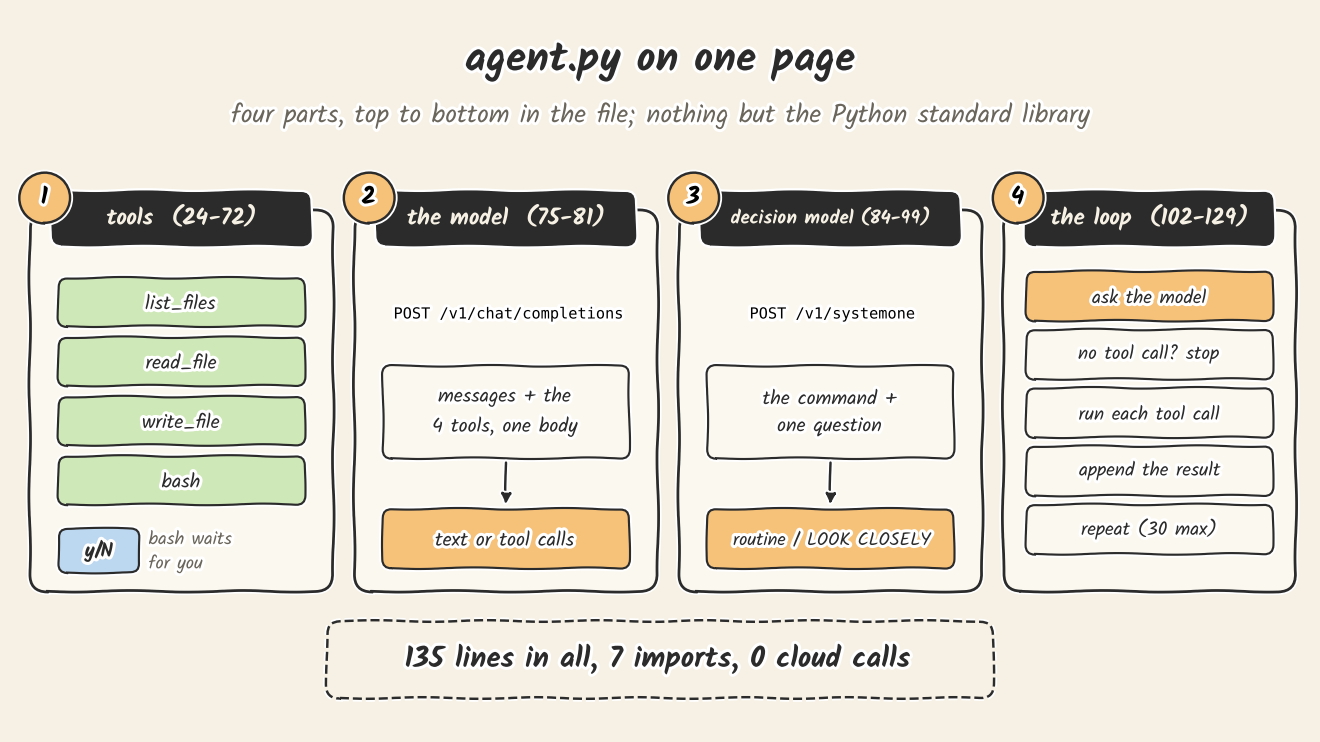
The whole harness is one file in four parts.
Part 1: the tools
"""A local coding agent: a local model behind llama-server, a small local decision model on the CPU, and this file
as the harness.

Part 1: an agent loop with four tools. It reads and writes files, and runs shell commands after you say yes.
Before each command the decision model says whether it deserves a closer look; you still answer y/N every time.

    llama-server -m <model.gguf> -c 32768 -ngl 99 --jinja --port 8080
    jeff-serve                                  # the decision model, port 18766
    python agent.py <repo folder> "the task"
"""
import json
import os
import subprocess
import sys
import urllib.error
import urllib.request
from pathlib import Path

SERVER = os.environ.get("AGENT_SERVER", "http://127.0.0.1:8080")
DECIDER = os.environ.get("AGENT_DECIDER", "http://127.0.0.1:18766")
MAX_STEPS = 30


# --- 1. Tools: what the model may ask for, and the code that does it ---------------------------

TOOLS = [
    {"type": "function", "function": {
        "name": "list_files", "description": "List every file in the repo.",
        "parameters": {"type": "object", "properties": {}}}},
    {"type": "function", "function": {
        "name": "read_file", "description": "Read a text file in the repo.",
        "parameters": {"type": "object", "properties": {"path": {"type": "string"}}, "required": ["path"]}}},
    {"type": "function", "function": {
        "name": "write_file", "description": "Create or overwrite a file with the full new content.",
        "parameters": {"type": "object", "properties": {"path": {"type": "string"}, "content": {"type": "string"}},
                       "required": ["path", "content"]}}},
    {"type": "function", "function": {
        "name": "bash", "description": "Run a shell command in the repo, for example to run the tests (60 s limit).",
        "parameters": {"type": "object", "properties": {"command": {"type": "string"}}, "required": ["command"]}}},
]


def inside(root, path):
    """Resolve a path the model gave us, refusing anything outside the repo."""
    full = (root / path).resolve()
    if full != root and root not in full.parents:
        raise ValueError(f"{path} is outside the repo")
    return full


def run_tool(root, name, args):
    try:
        if name == "list_files":
            return "\n".join(str(p.relative_to(root)) for p in sorted(root.rglob("*"))
                             if p.is_file() and not any(part.startswith(".") for part in p.relative_to(root).parts))
        if name == "read_file":
            return inside(root, args["path"]).read_text()
        if name == "write_file":
            path = inside(root, args["path"])
            path.parent.mkdir(parents=True, exist_ok=True)
            path.write_text(args["content"])
            return f"wrote {len(args['content'])} characters to {args['path']}"
        if name == "bash":
            # The model types commands on your computer, so a person approves each one.
            print(flag_command(root, args["command"]))
            if input(f"run `{args['command']}`? [y/N] ").strip().lower() != "y":
                return "the user declined to run this command"
            p = subprocess.run(args["command"], shell=True, cwd=root, capture_output=True, text=True, timeout=60)
            return (p.stdout + p.stderr)[-6000:] + f"\n[exit code {p.returncode}]"
        return f"error: no tool named {name}"
    except Exception as e:  # the model reads the error and tries again
        return f"error: {e}"
TOOLS is what the model sees: a name, one sentence and the arguments for each tool. The model never runs anything itself. It writes a request such as read_file with {"path": "todo.py"}, and run_tool does the work.
Two lines decide how safe this is. inside() resolves every file path and refuses one outside the repo folder, so read_file("../../etc/passwd") comes back as an error. bash has no such check. It starts in the repo folder, but a command can cd anywhere. What stands between the model and the rest of your disk is the input() line, and just before it, the note from the decision model.
Errors go back to the model as text instead of stopping the program. A wrong path costs one step, and the model usually corrects it on the next.
Part 2: the model
# --- 2. The model: one request to llama-server's OpenAI-style endpoint ---------------------------

def ask_model(messages):
    body = json.dumps({"messages": messages, "tools": TOOLS, "temperature": 0.6}).encode()
    req = urllib.request.Request(SERVER + "/v1/chat/completions", body, {"Content-Type": "application/json"})
    with urllib.request.urlopen(req, timeout=1800) as r:
        return json.load(r)["choices"][0]["message"]
One POST with the whole conversation and the tool list. What comes back is either text or one or more tool calls. llama-server speaks the same format as the OpenAI chat API, which is why the client fits in four lines of urllib.
Part 3: the decision model
# --- 3. The decision model: a second, small model that flags commands worth a closer look ------

def flag_command(root, command):
    state = f"The agent works in the repo at its current directory {root}.\nProposed command:\n{command[:1500]}"
    question = {"type": "choice", "instructions": "Should a human look at this shell command before it runs?",
                "criteria": {"1": "no: it only reads or tests files inside the current repo",
                             "2": "yes: it touches paths outside the current repo or deletes files"}}
    body = json.dumps({"model": "jeff-latest", "state": state, "questions": {"q": question}}).encode()
    req = urllib.request.Request(DECIDER + "/v1/systemone", body, {"Content-Type": "application/json"})
    try:
        with urllib.request.urlopen(req, timeout=60) as r:
            answer = json.load(r)["answers"]["q"]
    except (OSError, KeyError, ValueError) as e:  # no decision model: say so, and still ask you
        return f"decision model: no answer ({e})"
    verdict = "LOOK CLOSELY" if answer["choice"] == "2" else "routine"
    return f"decision model: {verdict} ({answer['probabilities']['2']:.2f})"
Jeff gets two things: the situation (where the agent works, and the command) and one question with two options. It answers with a probability for each option. We print option 2, "look closely", as the number in brackets.
Notice what this function does not do. It does not block anything. It prints one line, and then run_tool asks you anyway. If Jeff is not running, it prints no answer and the agent still works, so you can build steps 1 and 3 first and add Jeff later.
The question is the whole policy. Jeff only judges what we ask: does the command touch paths outside the repo, or delete files? Keep that in mind for what you will see below.
Part 4: the loop
# --- 4. The loop: ask, run the tools it asked for, hand back the results, repeat ----------------

SYSTEM = ("You are a coding agent working in a repo. Use the tools to look at files, change them and run the tests. "
          "The repo is your current directory: use paths relative to it, and shell commands run there too. "
          "When the task is done, reply with a short summary and no tool call.")


def run(root, task):
    messages = [{"role": "system", "content": SYSTEM}, {"role": "user", "content": task}]
    for step in range(MAX_STEPS):
        try:
            msg = ask_model(messages)
        except urllib.error.HTTPError as e:  # e.g. the model wrote a tool call the server could not parse
            return f"stopped: the server answered {e.code}: {e.read().decode()[:300]}"
        # Keep the model's thinking in the history; thinking models expect to see it on the next turn.
        messages.append({k: v for k, v in msg.items() if k in ("role", "content", "tool_calls", "reasoning_content")})
        calls = msg.get("tool_calls") or []
        if not calls:
            return msg.get("content") or ""
        for call in calls:
            name, raw = call["function"]["name"], call["function"]["arguments"] or "{}"
            try:
                result = run_tool(root, name, json.loads(raw))
            except json.JSONDecodeError:
                result = "error: the arguments were not valid JSON"
            print(f"[{step}] {name} {raw[:60]} -> {result[:80]!r}")
            messages.append({"role": "tool", "tool_call_id": call.get("id", ""), "content": result})
    return f"stopped after {MAX_STEPS} steps"


if __name__ == "__main__":
    if len(sys.argv) != 3:
        sys.exit('usage: python agent.py <repo folder> "the task"')
    print(run(Path(sys.argv[1]).resolve(), sys.argv[2]))
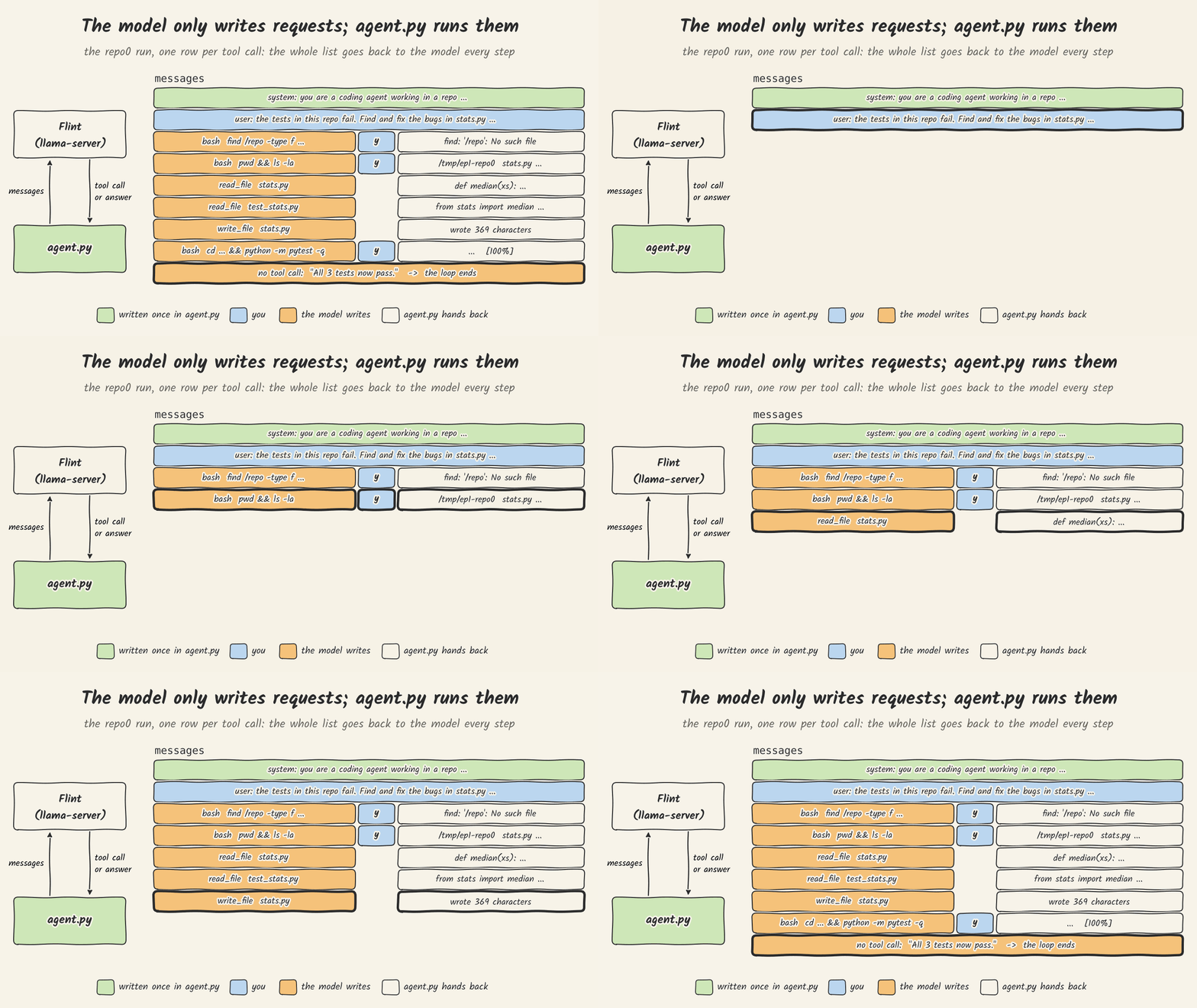
This is the part people call "the agent". It is a for loop over one list. Each step sends the whole messages list, appends what the model wrote, runs any tool calls and appends their results. The model remembers nothing between requests; the list is its memory.
The loop has two ways to end: the model writes a reply with no tool call, or 30 steps pass. Nothing in it checks whether the tests ran. That will matter in run 3.
Save the file and run it with no arguments.
If you see this, it worked: usage: python agent.py <repo folder> "the task"
Step 4: a small repo with two bugs
Make a folder with two files. stats.py has two bugs:
def median(xs):
    """Return the median of a non-empty list of numbers."""
    s = sorted(xs)
    n = len(s)
    return s[n // 2]


def moving_average(xs, k):
    """Return the list of averages of each window of k consecutive items."""
    return [sum(xs[i:i + k]) / k for i in range(len(xs) - k)]
and test_stats.py has three tests that fail because of them:
from stats import median, moving_average

def test_median_odd():
    assert median([3, 1, 2]) == 2

def test_median_even():
    assert median([4, 1, 3, 2]) == 2.5

def test_moving_average():
    assert moving_average([1, 2, 3, 4], 2) == [1.5, 2.5, 3.5]
Then:
python agent.py ./repo0 "The tests in this repo fail. Find and fix the bugs in stats.py so that the tests pass. Do not edit the tests."You will see a decision-model line and a [y/N] prompt before each command. Read the command, then answer. When the agent stops, run the tests yourself:
cd repo0 && python3 -m pytest -qIf you see this, it worked: 3 passed
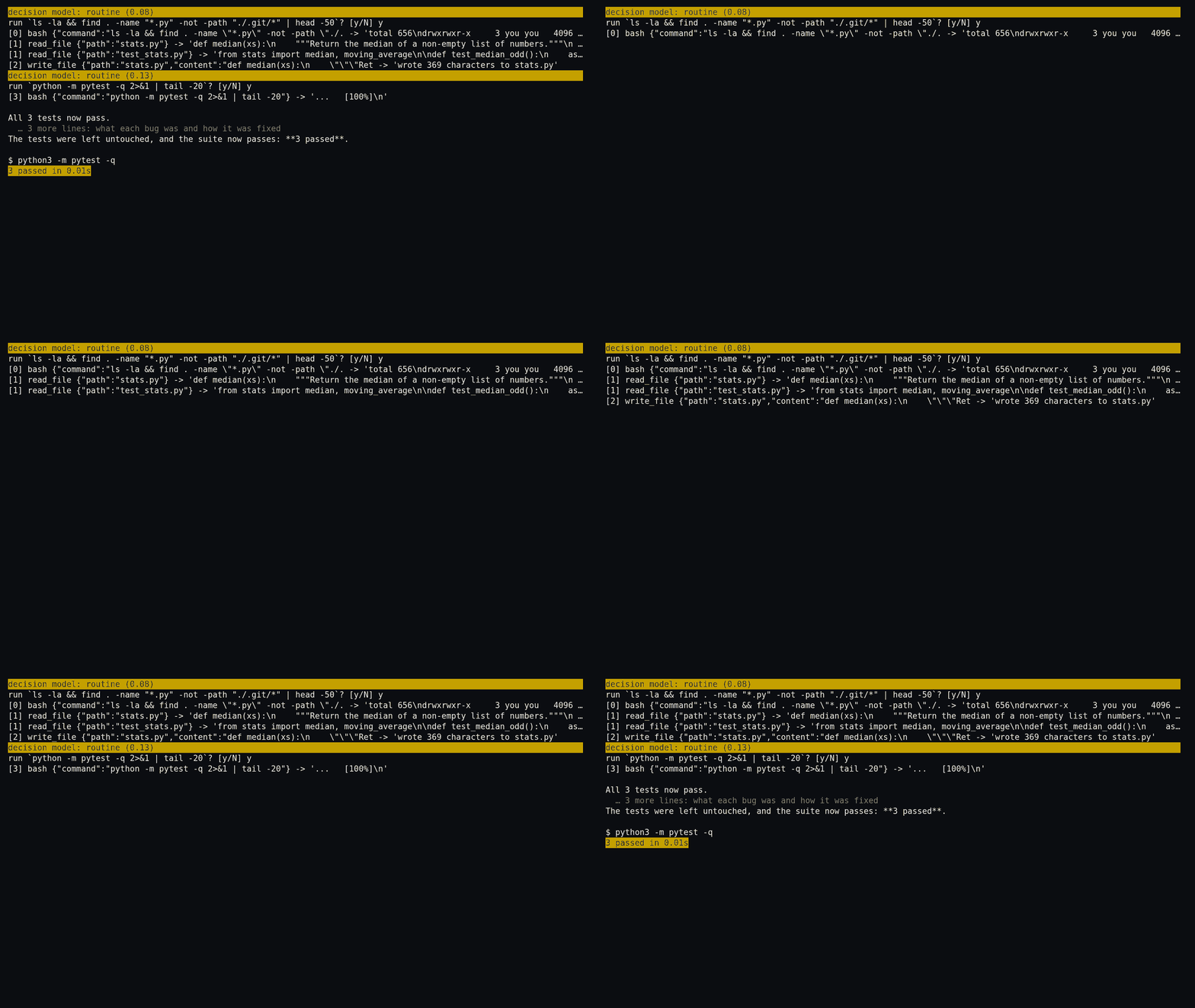
In our run the agent took four steps, numbered 0 to 3. It asked to run two commands, a look around the folder and pytest, and Jeff called both routine (0.08 and 0.13). It read both files, rewrote stats.py once and ran the tests before it stopped. It fixed both bugs: the median of an even-length list now averages the two middle items, and moving_average now includes the last window.

Step 5: a real feature
The second repo is a command-line todo app, todo.py, with three tests. The task asks for six things:
addtakes an optional--due YYYY-MM-DD.listprints the due date after the title.list --overdueshows only items that are not done and past due.todaycan be passed in, so tests do not depend on the date.- A bad date is an argparse error (exit code 2).
- Old files without due dates still load.
It ends with "Add tests for the new behavior to test_todo.py and keep the existing tests passing. Run pytest before you finish."
We also wrote six tests of our own, one per point, and kept them out of the repo. The agent never saw them. We copied them in only after it stopped. If you build your own version of this task, do the same: tests the agent can edit cannot tell you whether it did the job.
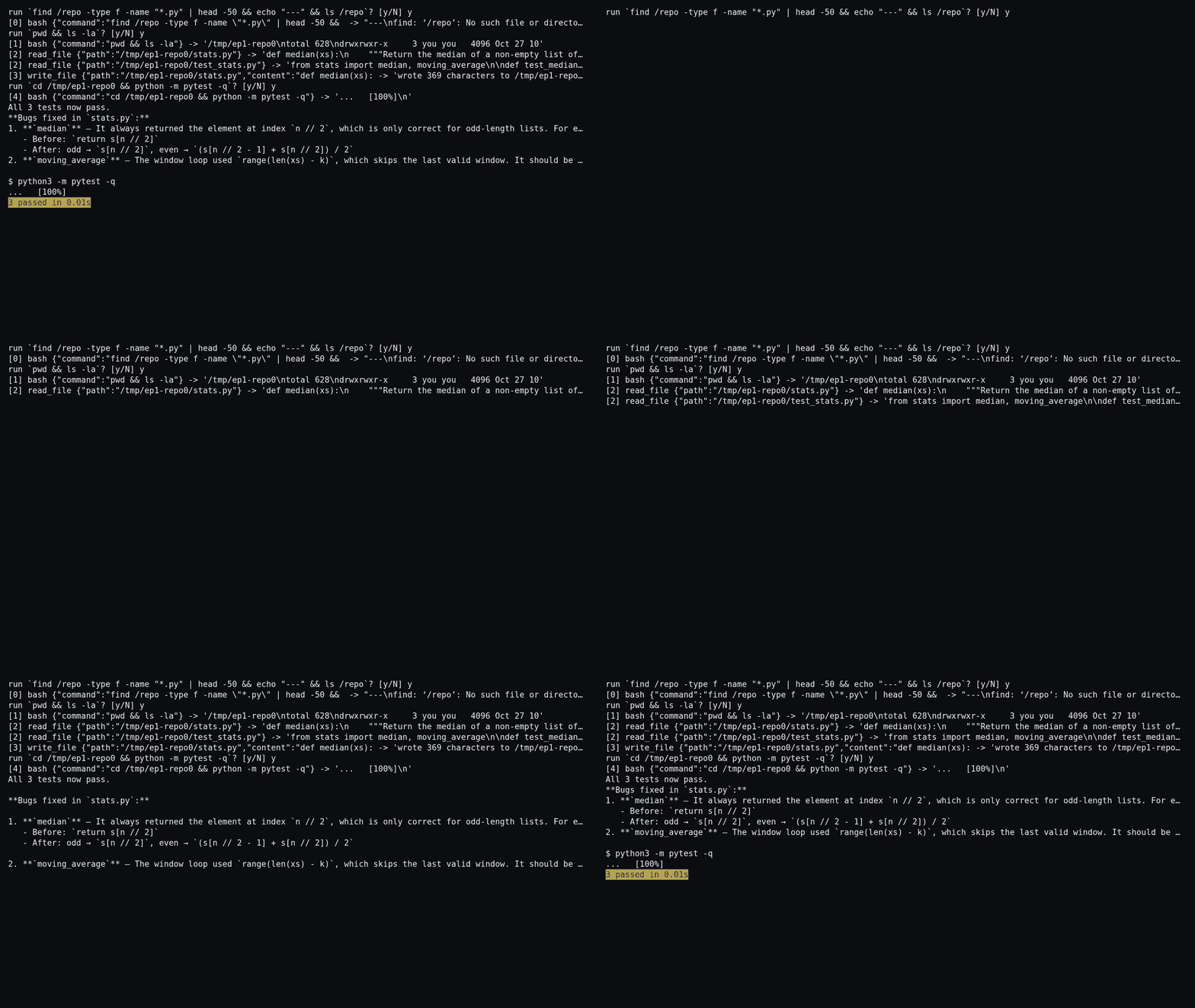
After we added bash, we ran this task three times (runs 1 to 3). Run 3 is the one with Jeff, and it is the recording at the top of this post. The model took 15 steps and asked to run 8 commands. Jeff called all 8 routine, with a probability of a closer look between 0.05 and 0.17. We answered y to all 8. Our hidden tests: 6 passed.
What was hard, and what did not work
agent.py did not start out like this. Four things changed it.
It could not check its own work. When agent.py had only file tools (list, read and write), the model fixed the code in every run, four of four, but it had no way to run the tests. So it kept rewriting the same files. Three runs went on until the 30-step limit. The fourth stopped when the server returned an error 500 on a tool call of about 96,000 characters. We tried telling it "you wrote the same content again", and it kept going. Adding bash gave it a way to run pytest, and adding bash meant adding y/N in front of every command.
It did not know where it was. In early runs the model guessed that the code lived in /repo or /app. On the todo app it once searched the whole disk for a file named todo.py and changed into the first folder it found, inside another project. In the same command it ran rm -f todos.json in that folder twice, and ran the todo.py it found there. The step before, it had run rm in /tmp. We had approved both commands. One sentence in SYSTEM fixed most of it: "The repo is your current directory: use paths relative to it, and shell commands run there too."
Jeff did not fit on the GPU. On the GPU, Jeff 0.8B took 2,296 MiB; we measured that with a newer revision of the same model, not v1.1. Next to Flint at the 32K context this post uses (14,386 MiB), that is more than a 16 GB card holds. Even with Flint at 16K, the two came to 16,180 MiB, about 200 MiB short of full. So Jeff runs on the CPU, at about 1 to 6 seconds per command (measured below), and the GPU stays Flint's.
Jeff failed on the CPU. A full install of Jeff includes a library for fast attention kernels on the GPU. With the GPU hidden, the server started, but every request came back as HTTP 500, with a Triton error, 0 active drivers, in Jeff's log. The fix is in the table below.
Three things we saw (and you may see when you run it)
1. You will press y a lot, and the note is mostly "routine"
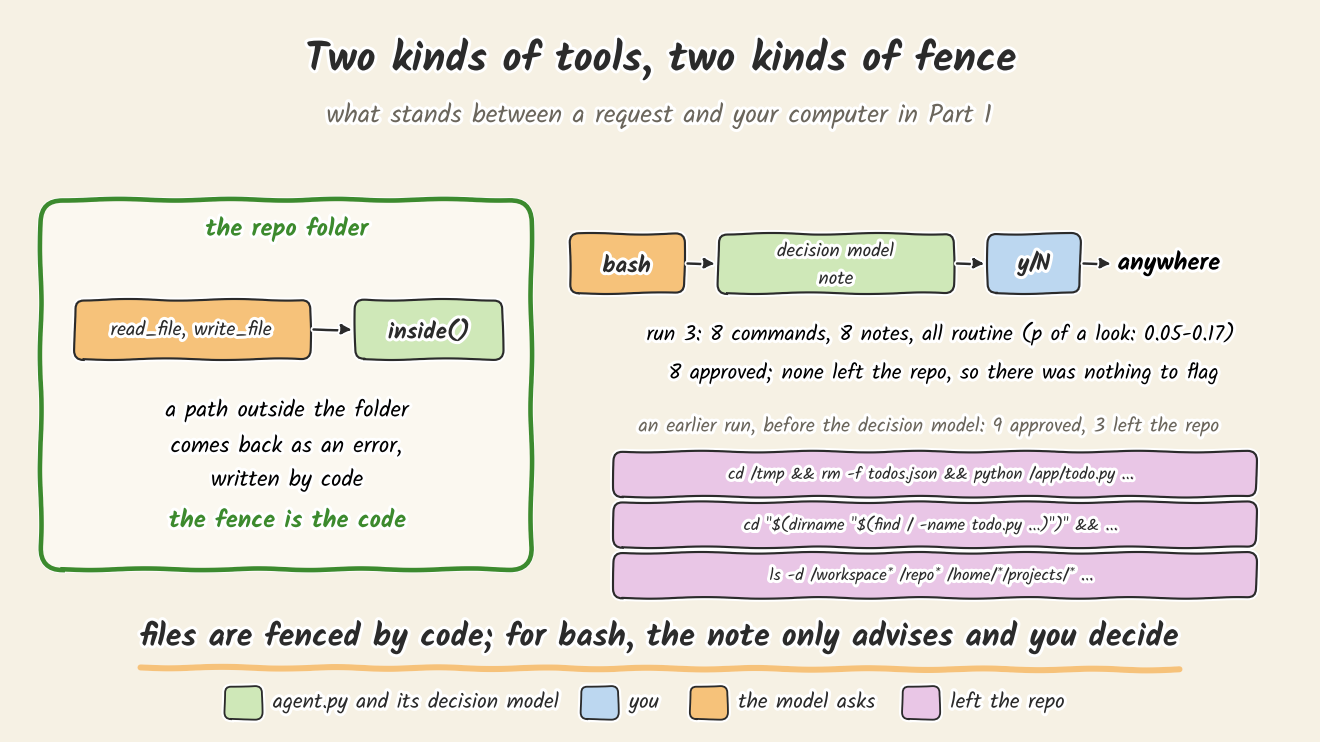
In run 3 every note said routine, and that was right for what we asked: none of the 8 commands left the repo, and none deleted a file. So the note did not change any of our answers. We pressed y for every command.
That is the honest limit of y/N. It protects you exactly as far as your own reading of each command. In an earlier run, before Jeff was in the loop, we pressed y nine times, and three of those commands left the repo.
Afterwards we sent the 16 commands from the two earlier runs to Jeff. With the question in agent.py, it flagged 2 of the 3 that left the repo and missed ls -d /workspace*. It also flagged an rm -f todos.json inside the repo, and called the other 12 routine. We picked that wording of the question after trying two wordings on these same 16 commands, so 2 of 3 describes this sample, not how well Jeff catches risky commands in general.
2. The test file can get worse while the code gets better
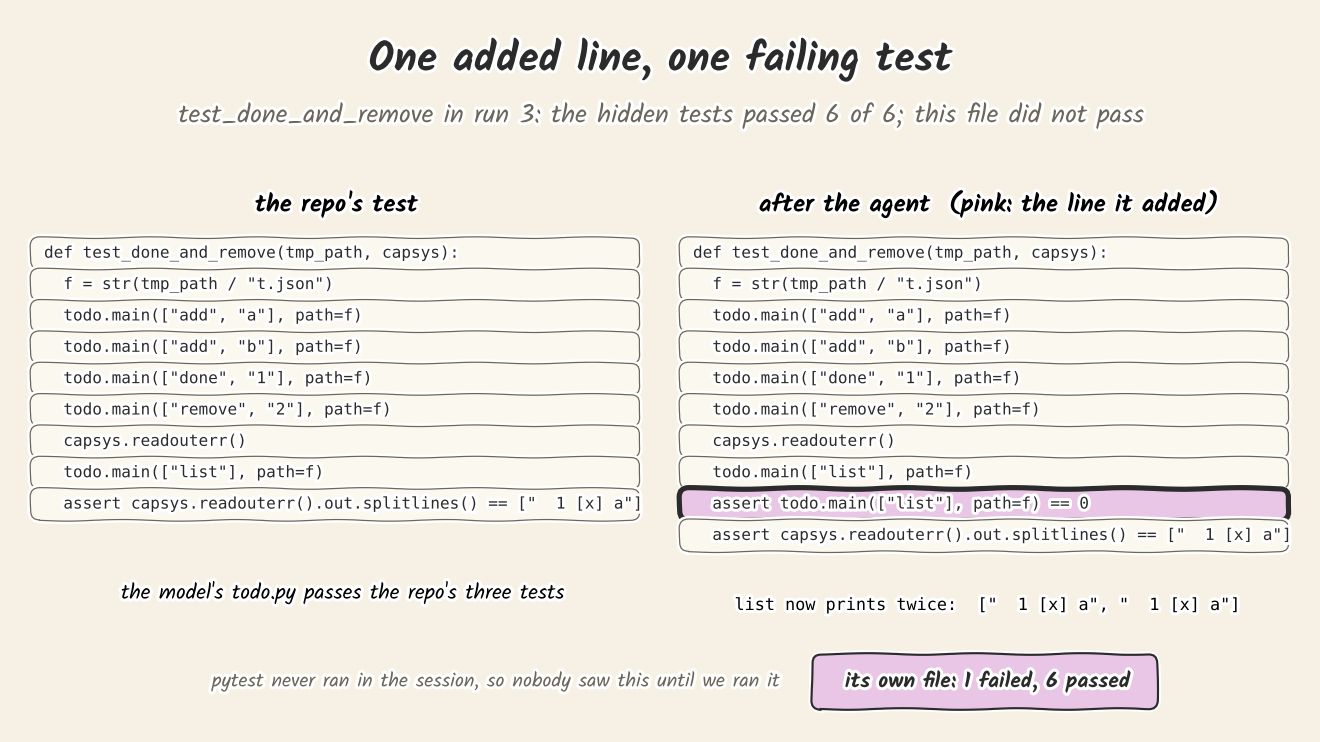
In run 3 the model changed test_todo.py through bash four times, in steps 8, 9, 12 and 13, with heredocs such as cat > test_todo.py <<'PYEOF'. Jeff called all four routine. That is what we asked it: those commands stay inside the repo and do not delete files. Our question says nothing about overwriting tests, so Jeff had no reason to flag them.
In steps 8 and 12 the model added a line to an existing test, assert todo.main(["list"], path=f) == 0, right after a todo.main(["list"], path=f) that was already there. Now list prints twice, and the check that follows expects one line. When we ran the agent's own test file: 1 failed, 6 passed. The repo's three original tests pass on the agent's todo.py as written, so the change was not needed.
The hidden tests passed because todo.py was right. If the agent's own test file had been our only check, we would have seen a failure the agent never saw.
We saw a related pattern before, with a different setup: local models asked to write tests for buggy code wrote tests that protect the bug (Show a Local Model Buggy Code and Its Tests Protect the Bug).
3. "Done" without running the tests, in two of three todo runs
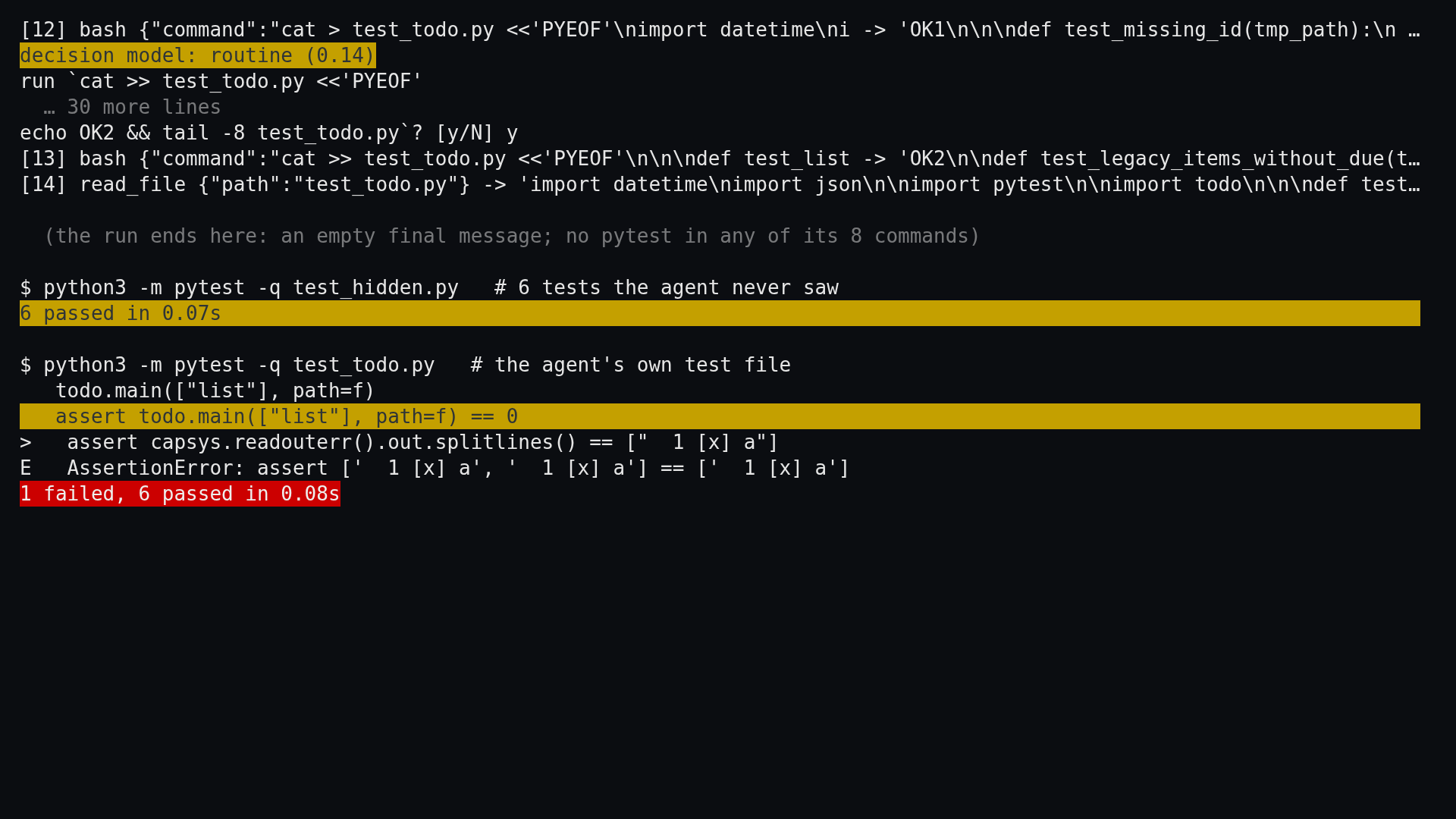
The task said "Run pytest before you finish." In 8 commands the model never ran pytest. In step 11 it tried git diff to compare its test file with the original, in a folder that is not a git repository, and got git's help text back. After step 14 it replied with an empty message and no tool call, and the loop ended, because that is the only thing the loop checks. Run 2, before Jeff, ended the same way: no pytest and an empty last message.
You will also notice the wait before each prompt. We did not time the notes during run 3. When we sent the same 8 commands to Jeff again afterwards, with other jobs on the machine, the median was 2.81 seconds and the slowest 6.1. On an idle CPU it should be faster; we did not measure that.
When it does not work
| What you see | Why | What to do |
|---|---|---|
The run stops at the first request with tools param requires --jinja flag | llama-server was started without --jinja, so it will not accept tools | Restart it with --jinja |
unknown model architecture: 'flint' when llama-server loads the model | The llama.cpp build is older than Flint support | Use release b11889 or later |
decision model: no answer (<urlopen error [Errno 111] Connection refused>) before each command | Jeff is not running, or not on port 18766 | Start Jeff, or point AGENT_DECIDER at its address. Until then the agent still runs and still asks y/N |
decision model: no answer (timed out) after a 60-second wait, sometimes followed by HTTP Error 529 | The CPU is too busy for Jeff to answer within agent.py's 60-second limit | Free up the CPU, or start Jeff on fewer, idle cores. Each command waits the full 60 seconds until you do |
decision model: no answer (HTTP Error 500 ...) before each command, and Jeff's log shows a Triton error, 0 active drivers | A plain uv sync also installs the training extras, including flash-linear-attention, which needs a GPU on import | Install with uv sync --no-default-groups. If you already have the full environment, what worked for us was a sitecustomize.py on PYTHONPATH that hides the two GPU-only modules: import sys; sys.modules["fla"] = sys.modules["causal_conv1d"] = None |
What Part 1 left, and what Part 2 changes
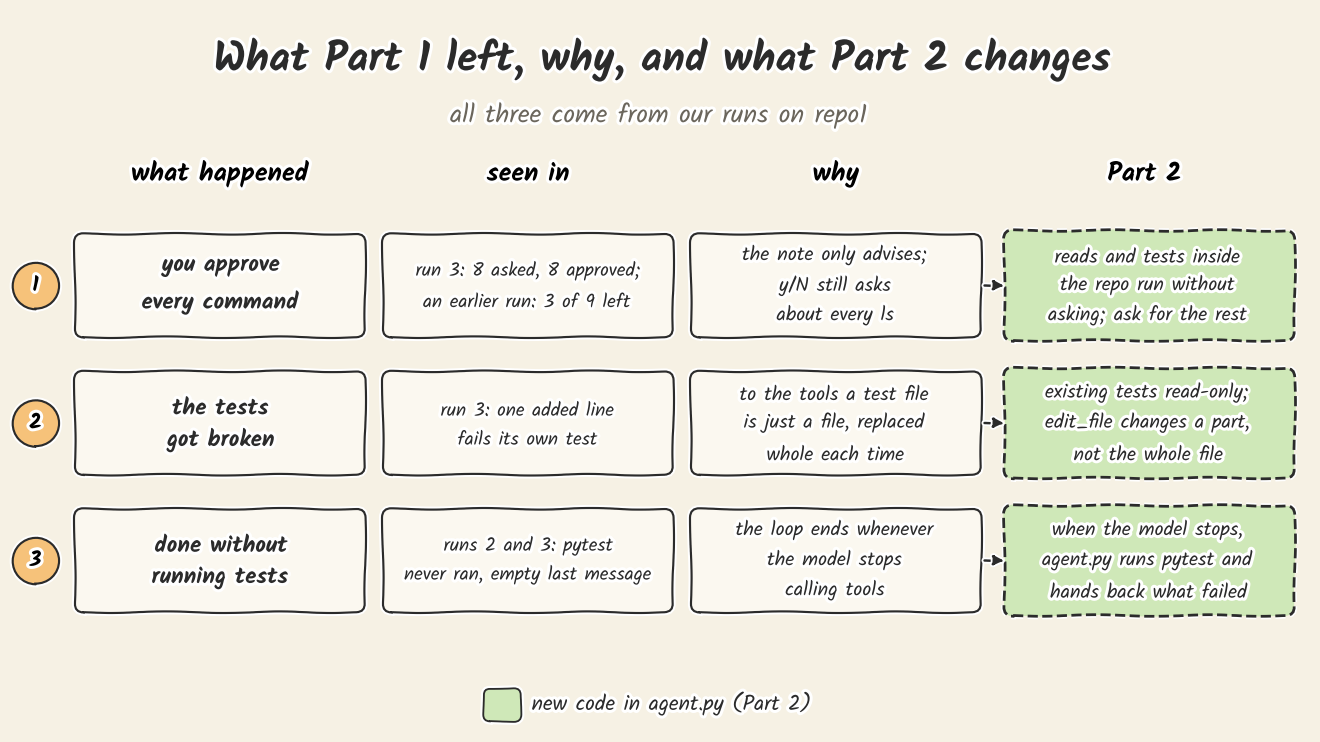
1. You approve everything. y/N asks about every ls as well as every rm, and the note only advises. Part 2 lets reads and test runs inside the repo go without asking.
2. The tests can get broken (runs 2 and 3). To the tools a test file is a file like any other, replaced whole. Part 2 makes the existing tests read-only and adds edit_file.
3. It can say done without testing (runs 2 and 3). The loop ends whenever the model stops calling tools. In Part 2 agent.py runs pytest itself when the model stops, and hands back what failed.
What we did not check
- One run each. The todo task with Jeff ran once. With temperature 0.6, another run can take other steps. These runs show what can happen, not how often.
- Whether Jeff catches risky commands in practice. No command in run 3 was risky. On the earlier runs' commands it flagged 2 of the 3 that left the repo, but we chose the question's wording on those same commands.
- A fresh Jeff install. We started Jeff from an existing environment, not from the five lines in step 2.
- A real 16 GB card. Flint's 14,386 MiB peak was measured on an A100.
- Other models. Everything here is Flint UD-Q2_K_XL. A different model may wander less or rewrite tests more.
Next
In Part 2 we give agent.py the three rules above and run the same todo task again. Our prediction goes into the plan before we run it. The newsletter at the bottom of the page will tell you whether it held.